How to Start an Ecommerce Business: A Practical UK Guide

To start an ecommerce business, validate demand before you spend money, choose the simplest selling route that fits your product, set up payments and delivery, and launch with one clear goal. Most new sellers lose time by building a full store first. The ones who last test an idea cheaply, then build around what customers actually buy.
This guide takes you from idea to first order. It is written for UK founders, and also for membership organisations, associations and nonprofits that want to sell merchandise, publications, training or event places online alongside their core work.
TL;DR
- Validate first: check that people already buy similar products, then test a simple listing or landing page before investing in stock or a custom site.
- Match the route to your stage: a marketplace can go live in days, a website builder in weeks, a custom build in months.
- Plan the whole journey: payments, delivery, returns and tax need deciding before launch, not after your first order.
- Budget for getting customers, not just building the store.
- If you run a membership organisation, selling inside your existing member platform keeps orders, members and payments in one place.
Table of Contents
- Start with the idea, not the website
- Choose how you will sell
- Set up the business side
- Choose a platform and arrange payments
- Plan delivery, returns and support
- Budget for customers, not just the shop
- Launch with one goal and a few channels
- Starting ecommerce as a membership organisation
- Our perspective
- Run your shop from your member platform
- FAQ
- Sources
Start with the idea, not the website
The first job is to prove that someone wants what you plan to sell. The Federation of Small Businesses (FSB) advises researching whether people already buy similar products, studying competitors’ prices and reviews, and then sharing a rough listing or landing page with your target audience to see whether they engage.
Four questions keep this practical:
- What problem does the product solve? If you cannot say it in one sentence, customers will struggle too.
- Who is the buyer? Be specific about who they are and where they spend time online.
- What will make you different? GOV.UK’s guidance on new products suggests talking to existing and potential customers, building a prototype quickly and cheaply, and finding out what they would be willing to pay.
- Can you source or make it reliably? A product people want is no use if you cannot deliver it at a cost well below the price.
Test demand with real commitment
Compliments cost nothing. Commitment does. A pre-launch landing page with a waitlist form is a quick test, and pre-orders are stronger still. BCG X notes that pre-orders are among the strongest indicators of demand, because people are paying for something that does not yet exist.
One practical benchmark comes from Nevuto, which suggests sending 200 to 500 visitors to a single waitlist page and treating a sign-up rate below 3% as a warning sign. Treat it as a rule of thumb rather than a law, but it gives you a number to work with instead of a feeling.
For a membership organisation, your test audience already exists. Email a small group of members about a planned product, such as branded merchandise, a handbook or a training bundle, and see who takes up a pre-order.
Choose how you will sell
Your selling route decides how fast you launch and how much control you keep. The FSB gives realistic timeframes: a marketplace such as Etsy, eBay or Amazon Handmade takes roughly 1 to 7 days, a website builder such as Shopify, Wix or Squarespace 1 to 3 weeks, and a fully custom site 1 to 3 months. Its advice for beginners is to start on a marketplace to validate demand before moving to your own store.
| Route | Typical set-up time | Best for | Main trade-off |
|---|---|---|---|
| Marketplace | 1 to 7 days | Testing a product quickly | You sit on someone else’s platform and brand |
| Website builder | 1 to 3 weeks | Your own branded shop | You manage design, payments and marketing |
| Custom build | 1 to 3 months | Complex catalogues or special requirements | Higher effort and a longer wait |
| Inside a membership platform | Depends on your set-up | Organisations selling to members | Best suited to selling to an existing community |
Timings are from the FSB guide. Your own will depend on how many products you list and how much content you prepare.
Pick the business model
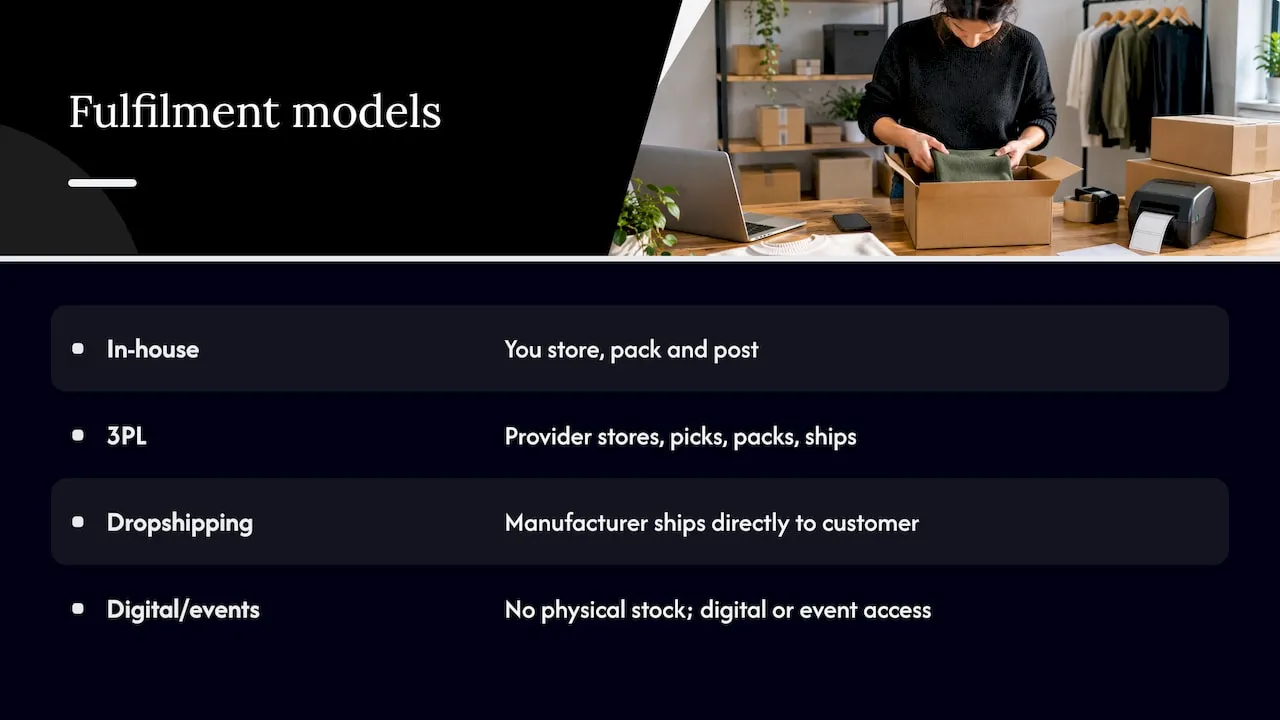
Decide how stock reaches the customer. Asendia describes three fulfilment models: in-house fulfilment, third-party logistics (3PL) and dropshipping. In-house means you store, pack and post. A 3PL provider stores, picks, packs and ships for you. With dropshipping the manufacturer ships directly to your customer.
If you sell digital items, training or event places, there is no physical stock at all. That is often the simplest first step for an organisation, since the product is something you already deliver.
Set up the business side
Before the first sale, sort out the basics that make you a legitimate seller:
- Legal structure. Decide whether you trade as a sole trader, a company or, for a nonprofit, your existing legal form.
- Registration. Register the business with the relevant authorities and open a business bank account so online income stays separate from personal money.
- Tax. Find out which sales taxes apply to you and your customers. Stripe notes that ecommerce laws vary by location, from sales tax to consumer protection rules on returns, shipping costs and warranties, so check the rules for every country you plan to sell to.
- Policies. Write clear terms, delivery information, a returns and refunds policy, and a privacy notice before you go live.
For US-based nonprofits, selling or fundraising online also brings charity-specific obligations. A guide to charity auction compliance rules explains the disclosure requirements that apply to US nonprofits. In the UK, take advice from your regulator or an adviser on how trading income fits your organisation’s legal form.
If your organisation is a nonprofit, our own guides on nonprofit compliance requirements and charitable solicitation licences cover the wider picture.
Choose a platform and arrange payments
The platform is the decision that compounds most, because it shapes fees on every sale. Hostinger suggests comparing platforms on product management, payment options and fees, shipping and fulfilment, design and customisation, marketing and SEO, scalability and overall cost. Add one more question of your own: does it connect to the systems you already use for customers or members?
Payments
Your payment processor is usually tied to the platform. TechRadar reports that processing typically costs between 2.9% and 3.5% per transaction, with international payments, chargebacks and monthly fees varying widely between providers. It also notes that some platforms push their own payment tool, while others let you choose between providers such as Stripe, PayPal and Square.
Whichever you choose, confirm the gateway is PCI DSS compliant, as Hostinger advises, and work out what a typical order costs you after fees before you set prices.
Build the store
Once the platform and payments are chosen, the build follows a predictable order:
- Get your domain name and hosting (many builders bundle these).
- Configure checkout and delivery options.
- Build the storefront and add products with clear photos and descriptions.
- Complete the essential pages: about, delivery, returns, contact, privacy.
- Test orders, payments, shipping, links and the mobile experience before launch.
Keep checkout short. Every extra field and every surprise cost at the final step gives a buyer a reason to leave, so show delivery costs early.
Plan delivery, returns and support
Customers judge a shop on what happens after they pay. Claimlane reports that “Where is my order?” questions make up 30 to 40% of ecommerce support tickets, and that automated shipping updates by email and SMS can cut them substantially. Returns matter too: the same source puts average ecommerce return rates at 20 to 30%, so a simple returns process protects revenue as well as reputation.
Before launch, decide:
- Who packs and posts, and how quickly orders leave you.
- Which carriers you use and what delivery costs customers pay.
- How customers track an order.
- What your returns window is and how refunds are issued.
Budget for customers, not just the shop
Building a store is the cheap part. Winning customers is where budgets go. List these cost lines before you start, and get current quotes for each rather than relying on generic ranges:
- Domain, hosting and platform subscription.
- Payment processing fees on every sale.
- Design and photography.
- Initial stock or production costs, if you sell physical goods.
- Packaging, postage and delivery set-up.
- Marketing, which is typically the most underestimated line.
- Accounting software and professional advice.
Shopify’s blueprint suggests allowing an 18 to 24 month runway, spending the first year testing and reinvesting rather than aiming for year-one profit. Plan your cash with that in mind.
Launch with one goal and a few channels
You do not need a large launch budget. Adobe’s guidance is that consistency across a few channels matters more than spend: an email list with a sign-up form on every page, one or two social platforms, clear page titles and descriptions for search, and one genuinely helpful piece of content. It also suggests choosing one primary goal for the first month, such as a number of orders or email sign-ups, so that your weekly tasks have a purpose.
After launch, measure what is working, fix what is not, and repeat. The first year is for learning which products, channels and messages bring buyers back.
Starting ecommerce as a membership organisation
Associations, professional bodies and nonprofits have an advantage most new sellers lack: an existing audience that already trusts them. Products that suit this audience include branded merchandise, publications, certification materials, training courses, event tickets and member-only items.
The practical question is where the shop lives. A separate store means a second login, a second customer list and a second set of reports. Selling inside the same platform that holds your member records keeps pricing, access and communications consistent. Our guides walk through the options in detail:
- How to set up an ecommerce business for associations
- Setting up online stores for membership organisations
- How to set up an online shop for membership organisations
- Starting an online boutique: a UK membership organisation guide
- E-commerce inside your membership platform
If your shop will include recurring payments, such as subscriptions or renewals, our subscription payments guide for nonprofits covers what to plan for.
Our perspective
Most organisations we speak to do not need a standalone shop. They need selling to be part of how they already serve members.
When products, events, training and renewals sit in separate tools, staff re-key data, members juggle logins and reports never quite agree. We built Colossus Systems as an all-in-one platform so member management, events, CRM, email marketing, analytics and e-commerce share one set of data, with integrated payment gateways and member-only portals.
Our approach is to start small and let the data guide you. Launch with a handful of products, offer member pricing, promote through the email tools you already use, and use reporting to see what sells. Then widen the range. Customisable workflows mean the checkout and registration journey can be tailored to your organisation rather than the other way round.
Rob
Run your shop from your member platform
If you run a membership organisation, association or nonprofit, our platform lets you sell products, event places and training from the same system that manages your members, with payments, CRM and email marketing in one place.
Our plans are published openly: Core is £349 per month, Growth £699 per month, Scale £1,299 per month and Enterprise starts from £2,500 per month, with a contributor licence from £29 per month. See the membership software pricing for what each plan includes, explore our membership management software, or look at our event management software if events will be your first product.
FAQ
How do I start an ecommerce business with no experience?
Begin with a small, low-risk test. Research whether people buy similar products, then list on a marketplace or share a simple landing page to gauge interest. Once you see real orders or pre-orders, move to your own store using a website builder.
How long does it take to set up an ecommerce store?
It depends on the route. The FSB puts marketplaces at about 1 to 7 days, website builders at 1 to 3 weeks and custom sites at 1 to 3 months. Product photography, policies and testing often take longer than the technical set-up.
How much does it cost to start ecommerce?
It varies widely with your product, stock and marketing plans, so build your own budget from current quotes. Include platform, payment fees, stock, delivery, design, accounting and marketing. Marketing is the line most new sellers underestimate.
Can a membership organisation or nonprofit sell online?
Yes. Many organisations sell merchandise, publications, training and event places to members and supporters. Check how trading income fits your legal form and regulator’s rules, and keep your payment set-up secure.
Is ecommerce worth starting?
It can be, if you validate demand first and plan for a slow first year. Shopify advises allowing 18 to 24 months to get established. Organisations with an existing audience start with a real advantage.
Sources
- FSB: How to start an ecommerce business in the UK
- GOV.UK: Develop new products and services
- BCG X: Placing desirability at the centre of innovation
- Nevuto: How to start an online business from scratch
- Asendia: Ecommerce fulfilment guide
- Stripe: How to start an online business
- Hostinger: How to make an ecommerce website
- TechRadar: How to create an online store
- Claimlane: Ecommerce customer experience
- Shopify: Ecommerce business blueprint
- Adobe: How to start an ecommerce business