How do I set up an online shop for membership organisations

The fastest route to a working integrated online shop is to build it inside your membership management platform, not alongside it. Your CRM holds the single source of truth for member state and entitlements; every purchase, renewal and event registration must write back to it in real time.
Minimum components to start:
- Offer catalogue: memberships (new and renewal), event tickets, courses, and member-only merchandise
- Payments and compliance: a gateway with Strong Customer Authentication (SCA) support, recurring billing, and DMCCA-compliant renewal reminders
- CRM entitlements: active/grace/expired state flags that gate pricing, access and content automatically
Two actions for the next 24–72 hours:
- Audit your current systems: list every place member and order data lives today and identify the gaps between them.
- Convene a stakeholder check with your product owner, CRM admin and payments lead to agree the pilot offer catalogue and a single source-of-truth definition before any build begins.
Key takeaways
An integrated membership shop works only when the CRM is the single source of truth and every purchase updates member state and entitlements in real time.
| Point | Details |
|---|---|
| Start with entitlements | Build the CRM state write-back as a synchronous step, not a nightly batch job. |
| DMCCA compliance is mandatory | Send standalone renewal reminders at least 10 days before the charge, with a single-click cancellation path. |
| Five integrations cover the minimum | CRM, event/LMS, payment gateway, accounting, and email/SMS must exchange data before launch. |
| Pilot with 20 members first | Test one offer type end-to-end before opening the full catalogue to public traffic. |
| Colossus covers the full stack | Colossus Systems provides configurable membership, events, CRM and ecommerce in one platform for UK organisations. |
Table of Contents
- What should you sell, and how do members move through your offers?
- How should you design member-state architecture and data ownership?
- What UK payment and compliance obligations must you meet?
- Which integrations does your shop actually need?
- How do you design the member account area and support flows?
- How do you build, test and launch reliably?
- What KPIs should you track after launch?
- How does Colossus Systems implement integrated shops for UK membership organisations?
- What GDPR and UK data privacy obligations apply to your membership shop?
- What security practices protect an integrated membership shop?
- How should you control user access and permissions in the shop environment?
- How do you handle refunds, cancellations and chargebacks?
- What automated communication workflows should you build?
- What experienced implementers know that most guides skip
- Colossus can run your integrated shop audit and pilot
- Sources
What should you sell, and how do members move through your offers?
MemberWise advises that associations sell services and digital products, including events, webinars, reports and courses, and that checkout flows should favour scannability and simplicity to convert both members and non-members. That guidance shapes the offer catalogue directly.
Your pilot catalogue should cover four offer types: membership subscriptions (individual, organisational, tiered), event tickets (public and member-priced), online courses or webinars, and member-only merchandise such as branded goods or publications. Bundles, for example a membership plus a conference ticket at a combined price, can follow once entitlements are stable.
Pricing rules need to be explicit before any build. Define public price, member price, and any tier-specific price for each offer. Map the entry points: a guest buying a ticket who then joins, a lapsed member reactivating, a new joiner who upgrades mid-year. Each path needs a defined onboarding trigger and an entitlement activation moment. Gated digital content, such as a members-only resource library, should be deferred to phase two; get the purchase and entitlement engine right first.
Platform selection must be driven by entitlement control and lifecycle orchestration rather than generic ecommerce features, so resist the temptation to bolt a standalone shop onto your existing stack.
How should you design member-state architecture and data ownership?
Entitlement consistency depends on a canonical set of member states that every system agrees on. Use five: Active, Paused, Grace (payment overdue, access temporarily maintained), Expired, and Reactivated. Each state must map to a purchasing permission, a pricing tier and an access level.
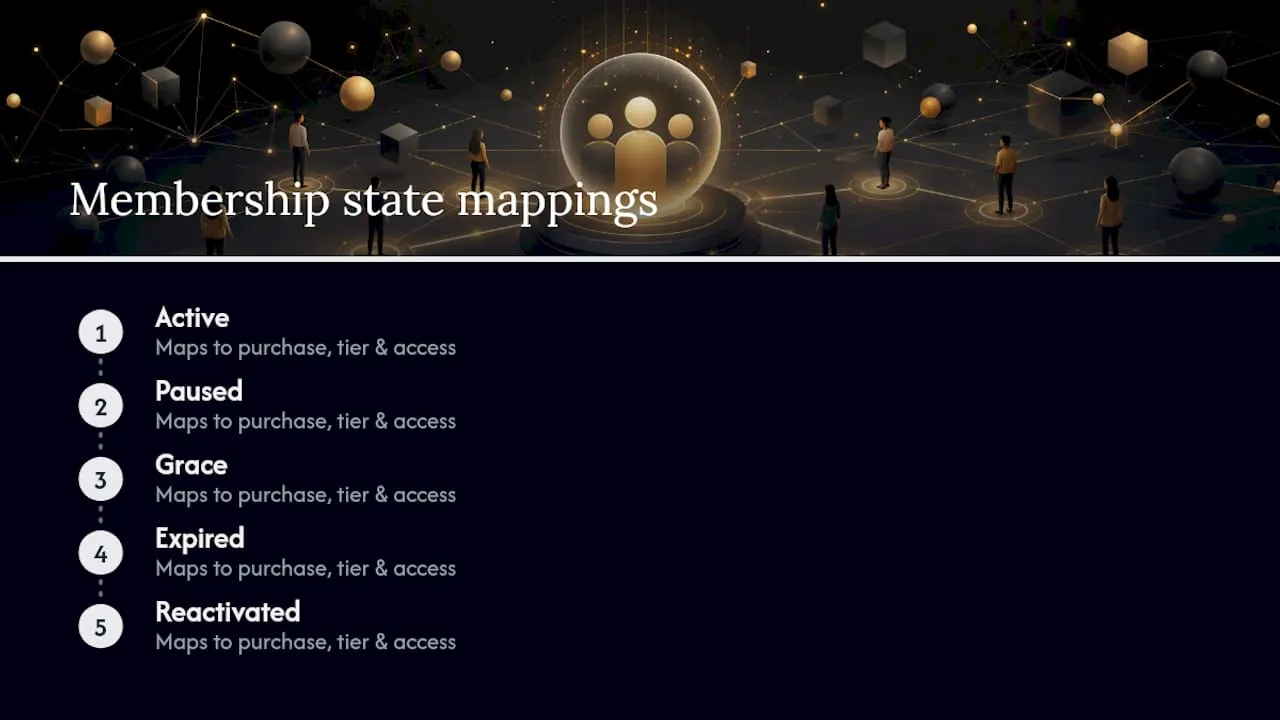
Your CRM data-field minimum: member ID, state flag, tier, entitlement list, renewal date, payment method token, tax status (VAT-registered or charity), and event registration history. Every order written by the shop must update the relevant fields within the same transaction or via a synchronous webhook.
Entitlement drift, where the shop and CRM fall out of sync, is the most common operational failure. Run a nightly reconciliation job that compares shop order status against CRM state flags and raises alerts on mismatches. Build a manual override screen for your CRM admin so support staff can correct individual records without a developer. A bespoke CRM and payment gateway integration at a UK membership organisation demonstrated that tighter portal-to-CRM data flows reduced administrative overhead and increased Direct Debit adoption.
What UK payment and compliance obligations must you meet?
The Digital Markets, Competition and Consumers Act (DMCCA) requires standalone, clearly timed renewal reminders and simple opt-out instructions for recurring payments. Membership organisations offering recurring services are likely in scope. A compliant renewal reminder must arrive as a separate communication (not buried in a newsletter), state the renewal date, the amount, the payment method to be charged, and include a single-click cancellation path.
Payment gateway checklist:
- SCA and 3D Secure 2 (3DS2) support for card payments
- Recurring billing with stored payment method handling
- Direct Debit via Bacs (GoCardless is a common UK option)
- Webhook notifications for payment success, failure and dispute events
- Tokenised card storage (never store raw card data on your own servers)
For charities, Gift Aid eligibility applies to donations, not membership fees or event tickets. If your shop includes a donation product, add a Gift Aid declaration checkbox and store the declaration against the member record for HMRC reporting.
Pro Tip: Send your renewal reminder at least 10 days before the charge date. That window gives members time to update payment details, reducing failed-payment rates and the support overhead that follows.
Which integrations does your shop actually need?
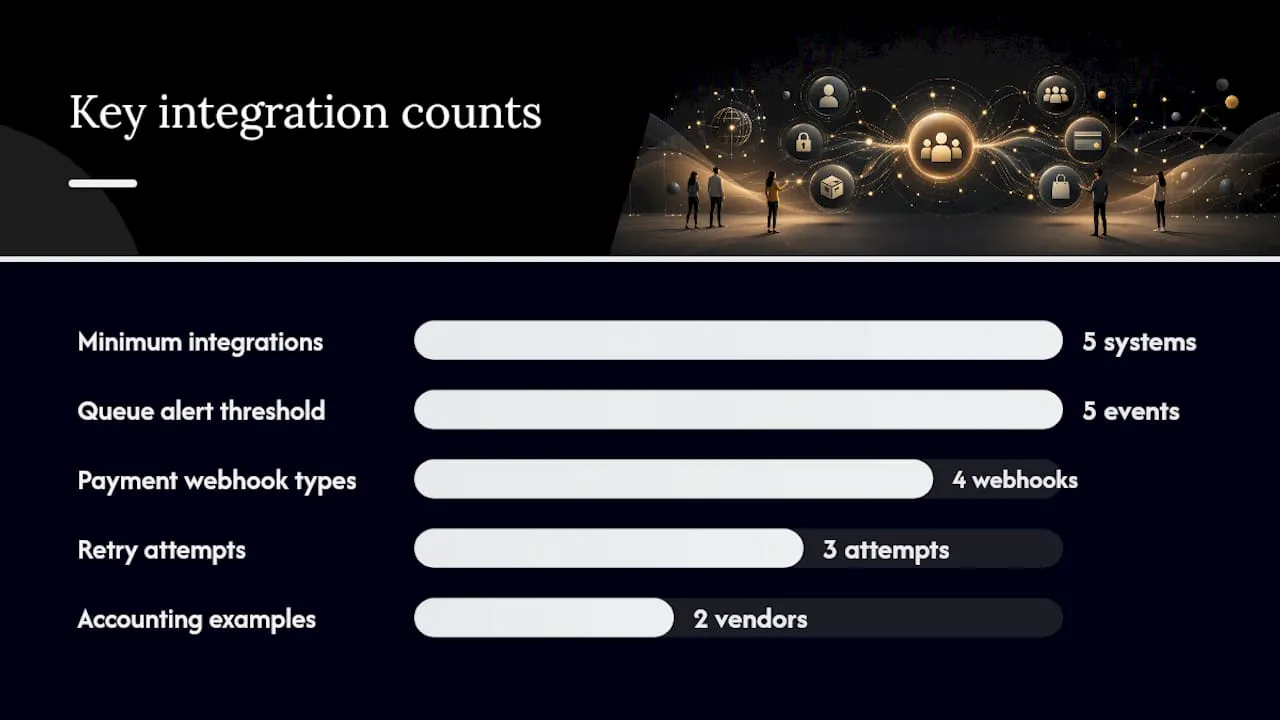
The minimum integration set is five systems: membership CRM (single source of truth), event management or LMS, payment gateway, accounting software, and email or SMS notification service. Every other integration is phase two.
- CRM: receives order confirmation webhooks; updates member state, entitlement list and renewal date; triggers onboarding or renewal email sequences.
- Event management/LMS: receives ticket purchase events; creates registration records; grants course access on payment confirmation.
- Payment gateway: sends payment success, failure, refund and dispute webhooks to both the shop and CRM simultaneously.
- Accounting: receives order and refund events for VAT reporting and reconciliation; Xero and QuickBooks both offer webhook-friendly APIs common in UK membership organisations.
- Email/SMS: triggered by CRM state changes (welcome, renewal warning, failed payment, reactivation).
For error handling, implement exponential-backoff retry logic on all outbound webhooks, with a dead-letter queue for events that fail after three attempts. Alert your CRM admin by email when the queue depth exceeds five unprocessed events. Keep a simple manual reconciliation log, a shared spreadsheet is sufficient at pilot scale, so support staff can track and resolve any order that did not propagate correctly.
How do you design the member account area and support flows?
Self-service portals and clear onboarding are central to retention and operational scale. The account area must show, on a single screen: current membership status and expiry date, active entitlements, order history with downloadable receipts, event tickets with QR codes, and a subscription management panel where members can update payment details or cancel.
Mobile matters. The account area should render correctly on a 375px viewport without horizontal scrolling. Ticket QR codes must be large enough to scan under venue lighting.
Pro Tip: Add a one-click “resend my access link” button to the account screen. It resolves the most common support ticket, a member who cannot find their course login, without any staff involvement.
For billing disputes, train support staff to follow a three-step verification: confirm identity via email address and last four digits of payment method, check CRM state and order history, then either restore access or issue a refund within the same session. Document the resolution in the CRM record.
How do you build, test and launch reliably?
A pilot launch needs five roles: product owner (defines acceptance criteria), developer (builds and integrates), CRM admin (validates entitlement data), payments lead (tests gateway flows), and support lead (runs user acceptance testing and writes support scripts).
QA checklist before go-live:
- Complete a member purchase flow: new join, entitlement activation, welcome email received.
- Complete a guest purchase flow: ticket bought, no entitlement granted, correct public price applied.
- Test a failed payment: grace state triggered, recovery email sent, access maintained for the grace period.
- Test a refund: order reversed, entitlement removed, CRM state updated.
- Trigger a 3DS2 challenge and confirm the payment completes correctly.
- Confirm webhook delivery for all five integration points under load.
| Phase | Duration | Scope | Rollback trigger |
|---|---|---|---|
| Pilot | Weeks 1–2 | 20 internal members, one offer type | Any entitlement mismatch or payment failure rate above 5% |
| Soft launch | Weeks 3–4 | Full offer catalogue, invite-only | Checkout error rate above 2% |
| Full launch | Week 5+ | Public traffic | Sustained webhook failure or data sync lag above 60 seconds |
What KPIs should you track after launch?
Track six metrics from day one: membership retention rate, returning-customer revenue (members who buy again within 90 days), average order value split by member vs non-member, time between orders, failed-payment rate, and email or SMS revenue attribution (orders placed within 48 hours of a lifecycle message).
Build two dashboard views: one for member economics (retention, LTV, churn indicators) and one for shop operations (conversion rate, failed payments, refund rate). Keeping them separate makes it easier to spot whether a revenue dip is a retention problem or a checkout problem.
Review lifecycle health monthly, comparing cohort retention curves to identify whether churn is concentrated at first renewal or later.
How does Colossus Systems implement integrated shops for UK membership organisations?
Colossus Systems provides configurable membership management, events, CRM and ecommerce features that support entitlement management and integrated payments. The platform covers the core build pattern described in this guide: member-state flags, tiered pricing rules, event registration linked to ticket purchases, payment gateway integration, and reporting that separates member and non-member revenue.
A typical Colossus implementation covers: member pricing engine, entitlement delivery on purchase, event and course registration linked to the shop, automated lifecycle emails (welcome, renewal, failed payment), and a self-service account portal. For organisations planning their first integrated shop, Colossus publishes practical setup guidance and updated thinking on membership shop approaches for current implementations.
Questions to ask any vendor during discovery: How does the platform handle member-state transitions in real time? Can pricing rules be configured per tier without custom code? What webhook events does the payment integration emit, and how are failures surfaced to operations staff?
What GDPR and UK data privacy obligations apply to your membership shop?
Under the UK GDPR, you must have a lawful basis for processing every data category your shop collects. Membership subscriptions typically rely on contract as the lawful basis; marketing communications require consent or legitimate interests with a documented balancing test. Store only the fields you genuinely need: avoid collecting date of birth unless your entitlement rules require it.
Publish a privacy notice that names every system that receives member data (CRM, payment gateway, email platform, accounting software) and states the data retention period for each. Payment card data must never leave your gateway’s tokenisation environment. For charities processing Gift Aid declarations, HMRC requires retention for six years after the last donation in a series.
Appoint a data protection lead internally and review your Record of Processing Activities (RoPA) whenever you add a new integration. The ICO’s accountability framework is the primary reference for UK organisations.
What security practices protect an integrated membership shop?
The integration surface, where shop, CRM, payment gateway and email platform exchange data, is the highest-risk area. Secure it with: HTTPS on every endpoint, API keys rotated quarterly, webhook signatures verified on every inbound event, and IP allowlisting for admin and CRM sync endpoints where your gateway supports it.
For member data security, apply role-based access so support staff can view order history and update contact details but cannot export bulk member records or modify payment tokens. Enable multi-factor authentication (MFA) for all admin accounts. Run penetration testing before full launch, not after.
Log every entitlement change with a timestamp, the triggering event (purchase, webhook, manual override) and the staff member or system that made it. That audit trail resolves most billing disputes within minutes.
How should you control user access and permissions in the shop environment?
Define three permission tiers before build: member (shop access, member pricing, self-service account), support staff (order lookup, access recovery, refund initiation), and admin (full configuration, bulk exports, pricing rule changes). Never give support staff admin rights; the blast radius of an accidental bulk change is too high.
Within the member tier, entitlements should be additive and state-driven. An active member sees member pricing automatically; a grace-period member retains access but cannot purchase new products until the overdue payment clears. Expired members revert to public pricing with no entitlements until reactivation completes.
How do you handle refunds, cancellations and chargebacks?
Set a written refund policy before launch and surface it on every product page and in every order confirmation email. For memberships, a common UK approach is a 14-day cooling-off period for new joins (aligned with Consumer Contracts Regulations), pro-rata refunds for cancellations within the membership year, and no refund for the final 30 days of a term.
For chargebacks, your payment gateway will notify you via webhook. Respond within the gateway’s dispute window (typically 7–20 days depending on the card scheme) with order confirmation, delivery evidence and any communication records. A CRM audit trail of entitlement grants is your strongest evidence. After resolving a chargeback, flag the member record to require manual review on any future purchase.
What automated communication workflows should you build?
Build six lifecycle triggers before launch: welcome (on first purchase), onboarding sequence (days 3 and 7 post-join), renewal reminder (30 days and 7 days before expiry, DMCCA-compliant), failed payment (immediate, with payment update link), grace-period warning (day 5 of grace), and reactivation confirmation (on successful recovery payment).
Each message should contain one clear action. The renewal reminder links directly to the payment update screen, not the homepage. The failed-payment email includes a tokenised link that pre-fills the member’s details so they update their card in two taps on mobile. Measure open rate, click rate and conversion rate for each trigger separately; a low conversion on the day-7 renewal reminder often signals a friction point in the payment update flow rather than a lack of intent to renew.
What experienced implementers know that most guides skip
Most integrated shop projects fail at the entitlement layer, not the checkout. Teams spend weeks perfecting the purchase flow and then discover that the CRM state flag does not update until the next morning’s batch job. Members who just paid cannot access their content, and support queues spike. Build the entitlement write-back as a synchronous step in the purchase confirmation, not a scheduled task.
Lifecycle messaging is underinvested in almost every first implementation. A single well-timed failed-payment recovery email, sent within two hours of the decline with a direct payment update link, typically recovers a meaningful share of at-risk renewals. Build it before launch, not as a phase-two item.
The third lesson is data ownership. Before you sign any platform contract, confirm that you can export your full member and order dataset in a standard format (CSV or JSON) at any time without a support ticket. Organisations that cannot export their own data are operationally dependent on a vendor in ways that compound over time.
Colossus can run your integrated shop audit and pilot
If your organisation needs a vendor-assisted path, Colossus offers a structured audit and pilot engagement. We review your existing systems (CRM, payment gateway, event platform), map your offer catalogue and member-state model, and deliver a gap analysis with a prioritised build plan. The pilot covers one offer type end-to-end: purchase, entitlement activation, lifecycle emails and reporting.

To prepare for an initial conversation, gather your current data map (which systems hold member records and where orders are written), a list of your key offers and pricing tiers, and any existing renewal or payment workflows. Explore the full Colossus features to see how membership management, events, CRM and ecommerce work together in a single platform, then contact us to book your audit.
Sources
- Ecommerce Platform Selection for UK Membership and Community Commerce Brands | StoreBuilt
- Turning digital investment into membership growth and retention | MSQ DX
- Ecommerce for Associations: Rethinking Your Online Approach - MemberWise
For legal advice on DMCCA compliance, UK GDPR obligations or Gift Aid rules, consult a qualified compliance specialist or solicitor. This guide is general information only and does not constitute legal advice.