E-commerce inside your membership platform: a UK guide

A membership-focused SaaS platform can host memberships, event tickets, paid training, and physical merchandise in a single built-in store, with no separate e-commerce system required. The term “built-in e-commerce” is the industry-standard phrase for this capability; you may also see it called an “integrated member store” or “member commerce.” Whatever the label, the practical outcome is the same: one checkout, one member record, one set of accounting exports.
Your three immediate next steps:
- Confirm your product types and business rules (member-only vs public pricing, VAT treatment, Gift Aid eligibility).
- Select and connect your payment gateway, and decide how Gift Aid-eligible items will be separated at checkout.
- Run a small end-to-end test purchase covering at least one membership, one event ticket, and one merchandise item before going live.
Before you start, check three quick signals: your platform’s API or app-marketplace availability, whether Stripe (UK) or PayPal (UK) is already a supported gateway, and whether you have a fulfilment plan for any physical goods.
Key takeaways
Built-in membership e-commerce works when your product catalogue, compliance rules, and access automations are configured correctly before launch, not patched afterwards.
| Point | Details |
|---|---|
| Define SKUs first | Map each product to its fulfilment type, VAT treatment, and access action before touching platform settings. |
| Gift Aid is not automatic | Most tiered memberships with tangible benefits do not qualify; configure the flag per product and collect declarations only where HMRC rules permit. |
| Test end-to-end before launch | Run every user journey, including refunds and accounting exports, with real test transactions before opening to members. |
| Assign operational ownership | Name a person responsible for orders, refunds, and access fixes; automated reporting reduces workload but does not replace human oversight. |
| Colossus unifies the stack | Colossus combines memberships, events, courses, merchandise, and CRM in one platform, with Stripe and PayPal integrated and Gift Aid flagging built in. |
Table of Contents
- What should you sell, and what are the rules?
- How do you configure the platform step by step?
- Which payment gateways and VAT rules apply in the UK?
- Gift Aid, VAT and data protection: what must you configure?
- What should your checkout and receipts include?
- How do you handle fulfilment for physical goods and digital products?
- What does your pre-launch testing plan look like?
- How do you keep operations running after launch?
- How does Colossus implement built-in e-commerce for membership organisations?
- What the evidence tells me about launching membership e-commerce
- Colossus supports your membership store from day one
- Sources
What should you sell, and what are the rules?
Getting your product catalogue right before touching any platform settings saves hours of rework. Membership software for UK charities needs to handle at least four distinct product categories, each with its own configuration logic.
Product categories to define:
- Memberships: new join and renewal, with recurring payment flags, access-tier assignment, and Gift Aid eligibility clearly marked per tier.
- Event tickets: single-session and multi-session, with capacity limits, attendee data fields, and ticket-code delivery.
- Paid training and courses: one-off or subscription access, with enrolment rules, prerequisites, and learner-record retention.
- Physical merchandise: SKUs with stock levels, variants (size, colour), shipping class, and returns policy.
Pricing decisions matter just as much as product structure. Decide early whether members receive a discounted price or exclusive access, whether VAT applies (most merchandise is standard-rated; many membership subscriptions are exempt), and whether you will offer bundled products such as a membership plus a conference ticket.
| Product category | Key fields needed | Fulfilment type |
|---|---|---|
| Membership | Term, tier, recurring flag, Gift Aid flag | Digital (role/access grant) |
| Event ticket | Capacity, attendee fields, ticket code | Digital (QR/PDF) |
| Course/training | Enrolment rules, access expiry, certificate | Digital (LMS enrolment) |
| Merchandise | SKU, variants, stock level, shipping class | Physical (pick, pack, post) |
Pro Tip: Map mixed-basket behaviour before you configure anything. If a member can add a membership, a conference ticket, and a branded mug in one checkout, your platform needs a bolt-on module or a mixed-basket rule set to handle the different fulfilment and tax treatments in a single transaction.
How do you configure the platform step by step?
Configuration follows the product catalogue you defined above. Work through each product type in sequence so access automations are in place before you test.
- Create membership products. Set category, term length, recurring payment flag, and Gift Aid eligibility. Configure the post-purchase automation: role assignment, portal access grant, and renewal-reminder sequence.
- Build event and ticket flows. Define ticket types, set capacity controls, add required attendee fields, and configure ticket-code delivery. Connect calendar integration if your platform supports it.
- Set up course products. Define enrolment rules and any prerequisites. Map purchase to LMS enrolment and configure certificate issuance and learner-record retention.
- Add merchandise SKUs. Enter stock levels, variants, and shipping class. Map each SKU to its fulfilment method and set the returns policy at product level.
| Platform field | Maps to | Access action triggered |
|---|---|---|
| Membership level | Member role | Portal access granted |
| Event ticket purchase | Attendee record | Ticket code issued |
| Course purchase | LMS enrolment | Learning access opened |
| Merchandise order | Fulfilment queue | Pick-and-pack task created |
Pro Tip: Configure membership-expiry automations before launch. An automated reminder at 30 days, 7 days, and the expiry date reduces lapsed members and keeps your access records clean without manual intervention.
Which payment gateways and VAT rules apply in the UK?
For UK membership organisations, Stripe (UK) and PayPal (UK) cover the vast majority of payment scenarios. Stripe handles recurring billing, one-off payments, and refunds with strong API support; PayPal adds a familiar checkout option for members who prefer it. Both support tokenisation, which keeps raw card data off your servers and satisfies the core PCI DSS requirement for hosted checkouts.
Use HTTPS across every page of your store, and ensure your platform logs transaction references for audit purposes.
VAT treatment varies by product type:
| Product | Typical VAT treatment |
|---|---|
| Membership subscription | Often exempt (if benefits are incidental) |
| Event ticket (commercial) | Standard rate |
| Training/education | May be exempt if supplied by eligible body |
| Physical merchandise | Standard rate |
These are general positions; confirm your specific situation with a VAT adviser or HMRC directly. Your platform should tag each product with the correct VAT code so accounting exports are accurate from day one.
Pro Tip: Separate payment handling for any Gift Aid-eligible items. Mixing a qualifying donation with a standard sale in one transaction line makes reconciliation and HMRC reporting significantly harder.
Guidance on subscription billing and reporting is worth reviewing before you configure recurring payments, particularly around failure handling and retry logic.
Gift Aid, VAT and data protection: what must you configure?
This is where many membership organisations make costly mistakes. HMRC’s Gift Aid guidance is clear: most tiered memberships that include tangible benefits (magazines, discounts, event access) do not qualify for Gift Aid. Collect signed declarations only where the payment genuinely qualifies, and issue clean payment confirmations for all non-qualifying sales.
Key compliance principle: A membership subscription that gives the member something of material value in return is a commercial transaction, not a gift. Treating it as Gift Aid-eligible without proper assessment exposes your organisation to HMRC clawback.
Configuration checklist:
- Mark Gift Aid-eligible products explicitly in the platform; do not apply the flag by default to all memberships.
- Collect Gift Aid declarations at checkout only for qualifying products, and store the declaration with a timestamp and consent metadata.
- Retain Gift Aid records for at least four years, in line with ICO guidance on data retention and GDPR obligations.
- Collect only the personal data you need at checkout; avoid capturing fields you have no operational use for.
Pro Tip: Store Gift Aid declaration records separately from general CRM contact data, with a clear retention and deletion schedule. This makes a Subject Access Request or an HMRC audit far easier to respond to.
Charity membership software must handle Gift Aid declarations correctly and support automatic renewals and digital membership cards to meet the expectations of UK members and regulators alike.
What should your checkout and receipts include?
A well-designed checkout does two things at once: it gives the member confidence, and it gives your finance team usable records. Every receipt should be machine-readable for reconciliation and human-friendly for the member receiving it.
Checkout checklist:
- Member lookup (existing members should not need to re-enter their details).
- Optional Gift Aid declaration field, shown only for qualifying products.
- Promo code field with clear validation messaging.
- Mixed-basket summary showing each product, its VAT treatment, and the total.
- Post-purchase access assignment triggered automatically on payment confirmation.
| Receipt field | Purpose |
|---|---|
| Purchaser name and member ID | Links transaction to CRM record |
| Product breakdown with VAT amount | Finance and VAT return |
| Gift Aid flag (where applicable) | HMRC reporting |
| Transaction ID and accounting tag | Reconciliation |
The automation flow runs: payment confirmed → receipt issued → access granted → CRM updated → accounting export queued. If any step in that chain fails silently, you will have members with no access and finance records with gaps.
How do you handle fulfilment for physical goods and digital products?
Digital delivery is straightforward when configured correctly: course enrolment triggers on payment, ticket QR codes are generated and emailed instantly, and download links carry an expiry date. Physical fulfilment needs more deliberate setup, particularly for low-volume organisations.
Physical fulfilment checklist:
- Define shipping zones using postcode-based rules (UK mainland, Highlands, Northern Ireland, international).
- Set shipping classes per product (standard letter, small parcel, large parcel).
- Configure a returns and refunds policy at product level and display it at checkout.
- Map each merchandise SKU to a fulfilment method: manual pick-and-pack or third-party logistics.
| Fulfilment type | Recommended approach for low-volume orgs |
|---|---|
| Physical merchandise | Manual fulfilment with printable packing slip |
| Digital course | Automatic LMS enrolment on payment |
| Event ticket | Auto-generated QR code emailed on purchase |
Pro Tip: For low-volume merchandise, configure the order screen to generate a single printable packing slip per order. It takes seconds and removes the need for a separate warehouse system when you are shipping fewer than 50 items a month.
For practical guidance on setting up a low-cost online shop inside a membership site, Colossus has a step-by-step resource worth bookmarking before you configure your first merchandise SKU.
What does your pre-launch testing plan look like?
Testing is where projects either earn confidence or expose gaps. MemberWise research recommends documenting processes, auditing data quality, and assigning clear internal ownership before any system goes live.
- Run a new-member join journey end-to-end: payment, receipt, access grant, CRM update.
- Test a membership renewal, including the expiry-and-reinstatement automation.
- Book an event ticket and verify the QR code arrives and scans correctly.
- Enrol on a paid course and confirm LMS access opens immediately.
- Purchase a merchandise item and check the packing slip generates and stock decrements.
- Process a refund and verify the access is revoked and the CRM record updated.
- Export an accounting report and confirm transaction tags are correct.
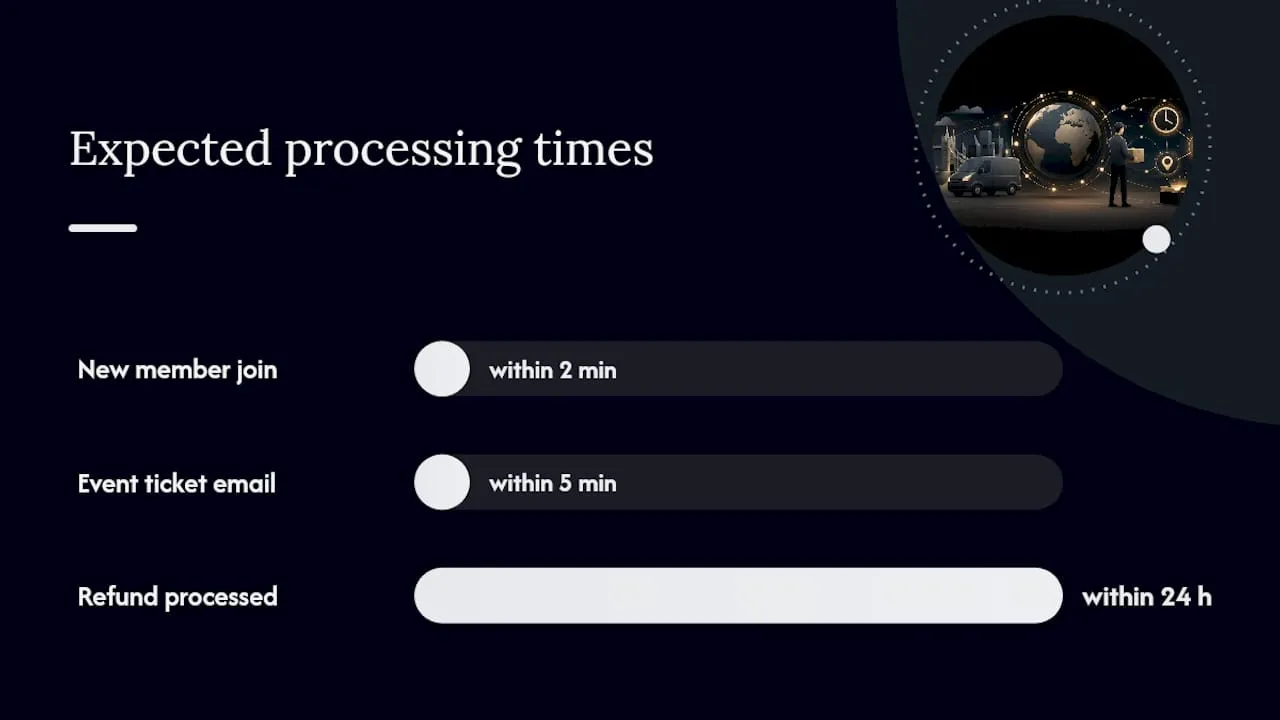
| Test case | Expected result | Pass criterion |
|---|---|---|
| New member join | Receipt + portal access within 2 minutes | Both confirmed by test user |
| Event ticket purchase | QR code emailed within 5 minutes | Code scans at simulated entry |
| Merchandise order | Packing slip generated, stock decremented | Admin confirms both |
| Refund processed | Access revoked, CRM updated | Both confirmed within 24 hours |
Pro Tip: Run a small pilot with staff or trusted volunteer members before opening to the full membership. Real-world edge cases, such as a member who already has a lapsed record or a mixed basket with a promo code, rarely surface in internal testing alone.
How do you keep operations running after launch?
Day-to-day operations need defined owners and automated reporting staying manageable. Integration projects that stall most often do so because of unclear ownership and manual workarounds that accumulate over time.
Operations checklist:
- Assign a named owner for order fulfilment, refunds, and access-fix requests.
- Schedule a nightly accounting export tagged by product type and VAT code.
- Monitor payment failure rates weekly; set up automated retry logic for recurring payments.
- Review outstanding fulfilment orders daily during the first month.
| Reporting metric | Why it matters |
|---|---|
| Revenue by product type | Identifies which products drive income |
| Membership churn rate | Flags retention issues early |
| Payment failure rate | Triggers intervention before lapsed members accumulate |
| VAT to remit | Required for HMRC returns |
| Gift Aid eligible totals | Required for HMRC Gift Aid claims |
A digital replatform with CRM integration at a large membership body showed that automation of routine membership tasks directly increased member self-service and participation. The lesson: the more your platform handles automatically, the more your team can focus on member experience rather than data entry.
How does Colossus implement built-in e-commerce for membership organisations?
Consolidating membership, training and e-commerce into one platform reduces admin overhead and supports the mixed-basket checkout that complex membership workflows require. Colossus is built around exactly this model.
Colossus platform features relevant to this guide:
- Unified product catalogue covering memberships, events, courses, and merchandise.
- Mixed-basket checkout with per-product tax tagging and Gift Aid flagging.
- Recurring payments via Stripe (UK) and PayPal (UK), with failure handling and retry logic.
- Automated access provisioning: role assignment, portal access, and LMS enrolment on payment.
- Event management with capacity controls, ticket codes, and attendee data capture.
- Accounting exports and CRM sync for reconciliation.
Implementation path:
- Discovery: map your SKUs, pricing rules, and access policies.
- Gateway configuration: connect Stripe or PayPal and configure Gift Aid separation.
- Product build: create membership tiers, event tickets, course products, and merchandise SKUs.
- Testing: run the full pre-launch checklist above with internal users.
- Phased launch: open to staff first, then a pilot group, then the full membership.
Quick wins to target in week one: a member-only storefront page, one live event with ticketing, and one merchandise item with a packing-slip workflow. For setting up online stores inside membership platforms, Colossus’s own how-to maps SKU types directly to access controls.
Pro Tip: Ask your platform vendor for a list of existing integrations before scoping any custom API work. Most common accounting and CRM connections already exist as standard modules, which cuts both cost and delivery time.
What the evidence tells me about launching membership e-commerce
The organisations that get this right share one habit: they treat the checkout as a member-experience problem, not a technical one. The technical configuration is learnable in a week. The harder question is whether your product catalogue is clean, your Gift Aid rules are defensible, and your team knows who owns what when something goes wrong.
The Gift Aid trap catches more organisations than any other compliance issue. Many assume that because they are a charity, all membership income qualifies. It does not, and the HMRC guidance is unambiguous on this. Getting it wrong means clawback, not just a correction.
My strongest advice: do not launch everything at once. A staged rollout, starting with memberships and one event, gives you real transaction data to validate your receipts, accounting exports, and access automations before you add the complexity of physical merchandise and mixed baskets.
Colossus supports your membership store from day one
Colossus gives membership organisations a single platform to sell memberships, event tickets, training, and merchandise, with Stripe and PayPal built in, Gift Aid flagging at product level, and automated access provisioning on every purchase. There is no need to bolt together separate systems or manage multiple vendor relationships.

A Colossus demo covers SKU mapping for your specific product types, payment gateway configuration, Gift Aid separation, and a phased pilot plan sized to your organisation. You can see the full platform features before committing to anything, and the demo is structured around your catalogue, not a generic walkthrough. To arrange a session with the team, visit the Colossus contact page and request a membership e-commerce demo.
Sources
Official guidance:
- Are you ready to change your membership CRM?
- Napit Ecommerce Case Study
- Best charity membership software UK 2026 | Zeffy
Sector research and case studies:
Colossus practical guides: