How to set up an ecommerce business for associations

Launch a CRM-first ecommerce MVP that sells memberships, event tickets, donations, and merchandise while keeping every transaction and member record unified in one source of truth. That is the core recommendation for any membership organisation, association, or nonprofit starting this process. Your MVP needs three things: a defined product mix (at minimum one membership product, one event ticket type, and a donation option), a platform with first-class APIs or native connectors to your CRM or AMS, and at least two staff roles assigned before you write a line of configuration.
Must-have integrations for your MVP:
- Payment gateway with tokenisation support (Stripe, PayPal, or equivalent)
- CRM/AMS membership mapping via webhook or native connector
- Event engine webhook for ticket registration and seat-limit enforcement
- Automated receipt and confirmation emails triggered by order status
Pro Tip: Before selecting any platform, confirm it emits order.paid and subscription.renewed webhooks natively. Without those two events, every membership creation and renewal will require manual intervention.
Key takeaways
Setting up ecommerce for a membership organisation requires a CRM-first architecture, a phased rollout, and automated membership lifecycle events from the first day of trading, without specifying exact timelines.
| Point | Details |
|---|---|
| Start CRM-first | Map every product to a CRM entity before build; contact matching and membership creation rules must be defined upfront. |
| Phase your rollout | Run discovery (2–3 weeks), MVP build (4–6 weeks), then feature sprints; validate each layer before adding complexity. |
| Enforce SKU naming | Use SKU strings that match CRM membership-type field values exactly to remove translation layers and prevent data errors. |
| Automate reconciliation | Run nightly order-to-membership reconciliation jobs from launch; do not wait for discrepancies to surface manually. |
| Colossus accelerates delivery | Colossus combines membership commerce, event ticketing, CRM, and billing natively, reducing integration build time to configuration. |
Table of Contents
- What does a phased launch roadmap look like?
- Unified platform or best-of-breed: which architecture suits your organisation?
- How do you model memberships, tickets, donations, and merchandise?
- How do you map orders to contacts and automate membership creation?
- What payment and checkout practices reduce abandonment?
- How do you handle merchandise fulfilment and POS at events?
- Which KPIs and segments should you track?
- What governance, security, and compliance steps are non-negotiable?
- How do you test and go live without losing data?
- How do you market your ecommerce launch to members and supporters?
- How should customer support workflows connect to your ecommerce platform?
- What nonprofit-specific financial regulations apply to your ecommerce activity?
- What practitioners learn after going live
- Colossus gives your organisation a faster path to integrated ecommerce
- Sources
What does a phased launch roadmap look like?
Setting up an ecommerce store for your organisation is not a single sprint. Associations are advised to roll out features in stages, validating each layer before adding complexity.
| Phase | Estimated weeks | Core deliverables | Owner |
|---|---|---|---|
| Discovery | 2–3 | Stack audit, product catalogue, integration map | Project lead + CRM admin |
| MVP build | 4–6 | Membership product, donation form, basic checkout, CRM webhook | Developer/agency + payments lead |
| Feature sprint 1 | 3–4 | Event ticketing, seat limits, attendee metadata | Developer + operations |
| Feature sprint 2 | 2–3 | Merch SKUs, inventory, POS sync | Operations + developer |
| Optimisation | Ongoing | Reporting, personalisation, auto-renew tuning | CRM admin + project lead |
Minimum roles: project lead (owns scope and timeline), CRM admin (owns data mapping), payments lead (owns gateway and PCI compliance), and a developer or agency for configuration. Budget for setup costs to vary significantly by platform choice and integration complexity; ongoing operations typically require a moderate staff allocation for a mid-sized organisation once the MVP is live.
- Assign a single decision-maker for product catalogue changes to avoid conflicting SKU naming.
- Document every integration decision in a shared log before build begins.
- Plan a communications sprint alongside the technical build so members receive clear messaging at launch.
Pro Tip: Run a two-week discovery sprint before committing to any platform. Map every product type, every CRM field it must populate, and every staff workflow it must support. Gaps found in discovery cost hours; gaps found post-launch cost members.
Unified platform or best-of-breed: which architecture suits your organisation?
The fundamental architecture decision shapes every integration, every staff workflow, and your long-term maintenance burden. Siloed tools create a “spaghetti problem” that fragments member insight; connecting email, events, payments, and campaigning into one coherent view is what separates growing organisations from stagnant ones.
| Criterion | Unified platform | Best-of-breed + integrations |
|---|---|---|
| Speed to market | Faster (prebuilt connectors) | Slower (custom integration work) |
| Customisability | Moderate | High |
| Vendor lock-in risk | Higher | Lower |
| Integration maintenance | Low (vendor-managed) | High (your team manages) |
| Data residency control | Depends on vendor | More control possible |
| Upfront cost | Often lower | Often higher |
Integration requirements checklist for either approach:
- First-class REST or GraphQL APIs with published documentation
- Outbound webhooks for order, subscription, and ticket lifecycle events
- Two-way sync for contact and membership status
- Idempotent order event handling (duplicate webhooks must not create duplicate memberships)
- Published rate limits and retry guidance
Unified commerce and CRM consolidate sales channels and member data, enabling real-time tracking of event and course sales while simplifying renewals. CRM platforms that combine lifecycle automation with native billing and open integrations are winning procurement shortlists in 2026.
Pro Tip: Favour a unified platform when your organisation runs frequent events, manages tiered membership levels, and needs POS at physical venues. The integration maintenance burden of best-of-breed grows sharply once you add a third or fourth tool.
How do you model memberships, tickets, donations, and merchandise?
Every product in your store maps to a CRM entity. Getting that mapping right before build begins prevents data debt that takes months to unwind.
- Membership products: define type (individual, organisational, student), duration (annual, monthly, lifetime), auto-renew flag, and the CRM membership-type field it populates on purchase.
- Event tickets: set seat limits per ticket type, capture attendee metadata (name, dietary requirements, accessibility needs) separately from the purchaser, and emit a
ticket.registeredwebhook on confirmation. - Donations: support one-off and recurring tiers; map each to a CRM gift record with campaign attribution and a tax-receipt trigger.
- Merchandise: assign SKUs with a naming convention that includes product category, variant, and size (e.g.
MERCH-TSHIRT-BLU-M); track inventory location separately from digital products. - Subscriptions and bundles: define proration rules upfront; a bundle of membership plus event access needs a clear split of revenue across accounting codes.
Purchaser vs. beneficiary: a corporate member purchasing on behalf of staff requires the CRM to record the organisation account as purchaser and each staff member as beneficiary. Build this distinction into your data model from day one.
| Ecommerce field | CRM/AMS entity | Notes |
|---|---|---|
| Product variation: membership type | Membership type record | Must match exactly for auto-creation |
| Order contact email | Contact lookup key | Fallback: name + postcode |
| Order reference | Gift/transaction record | Used for receipt and reconciliation |
| Ticket attendee email | Event attendance record | Separate from order contact |
Pro Tip: Name SKUs and product variation fields using the exact string your CRM membership-type field expects. A SKU of MEM-ANNUAL-IND that maps to a CRM field value of Annual Individual requires a translation layer; a SKU that matches the field value exactly removes it entirely.
How do you map orders to contacts and automate membership creation?
Integration is where most organisations lose data integrity. The crm_membership_commerce module for Drupal Commerce demonstrates the pattern well: it automatically creates or renews CRM memberships when a membership product is purchased, shipping with a default configuration to accelerate setup. Your own implementation needs the same logic regardless of platform.
Contact matching rules (in priority order):
- Match on email address against existing CRM contacts.
- If no match, match on name plus postcode.
- If still no match, create a new contact and flag for manual review.
- Never silently merge contacts; log every merge action with a timestamp and user ID.
Webhooks to emit from your ecommerce platform:
order.created,order.paid,order.refundedsubscription.created,subscription.renewed,subscription.cancelledticket.registered,ticket.cancelledrefund.processed
Reconciliation steps: run a nightly reconciliation job comparing ecommerce orders marked paid against CRM membership records created that day. Flag mismatches for the CRM admin. For mid-term membership upgrades, calculate proration in the ecommerce platform and pass the adjusted amount and new membership type to the CRM in a single atomic event.
What payment and checkout practices reduce abandonment?
Checkout friction costs memberships. Multiple payment options and a simplified checkout experience are among the highest-impact improvements an association can make.
- Accept cards, PayPal, Apple Pay, and Google Pay as a minimum; add direct debit or ACH for recurring donations where your payment gateway supports it.
- Use a single-page or two-step checkout; every additional page increases drop-off.
- Pre-fill known member details when a logged-in member reaches checkout.
- Display fees transparently before the final confirmation step.
- For subscriptions, show the next billing date and cancellation terms on the checkout page.
Subscription billing and dunning: configure at least three retry attempts for failed recurring payments (day 1, day 3, day 7), send an automated email after each failure, and suspend rather than cancel membership after the final retry to allow self-service recovery.
Security: use a hosted checkout page to minimise PCI scope. Tokenise card details at the gateway so your platform never stores raw card data. For EU members, confirm your gateway handles Strong Customer Authentication (SCA) under PSD2.
Organisations that offer three or more payment methods at checkout typically see higher completion rates for recurring donation sign-ups, particularly among older member demographics who prefer direct debit over card payments.
How do you handle merchandise fulfilment and POS at events?
Physical merchandise adds operational complexity that digital products do not. Unified commerce platforms handle POS sync, inventory, and reporting in one admin, which reduces the risk of overselling at events.
- Design SKUs with location codes so you can track stock across your warehouse, event stock, and online store separately.
- Reserve a defined quantity of each SKU for event sales before opening online inventory.
- Define your returns policy before launch: most membership organisations accept returns on unworn merchandise within 28 days; digital products and event tickets are typically non-refundable.
- For international shipping, confirm VAT or GST obligations in each destination country and consult local tax counsel before enabling cross-border sales.
- At events, use a POS terminal that syncs inventory in real time and captures member or donor details at point of sale.
Pro Tip: Run a single-event POS pilot with two or three SKUs before committing to a full merch range. Validate your inventory sync, receipt workflow, and member capture process at small scale; the lessons from one event save significant rework across a full season.
Which KPIs and segments should you track?
Purchase and attendance data is only valuable when it drives decisions. Unified CRM and commerce platforms enable real-time segmentation and personalised communications that generic email tools cannot replicate.
Segments to build from day one:
- Lapsed members (membership expired, no renewal in 60 days)
- Frequent event attendees (three or more events in 12 months)
- High-value donors (cumulative giving above a defined threshold)
- Merchandise purchasers (for cross-sell of new product lines)
| KPI | What it measures | Review cadence |
|---|---|---|
| Membership renewal rate | % of due renewals completed | Monthly |
| Event conversion rate | Ticket sales / page visits | Per event |
| Donation retention rate | Recurring donors active year-on-year | Quarterly |
| Revenue by channel | Online vs. event vs. POS | Monthly |
Avoiding double-counting: when a single order generates a membership fee and an event ticket, split revenue across two accounting codes in your reporting layer. Counting the full order value against both lines inflates both figures.
What governance, security, and compliance steps are non-negotiable?
Security checklist:
- Apply least-privilege access: staff can view orders relevant to their role; only the CRM admin can edit membership status.
- Enable audit logs for all order edits, refunds, and membership status changes.
- Use hosted checkout to keep card data off your servers and reduce PCI scope to SAQ A.
- Document your incident response plan before go-live, including who is notified within 72 hours of a data breach (required under GDPR and similar frameworks).
Legal and accounting:
- Issue tax receipts for charitable donations automatically on
order.paid; the receipt must state the gift amount, the organisation’s registered charity number, and the date. - Unrelated business income (UBIT in the US, trading income rules in the UK) may apply to merchandise sales; confirm with your accountant before launch.
- Sales tax and VAT obligations vary by jurisdiction and product type; donations are generally exempt, but merchandise and event tickets may not be. Always verify with local counsel.
- Retain order and payment records for the period your jurisdiction requires (commonly seven years for financial records).
Cloud-based platforms reduce manual operational overhead through automated workflows and near-real-time dashboards, and typically handle backup and data retention schedules as part of the service agreement.
How do you test and go live without losing data?
A structured test plan prevents the most common launch failures: duplicate memberships, missed webhooks, and payment gateway misconfigurations.
- Create a test order for each product type using your gateway’s test card numbers.
- Verify that each
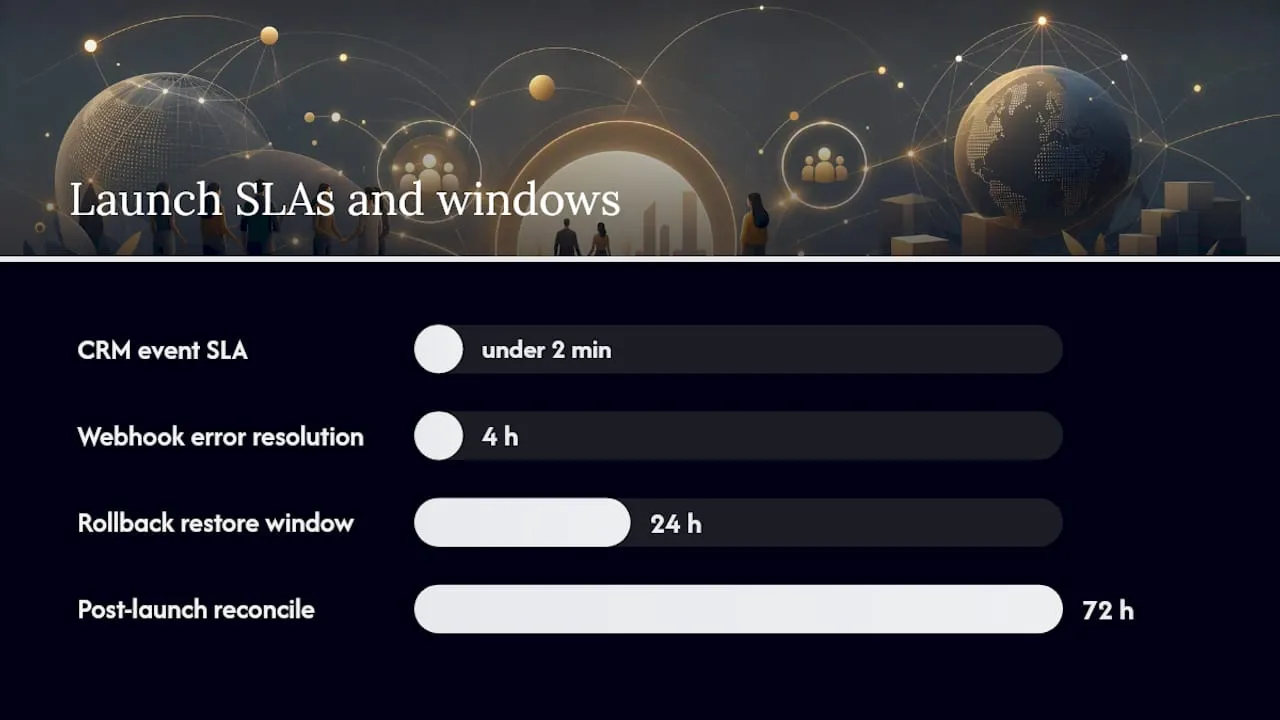
order.paidevent creates the correct CRM record within your defined SLA (recommend under two minutes). - Test subscription lifecycle: creation, renewal, failed payment retry, and cancellation.
- Replay a failed webhook manually and confirm idempotency (no duplicate membership created).
- Process a partial refund and confirm the CRM membership status updates correctly.
- Test guest checkout and confirm the contact-matching logic creates a new contact rather than overwriting an existing one.
Prelaunch checklist:
- Staff trained on order management, refund processing, and membership status queries
- Communication templates approved and loaded (confirmation, receipt, renewal reminder, failed payment)
- Rollback plan documented: know which database snapshots or platform restore points you can use within the first 24 hours
- Monitoring dashboards live for order volume, webhook error rate, and payment failure rate
Post-launch (first 72 hours): reconcile every ecommerce order against CRM records manually. Resolve any webhook error queue items within four hours. Set an alert threshold for payment failure rates above your baseline.
How do you market your ecommerce launch to members and supporters?
A technically sound store generates no revenue without a deliberate launch communications plan. Treat the launch as a campaign, not an announcement.
Segment your existing member database before launch and tailor messaging by segment: lapsed members receive a renewal offer, active members receive early access to event tickets, and donors receive a recurring gift upgrade prompt. Email remains the highest-converting channel for membership organisations, so schedule a three-email sequence: a teaser one week before launch, a launch-day email with a direct link to the store, and a follow-up seven days later highlighting what has sold or what events are filling up.
For merchandise and event tickets, social proof works well. Showing ticket availability (“only 12 places remaining”) and featuring member testimonials on product pages lifts conversion without requiring paid media. If your organisation has a newsletter or member portal, feature the store prominently in the first two issues after launch.
How should customer support workflows connect to your ecommerce platform?
Support queries about orders, memberships, and event bookings land in your inbox whether you plan for them or not. The difference between a frustrating experience and a confident one is whether your support staff can see the full order and membership context without switching systems.
Connect your helpdesk or ticketing tool to your CRM so that when a member raises a query, the support agent sees their membership status, recent orders, and event registrations on the same screen. For common queries (order confirmation not received, membership not activated, refund request), build templated responses that include the relevant order reference and next steps. Route refund approvals above a defined threshold to a manager rather than allowing all staff to process them unilaterally.
Define a clear SLA for ecommerce support: most membership organisations target a first response within one business day and resolution within three. Publish this in your confirmation emails so members know what to expect.
What nonprofit-specific financial regulations apply to your ecommerce activity?
Fundraising and trading rules for nonprofits vary significantly by country, but several obligations apply broadly. Charitable donations collected online must be receipted in a format that satisfies your jurisdiction’s tax authority requirements; in the UK, Gift Aid declarations must be collected at the point of donation and retained for HMRC audit purposes. In the US, the IRS requires written acknowledgement for donations of $250 or more.
Trading income (merchandise sales, paid events, sponsorship) may be subject to tax even for registered charities if it falls outside your primary charitable purpose. Most jurisdictions provide a threshold or exemption for small-scale trading, but the rules differ; confirm with a qualified accountant before your store goes live. Fundraising registration requirements also vary: some US states require charities to register before soliciting donations from residents of that state, and similar rules apply in parts of Australia and Canada.
Payment card industry (PCI DSS) compliance is a legal and contractual obligation for any organisation processing card payments, regardless of nonprofit status. Using a hosted checkout page from a PCI-compliant gateway is the most practical way to meet this requirement without a dedicated compliance programme.
What practitioners learn after going live
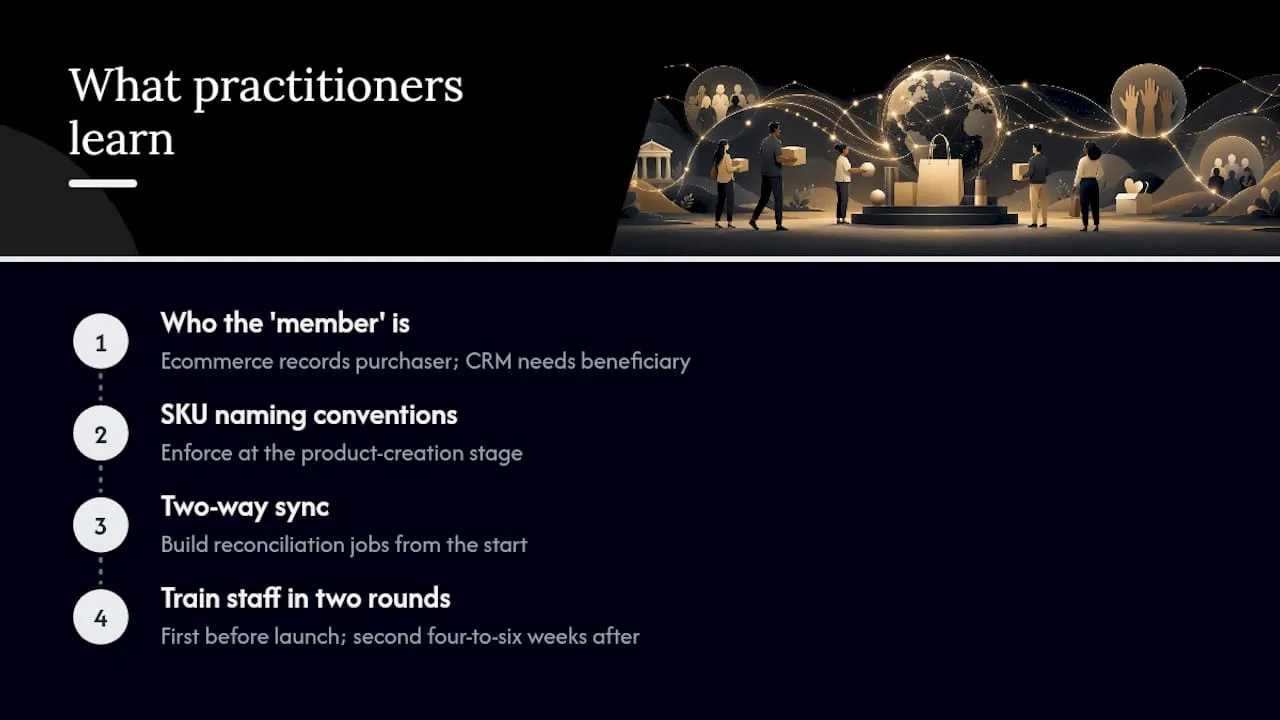
The integration surprises that catch organisations off guard are rarely technical. They are definitional. The most common one: the ecommerce platform and the CRM disagree on who the “member” is. The ecommerce order records the purchaser (the person who paid); the CRM needs the beneficiary (the person who holds the membership). For individual memberships these are usually the same person, but for organisational accounts, family memberships, or gift purchases they are not. Discovering this distinction after launch means retroactively cleaning hundreds of records.
Two other lessons stand out. First, SKU naming conventions feel trivial until they are not. A naming convention agreed in a spreadsheet but never enforced in the platform creates a translation layer that breaks every automated mapping. Enforce it at the product-creation stage, not the reporting stage. Second, two-way sync sounds like a feature; in practice it is a discipline. Webhooks fail, queues back up, and idempotency breaks under load. Build reconciliation jobs from the start, not as an afterthought when discrepancies appear in month three.
On stakeholder communication: train staff in two rounds. The first round covers the basics before launch. The second round, four to six weeks after launch, covers the edge cases that only emerge once real orders are flowing. The gap between those two sessions is where most support escalations originate.
Colossus gives your organisation a faster path to integrated ecommerce
Colossus brings together membership management, event ticketing, CRM, and billing in a single platform, which means the integration work that consumes weeks in a best-of-breed build is largely prebuilt. Native membership commerce mapping creates and renews member records automatically on purchase. The event management module handles ticketing, seat limits, attendee management, and POS workflows without a separate integration. Subscription billing, payment gateway connections, and API/webhook support are included, so your team configures rather than builds.

Organisations that need to add digital fundraising and ecommerce to an existing member base can use Colossus’s onboarding services and prebuilt templates to reach an MVP in weeks rather than months. To see how the platform maps to your specific product mix and CRM requirements, book a discovery call with the Colossus team at Colossus.