- Home
- Membership challenges
- Too many tools
We pay for a stack of tools that don't talk to each other
We run a CRM, a website, an event booking tool, an email platform, a forum and a shop. Each has its own login, its own licence and its own copy of the member list. Every week someone exports from one and imports into another, and nobody has added up what the whole stack costs.
Signs the stack is working against you
- A new member has to be added by hand to three or four systems before they get everything they joined for.
- Software invoices arrive at different times of year, and finance has to ask who uses each tool and whether it is still needed.
- A new starter needs accounts on six systems. When someone leaves, nobody is sure which ones they can still sign in to.
- Members email to ask which login they need, because the website, the forum and the shop each have their own.
- Part of someone’s week goes on exporting from one tool and importing into another, and the job stops when they are on leave.
A typical case: a professional body sells conference places through an event booking service, and each Friday the events officer exports the bookings. The membership team checks who qualifies for the member rate, then the list is imported into the email platform for joining instructions. When the board asks what the conference cost to run, the answer includes three software invoices and two days of exports nobody had counted.
Each tool solved one problem when it was bought
Tools are bought one problem at a time
An event tool before a big conference, a forum when members asked for one, a shop for a new publication. Each purchase made sense alone, but nobody planned how the tools would work together.
Every tool keeps its own member list
Each system needs its own copy of your members, with its own login and fields. Linking them takes money and technical skills a small team rarely has, so staff become the link.
Nobody owns the whole stack
Licences sit in different teams’ budgets, some on a manager’s company card. Contracts renew quietly each year, and because nobody adds the costs together, nobody is asked to reduce them.
The stack costs more than the invoices show
- Staff time goes on moving data. Exports, imports and re-keying repeat every week, and each one is a chance to drop a record.
- Licence costs grow without a decision. Many tools charge per staff user or per contact, so the bill rises as the team and the member list grow.
- Members get a disjointed experience. Separate logins, pages that look different and the same questions asked twice make the membership feel smaller than it is.
- Simple questions take days to answer. “Which members came to the conference and opened the last newsletter?” means exports from two systems and an afternoon in a spreadsheet.
MemberWise’s Digital Excellence 2026 research covered around 480 UK membership bodies. Cost, incompatibility, lack of in-house IT skills and supplier uncertainty were the most-cited barriers to integration. Only 18% said ease of integration met or exceeded expectations, while 59% said it fell short. Source
Momentive Software’s 2026 survey of 500 managers at US nonprofits and associations was run by Wakefield Research. Some 41% named too many disconnected systems among their biggest daily frustrations, and 46% named manual data entry across platforms. In all, 82% agreed that inefficient or disconnected systems contribute to burnout at their organisation. Source
iMIS surveyed more than 400 association and membership professionals, mostly in the US, for its 2026 Membership Performance Benchmark Report. It found the top challenge was “inadequate integration between member management systems and their corresponding websites”. Source
Five steps to a simpler stack, whatever you choose
List every tool, its cost and its owner
For each tool, record the annual cost, the renewal and notice dates, a named owner, who uses it and what member data it holds. Include free tools and anything paid for on a card.
Map every hand-off between tools
Write down each time data moves by hand: an export, an import, a list typed in again or a report stitched together. Note how often it happens, who does it and how long it takes.
Count the full cost, including staff time
Add the licence fees to the hours spent on hand-offs, priced at an agreed hourly rate. Include the time it takes to train a new starter on each tool. This is the figure to compare every option against.
Decide what to bring together and what to keep
Tools that hold or change member data are the strongest candidates to bring together. A specialist tool that does its job well can stay, once you agree how its data reaches the main record and who checks it.
Retire tools on purpose, with an export plan
Check the notice period, export everything in a format you can open, and archive it with a note of what it holds. Redirect old links and tell members what has changed, then cancel the licence.
Your membership tools as modules of one platform
In Colossus the CRM, website, events, email, shop and forum are modules of one platform, sharing one member record and one staff sign-in.
| What it does | How it works | Plans |
|---|---|---|
| One member record | Each member organisation is one CRM account, with its contacts, branches, meetings, activities, correspondence, documents and audit trail. The accounts list and its Excel export read this same record, so staff work from one copy. | CoreGrowthScaleEnterprise |
| Website pages and forms | Pages are stored in Colossus and edited in its page editor, with shortcodes for embedding components. Enquiry forms built in Colossus can sit on any page, and submissions arrive in the CRM as leads. | Core (optional)GrowthScaleEnterprise |
| Events and tickets | In-person and online events with ticket tiers, allocations and members-only tiers. Staff mark attendance, and the events summary shows tickets sold and remaining for each event. | Core (basic)GrowthScaleEnterprise |
| Email campaigns | Campaigns go to email lists, member groups or contacts you pick, with merge fields. Unsubscribed contacts are left out, and sent, opened and clicked dates are recorded against each contact. | CoreGrowthScaleEnterprise |
| Shop and card payments | Products with variants, stock and postage options. Buyers pay by card through Stripe, Paysafe, Lloyds Cardnet or Klarna, depending on your set-up, and receive a receipt. | Core (optional)GrowthScaleEnterprise |
| Members’ forum | Boards, topics, follows and polls for members. Staff moderate it from the CRM, including posts that members report. | GrowthScaleEnterprise |
Modules depend on your plan, and some, such as the member portal, are configured during implementation. Check each current tool against this table before deciding what to retire.
How a professional body went from seven tools to two
Illustrative example. The Society of Marine Coating Inspectors is a fictional professional body with 1,050 members and a staff of five. This is a composite scenario, not a customer story.
It used seven tools: a membership database, website, event booking service, email platform, forum, web shop and accounts package. Each had its own licence and logins, and five held their own copy of the member list. Most weeks someone exported from one tool and imported into another.
The operations manager listed every tool with its cost, renewal date, owner, users and the data it held, then mapped each hand-off. The map showed nine regular exports, and three contracts renewing in the same quarter. Adding staff hours to the licence fees gave the board one figure for the whole stack for the first time.
They moved the database, website, events, email, forum and shop onto Colossus in stages, retiring each tool once its data was archived. The accounts package stayed, with one documented monthly hand-off to finance. Staff now work from one menu, and members book places and buy guides on one website.
Run the conference, its email, a shop item and the web page from one platform
The Society of Marine Coating Inspectors, a fictional professional body, pays for seven tools that each keep their own member list. It wants its annual conference, joining email, guide sales and web pages run from one place.
- Organisation
- Society of Marine Coating Inspectors (fictional), 1,050 members
- Goal
- Set up a conference, its joining email, a guide for sale and the conference web page in one platform, against one member record
- Takes
- About 85 seconds, 6 steps
- Plan
- Growth, Scale and Enterprise plans
A walkthrough of real Colossus screens with a fictional organisation and demonstration data. Your own set-up, fields and wording will differ.
-
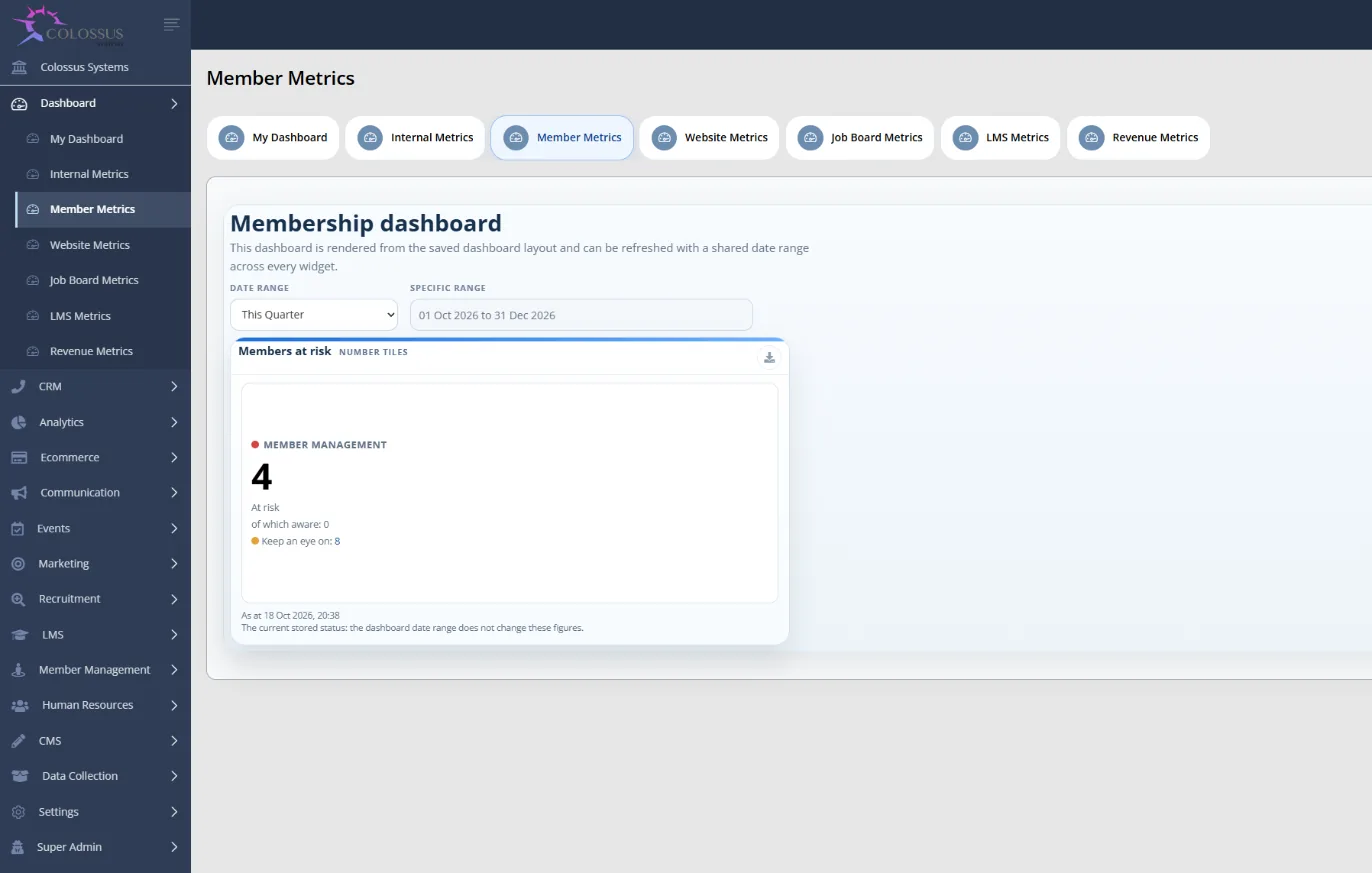
Colossus screen, demonstration data Step 1 of 6Start from one menu
What you do: Sign in to Colossus and open the side menu.
What to notice: Accounts, events, campaigns, e-commerce and the other modules on your plan sit in one menu. Roles and permissions decide what each colleague can see and change.
-
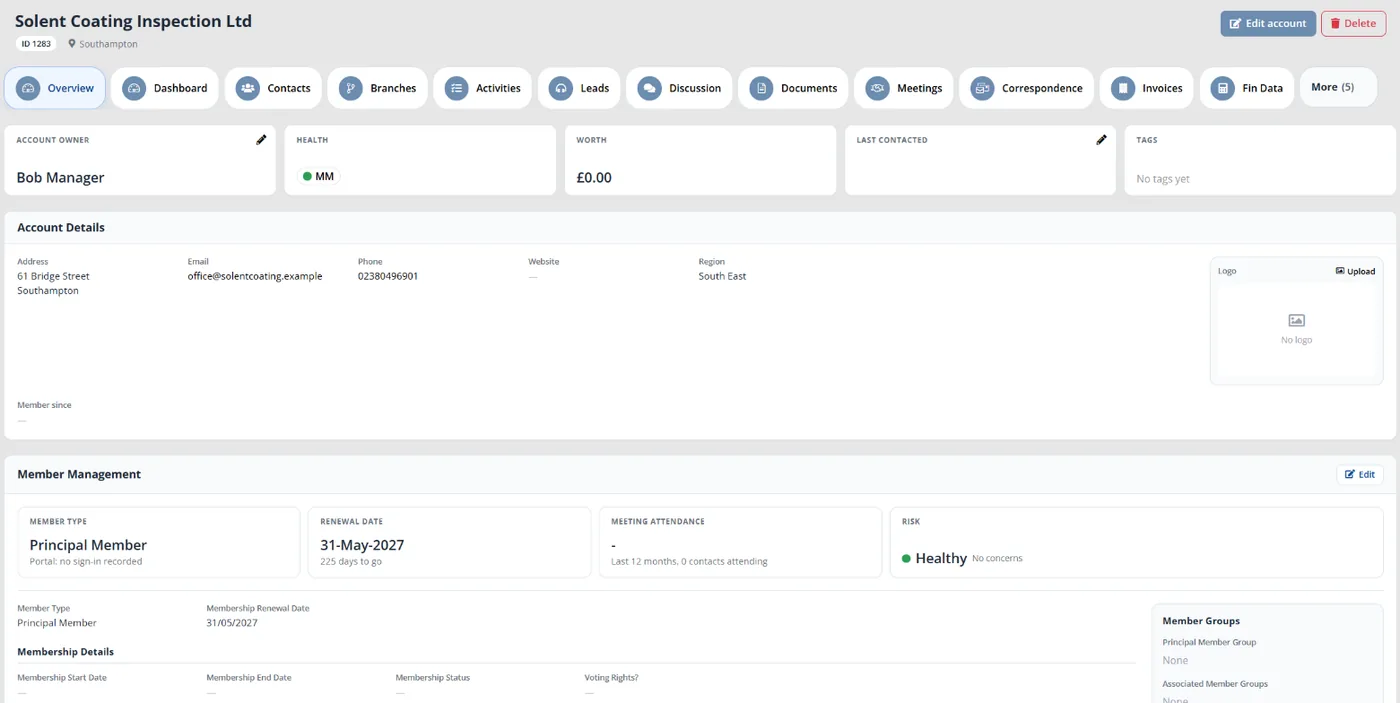
Colossus screen, demonstration data Step 2 of 6Open one member's record
What you do: Open a member's account from the accounts list.
What to notice: The account owner, health, last contacted date and tags sit at the top, with tabs for contacts, meetings, activities, correspondence, documents and the audit trail.
-
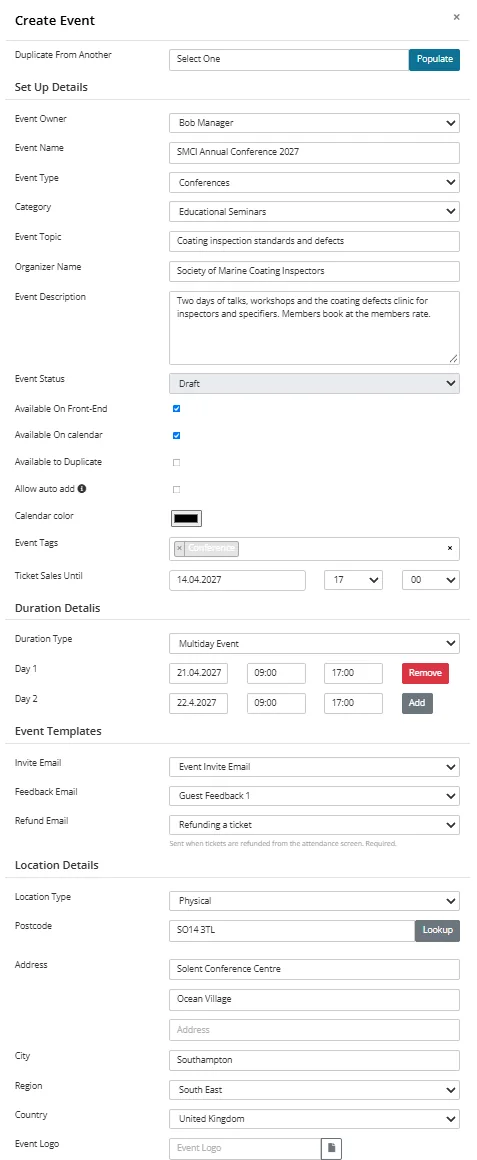
Colossus screen, demonstration data Step 3 of 6Create the annual conference
What you do: Click Add Event and enter the topic, dates and venue, with the organiser, tags, ticket sales deadline and event logo the form requires, then save. A new event starts as Created: set it to Draft from the Event State card on its page.
What to notice: The summary lists each event with its tickets sold and remaining. Ticket tiers, including a members-only tier, are set on the event's tickets tab.
-
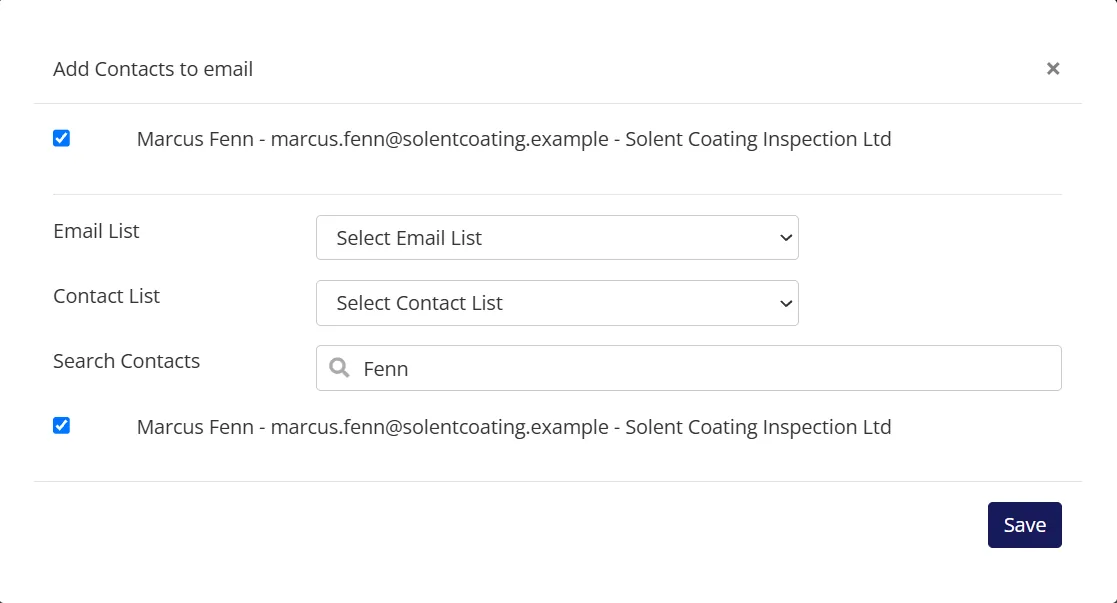
Colossus screen, demonstration data Step 4 of 6Send the joining instructions
What you do: Add a campaign, attach an email template with Add Email Template, add contacts from an email list or by searching, then click Start Campaign.
What to notice: Unsubscribed contacts are left out, and sent, opened and clicked dates are recorded against each contact.
-
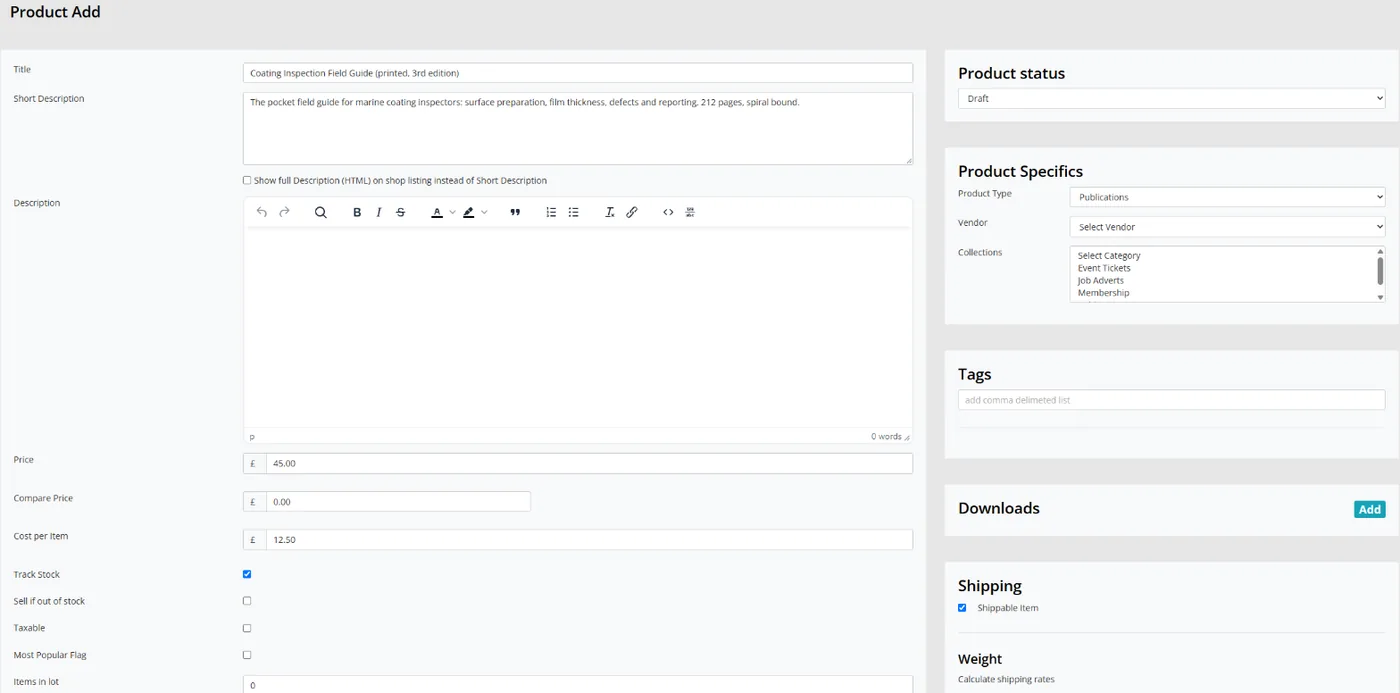
Colossus screen, demonstration data Step 5 of 6Put the inspection guide on sale
What you do: Add the printed guide as a product with its title and price, and switch on Track Stock.
What to notice: Buyers pay by card through the provider your site is set up with, such as Stripe or Paysafe, and get a receipt.
-
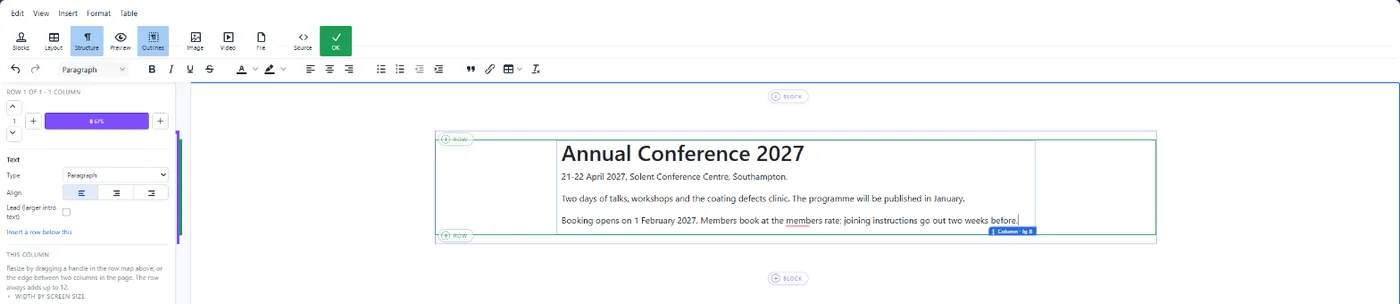
Colossus screen, demonstration data Step 6 of 6Update the conference web page
What you do: Open the conference page, click Maximise to edit its Page Content, make the change, click OK and then Update.
What to notice: The page is stored in Colossus, so staff edit it with the same sign-in. Colleagues with permission can also use the Edit this page bar on the live site.
The result
The conference, its joining email, the printed guide and the web page are all managed from one CRM menu with one staff sign-in. Each member's record holds their contacts, meetings, correspondence and audit trail, and none of these jobs needs an export from one tool to another.
What to measure
Take a baseline from your tool list before you change anything, then check it each quarter. The aim is fewer hand-offs and a known total cost, measured against where you started.
- Tools holding a copy of the member listSystems that keep their own member or contact records, counted from your tool list.Lower is better
- Manual hand-offs each monthExports, imports and lists typed in again between systems, taken from your hand-off map.Lower is better
- Full annual cost of the stackLicence fees plus staff hours on hand-offs at your agreed hourly rate, worked out again at each renewal.Lower is better, for the same work
- Accounts a new starter needsSeparate staff logins that must be set up before a new colleague can do their job.Lower is better
- Tools retired with an archived exportRetired tools whose data was exported, checked and stored before the licence ended.The aim is every one
Frequently asked questions
Is one platform always cheaper than several tools?
Should we connect our tools rather than replace them?
Who should own the list of tools?
How do staff licences work if we bring our tools into Colossus?
Which Colossus plans include the website, events and shop?
Sources
- MemberWise, Digital Excellence Report 2026. Around 480 UK membership organisations; findings as summarised by research partner Cantarus, March 2026.
- Momentive Software, The State of the Mission-Driven Workforce in 2026, survey conducted by Wakefield Research, 4–15 December 2025. 500 managers and above at US nonprofits and associations with annual revenue of at least US$500,000; US only, commissioned by a software vendor.
- iMIS, 2026 Membership Performance Benchmark Report, 11th edition, release of January 2026. More than 400 association and membership professionals, mostly in the US.
See where your own systems stand
The Membership Systems Health Check is ten multiple-choice questions about your data, renewals, automation, reporting and member experience. You get your score out of 100 on screen straight away, with no email needed to see it.
Prefer to talk it through? Book a tailored demonstration and we will start from this problem, not a feature tour.