- Home
- Membership challenges
- Switching membership systems
Our membership system holds us back, but switching feels too risky
Our database was built for us years ago, and every workaround since has made it harder to leave. We know it costs us time, but we can’t risk losing records, upsetting renewals or burying a small team in a migration. This guide sets out how to make the move safely, whichever system you choose.
Does this sound familiar?
- One person really understands how the database works, and most of what they know is not written down.
- A small change, such as a new membership grade or a field on a report, needs a developer’s quote or another spreadsheet.
- Colleagues keep their own lists because they don’t trust the main record.
- You have looked at replacements before, and each time the project stalled on “but what about our data?”
- Nobody is sure what your current contract says about notice periods or getting your data out.
A typical case: a trade association runs on a system a contractor built fifteen years ago. Renewals go out in February and the conference is in October, so there never seems to be a safe month to move. The board approves a review each year, and each year it is parked.
The risk is real, but it is mostly unmapped
Nobody has written the work down
The real process lives in habits and workarounds, so no one can say what a new system must do. Without that list, every option looks equally risky.
Old data has its own shape
Years of custom fields, free-text notes and duplicate records make an export look daunting. The fear attaches to the system, but most of the risk sits in the data.
Small teams have no spare season
Renewals, events and board meetings fill the year. A migration looks like an extra job with no owner and no quiet month, so it never starts.
Standing still has a price too
- Staff time goes on workarounds. Re-keying, reconciling side spreadsheets and waiting for the one person who knows the database.
- Members feel the system’s limits. They update the same details twice, or receive letters with the wrong grade or contact.
- Renewals depend on fragile steps. When the renewal run relies on a script or one person, a single absence can hold up invoices.
- Board figures are built by hand. They arrive late, are hard to check and rarely answer the next question.
MemberWise’s Digital Excellence 2026 research found 22% of UK membership bodies plan to replace their AMS within 12 months, down from 27%. Some 47% intend to stay with their current provider and upgrade. Bespoke and specialist systems account for 54% of the sector. Source
The same UK research found only 27% of membership bodies have a formal digital strategy. Just 14% have technology spend aligned to a strategy with planned investment. Source
The UK Charity Digital Skills Report 2026 found CRM limitations are a barrier for 38% of large charities, among their most significant. Small charities were less affected, at 17%. Its examples include poor reporting and systems that don’t integrate. Source
Five steps that make any switch safer
Write down your critical workflows and success measures
List the jobs that must work on day one, such as joining, renewing, invoicing, event booking and board reporting. Give each a measure, so “working” means something you can check.
Audit and clean the data before it moves
Export everything, count the records, and find duplicates, blank fields and members kept “just in case”. Decide what moves, what is archived and who signs it off.
Choose a quiet window, not renewal season
Work back from your renewal dates and event calendar. Go live when the team has a few calm weeks, and keep the old system readable until the first renewals have run.
Run a test import, then check in parallel
Import a real export first and compare counts and a sample of records with the old system. Fix the mapping or the source file, then repeat until the totals agree.
Train first, agree the exit and plan what to retire
Let staff practise on test data before launch. Agree in writing how you would get your data out, and list the old tools, scripts and spreadsheets you will switch off.
A migration you can check, practise and walk away from
Colossus implementations follow four stages: discover and define, configure and migrate, train and test, then launch and improve. These are the tools and terms behind them.
| What it does | How it works | Plans |
|---|---|---|
| Import wizard | Upload a file from your current system and match each of your columns to a Colossus field. Review what will and won’t be imported; nothing is written until you commit. It covers accounts, contacts, leads, member groups, meetings, activities, branches and renewal dates. | Used during implementation by an administrator; migration scope is confirmed in your proposal |
| Reconciliation report | After each import, download the rows not imported, with the reason beside each. A second workbook lists every external ID imported from your old system and the Colossus record it became. Rows already imported are never imported twice. | Used during implementation by an administrator; migration scope is confirmed in your proposal |
| Playground sandbox | A separate Playground for your organisation, reached from the account menu, where staff can practise without touching real records. Everything entered there is deleted every 30 days. | Growth (optional)ScaleEnterprise Configured during implementation |
| Roles, permissions and audit trail | Each user has a role with create, read, update, delete, financial and download permissions. Changes record the old and new values, so you can see who changed what after go-live. | CoreGrowthScaleEnterprise |
| Switch & Grow offer | Eight full staff licences for the price of five in year one, and 24-month licence-rate protection. Standard migration from one principal data source, with agreed field mapping, a test import and a final import. No regular platform fees until the agreed system is live, subject to the implementation responsibilities agreed by both parties. | Growth Qualifying new customers |
| 90-Day Fit Guarantee | Measured against the critical workflows documented with you in discovery. If Colossus cannot deliver them, qualifying customers may leave within 90 days of launch without future platform fees. They also receive an export of their data. | Growth Qualifying new customers, as part of Switch & Grow |
Switch & Grow eligibility and standard migration scope are confirmed during discovery, and full terms are in the agreement. Complex data cleansing and bespoke integrations may be charged separately.
How a trade federation moved without disturbing renewals
Illustrative example. The Midland Federation of Scaffolding Contractors is a fictional trade association with 910 member companies and a three-person team. This is a composite scenario, not a customer story.
Its records sat in a database a contractor built in 2009, plus a renewals spreadsheet only the membership manager understood. Renewals fall due on 1 April and the annual conference is in October. Two earlier reviews had stalled over the data.
This time the team wrote down eight critical workflows first, from adding a new member company to pulling the April renewal list. They chose a May to July window, after renewals had settled. Before exporting, they merged duplicate company records and archived firms that had lapsed years ago.
The test import’s review listed a few dozen rows it would not bring across, mostly members with no renewal date. The team fixed them in the old export and checked the reconciliation workbook against the old system’s counts. Staff practised in the Playground before go-live, and the old database stayed read-only until April’s renewals were done.
Bring your members across, check every row, and practise before go-live
The Midland Federation of Scaffolding Contractors, a fictional trade association, is leaving a bespoke database. It needs to prove nothing was lost before its April renewals.
- Organisation
- Midland Federation of Scaffolding Contractors (fictional), 910 members
- Goal
- Import member companies with their renewal dates, account for every row left out, and let staff practise safely before launch
- Takes
- About 85 seconds, 7 steps
- Plan
- Import wizard used during implementation; Playground included on Scale and Enterprise, optional on Growth
A walkthrough of real Colossus screens with a fictional organisation and demonstration data. Your own set-up, fields and wording will differ.
-
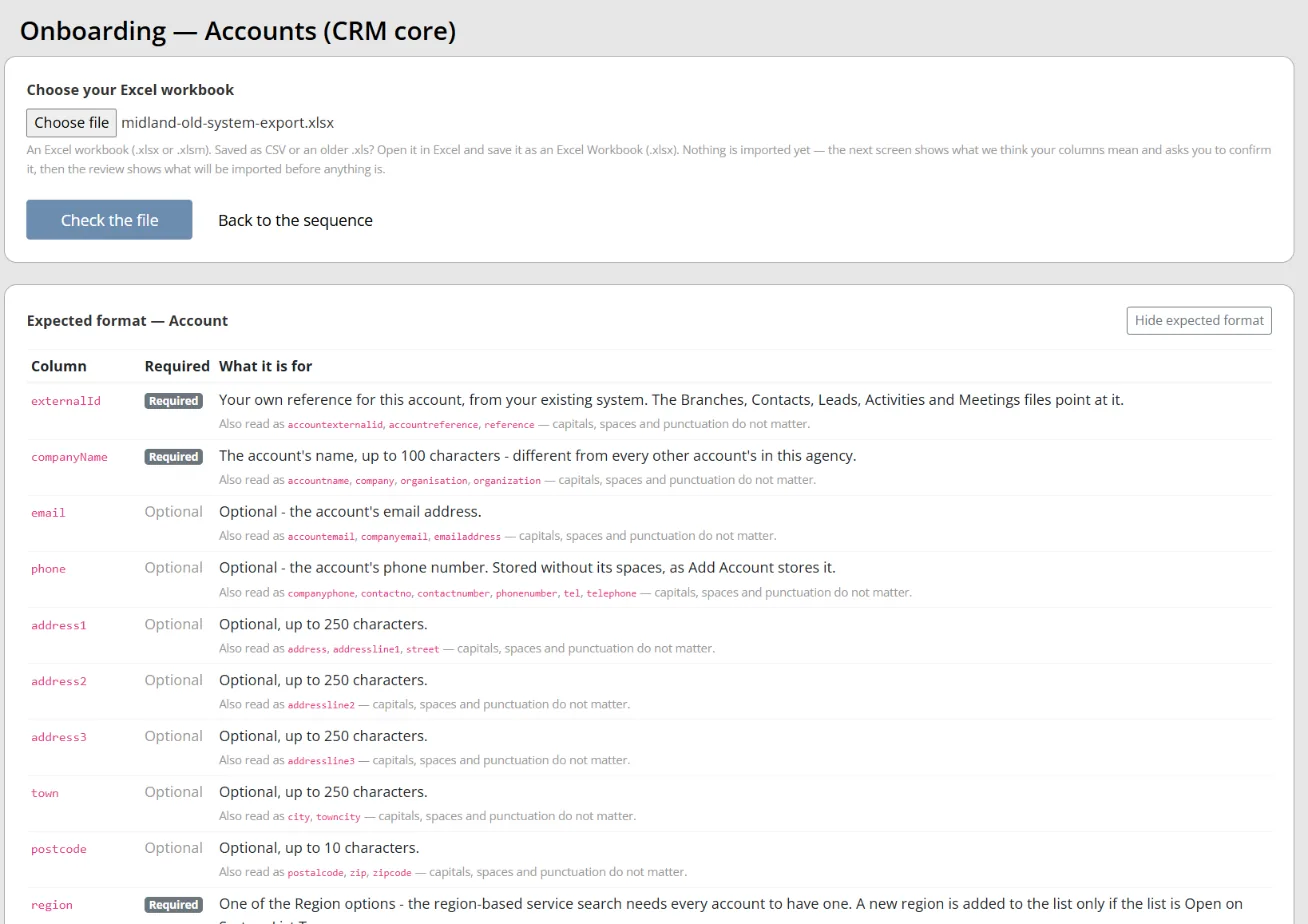
Colossus screen, demonstration data Step 1 of 7Upload the export from the old system
What you do: Open Onboarding, choose the Accounts (CRM core) step and upload the spreadsheet exported from the old database as an Excel workbook.
What to notice: The upload page lists the columns the file needs, which are required and what each is for. Gaps show up before the file goes in.
-
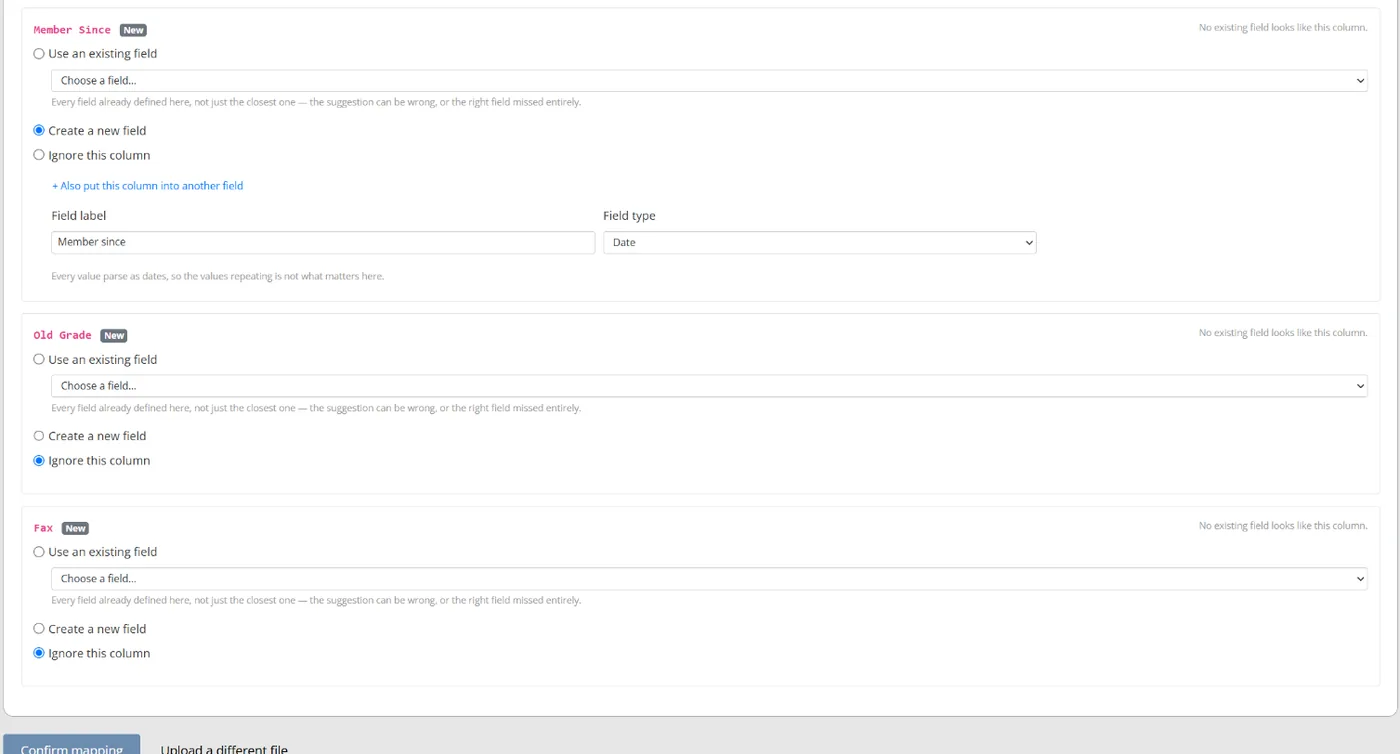
Colossus screen, demonstration data Step 2 of 7Match your columns to Colossus fields
What you do: Check each of your columns against the field it maps to and ignore the ones you no longer need. Create a new field where one is missing, then confirm the mapping.
What to notice: Colossus reads every value in each column to suggest a field and type, so the team checks suggestions rather than mapping from scratch.
-
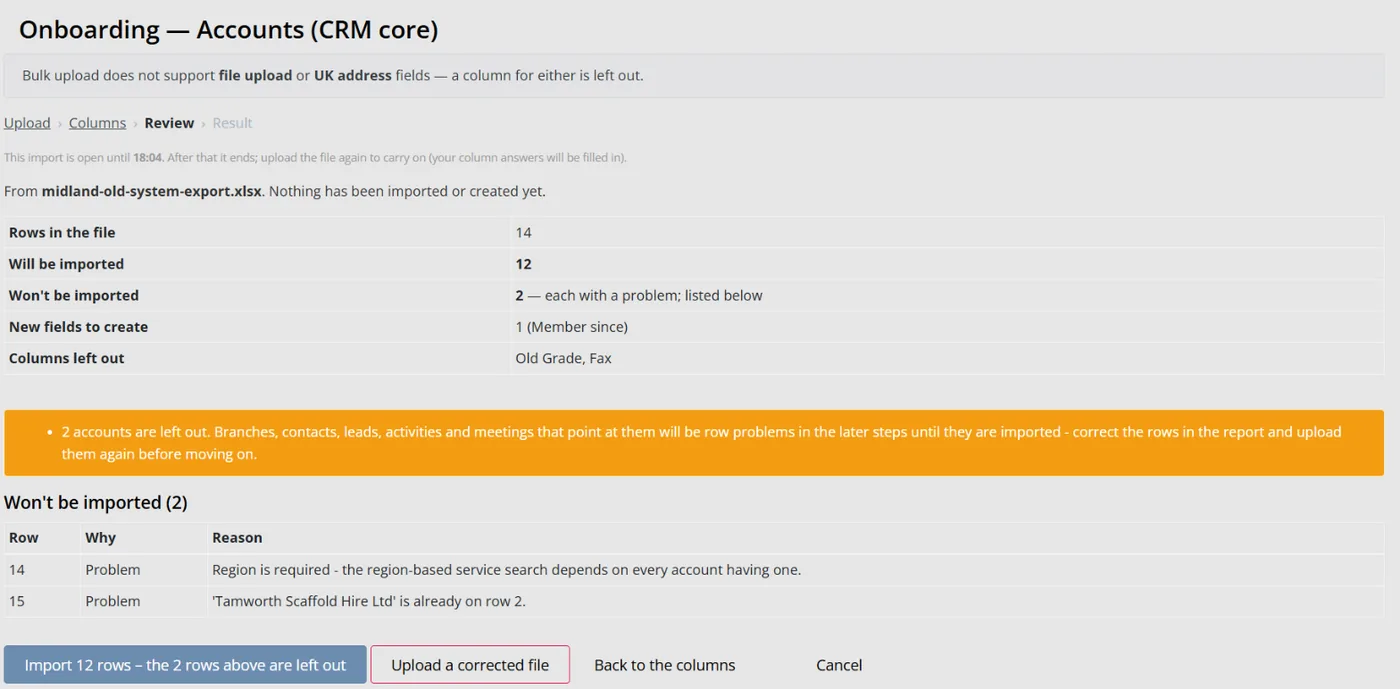
Colossus screen, demonstration data Step 3 of 7See what will and won't be imported
What you do: Read the counts for rows that will be imported and rows that won't, then open the list of rows left out.
What to notice: Each row left out shows its row in your sheet and the reason. Nothing has been imported yet, so you can upload a corrected file instead.
-
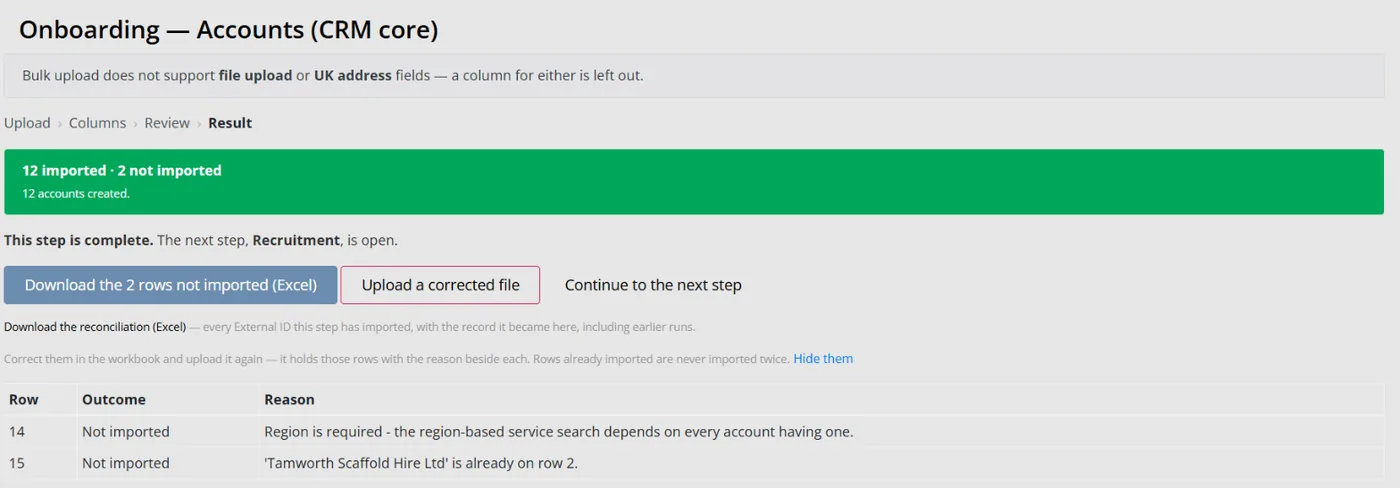
Colossus screen, demonstration data Step 4 of 7Commit the import and download the leftovers
What you do: Click Import, then download the rows not imported as an Excel workbook.
What to notice: The workbook holds those rows with the reason beside each. Correct them and upload it again: rows already imported are never imported twice.
-
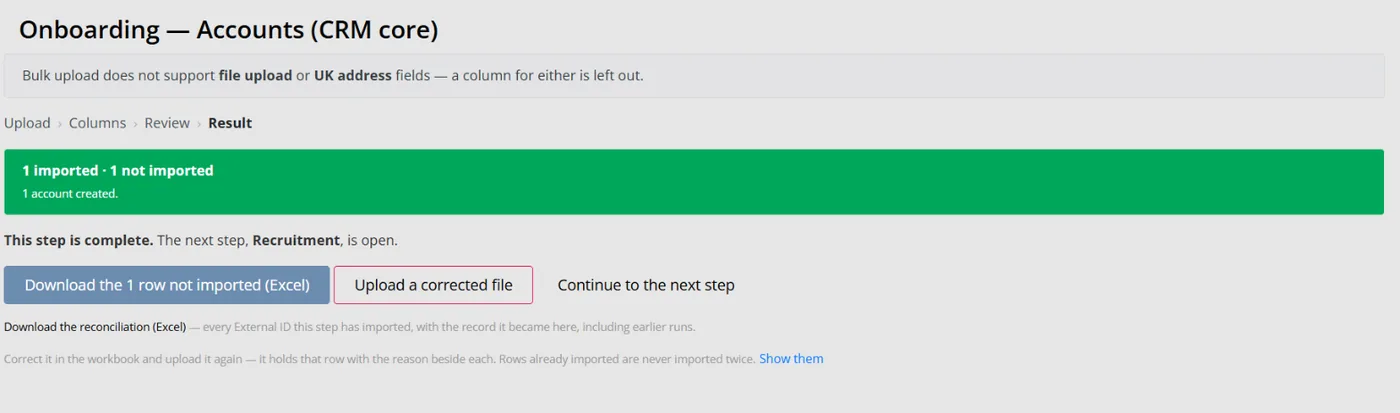
Colossus screen, demonstration data Step 5 of 7Check the new records against the old system
What you do: Download the reconciliation workbook and compare its totals with the record counts from the old database.
What to notice: It lists every external ID the step has imported with the Colossus record it became, including earlier runs, which makes parallel checks straightforward.
-
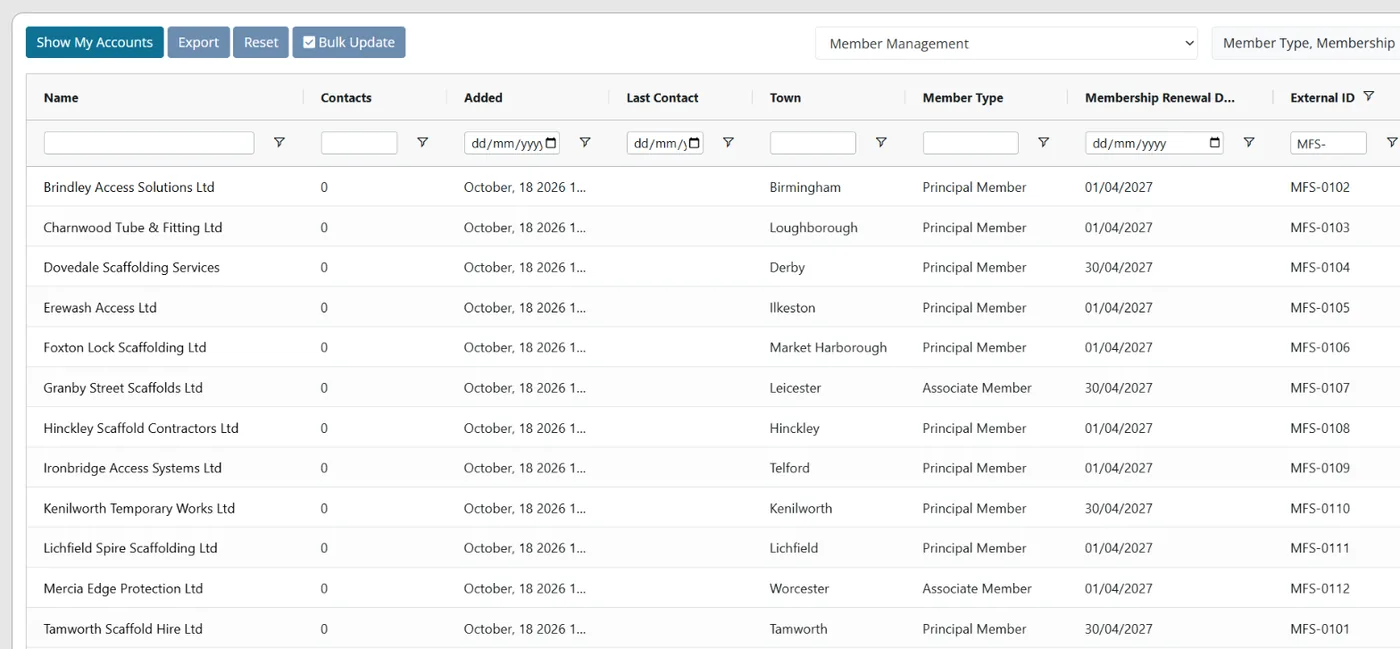
Colossus screen, demonstration data Step 6 of 7Bring in renewal dates and spot-check them
What you do: Run the Member Management step with each member's type and renewal date, then open Accounts in the Member Management view, add the Membership Renewal Date column and compare a sample with the old system.
What to notice: Renewal dates arrive with the import, so the first renewal cycle can be checked well before it starts.
-
ScreenBusiness name at the top of the side menu > PlaygroundStep 7 of 7
Let staff practise without touching real records
What you do: Click your business name at the top of the side menu, choose Playground and have each colleague try their everyday tasks.
What to notice: The Playground is a separate copy for practice. Every 30 days it is put back to its starting data, with a countdown to the next reset.
The result
Every member company is in Colossus with its renewal date, and every row left out has a recorded reason. The reconciliation workbook ties each old record to its new one. Staff have practised in the Playground before go-live.
What to measure
Agree these before the move and check them at each stage. The aim is a switch that members barely notice, judged against your own baseline.
- Records that reconcileAccounts, contacts and renewal dates in the new system against the old export, counted by type.Higher is better
- Rows left out of the final importRows the final import did not bring across, and how many of those were then fixed.Lower is better
- Critical workflows passing acceptance testsEach documented workflow, tested by the staff who do it, before launch.Higher is better
- Renewal dates carried across correctlyA sample of members whose renewal date matches the old record, checked before the first renewal cycle.Higher is better
- Side spreadsheets still in useWorkaround lists and tools still kept three months after launch.Lower is better
Frequently asked questions
When is the best time of year to switch?
Do we have to clean our data before we move?
Should we run the old and new systems side by side?
What if the new system turns out not to fit?
Which Colossus plans include migration support and a sandbox?
Sources
- MemberWise, Digital Excellence Report 2026. Around 480 UK membership organisations; findings as summarised by research partner Cantarus, March 2026.
- Zoe Amar Digital and Think Social Tech, Charity Digital Skills Report: priorities for the year ahead, 2026 edition, accessed 18 October 2026. 807 responses from UK not-for-profits, self-selecting online survey.
See where your own systems stand
The Membership Systems Health Check is ten multiple-choice questions about your data, renewals, automation, reporting and member experience. You get your score out of 100 on screen straight away, with no email needed to see it.
Prefer to talk it through? Book a tailored demonstration and we will start from this problem, not a feature tour.