- Home
- Membership challenges
- Member data in too many places
Our member data is spread across spreadsheets and systems
The same member company sits in our CRM, the events tool, the finance system and three spreadsheets, and no two of them agree. When the board asks how many members we have, membership, finance and events each give a different number. Here is how to decide which version is right, and how to stop the copies multiplying again.
Signs your member data has split
- Ask membership, finance and events how many members you have, and you get three different numbers.
- A member tells one team about a new address, and the old one keeps turning up on invoices and event badges.
- Someone keeps a “master” spreadsheet that is more up to date than the CRM, and only they understand it.
- Before each mailing, a day goes on merging exports and deleting duplicates by hand.
- When a record looks wrong, nobody can say who changed it or when.
Take an association that holds members in a CRM, renewals in a spreadsheet, invoices in an accounts package and delegates in a booking tool. A member company moves office and tells only the events team. Six months later its renewal invoice goes to the old address, and its new technical manager appears twice on the mailing list.
Copies multiply when nothing says which one counts
Updates go wherever the call lands
When a member reports a change, it is made in the system of whoever took the call. No rule says which system changes first, so the others fall behind.
Each tool brought its own contact list
Events, finance and email tools were bought one at a time, each with its own records. Exports fill the gaps, and every export is a copy that starts to go stale the day it is made.
Nobody owns the data
Data quality is everyone’s job, so in practice it is no one’s. Without a named owner, nobody settles which address is right, and clean-ups start but never finish.
Untrusted data costs time, income and goodwill
- Staff time goes on reconciling, not on members. Merging lists before every mailing, renewal run or board paper is work that never stays done.
- Members notice the mistakes. Two copies of a newsletter, an invoice to someone who left, an old job title on a badge: each one says you don’t know them.
- Renewal income is put at risk. An invoice sent to the wrong contact is paid late or not at all. A member who meant to stay can end up counted as lapsed.
- The board stops trusting the numbers. When three teams report three totals, decisions wait while someone works out which is right.
MemberWise’s Digital Excellence 2026 research covered around 480 UK membership organisations. Only 18% said ease of integration met or exceeded expectations, against 59% who said it fell short. Source
In the Charity Digital Skills Report 2025, 27% of UK charities cited “We don’t have a CRM/rely on disjointed spreadsheets” as a barrier. In the 2026 edition, 26% said they are poor at, or don’t use, systems such as CRMs. Source (2025) Source (2026)
Validity surveyed 631 CRM administrators across sectors in the US, UK and Australia in 2024. Among those with data-quality problems, 53% had duplicate records, and over half of all respondents used manual processes to find and correct data-quality issues. Source
Five steps to one trusted record, in any system
Decide the system of record, field by field
List the fields that matter: name, address, main contact, grade, renewal date and invoice contact. For each, name the one system where it is changed. Every other copy is read-only or out of date.
Give the data a named owner
One person sets the rules: what counts as a duplicate, which spelling wins and who may add a field. They don’t do all the editing; they settle disputes and keep the field list current.
Clean duplicates before you move anything
Moving messy data just moves the mess. Match rows on something stable, such as a company number or member ID, merge them in the spreadsheet, and log which records you combined.
Standardise fields and lists
Agree one format for postcodes, phone numbers and dates. Use fixed lists for grade, region and sector, because free text is where five spellings of one value appear.
Keep a change trail and stop new copies
Record what changed, when and by whom, so a disputed value can be traced. Then limit who can export, and answer “send me the list” with an export from the system of record.
One record per member, with its history
Colossus keeps each member organisation as one CRM account, records old and new values when it changes, and lets you control exports.
| What it does | How it works | Plans |
|---|---|---|
| One record per member organisation | Each account holds the organisation’s contacts, branches, meetings, documents and leads, with an Audit tab. Staff work from the account rather than from their own lists. | CoreGrowthScaleEnterprise |
| Spreadsheet import with a review step | An admin uploads an Excel workbook, confirms what each column means, and sees which rows won’t be imported and why before anything is written. A reconciliation then lists every External ID imported and the record it became. It covers accounts, contacts, leads, member groups, meetings, activities, branches and renewal dates. | Part of onboarding Admin users only |
| Fields that match how you work | Custom fields, including drop-down lists, are added to records through dynamic forms. A fixed list for grade or region stops new spellings creeping in. | CoreGrowthScaleEnterprise Configured during implementation |
| Audit trail | Old and new values are recorded for changes to accounts, contacts, committees, events and campaigns. An account’s Audit tab lists each change with its date, previous values and changed values, and an audit-trail grid brings them together. | CoreGrowthScaleEnterprise |
| Roles and permissions | Role collections set create, read, update and delete rights, with separate financial and download permission points. Exports can be limited to the people who need them. | CoreGrowthScaleEnterprise |
| Members update their own details | In the member portal, members edit their company and personal details, contacts and branches, so the change lands on the record staff use. | CoreGrowthScaleEnterprise Configured during implementation |
Clean and match your records before you upload. The Review shows which rows have problems, and your data owner decides which version of a member is correct.
How a trade association got down to one member list
Illustrative example. The Association of Roof Drainage Contractors is a fictional trade association with 380 member companies and a membership team of three. This is a composite scenario, not a customer story.
Its member records sat in an old CRM, a renewals spreadsheet, the accounts package and two committee lists. A combined export ran to just over 900 rows for 380 members, and nobody knew which address was current.
The membership manager became the data owner. The team agreed that Colossus would hold names, addresses and contacts, while the accounts package kept invoice amounts. They matched rows on company number, merged duplicates and fixed regions to a list of eight before importing.
The Review flagged a few dozen rows, each with its reason, and the team fixed and re-uploaded them. Download permission now sits with two people, and members update their own contacts in the portal. When a member queried a changed address, the Audit tab showed the previous value and the date it changed.
Bring scattered member lists into one record you can trace
The Association of Roof Drainage Contractors, a fictional trade association, wants one member list that membership, finance and events all trust, in place of an old CRM and four spreadsheets.
- Organisation
- Association of Roof Drainage Contractors (fictional), 380 members
- Goal
- Import a cleaned member list, reconcile it against the source file and show where each later change is recorded
- Takes
- About 85 seconds, 7 steps
- Plan
- Core, Growth, Scale and Enterprise plans (the import is run by an admin during onboarding)
A walkthrough of real Colossus screens with a fictional organisation and demonstration data. Your own set-up, fields and wording will differ.
-
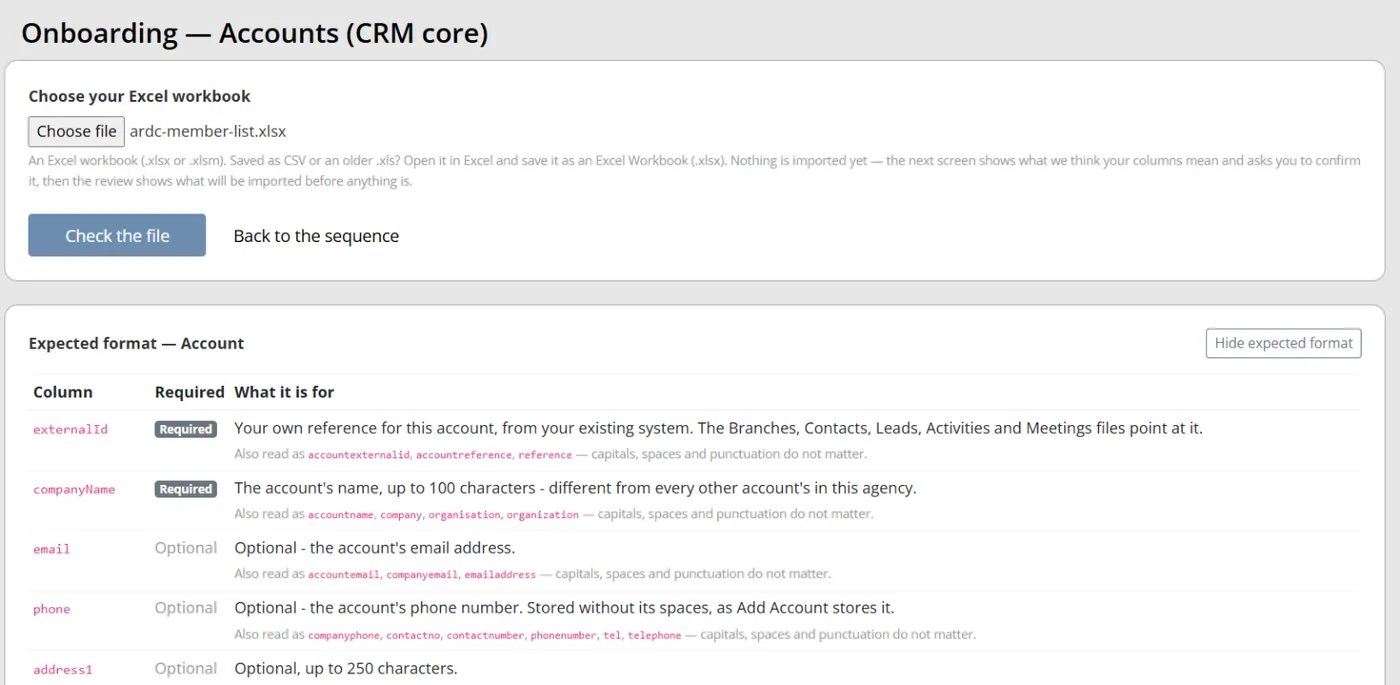
Colossus screen, demonstration data Step 1 of 7Upload the cleaned member list
What you do: Open the Accounts (CRM core) step of the onboarding sequence, choose the cleaned Excel workbook and click Check the file.
What to notice: View expected format lists the columns this step reads and which are required. Nothing is imported at this stage.
-
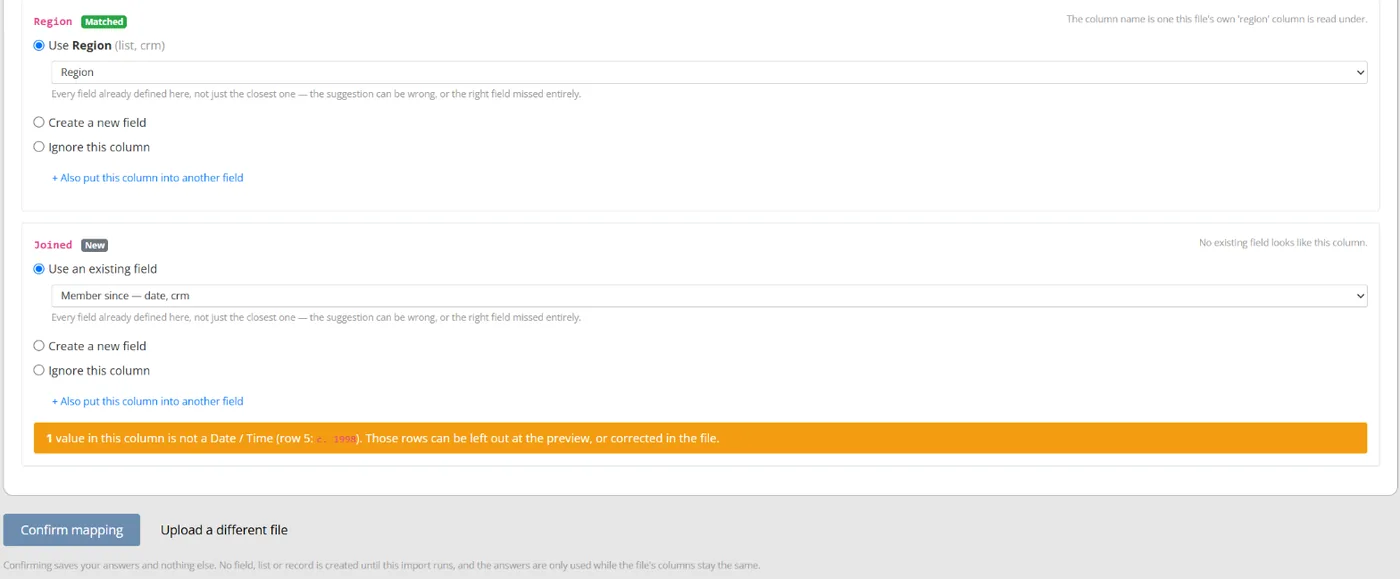
Colossus screen, demonstration data Step 2 of 7Confirm what each column means
What you do: Check the suggested field for each column. Keep it, choose another field, create a new one or ignore the column, then click Confirm mapping.
What to notice: Values that don't fit the chosen field type are counted and the first is shown with its row, so a year typed as 'c. 1998' in a date column shows up before anything is imported.
-
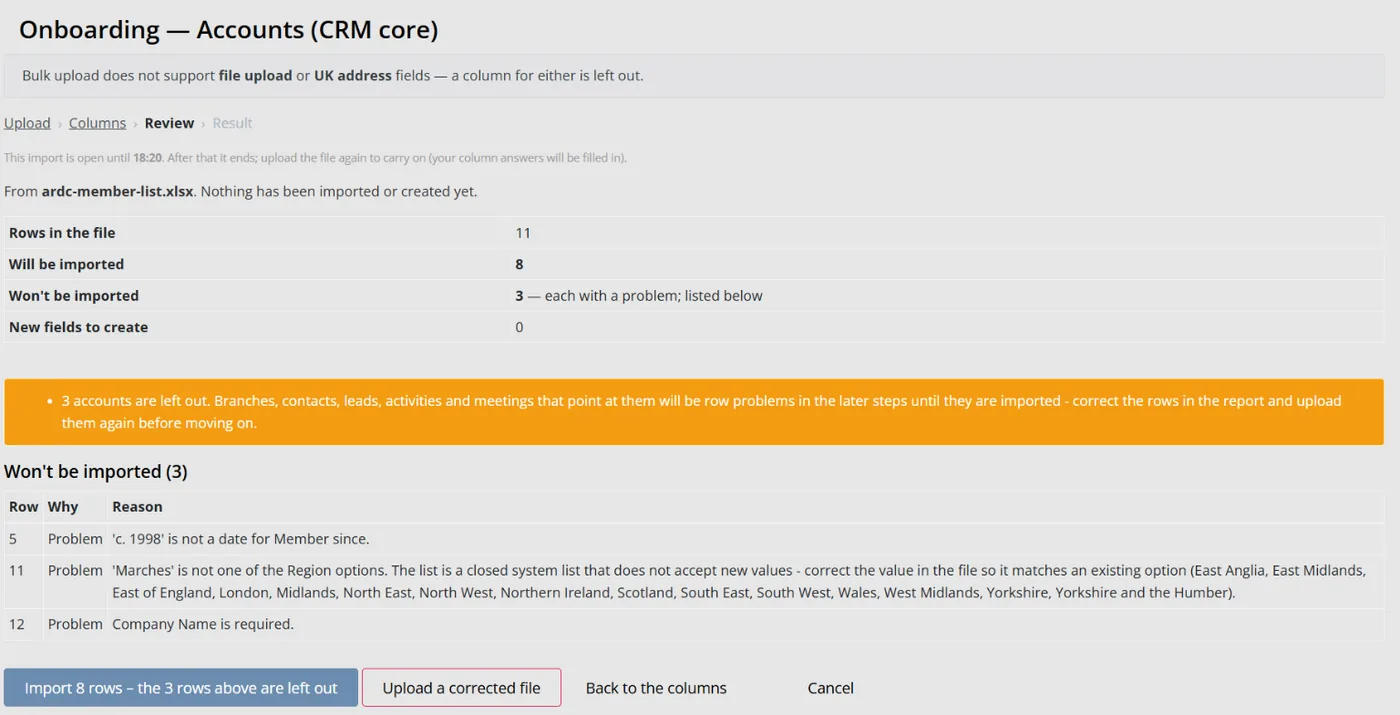
Colossus screen, demonstration data Step 3 of 7See what will and won't be imported
What you do: Read the counts and the Won't be imported table, which gives each row's number and reason, then click Import.
What to notice: Region is a closed list, so an unfamiliar region is refused here with the accepted options listed, to be corrected in the file. For lists that take new values, the values to add are called out before the import.
-
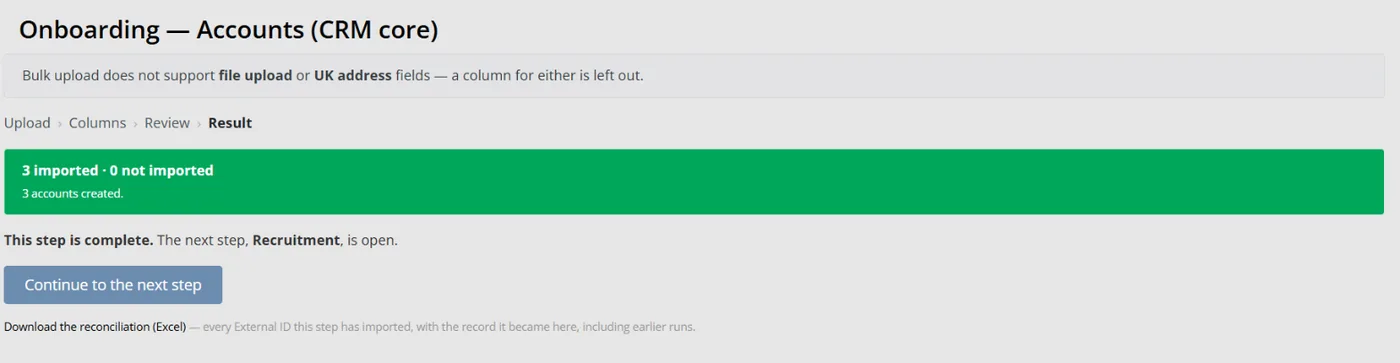
Colossus screen, demonstration data Step 4 of 7Reconcile against the source file
What you do: Download the rows not imported, correct them in the workbook and upload it again. Then download the reconciliation.
What to notice: The reconciliation lists every External ID imported with the record it became. Rows already imported are not imported twice.
-
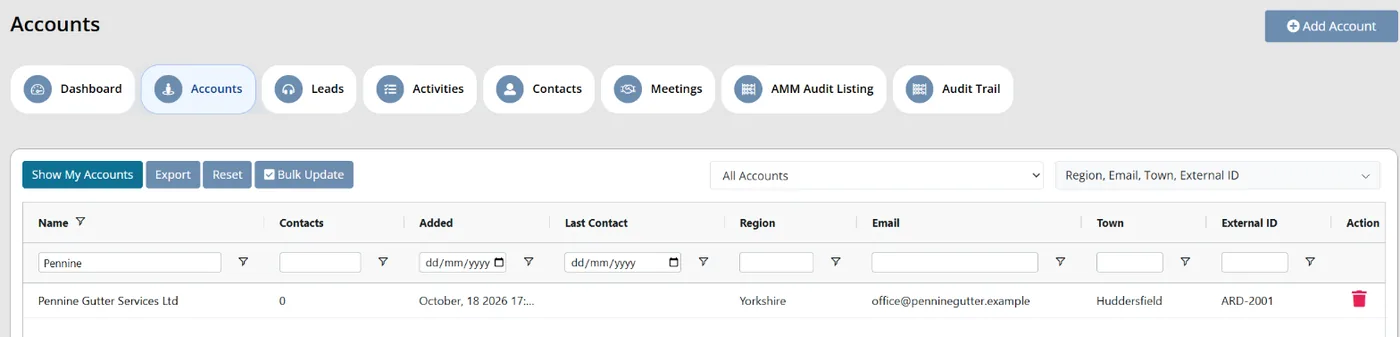
Colossus screen, demonstration data Step 5 of 7Work from one member list
What you do: Open Accounts and filter the company name column for a member that was in two of the old lists.
What to notice: It appears once, because the duplicates were merged in the spreadsheet before import. Exporting the grid needs the download permission.
-
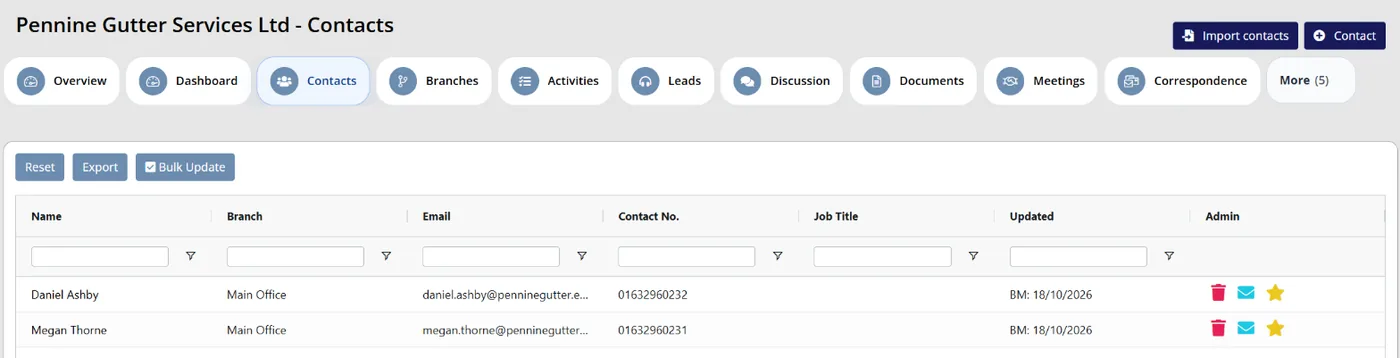
Colossus screen, demonstration data Step 6 of 7Open the member's record
What you do: Open the account and move across its contacts, branches, meetings and documents.
What to notice: Staff update the member here, so there is no separate list to keep in step.
-
ScreenCRM > Account overview > AuditStep 7 of 7
See what changed and when
What you do: Edit the account's address, then open the account's Audit tab.
What to notice: Each change is recorded with the previous and changed values, who made it and when, so a disputed address can be traced.
The result
Each member company is one account with its contacts and branches. The team holds a reconciliation of what was imported, and every later change shows its previous and changed values on the account's Audit tab.
What to measure
Take a baseline before you change anything, then check monthly. The aim is one set of member figures that every team uses, measured against where you started.
- Gap between member countsThe member total in your system of record against the totals finance and events report, checked each month.Lower is better; the aim is no gap
- Duplicate records foundRecords your data owner merges or removes as duplicates each month.Lower is better after the first clean-up
- Member lists held outside the system of recordSpreadsheets in regular use, plus the number of exports taken each month.Lower is better
- Time to produce a figure nobody disputesStaff hours from a board or mailing request to a list or number that every team accepts.Lower is better
- Changes made by members themselvesThe share of address and contact updates that members make online rather than by emailing staff.Higher is better
Frequently asked questions
How do we choose the system of record?
Should we clean the data before or after migrating?
Can we import our own spreadsheets into Colossus?
How do we stop staff keeping their own lists?
Which Colossus plans include this?
Sources
- MemberWise, Digital Excellence Report 2026. Around 480 UK membership organisations; findings as summarised by research partner Cantarus, March 2026.
- Zoe Amar and Nissa Ramsay, Charity Digital Skills Report 2025, July 2025. 672 UK charities, self-selecting online survey, 5 March to 28 April 2025.
- Zoe Amar Digital and Think Social Tech, Charity Digital Skills Report 2026: IT provision, connectivity and services, accessed 18 October 2026. 807 responses from UK not-for-profits, self-assessed.
- Validity, The State of CRM Data Management in 2024, May 2024. 631 CRM administrators across sectors in the US, UK and Australia, surveyed 28 March to 13 April 2024; not a survey of membership bodies.
See where your own systems stand
The Membership Systems Health Check is ten multiple-choice questions about your data, renewals, automation, reporting and member experience. You get your score out of 100 on screen straight away, with no email needed to see it.
Prefer to talk it through? Book a tailored demonstration and we will start from this problem, not a feature tour.