- Home
- Membership challenges
- Enquiries going cold
Membership enquiries go cold before anyone follows them up
A prospective member fills in our join form on a Friday, it lands in the shared inbox, and nobody replies until Wednesday. By then the person who asked has moved on, and we never find out why. This guide covers how to catch every enquiry, give it an owner and see it through to membership, with or without new software.
Does this sound familiar?
- Enquiries arrive by web form, the info@ inbox, phone calls and event sign-up sheets, and each route ends up somewhere different.
- When an enquiry comes in, everyone assumes someone else has already replied.
- The first reply depends on who has a quiet afternoon, so it can take a week.
- A promising prospect goes quiet after one email, and nobody notices because there was no next step.
- Nobody can say how many enquiries came in last year, or how many of them joined.
A typical case: a trade association takes a stand at its industry’s spring show and comes back with 60 business cards. The cards sit in the events manager’s drawer while that week’s website enquiries sit unread in the general inbox. Six weeks later the membership officer starts calling, and most contacts barely remember the conversation.
Recruitment has no process of its own
No route from enquiry to member
Most organisations have a renewal cycle but no recruitment process. An enquiry has no stages, no next step and no point at which it counts as won or lost.
Enquiries land in too many places
Web forms email a shared inbox, event contacts go into spreadsheets and phone calls end up in notebooks. Nothing brings them together, so nothing can be counted or chased.
The team owns it, so nobody does
Recruitment often sits between membership, marketing and events. When an enquiry belongs to a team rather than a person, each assumes another has picked it up.
A cold enquiry is a lost member nobody counted
- Subscription income is lost before anyone sees it. A prospect who hears nothing joins nobody, or joins someone else, and never appears in a report.
- Staff time goes on catching up. Working through a backlog of old enquiries is slow, and the replies arrive after interest has gone.
- The value case is never made. The first conversation is where a prospect learns what membership would do for them. Without it, they judge you on the website alone.
- Recruitment spend can’t be judged. With no source on each enquiry, nobody can say whether the show stand, the advert or the webinar produced members.
In the UK, MemberWise’s Digital Excellence 2026 research found that new member acquisition has been membership bodies’ top digital priority for two consecutive reports. Source
Marketing General’s 2024 benchmark covers mostly US associations. Two-thirds of executives (66%) indicated that prospects do not join because they do not see value in the membership. The most common reason for a weak value proposition was difficulty effectively articulating it (48%). Source
MemberWise’s Digital Excellence 2026 research also found that 77% of UK membership bodies report an increase in cost and workload. Source
Five steps that work with any system
Send every route to one list
Write down every way an enquiry reaches you: web forms, the general inbox, phone, events and member referrals. Log each one in a single list on the day it arrives, even if that list is a shared spreadsheet.
Name an owner the moment it arrives
Assign enquiries by a simple rule, such as region, membership type or a weekly rota. The owner’s name goes on the enquiry when it is logged, not when someone gets round to it.
Agree a reply standard and check it
Set a target for first contact, such as one working day, and look at it weekly. Use that first reply to ask what the prospect needs, so you can explain membership in their terms.
Define the stages from enquiry to member
Four to six stages are enough: new, contacted, conversation held, application sent, then joined or closed. Every open enquiry should have a next step and a date.
Record the source and review it quarterly
Ask how each prospect heard about you and record the answer every time. Each quarter, count the members each source produced, not just the enquiries.
Every enquiry in the CRM, with an owner and a next step
Colossus turns each website enquiry into a lead in the CRM, with its answers, its source and an owner. It then tracks the lead through your own stages until it becomes a member account.
| What it does | How it works | Plans |
|---|---|---|
| Enquiry forms on your website | Build the form on the CRM’s Lead forms screen, choosing its fields, owner, starting stage and source. Place it on a website page with its snippet; each submission arrives in the CRM as a lead with the prospect’s answers. | CoreGrowthScaleEnterprise |
| A named owner for every lead | The form sets the owner, and staff can reassign a lead or add collaborators. A form left unassigned passes its leads to your default assignee. | CoreGrowthScaleEnterprise |
| “Lead assigned” notification | A colleague gets an in-app notification in the CRM’s bell when a lead is assigned to them, or they are added as a collaborator. | CoreGrowthScaleEnterprise |
| Your own pipeline, from enquiry to member | Leads move through stages you define, and the Leads summary shows how many sit at each one. When the prospect joins, Convert lead to member account turns the lead into a member account. | Core (basic)GrowthScaleEnterprise |
| Next steps with due dates | Log calls and meetings on the lead and add the next activity with a due date. Activities past their date appear in the owner’s daily “Overdue activities” notification. | Core (basic)GrowthScaleEnterprise Overdue notification configured during implementation |
| A source on every lead | Each lead records where it came from, such as the form or campaign. Standard reports break leads down by source, so you can see which channels produce members, not just enquiries. | CoreGrowthScaleEnterprise |
Pipeline stages and lead sources are lists your organisation defines, so they match the way you actually recruit.
How a trade body stopped losing its show enquiries
Illustrative example. The Wessex Association of Event Caterers is a fictional trade body with 420 member companies and a membership team of two. This is a composite scenario, not a customer story.
Enquiries came from a join form that emailed the general inbox, from calls to reception and from two trade shows a year. None of them had an owner. The team could not say how many enquiries arrived each year, let alone how many joined.
The team built an enquiry form for the join page with the source Website, plus a stand copy with the source Trade show. Both give their leads to the membership officer, who reassigns larger companies to the membership manager. Each lead moves through five stages, from New enquiry to Joined, with a dated next activity.
After the autumn show, every stand enquiry had an owner and a call booked by the following Monday. At the year-end review, the source on each lead showed which show and which web page had produced members.
Turn a website enquiry into a member, with an owner at every step
The Wessex Association of Event Caterers, a fictional trade body, wants every enquiry from its join page to reach a named person with a dated next step, instead of waiting in the general inbox.
- Organisation
- Wessex Association of Event Caterers (fictional), 420 members
- Goal
- Capture every enquiry as a lead with an owner and a source, and follow it through to a member account
- Takes
- About 85 seconds, 7 steps
- Plan
- All plans: Core, Growth, Scale and Enterprise
A walkthrough of real Colossus screens with a fictional organisation and demonstration data. Your own set-up, fields and wording will differ.
-
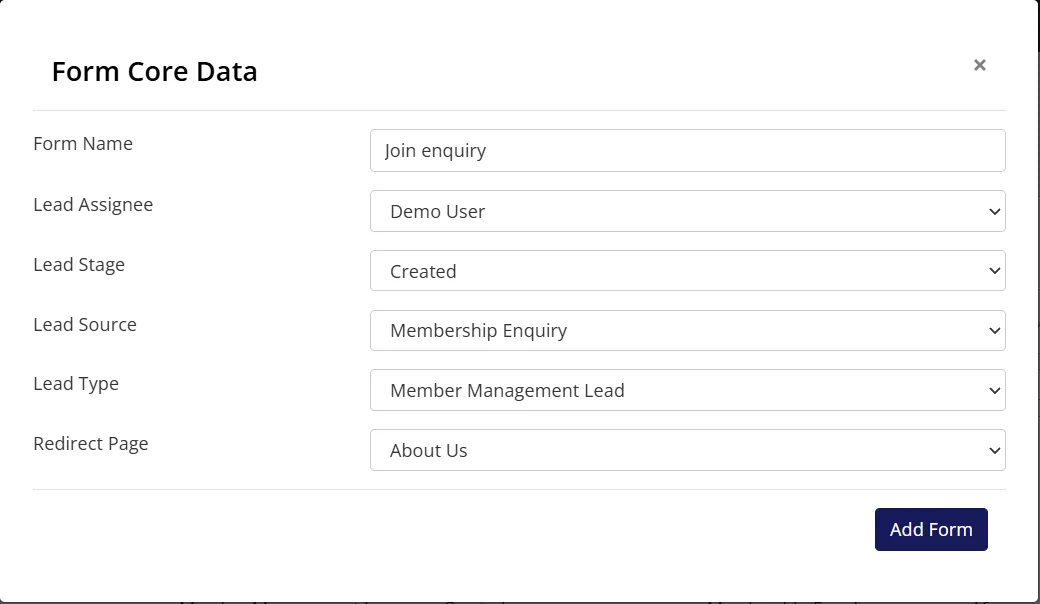
Colossus screen, demonstration data Step 1 of 7Build the enquiry form
What you do: Click Add Form and name it 'Join enquiry'. Set the Lead Assignee to the membership officer and choose the stage, source and lead type, then tick the fields to show on the form's own page.
What to notice: Owner, starting stage and source are set on the form, so every submission arrives already sorted.
-
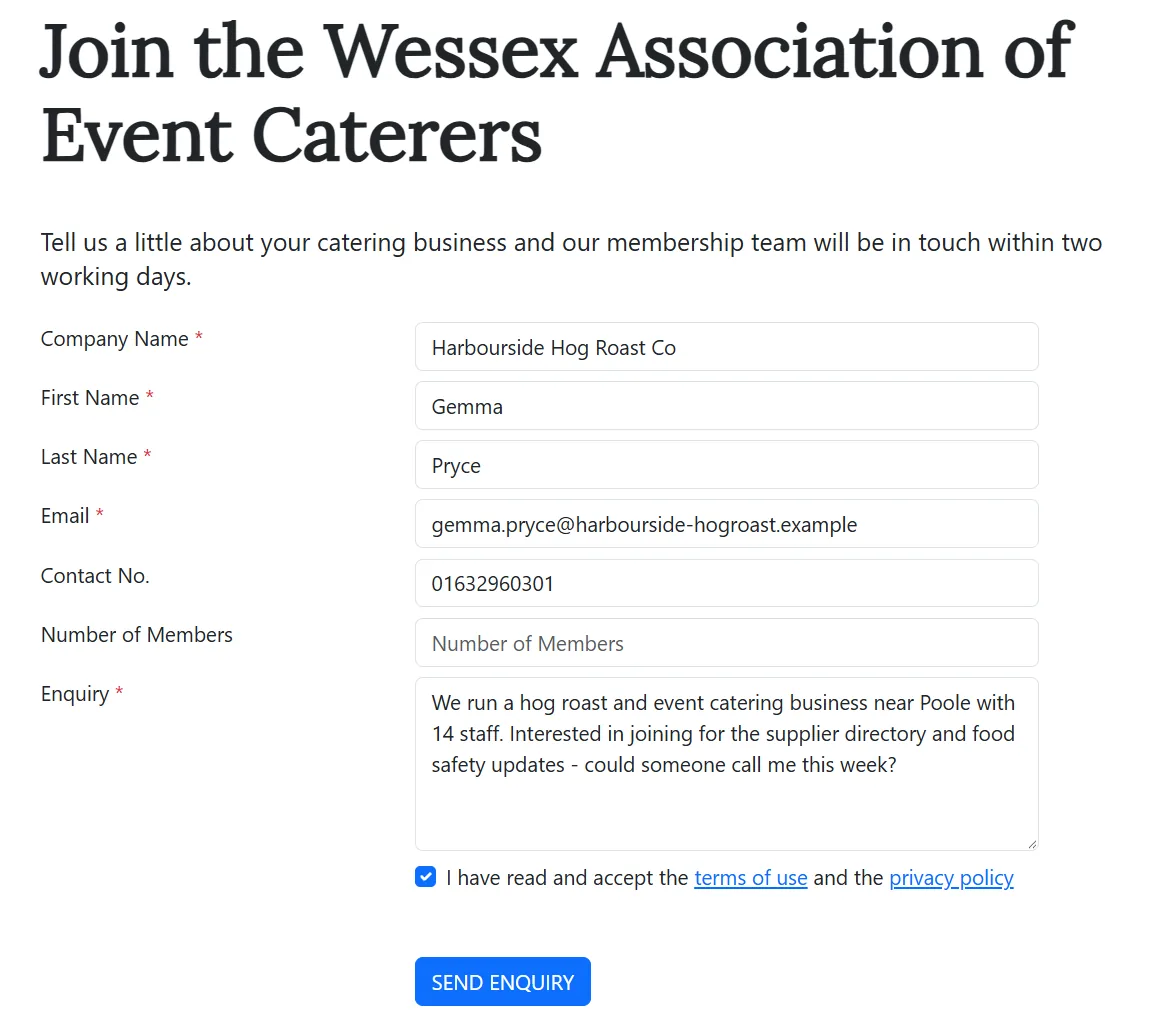
Colossus screen, demonstration data Step 2 of 7Put the form on the join page
What you do: Copy the form's snippet into the join page, then submit a test enquiry as a prospect would.
What to notice: The prospect fills in the form on your own page and is then taken to the page you chose. The submission also creates the company account and its contact, owned by the form's assignee.
-
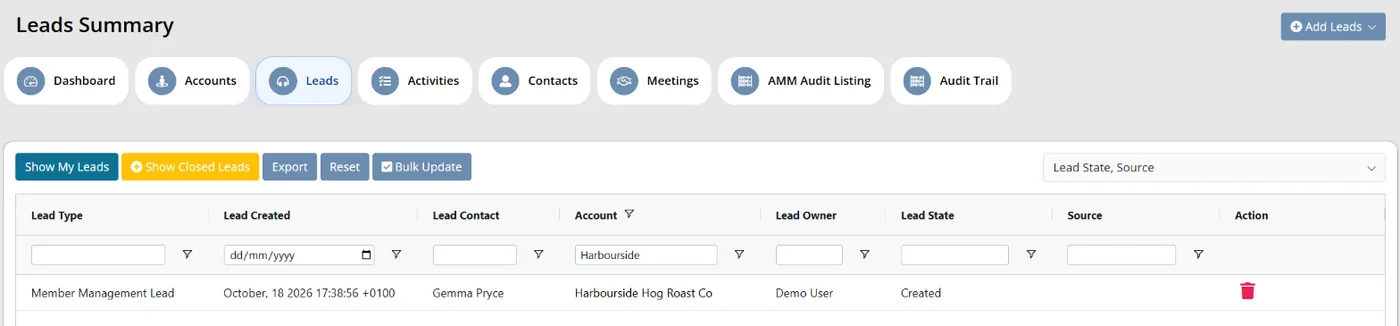
Colossus screen, demonstration data Step 3 of 7See the enquiry in the pipeline
What you do: Open the Leads summary and find the new lead at the first stage.
What to notice: Each lead shows its stage and owner and the grid filters on both, so a backlog waiting at the first stage is easy to spot.
-
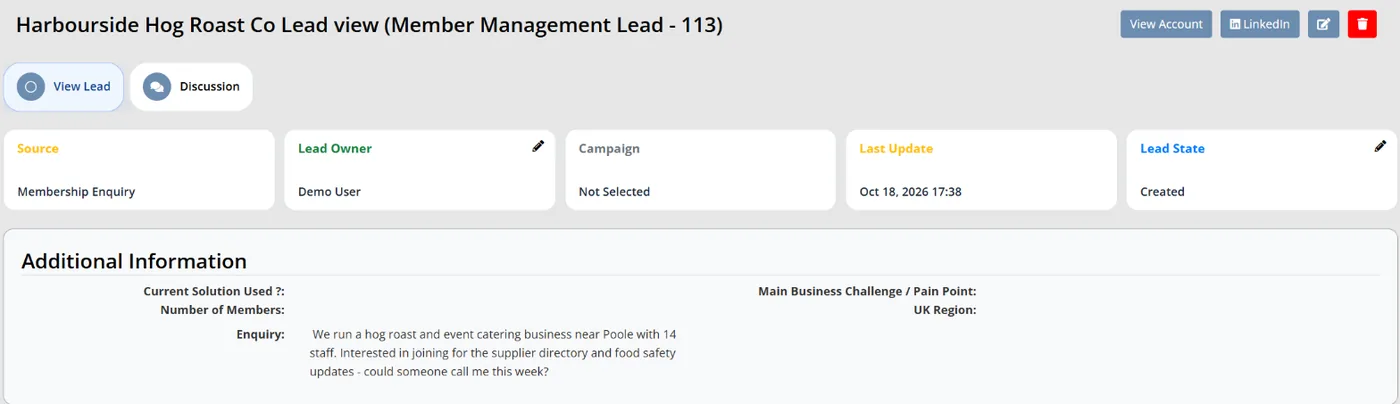
Colossus screen, demonstration data Step 4 of 7Read what the prospect asked
What you do: Open the new lead.
What to notice: The prospect's answers, the source and the owner are on the record, with nothing copied out of an inbox.
-
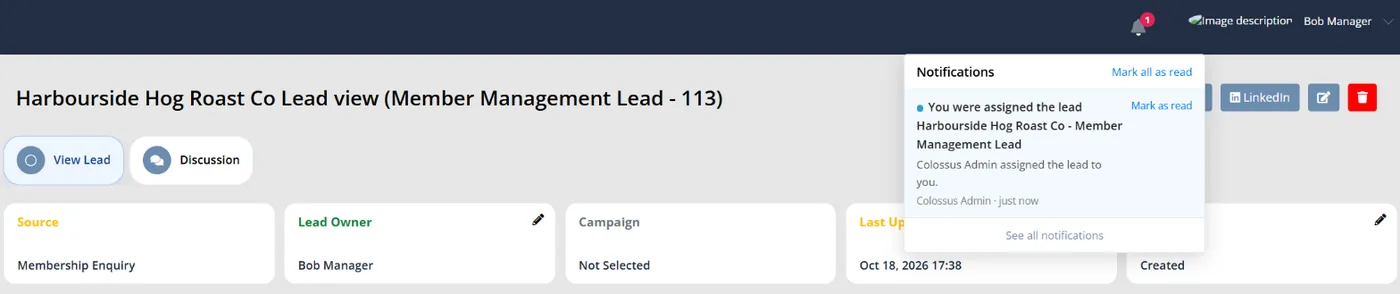
Colossus screen, demonstration data Step 5 of 7Hand it to the right colleague
What you do: Click the pencil on Lead Owner and choose the membership manager, who looks after larger companies.
What to notice: The new owner gets an in-app 'You were assigned the lead' notification in the bell. Assigning a lead to yourself sends nothing.
-
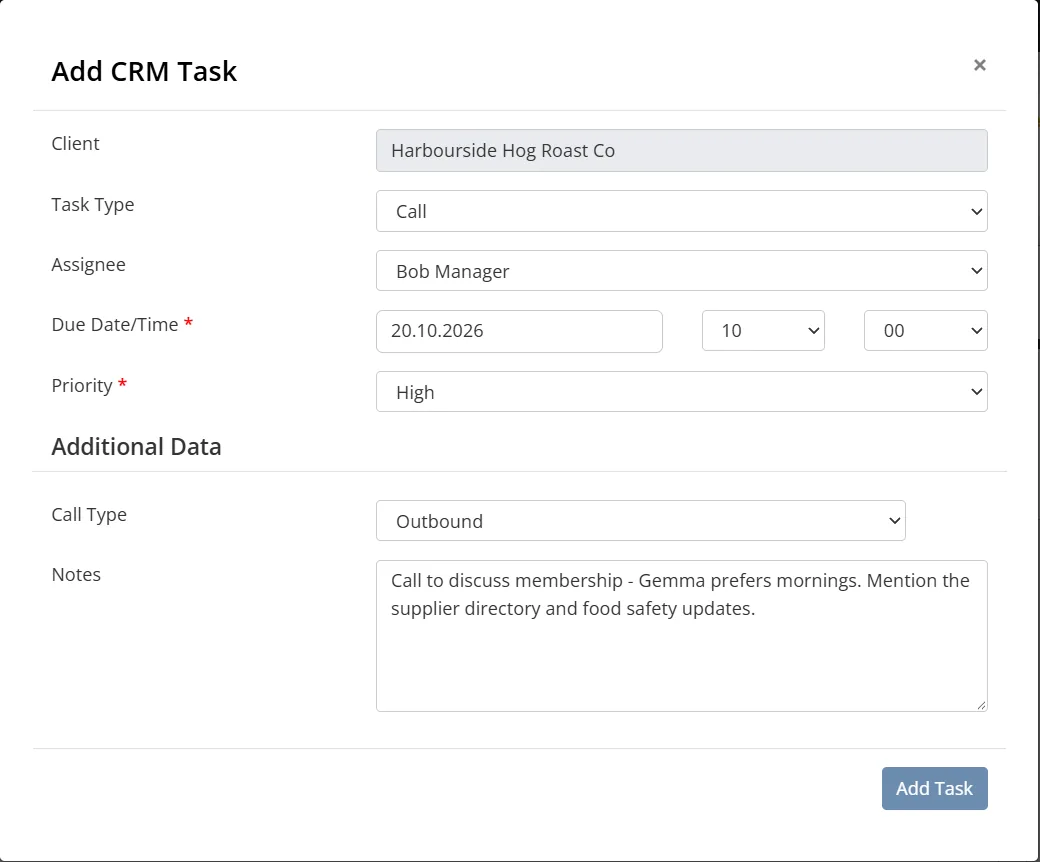
Colossus screen, demonstration data Step 6 of 7Set the next step with a date
What you do: Add a call task, 'Call to discuss membership', due in two working days.
What to notice: If the date passes, it appears in the owner's 'Overdue activities' notification.
-
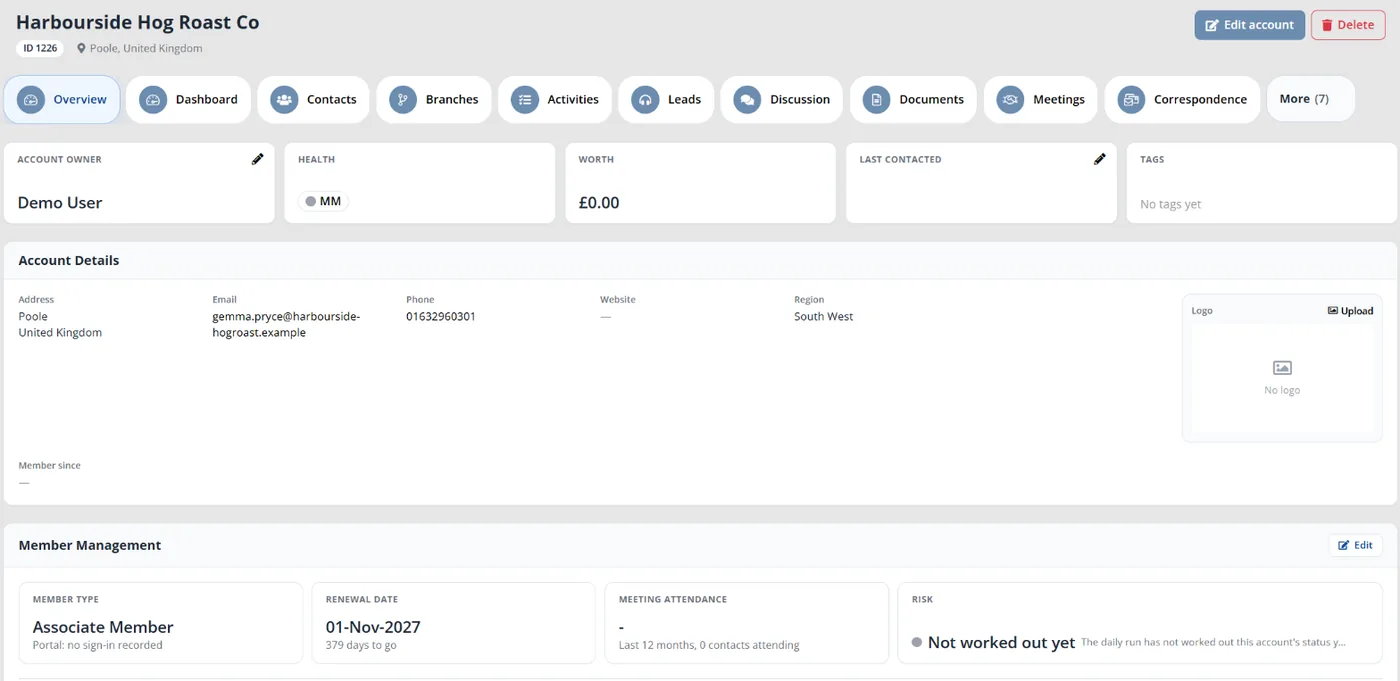
Colossus screen, demonstration data Step 7 of 7Record the join when the company signs up
What you do: Set the lead's state to Won. Then, on the company's account that the enquiry form created, switch on the Member Management product and enter the member type and renewal date.
What to notice: There is no separate convert step: the account exists from the first enquiry, and the lead keeps its source for reporting on which channels produce members.
The result
Every enquiry is in the CRM with the prospect's answers, its source, an owner and a dated next step. The team follows each lead by stage, and when the company joins it marks the lead Won and switches on membership for the account the enquiry created.
What to measure
Start counting on the day the new process begins, and compare each quarter with the last. The aim is fewer enquiries lost in silence and a clear view of which recruitment effort produces members.
- Time to first contactWorking hours between an enquiry arriving and its owner first speaking to or emailing the prospect.Lower is better
- Open enquiries with no next stepLeads with no owner, or no activity due, counted each week.Lower is better
- Enquiry-to-member rate by sourceLeads converted to member accounts, divided by leads received, for each source.Higher is better; compare sources, not just totals
- Enquiries closed without contactLeads closed as lost with no call, email or meeting recorded against them.Lower is better
- Days from enquiry to joiningThe median time from a lead being created to its conversion to a member account.Shorter is usually better
Frequently asked questions
Who should own new enquiries?
What about enquiries that arrive by email or phone?
What if a prospect isn’t ready to join yet?
Can we see which channels actually produce members?
Which Colossus plans include lead forms and the lead pipeline?
Sources
- MemberWise, Digital Excellence Report 2026, published 2026 from data collected March to September 2025. Around 480 UK membership organisations; findings as summarised by research partner Cantarus, 24 March 2026.
- Marketing General Inc., 2024 Membership Marketing Benchmarking Report, 16th edition, 2024. 696 associations, mostly in the US.
See where your own systems stand
The Membership Systems Health Check is ten multiple-choice questions about your data, renewals, automation, reporting and member experience. You get your score out of 100 on screen straight away, with no email needed to see it.
Prefer to talk it through? Book a tailored demonstration and we will start from this problem, not a feature tour.