- Home
- Membership challenges
- Event admin
Running events eats the team's week
Every event brings a week of admin either side of it. Bookings come through one tool, payments through another, and the sign-in sheet gets typed up whenever someone has a spare afternoon. Then the renewals team asks which members actually come, and nobody can say.
Does this sound familiar?
- Bookings arrive through a ticketing site, an inbox and the odd phone call, and someone merges them into a spreadsheet.
- Checking who has paid means matching the booking list against a separate payments report, line by line.
- Every event is set up from scratch: new ticket types, new prices and a new decision about who may book.
- Attendance is a paper sign-in sheet that is typed up days later, if it is typed up at all.
- When someone asks which members came to three or more events this year, the answer takes an afternoon of spreadsheet work.
A typical case: a trade body runs a two-day annual conference, a regional breakfast series and monthly webinars. After each event, the events officer spends a day matching the ticketing export to the card payments report. The conference sign-in sheets wait for a quiet week, so the renewals team cannot tell whether a large member company sent anyone.
Every event starts from nothing
Each event is rebuilt by hand
Ticket types, prices, capacity and booking rules are re-created for every event. Small differences creep in, and each one has to be checked before tickets go on sale.
Booking, payment and attendance live apart
The ticketing tool knows who booked, the payment provider knows who paid and the sign-in sheet knows who came. None of them updates the member record.
Nobody owns the data after the day
Events teams are judged on bookings and on how the day went. Nobody is asked to pass attendance to the membership team, so it stays in the events folder.
The cost lands on staff and on members
- Staff time goes on reconciliation. Matching bookings, payments and sign-in sheets fills the days around each event, so planning the next one slips.
- Members get a slow, generic follow-up. A thank-you that arrives a fortnight later, written for everyone, misses the moment when the event was fresh.
- Renewal conversations start blind. A member who came to six events and one who came to none look the same at renewal time.
- The board sees bookings, not value. Reports show tickets sold and income per event, but not which members keep coming back.
In the UK, MemberWise’s Digital Excellence 2026 research found that 77% of membership bodies report an increase in cost and workload. Source
Momentive’s 10th Associations Trends Report (October 2025) surveyed US association members and staff. It found that 72% of members continue to favour in-person events. Source
In Marketing General’s 2024 benchmark of mostly US associations, 62% reported higher in-person conference attendance. Associations where engagement rose in areas such as conferences and webinars were more likely to report membership growth and a rising renewal rate. That is a correlation, not proof that events cause renewals. Source
Five habits that take the admin out of events
Give every event one booking route
Members, guests and speakers all book through one page that takes payment. A booking that arrives by email or phone goes in through that same route, the same day.
Set up ticket types once and reuse them
Agree a standard set, such as a members-only ticket, a standard ticket and a speaker place. Decide capacity, the limit per booking and when sales close, then reuse the set for each event.
Record attendance on the day
Mark who came at the door or straight after the session, working from the booking list rather than a blank sheet. Record online attendees and no-shows too; both tell you something.
Follow up within three working days
Send attendees a thank-you, the slides and a request for feedback while the event is fresh. Send no-shows a shorter note about what they missed and what is coming next.
Put attendance where renewals are decided
Make attendance visible to the people who speak to members about renewing. Once a year, review which events members come back to, and which members never come to anything.
One place from booking to follow-up
In Colossus the event, its tickets, the card payment and the attendance list sit together in the CRM, next to your member accounts.
| What it does | How it works | Plans |
|---|---|---|
| Event set-up | In-person and online events, using location types your organisation defines. Single or multi-day dates, a date when ticket sales close, draft, open and closed states, and a page layout editor. A new event can start as a copy of a past one. | Core (basic)GrowthScaleEnterprise |
| Ticket tiers and capacity | Several ticket tiers per event, each with its own allocation and an optional maximum per purchase. A tier can be members only, limited to the membership types you choose. Full tiers show as sold out, and refunded seats go back on sale. | Core (basic)GrowthScaleEnterprise |
| Promotional codes | Fixed-amount or percentage codes with start and end dates, for one product or for all, and limited to chosen access groups. | GrowthScaleEnterprise |
| Card payment at checkout | Tickets are paid for by card in the Colossus basket, through Stripe, Paysafe, Lloyds Cardnet or Klarna depending on your set-up. Members see the tickets they have bought in the member portal. | CoreGrowthScaleEnterprise |
| Attendance and follow-up | Staff mark each attendee as attended in person, attended online or did not attend. They then send the event’s feedback email template to the attendees they choose. | Core (basic)GrowthScaleEnterprise |
| Attendance on the member record | Event attendance counts towards the “last contacted” date on the member’s account and in the accounts list. It sits alongside signals such as portal sign-ins and email activity. | Core (basic)GrowthScaleEnterprise |
Attendance is marked by your staff, and which card providers appear at checkout depends on the payment accounts connected for your organisation.
How a professional body stopped retyping sign-in sheets
Illustrative example. The Northern Society of Acoustic Consultants is a fictional professional body with 1,450 members and a two-person events team. This is a composite scenario, not a customer story.
The society runs a technical evening most months, a webinar each quarter and a two-day conference in Leeds. Bookings came through a ticketing website, payments through a separate card account, and attendance on paper. Matching the three took most of the week after every event.
Now the team copies last month’s evening in Colossus and changes the date. Each evening has a members-only Member ticket for full and associate members, a Standard ticket for guests and a fixed allocation. When a tier fills, the event page shows it as sold out, and any refunded seat goes back on sale.
On the night, a colleague marks each booking as attended in person or online. Two days later the feedback email goes to everyone marked as attended. Attendance now counts towards each member’s last contacted date, which the renewals team checks before every call.
Run a members' event from one booking page to the follow-up email
The Northern Society of Acoustic Consultants, a fictional professional body, wants its monthly technical evening run end to end in one place.
- Organisation
- Northern Society of Acoustic Consultants (fictional), 1,450 members
- Goal
- Copy last month's event, take card payment at booking, ask every guest for feedback the day after and record who came
- Takes
- About 85 seconds, 7 steps
- Plan
- Core (basic), Growth, Scale and Enterprise plans; promotional codes on Growth, Scale and Enterprise
A walkthrough of real Colossus screens with a fictional organisation and demonstration data. Your own set-up, fields and wording will differ.
-
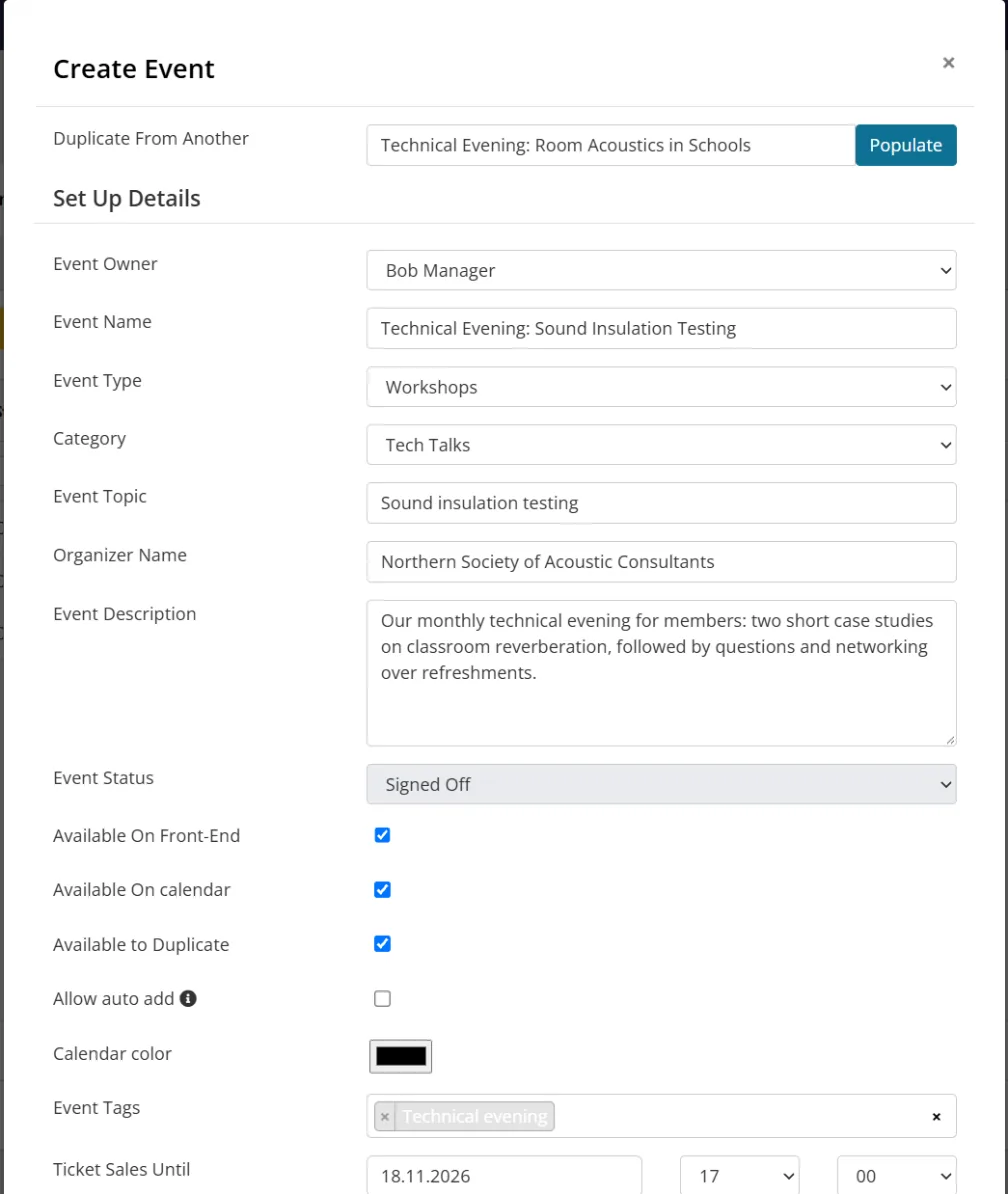
Colossus screen, demonstration data Step 1 of 7Start from last month's evening
What you do: Click Add Event, choose last month's technical evening in Duplicate From Another and click Populate. Change the name and date, and set Ticket Sales Until to the day before.
What to notice: The description, location type, venue and feedback email template carry over, so nothing is typed twice. Location types are your organisation's own list.
-
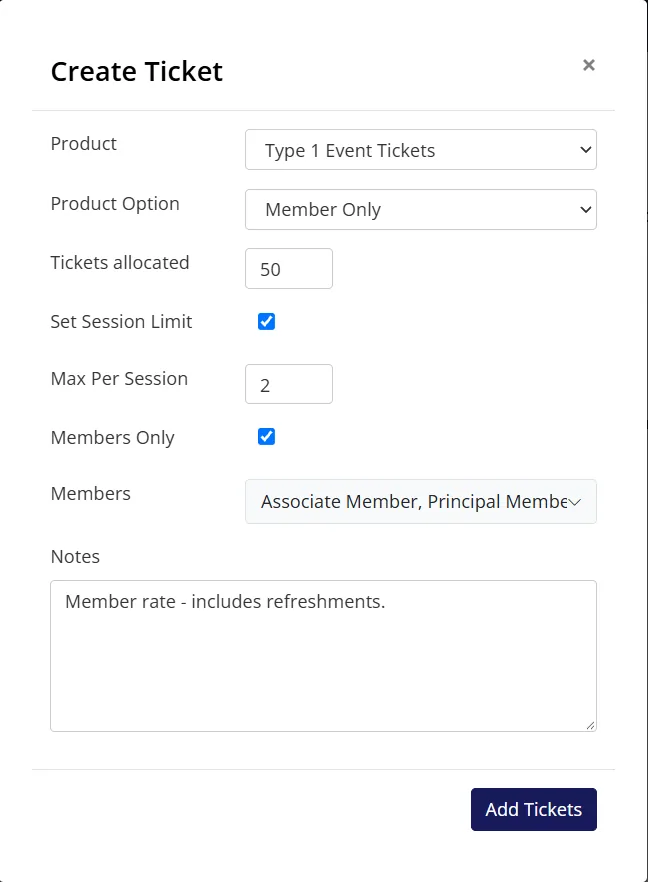
Colossus screen, demonstration data Step 2 of 7Add the ticket types
What you do: Click Add Ticket, pick the ticket product and its Member Only option, set Tickets allocated to 50, tick Members Only and choose the membership types, then tick Set Session Limit with a maximum of 2. Add the General Access option with 10 places.
What to notice: Tickets are chosen from your existing products, so the same ticket types can be used again for every event, each with its own allocation.
-
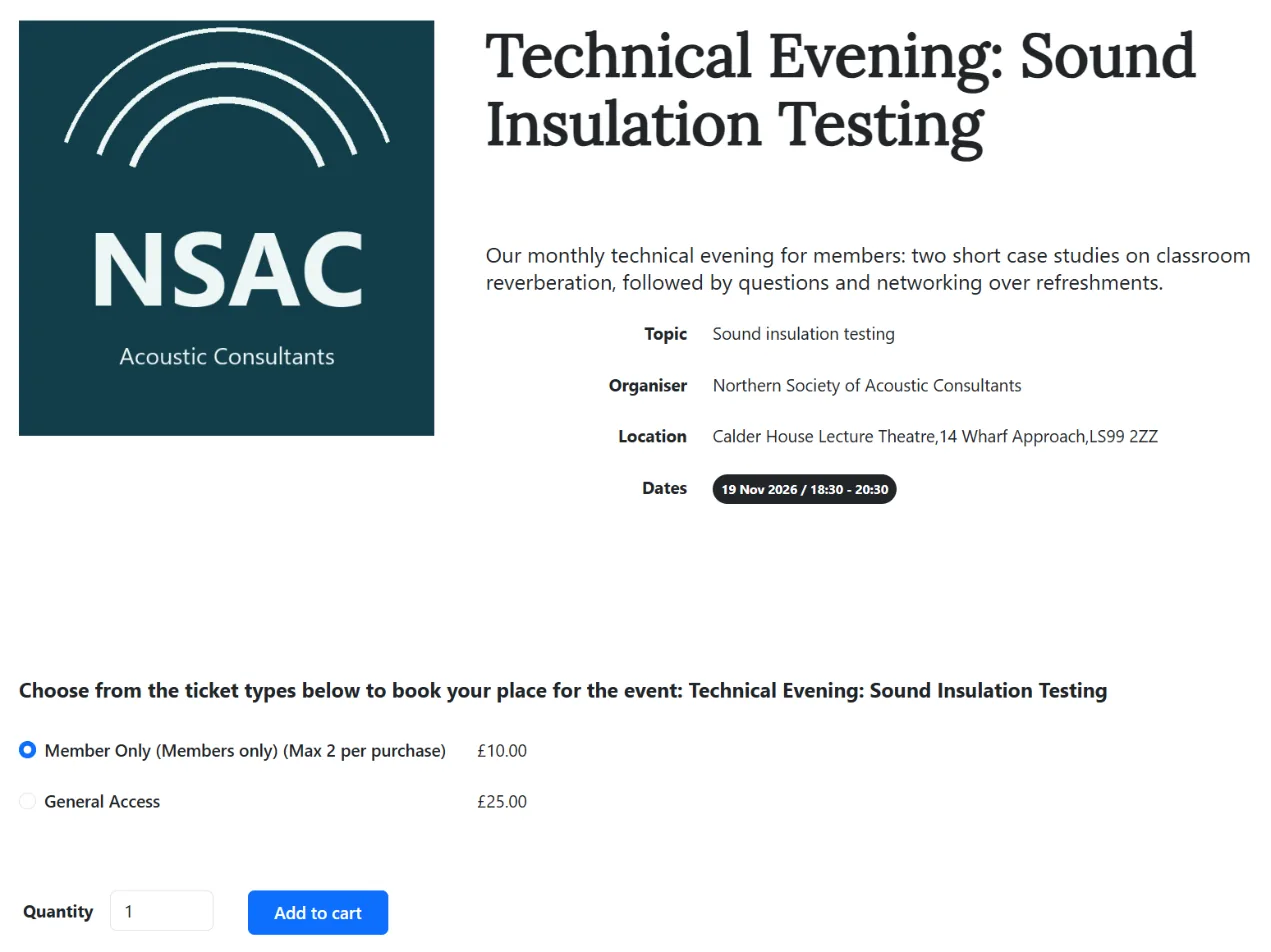
Colossus screen, demonstration data Step 3 of 7Check what members see
What you do: Open the event page on your website as a visitor would.
What to notice: The member tier is labelled (Members only) with its purchase limit, and a tier with no places left shows (Sold Out).
-
ScreenBasket and checkoutStep 4 of 7
Book and pay in one go
What you do: Add a Member ticket to the basket, enter a promotional code if there is one, and pay by card.
What to notice: The booking and the card payment happen in the same checkout, and each ticket bought becomes a booking on the event's attendance list. Promotional codes are on Growth, Scale and Enterprise.
-
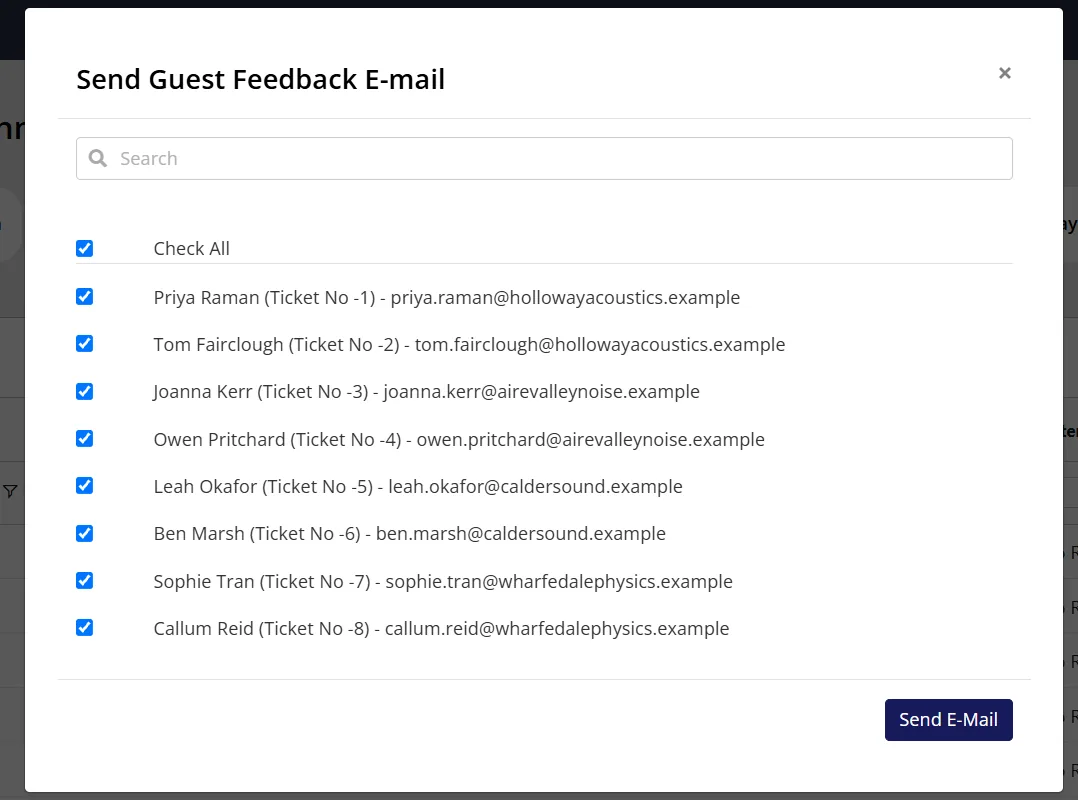
Colossus screen, demonstration data Step 5 of 7Ask every guest how it went
What you do: The day after the evening, click Guest Feedback, tick Check All and click Send E-Mail.
What to notice: Each guest gets the event's feedback template with a link to say whether they came, give a star rating and leave a comment, which fill in the Attendance, Rating and Comments columns. Only bookings with no attendance recorded are listed, so send it before marking anyone.
-
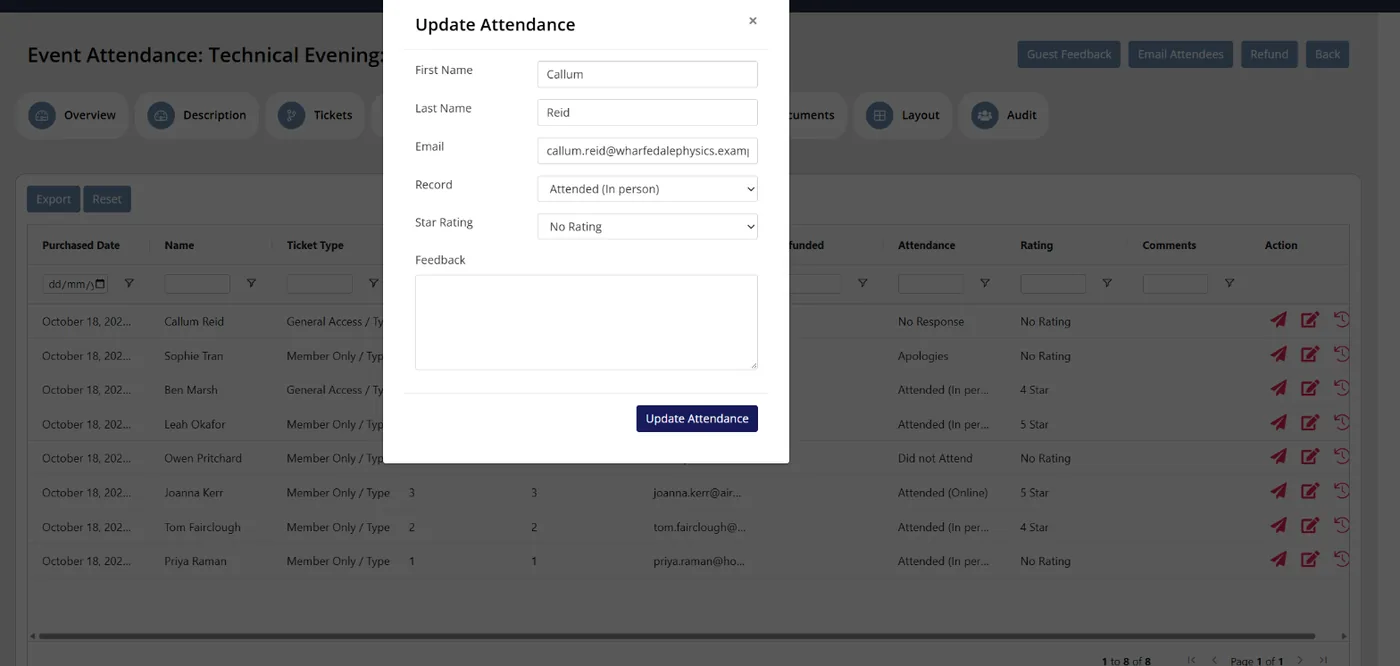
Colossus screen, demonstration data Step 6 of 7Record who came
What you do: For guests who have not answered, click the edit icon and set Attended (In person), Attended (Online), Apologies or Did Not Attend.
What to notice: Attendance, ratings and comments sit with each booking, and the list exports to Excel.
-
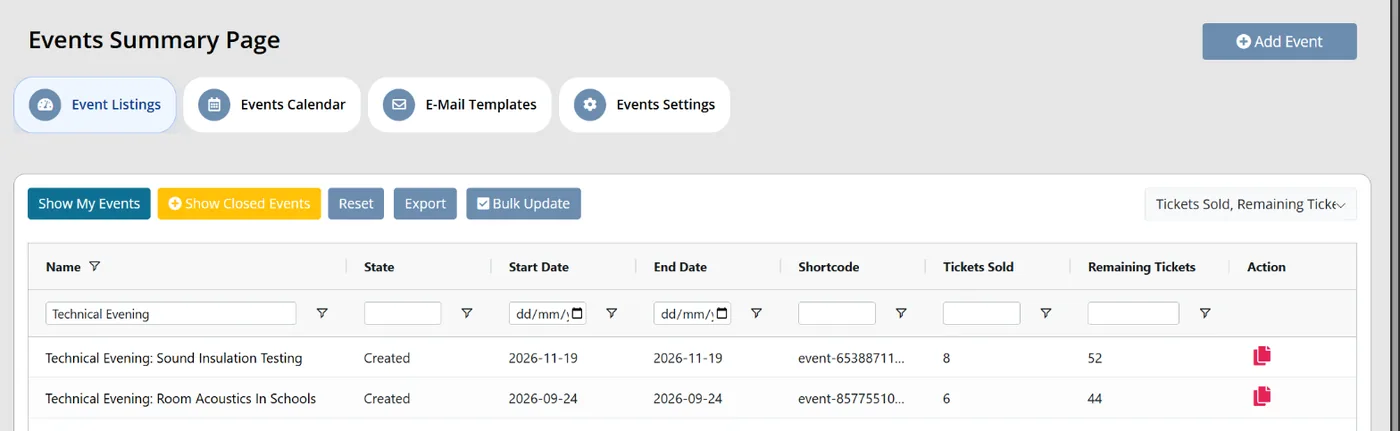
Colossus screen, demonstration data Step 7 of 7Review the season
What you do: Back on Events summary, show the Tickets Sold and Remaining Tickets columns.
What to notice: Every event's take-up sits side by side, which shows which events members book and which struggle to fill.
The result
The evening has one booking page with a members-only tier and a fixed allocation. Payment is taken at checkout, every guest is asked for feedback the day after, and attendance is complete for the members' records.
What to measure
Measure a full season of events against your own baseline before drawing conclusions. The aim is less admin per event, and attendance data the renewals team can actually use.
- Staff hours per eventTime spent on bookings, payment matching, attendance and follow-up for one event, logged before and after.Lower is better
- Bookings taken outside the booking pageBookings that arrived by email, phone or invoice request, as a share of all bookings.Lower is better
- Days from event to follow-upWorking days between the event and the feedback email reaching attendees.Lower is better
- Events with attendance recorded within two daysThe share of events where attendance was marked by the end of the second working day.Higher is better
- Members who attended at least one eventCount them from attendance records each year, then compare their renewals with members who came to nothing.The gap shows what events mean for retention
Frequently asked questions
Should members and non-members book on the same page?
What happens when someone cancels?
How soon should we follow up after an event?
Can we run online events alongside in-person ones?
Which Colossus plans include event management and ticketing?
Sources
- MemberWise, Digital Excellence Report 2026. Around 480 UK membership organisations; findings as summarised by research partner Cantarus.
- Momentive Software, Bridging the Gap: Aligning Association Professionals and Members for Success, 10th Annual Associations Trends Research Report, announced 16 October 2025. Research by Edge Research in July and August 2025 with thousands of association members and hundreds of association professionals, US only.
- Marketing General Inc., 2024 Membership Marketing Benchmarking Report, 16th edition. 696 associations, mostly in the US.
See where your own systems stand
The Membership Systems Health Check is ten multiple-choice questions about your data, renewals, automation, reporting and member experience. You get your score out of 100 on screen straight away, with no email needed to see it.
Prefer to talk it through? Book a tailored demonstration and we will start from this problem, not a feature tour.