- Home
- Membership challenges
- Members drifting before renewal
Members drift away and we only find out at renewal
Most members who lapse made up their minds months earlier. They stopped opening emails, stopped booking events and stopped signing in, and nobody noticed until the invoice went unpaid. This guide covers how to spot that drift early and what to do about it, with or without new software.
Does this sound familiar?
- Lapsed members are a surprise. You find out who has gone when the renewal deadline passes, not before.
- When you ask why, the answer is usually “we didn’t use it enough”, but nobody saw that coming.
- Engagement lives in different places: event bookings in one tool, email opens in another, portal sign-ins somewhere else.
- The first serious conversation with a member about renewing happens when their invoice is overdue.
- Retention is reported once a year as a percentage, after the decisions have been made.
A typical case: a mid-sized professional body sends renewal invoices in October. In January the finance team flags 140 unpaid. The membership team rings round and learns that many of those members had not attended anything, opened a newsletter or signed in to the portal for most of the year. The warning signs were there, just in four different systems.
Renewal is the only checkpoint
The process waits for the invoice
In most organisations the renewal cycle is the only routine moment anyone looks at an individual member’s relationship. Everything before it is unmonitored.
The signals are scattered
Event attendance, email engagement, portal use and contact history sit in separate tools, so no one can see a member going quiet in one place.
Nobody owns engagement
Events, communications and membership are often different teams. Each sees part of the picture, and retention ends up treated as a finance task.
Late discovery is expensive
- Income at risk is found too late to save. By the time an invoice is overdue, the member has usually decided.
- Staff time goes on chasing, not helping. Phone rounds after the deadline are slow and rarely change minds.
- Each lapse has to be replaced by recruitment, which is harder and slower than keeping a member you already have.
- The board hears about losses after the fact, with no leading indicator of what next year looks like.
In Marketing General’s 2025 benchmark of mostly US associations, 52% of leaders named lack of engagement as a top reason members do not renew. It was the most common answer. Source
In the UK, MemberWise’s Digital Excellence 2026 research found that being unable to measure engagement is now membership bodies’ top challenge, and that only 61% measure engagement at all. Source
ASAE’s November 2025 poll of association leaders, mostly in the US, found membership retention and engagement was the challenge named most often, by 31.9%. Source
Five steps that work with any system
Agree what “engaged” means
Pick three to five signals you already hold, such as event attendance, portal sign-ins, email clicks and contact with staff. Don’t wait for perfect data.
Put the signals next to the renewal date
A falling signal matters most when renewal is close. Look at both together, member by member, at least monthly.
Use simple thresholds, not a perfect score
“Renews within 90 days and no sign-in for 90 days” is enough to start. You can refine it once you see who it catches.
Give every flagged member an owner
A list nobody owns gets ignored. Name the person responsible and the next step: a call, an invitation, help with something they signed up for.
Check your rules against what happened
After each renewal cycle, compare who you flagged with who actually lapsed. Tighten the rules that cried wolf and add the signals you missed.
Rules that flag drifting members, every day
Colossus keeps each member’s activity on one record and runs your own risk rules against it overnight, so the list of members to speak to is ready each morning.
| What it does | How it works | Plans |
|---|---|---|
| Risk rules you define | Ordered red and amber rules built from member signals and renewal timing. The first rule that matches sets the colour; anything unmatched is green. Recalculated daily, or on demand. | ScaleEnterprise Configured during implementation |
| Signals on the member record | Last contacted, portal sign-ins, email opens and clicks, meeting attendance and an attendance score, alongside the renewal date and days to go. | Core (basic)GrowthScaleEnterprise |
| At-risk views | Risk columns and filters in the accounts list, a risk block on each account, and an At risk accounts dashboard widget. | ScaleEnterprise |
| “Aware” acknowledgement | A colleague marks a flagged account as being handled, with a note and a review date. A colour change or a passed review date clears it. | ScaleEnterprise |
| Owner notifications | Account owners get an in-app notification when a member they look after changes colour, one notification per owner per daily run. | ScaleEnterprise |
Risk colours come from rules your team writes. They are not a prediction, and they work best alongside staff knowledge of each member.
How a professional body found its quiet members in time
Illustrative example. Northfield Institute is a fictional professional body with 3,200 members and a four-person membership team. This is a composite scenario, not a customer story.
Northfield’s renewals run from October to January. Every year a few hundred members lapsed, and the team only learned who when the invoices went unpaid.
The team agreed two simple rules. Amber: renewal within 90 days and no portal sign-in for 90 days. Red: renewal within 30 days and an attendance score below 20. In July, the first daily run flagged a few dozen members. Each was assigned to the account owner who knew them best.
The owners called the red members first and invited the amber ones to the autumn webinar series. Each conversation was recorded as “Aware” with a note and a review date, so nobody was rung twice. The team used the same list to brief the board on renewal risk in September, before a single invoice had gone out.
Find the members who are drifting, three months before renewal
Northfield Institute, a fictional professional body, wants a list of members to speak to each morning instead of a list of lapses each January.
- Organisation
- Northfield Institute (fictional), 3,200 members
- Goal
- Flag drifting members 90 days before renewal and give each one an owner
- Takes
- About 80 seconds, 6 steps
- Plan
- Scale and Enterprise plans
A walkthrough of real Colossus screens with a fictional organisation and demonstration data. Your own set-up, fields and wording will differ.
-
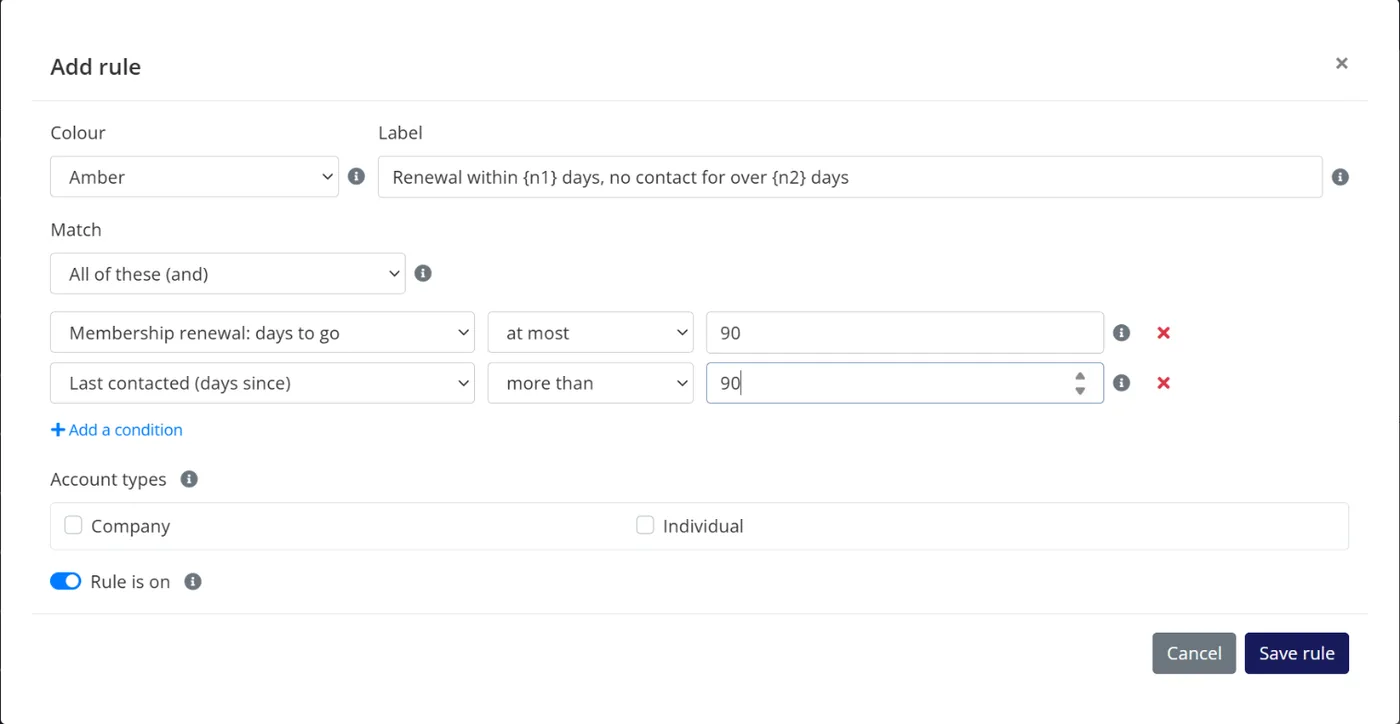
Colossus screen, demonstration data Step 1 of 6Write the rule that defines drifting
What you do: Choose the Member Management product and click Add rule: amber when membership renewal is at most 90 days away and the member was last contacted more than 90 days ago.
What to notice: Rules use signals Colossus already holds on the member record, such as the renewal date and last contact, so there is nothing to import first.
-
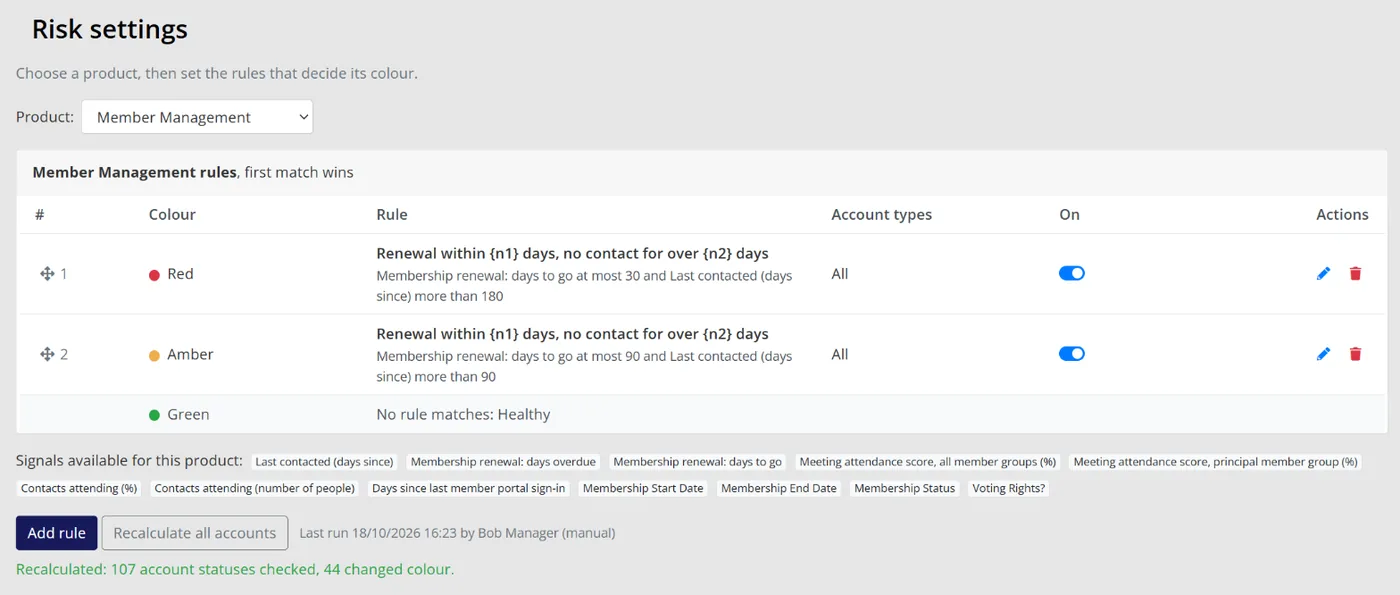
Colossus screen, demonstration data Step 2 of 6Add a red rule for the urgent cases
What you do: Add a second rule and drag it above the first: red when renewal is at most 30 days away and the member was last contacted more than 180 days ago.
What to notice: Rules run in order and the first match sets the colour, so the most urgent rule goes first. Recalculate all accounts applies them straight away.
-
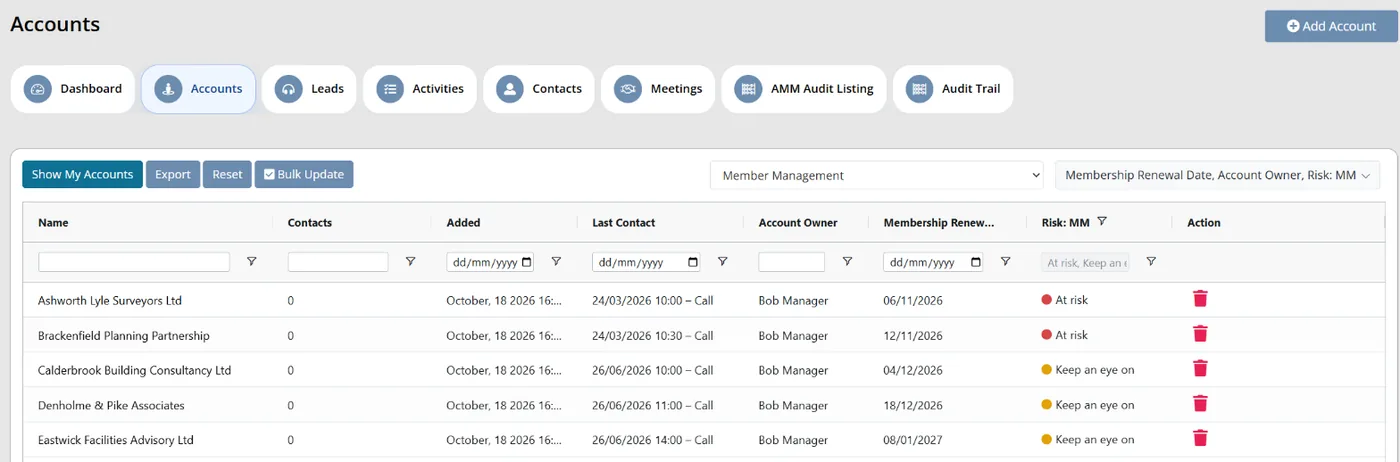
Colossus screen, demonstration data Step 3 of 6See who is drifting
What you do: Open Accounts, switch the view to Member Management, add the Risk: MM column and filter it to At risk and Keep an eye on.
What to notice: The colours are recalculated every night, so this list is current each morning.
-
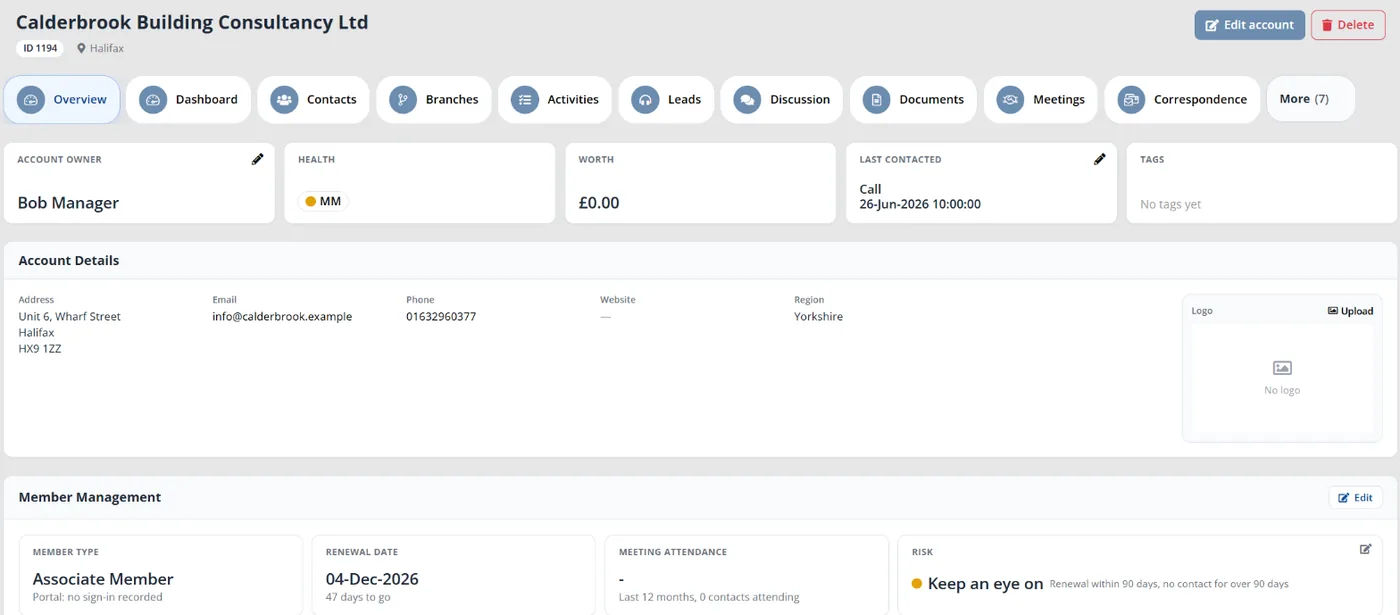
Colossus screen, demonstration data Step 4 of 6Open a member's record
What you do: Open one of the amber accounts.
What to notice: The Risk card names the rule that matched, beside the member type and renewal date, and Last contacted sits at the top of the overview.
-
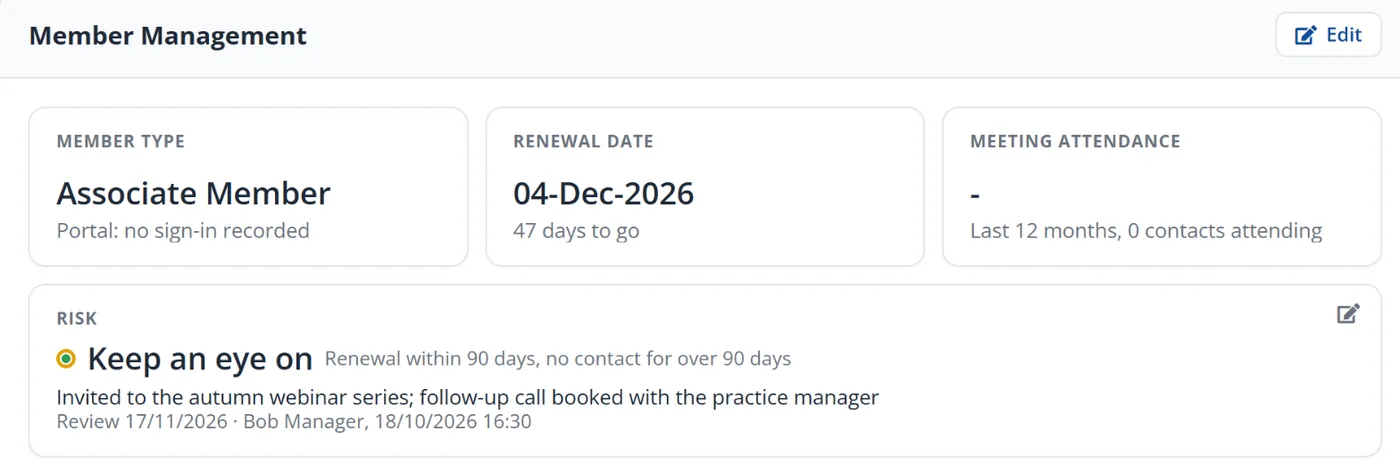
Colossus screen, demonstration data Step 5 of 6Record what you are doing about it
What you do: Click the edit icon on the Risk card, add a reason such as 'Invited to the autumn webinar series' and set a review date.
What to notice: Colleagues can see the account is being handled. A colour change or a passed review date clears Aware.
-
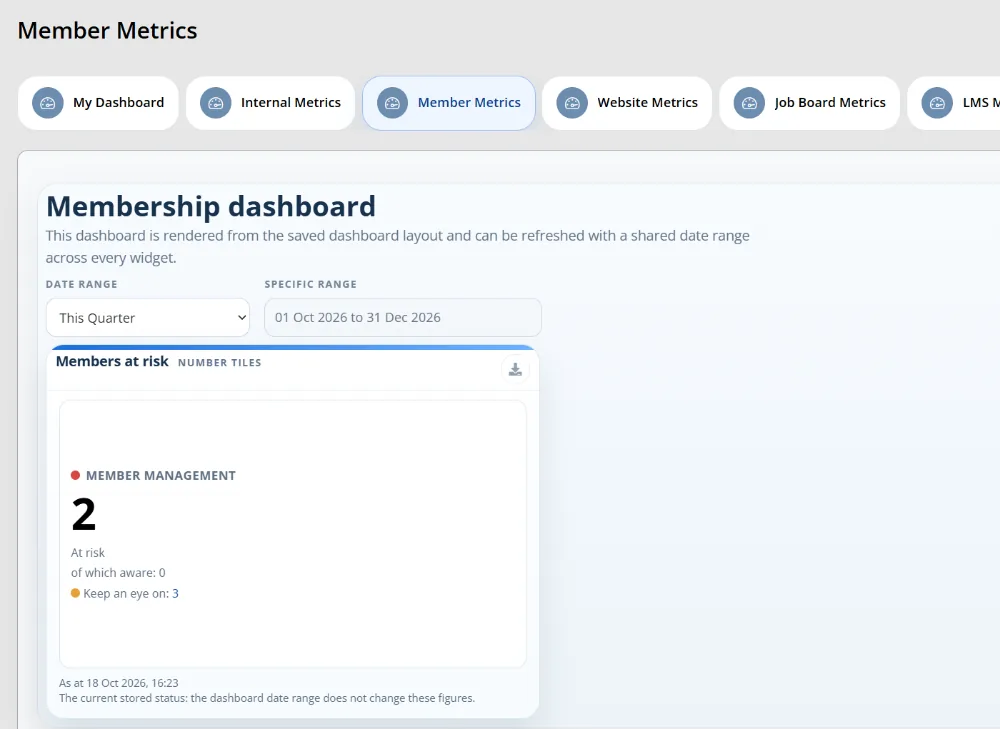
Colossus screen, demonstration data Step 6 of 6Keep it in front of the team
What you do: In Analytics > Widgets, make a widget from the At risk accounts source, add it to the membership dashboard in Manage Dashboards and show that dashboard under Dashboard > Member Metrics.
What to notice: The nightly recalculation also sends the account owner an in-app notification when one of their members changes colour.
The result
The membership team has a daily list of amber and red members. Each shows the rule that flagged it, the account owner and a recorded next step, months before the renewal date.
What to measure
Track these for a full renewal cycle before drawing conclusions. The aim is earlier warning and fewer surprises, measured against your own baseline.
- Members flagged 90 days before renewalHow many lapsed members were flagged in time, and how many your rules missed.Higher is better
- Time from flag to first contactDays between a member turning amber or red and someone speaking to them.Lower is better
- Renewal rate of contacted membersCompare flagged members who were contacted with those who weren’t.The gap shows the value of the outreach
- Lapses that were never flaggedEach one points to a signal your rules don’t yet use.Lower is better
- Staff time spent chasing after the deadlineHours spent on post-deadline phone rounds, before and after.Lower is better
Frequently asked questions
How far ahead of renewal should we start looking?
Which signals predict lapsing best?
Is a risk rule just a report?
Can staff disagree with a flag?
Which Colossus plans include risk rules?
Sources
- Marketing General Inc., The Pulse of Association Membership: 2025 Membership Marketing Benchmarking Report update, presented by Tony Rossell, September 2025. Over 450 associations, mostly in the US.
- Marketing General Inc., 2024 Membership Marketing Benchmarking Report. 696 associations, mostly in the US.
- MemberWise, Digital Excellence Report 2026. Around 480 UK membership organisations; findings as summarised by research partner Cantarus.
- ASAE, Insight Update: top challenges facing associations in 2025. 257 association leaders, mostly in the US.
See where your own systems stand
The Membership Systems Health Check is ten multiple-choice questions about your data, renewals, automation, reporting and member experience. You get your score out of 100 on screen straight away, with no email needed to see it.
Prefer to talk it through? Book a tailored demonstration and we will start from this problem, not a feature tour.