- Home
- Membership challenges
- Chasing renewals
Every renewal season means weeks of chasing members
Every year we send the invoices, then the follow-up emails, then spend weeks on the phone. Too many calls reach someone who has left the member company. And when a member lapses, we rarely know whether they forgot or chose to go.
Does this sound familiar?
- Renewal season starts with an export to a spreadsheet, and the spreadsheet becomes the plan, the tracker and the record.
- Invoices go to finance contacts who left the member company months ago, and you only find out when you chase.
- Some members get three chasers and a call, while others hear nothing because nobody checked who had been contacted.
- Two colleagues ring the same member in the same week, because the call notes live in someone’s inbox.
- Every lapse is recorded the same way, so “forgot” and “decided to leave” look identical in the figures.
A typical case: a professional body’s subscriptions fall due on 1 January. By late February the membership officer is working down a spreadsheet of unpaid renewals, ringing each in turn. Many calls end at a switchboard because the named contact has moved on, and several members say they never saw the invoice.
Renewal season runs on habit, not a plan
The season is improvised
Few teams write down when each message goes and when calls start. The timetable shifts with whoever has time, so members get an uneven run of chasers.
The facts sit in different places
Renewal dates live in the membership list, payments in finance and the chase in a spreadsheet. Contacts go stale during the year, and nobody notices until an invoice goes astray.
Nobody owns the outcome
Finance sends invoices, membership sends emails and whoever is free makes calls. Nobody records why members left, so each season starts with the same guesses.
Chasing costs more than staff time
- Weeks of the team’s year go on chasing. Repeated emails and call rounds crowd out work that members would actually value.
- Members feel chased, not valued. Several chasers, some addressed to the wrong person, make renewal feel like debt collection.
- Avoidable lapses count as losses. A member who forgot, or whose invoice went astray, can leave without ever deciding to.
- Income arrives late and the forecast is guesswork. Without recorded reasons, the board cannot tell admin failures from real decisions to leave.
Marketing General’s 2024 benchmark covers mostly US associations. On average, a renewal series ran to six emails, three mailings, three texts and three phone calls. Some 98% use email for renewals, and 54% use phone calls from staff, board or chapter leaders. Source
Marketing General’s 2025 update asked mostly US association leaders why they believe members do not renew. “Forgot to renew” was named by 24%, against 29% in 2024, and a “change in company contact” by 22%. These are leaders’ beliefs, not members’ own answers. Source, 2024 report
The same 2025 update found that 41% of associations offer automatic annual card renewal. Automatic annual EFT, an electronic funds transfer from a bank account, was offered by 21%. Growing associations were more likely to offer multi-year renewals or EFTs. Source
Five steps that work with any system
Write the renewal calendar down
Fix the dates before the season starts: when the renewal message goes, when the follow-up goes, when calls begin and when a member lapses. Then keep to them, so every member gets the same run of messages.
Clean the contacts before you send anything
Six to eight weeks ahead, check who receives each renewal, including the billing contact for employer-paid members. Ask members to confirm their details, and take off people who have left.
Send one clear message with an easy way to pay
Put the amount, the due date and how to pay at the top, with one link or reference. Send it to the person who pays, as well as to the member.
Make renewing the default where you can
If your bank or payment provider allows it, offer members an automatic renewal option. Multi-year terms also take members out of the yearly chase.
Decide who gets a call, and record why people leave
Calls take the most time, so save them for the members who need them most, such as large accounts and first-year members. Record every outcome in the same few words: renewed, forgot, contact left or decided to leave.
Renewal dates, contacts and calls on one member record
Colossus keeps each member’s renewal date, contacts and calls on the account. The team works the season from one filtered list, not a spreadsheet.
| What it does | How it works | Plans |
|---|---|---|
| A renewal date on every member account | A Membership Renewal Date on the account’s Member Management details, with an Ignore tick for members who have no renewal cycle. Each change is recorded in the audit trail. | CoreGrowthScaleEnterprise Configured during implementation |
| Renewals in the accounts list | Show the Membership Renewal Date column in Accounts and filter it to a date range, such as next month. Bulk Update sets the date, or Ignore, on many accounts at once. | CoreGrowthScaleEnterprise |
| Renewal risk rules | Red and amber rules built on renewal days to go or days overdue, alongside signals such as last contacted. Account owners get an in-app notification when an account changes colour. | ScaleEnterprise Configured during implementation |
| Calls with an owner and a due date | Add a Call to the account, choose the assignee and set a due date. Assignees get a daily in-app Overdue activities notification, and each call is completed with an outcome from your own list. | CoreGrowthScaleEnterprise Configured during implementation |
| One clear renewal email | Email campaigns to an email list or member group, with merge fields. Opens and click-throughs show per template, and unsubscribed contacts are left out automatically. | Core (standard)Growth (advanced)Scale (advanced)Enterprise |
| The right person on each account | Contacts and branches are kept per account, with one contact marked as primary. Members can update their own contacts in the portal. | CoreGrowthScaleEnterprise Configured during implementation |
Your team moves a member’s renewal date on when they renew, on the account, by bulk update or by import. The lists are only as current as that habit, and risk colours come from rules you write, not a prediction.
How a professional body planned its renewal season
Illustrative example. The Institute of Utility Metering Engineers is a fictional professional body with 2,600 members and a membership team of three. This is a composite scenario, not a customer story.
Its subscriptions fall due on 1 April, and many are paid by members’ employers. Each year the team exported a spreadsheet, sent emails when someone had time, then rang round until June. Every lapse was logged simply as “lapsed”.
In January the team wrote a calendar: one renewal email in late February, a follow-up in March and calls from 14 days overdue. They filtered Accounts to April renewal dates, checked each primary contact and filled in missing dates with Bulk Update. Honorary fellows were marked Ignore, and the team agreed to move a member’s date on a year as soon as they paid.
The renewal email went as one campaign to an email list of April renewals. A red risk rule caught accounts over 14 days overdue, and each got a Call with an owner and a due date. Every call ended with a recorded outcome, so the board saw how many lapses were forgotten renewals and how many were decisions to leave.
Run renewal season from one list, not a spreadsheet
The Institute of Utility Metering Engineers wants every April renewal sent to the right person, and every unpaid member called by someone named.
- Organisation
- The Institute of Utility Metering Engineers (fictional), 2,600 members
- Goal
- Prepare renewal dates and contacts before the season, then give every overdue member an owner, a due date and a recorded outcome
- Takes
- About 90 seconds, 7 steps
- Plan
- Scale and Enterprise plans for the renewal risk rule; renewal dates, bulk updates, activities and email campaigns are on every plan
A walkthrough of real Colossus screens with a fictional organisation and demonstration data. Your own set-up, fields and wording will differ.
-
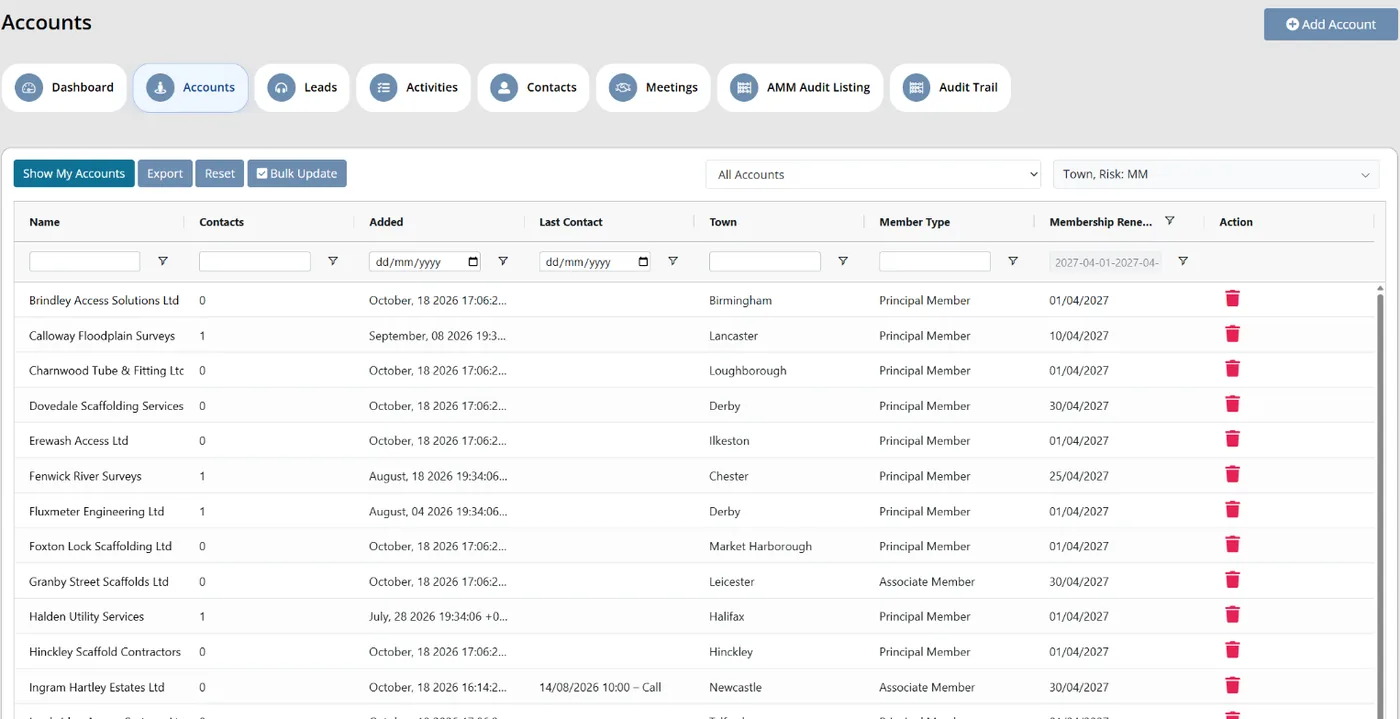
Colossus screen, demonstration data Step 1 of 7Find this season's renewals
What you do: Open Accounts, add the Membership Renewal Date column from the column picker and filter it to dates in April.
What to notice: An account with no renewal date is treated as ignored and never matches a renewal rule, so fill the gaps before the season starts.
-
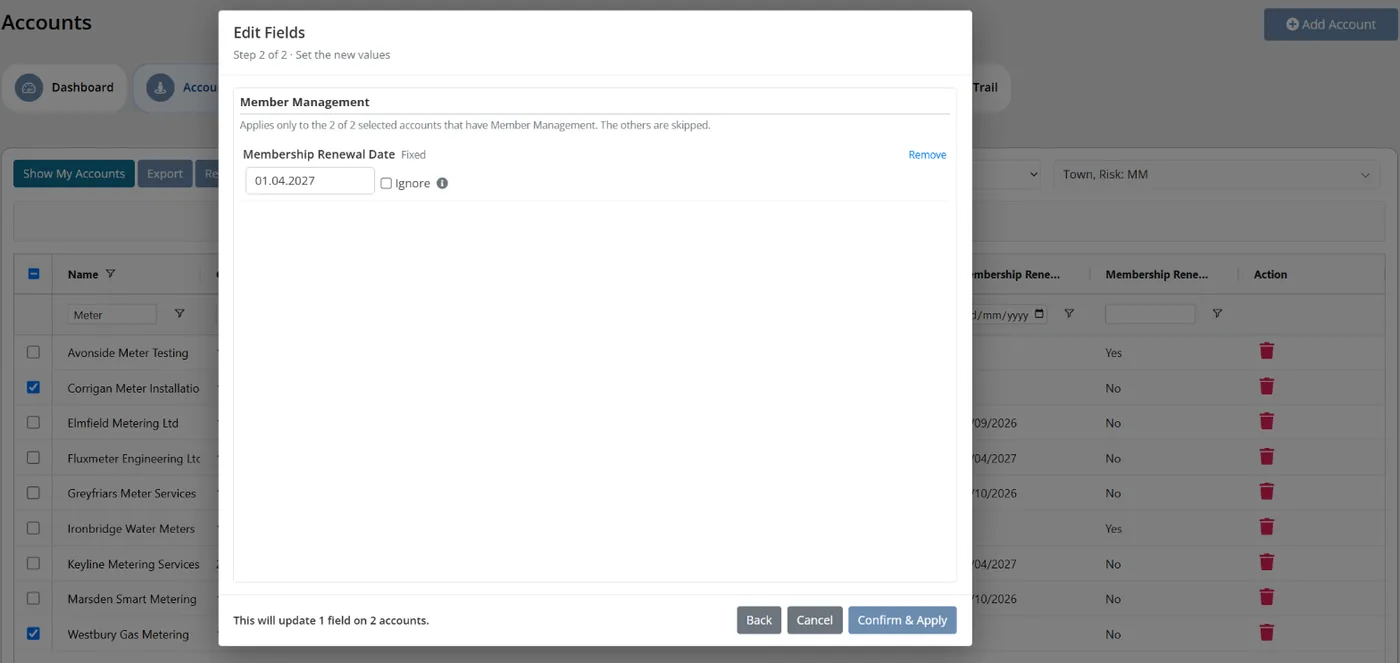
Colossus screen, demonstration data Step 2 of 7Set missing dates in one go
What you do: Click Bulk Update, tick the accounts that renew on 1 April, choose Edit Fields and set the Membership Renewal Date. Tick Ignore for honorary fellows instead.
What to notice: The update replaces the date on every account it reaches, and each change is recorded in that account's audit trail.
-
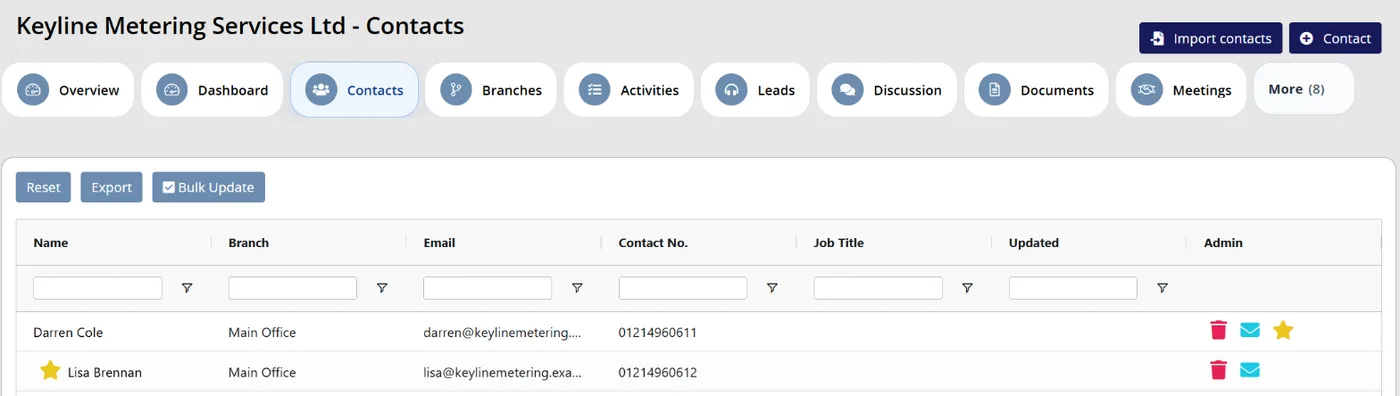
Colossus screen, demonstration data Step 3 of 7Check who receives the renewal
What you do: Open an employer-paid account's Contacts and mark the person who pays as the primary contact.
What to notice: Contacts and branches sit on the account, and members can update their own contacts in the portal.
-
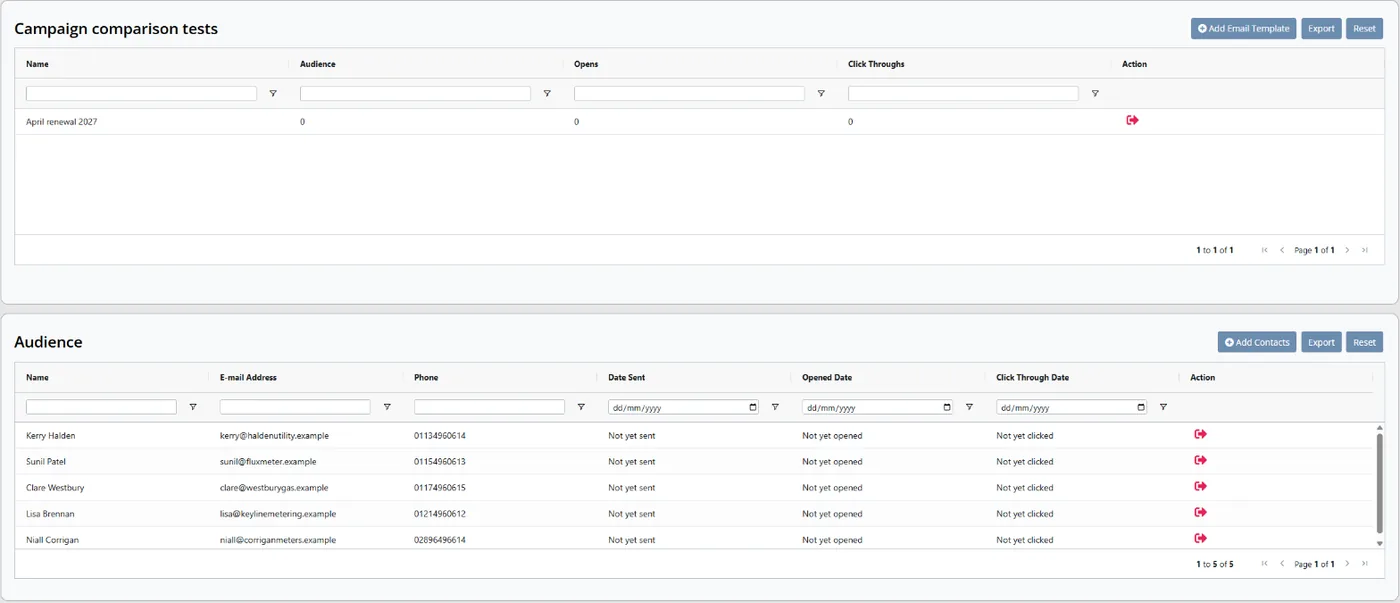
Colossus screen, demonstration data Step 4 of 7Send one clear renewal email
What you do: Create a campaign, click Add Email Template to add the renewal email, then use Add Contacts to choose the April renewals email list, tick Check All and click Save. Start the campaign.
What to notice: Opens and Click Throughs show for each template, and unsubscribed contacts are left out automatically.
-
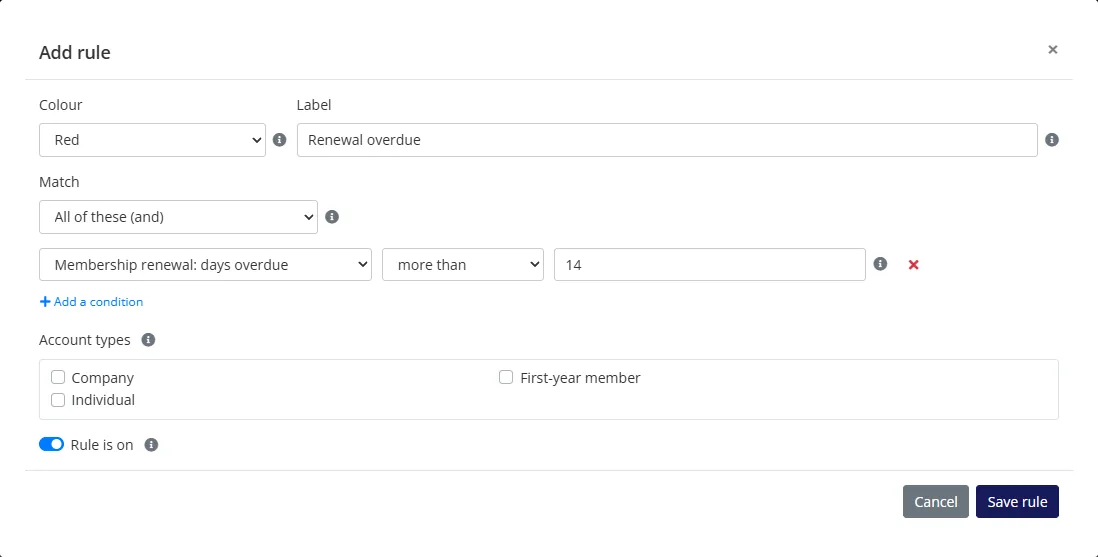
Colossus screen, demonstration data Step 5 of 7Flag who is still unpaid
What you do: Choose Member Management, click Add rule and save a red rule: Membership renewal: days overdue, more than 14. Label it 'Renewal overdue'.
What to notice: Moving a member's renewal date on a year when they pay takes them out of the rule. Account owners are notified when an account turns red.
-
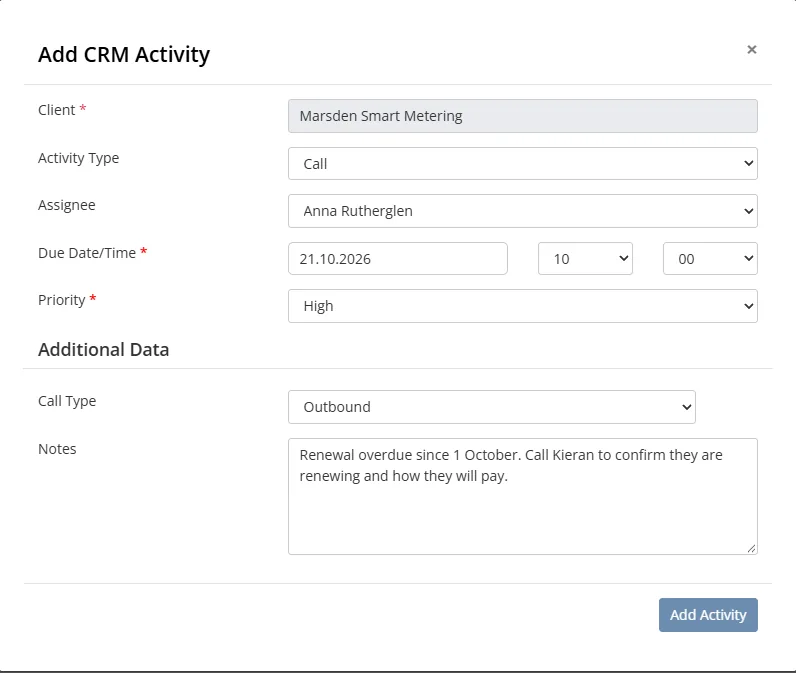
Colossus screen, demonstration data Step 6 of 7Give each overdue member a caller
What you do: On a red account, add a Call, choose the Assignee and set the Due Date/Time and a Priority.
What to notice: Calls still open after their due date appear in the assignee's daily in-app Overdue activities notification.
-
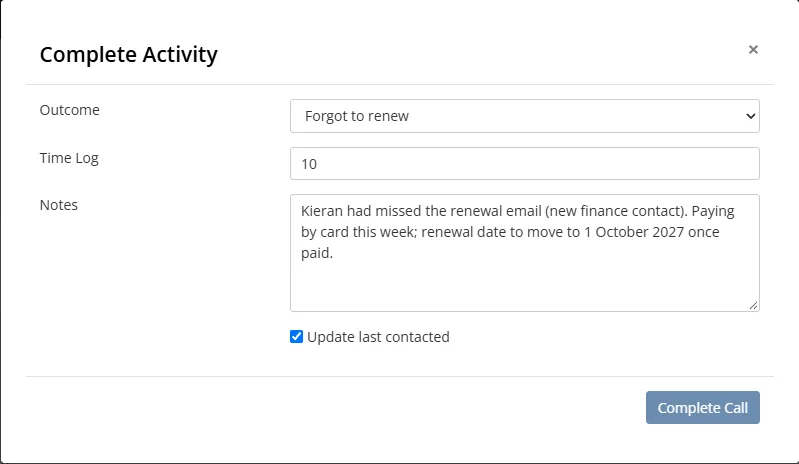
Colossus screen, demonstration data Step 7 of 7Record why
What you do: After the call, click Complete Call, choose an outcome such as Forgot to renew or Decided to leave, and tick Update last contacted.
What to notice: The outcome shows as the Completed Reason in the activities list, ready to count at the end of the season. The outcome list is set up during implementation.
The result
Every April renewal has a date and a checked contact before anything is sent. Overdue members turn red, each has a named caller and a due date, and every lapse has a recorded reason.
What to measure
Compare one renewal season with the next, against your own figures. The aim is fewer chasers for each renewal, fewer misdirected invoices and a recorded reason for every lapse.
- Renewed by the due dateThe share of members who renew before any follow-up or call is needed.Higher is better
- Messages and calls per renewalEmails sent and calls made in the season, divided by the number of members who renewed.Lower is better
- Renewals sent to the wrong personInvoices or emails returned or forwarded because the named contact had left.Lower is better
- Lapses with a recorded reasonThe share of lapsed members whose call outcome says forgot, contact left or decided to leave.Higher is better
- Staff time on renewal seasonHours spent on renewal emails, calls and spreadsheets, from the first message to the final lapse.Lower is better
Frequently asked questions
How many renewal messages should we send?
How do we stop invoices going to people who have left?
Should we ring every member who has not renewed?
How can we tell members who forgot from members who chose to leave?
Which Colossus plans include renewal dates and renewal risk rules?
Sources
- Marketing General Inc., 2024 Membership Marketing Benchmarking Report, 16th edition, 2024. Online survey of 696 associations, January to February 2024, mostly in the US; the renewal-series questions were answered by 549.
- Marketing General Inc., The Pulse of Association Membership: 2025 Membership Marketing Benchmarking Report update, presented by Tony Rossell, September 2025. Over 450 associations, mostly in the US.
See where your own systems stand
The Membership Systems Health Check is ten multiple-choice questions about your data, renewals, automation, reporting and member experience. You get your score out of 100 on screen straight away, with no email needed to see it.
Prefer to talk it through? Book a tailored demonstration and we will start from this problem, not a feature tour.