- Home
- Membership challenges
- First-year renewals
Too many first-year members don't renew
We work hard to recruit new members, and then too many of them are gone after a year. They get a welcome email, a login and the newsletter, and we don’t hear from them again until the renewal invoice. By then most have already decided the membership wasn’t for them.
Does this sound familiar?
- Nobody has worked out the renewal rate for first-year members on its own, or it is well below everyone else’s.
- After the welcome email, a new member gets exactly what a member of twenty years gets.
- No one on the staff speaks to a new member in their first three months unless the member gets in touch first.
- New members rarely appear at regional meetings, and when they do, they don’t know anyone there.
- The first renewal invoice is the first time anyone asks how the year went.
A typical case: a professional body signs up more new members than usual after a stand at a careers fair. Twelve months later, their first renewals lag well behind everyone else’s. When the membership officer looks, many leavers never signed in, never joined a regional group and never spoke to the staff.
The welcome ends too soon
Joining is treated as the finish line
The new record is set up, the welcome pack goes out and the job feels done. Nothing is planned for months two to eleven, which is when a new member decides whether the fee was worth it.
New members look like everyone else
Most records make it hard to list who joined this year and what they have done since. Without that list, nobody can see a new member going quiet.
The first year has no owner
Recruitment hands over on the day someone joins, and retention work starts at renewal. The months in between belong to nobody, so nobody plans them.
A weak first year costs twice
- Recruitment spend is wasted. Each first-year lapse throws away what it cost to recruit that member, and the place has to be filled again next year.
- Members leave before the value arrives. Benefits that take time to pay off, such as a network or a regional group, never get the chance.
- Staff effort lands at the wrong end. Time goes on chasing first renewals instead of the early contact that might have made the chasing unnecessary.
- The headline rate hides the problem. Long-standing members keep the overall renewal figure healthy, so a weak first year never reaches the board.
In Marketing General’s 2024 benchmark of mostly US associations, the median renewal rate for first-year members was 75%, against 85% for members overall. Source
Marketing General’s 2025 update, again mostly US associations, found the first-year median steady at 75%, while the overall median was 84%. Source
The 2024 benchmark also found that welcome emails were the most common way to welcome new members, used by 81%. Associations with overall and first-year renewal above 80% were significantly more likely to make welcome phone calls. That is a link, not proof that calls cause renewals. Source
Five ways to make the first year count
Map the first year, month by month
List what a new member receives and is asked to do in months one, three, six and nine. Most maps show a long silence between the welcome email and the first invoice.
Make the welcome personal
Follow the welcome email with a call or a short note from a named colleague in the first fortnight. Ask why they joined, and write the answer on their record.
Make the first benefit easy to reach
Pick the benefit most new members joined for, such as the guidance library or a webinar, and take them straight to it. Remove any step that stands in the way.
Connect them to people in the first 90 days
Put each new member in a regional or interest group and invite them to its next meeting or event. Ask an established member to look out for them on the day.
Check in at 90 days and six months
Book both calls on the day they join, each with a named owner. Then report first-year renewal as its own figure, separately from the overall rate.
Plan the first year and see who is slipping
Colossus keeps a new member’s groups, invitations and check-in calls on their record. A risk rule written for first-year members flags the ones going quiet.
| What it does | How it works | Plans |
|---|---|---|
| Regional and interest groups | Staff add a new member to a member group at CRM > Member Management > Groups and can give them a contact role. Each group keeps its meetings and an Attendance tab, so you can see who comes. | Core (basic)GrowthScaleEnterprise |
| Welcome and invitation emails | Staff send an email campaign to an email list or a member group, using V2 templates with merge fields such as the contact’s name. Opens and click-throughs are reported for each template. | CoreGrowthScaleEnterprise |
| Members-only places at events | An event can carry a members-only ticket tier, limited to the membership types you choose. Use one for a new members’ evening or a first regional meeting. | Core (basic)GrowthScaleEnterprise |
| Check-in calls with due dates | Add a call or task to the member’s account with an assignee and a due date, for the 90-day and six-month check-ins. Missed ones appear in the assignee’s daily “Overdue activities” notification. | Core (basic)GrowthScaleEnterprise Overdue notification configured during implementation |
| A risk rule for first-year members | A rule can be limited to the account types you tick, such as a First-year member type. It can use days since the last portal sign-in, meeting attendance score, last contacted and renewal days to go. Colours are recalculated daily. | ScaleEnterprise Configured during implementation |
| Quiet new members in one list | Show the Type and Risk columns on the Accounts list and filter them, to see which first-year members need a call. Hovering over a colour shows the label of the rule that set it. | ScaleEnterprise |
The first year is still planned by your team. Colossus records each step and flags the members who have gone quiet; the welcome, the introductions and the conversations come from your staff.
How a professional body planned its members’ first year
Illustrative example. The Society of Floodplain Surveyors is a fictional professional body with 1,800 members and a membership team of three. This is a composite scenario, not a customer story.
About 250 people join the society each year, mostly after passing its practitioner exam, and each renews on the anniversary of joining. New members received a welcome email and a certificate by post. At first renewal, the team kept finding leavers who had never signed in to the portal or met another member.
The team mapped the first year and filled the gaps it found. Each new member now gets the First-year member account type and a place in their regional group. On the day they join, two calls are booked on their account, at 90 days and at six months, each with a named colleague.
A risk rule limited to that account type turns a member amber when they are three months in and have never signed in. Each Monday the membership officer filters the Accounts list to amber first-year members and rings them first. In spring, the quarter’s joiners were emailed an invitation to a members-only evening, and the team checked its opens and clicks a week later.
Give a new member a planned first year, and see who has gone quiet
The Society of Floodplain Surveyors, a fictional professional body, wants every new member booked in for check-in calls, placed in a regional group and invited to meet people, and wants to see who has gone quiet long before their first renewal.
- Organisation
- Society of Floodplain Surveyors (fictional), 1,800 members
- Goal
- Book two check-ins, connect each new member to a group and an event, and flag first-year members who have not engaged three months in
- Takes
- About 85 seconds, 6 steps
- Plan
- Groups, campaigns and check-in activities on Core (basic), Growth, Scale and Enterprise; the first-year risk rule on Scale and Enterprise
A walkthrough of real Colossus screens with a fictional organisation and demonstration data. Your own set-up, fields and wording will differ.
-
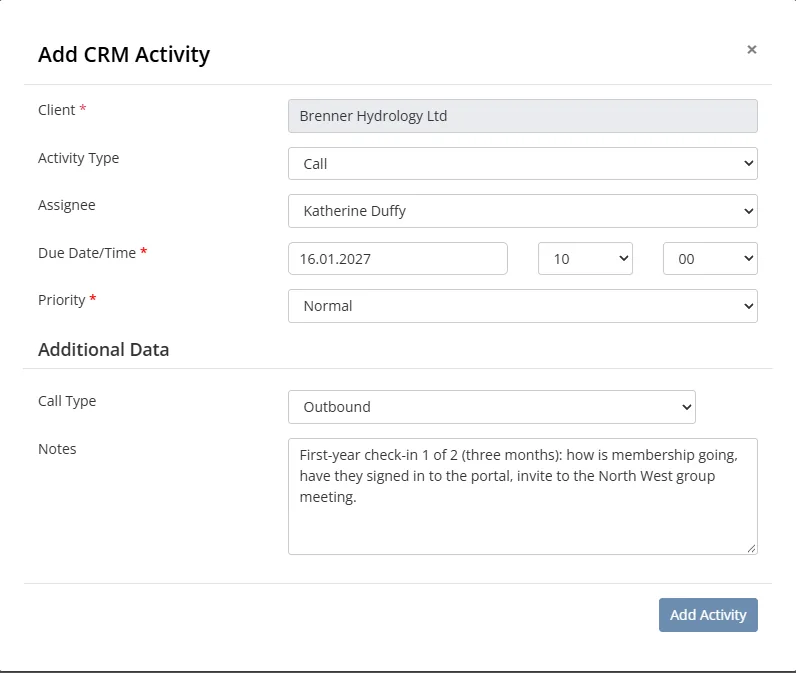
Colossus screen, demonstration data Step 1 of 6Book the two check-in calls on the day they join
What you do: On the new member's account, click Add Activity and choose Call. Pick the assignee, set the Due Date/Time 90 days ahead and a Priority, and click Add Activity. Add a second call due at six months.
What to notice: If a call's date passes before it is done, it appears in the assignee's daily 'Overdue activities' notification.
-
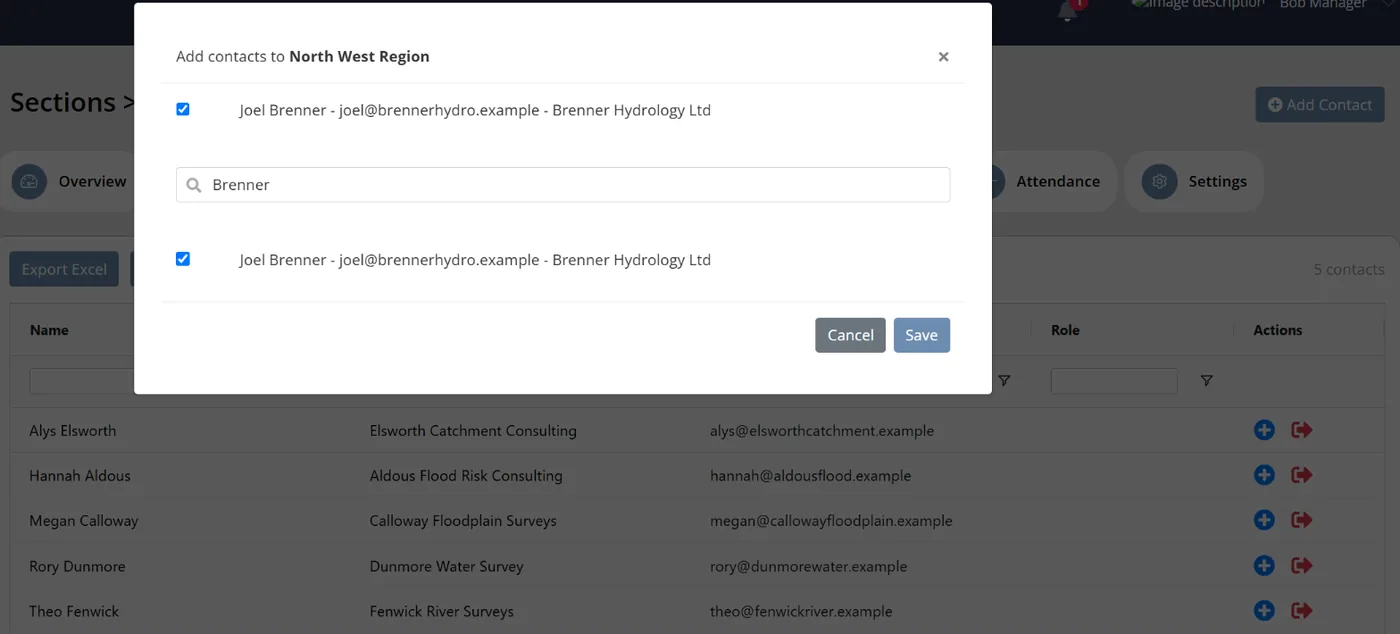
Colossus screen, demonstration data Step 2 of 6Put the new member in their regional group
What you do: Open the North West group, click Add Contact, search for the new member, tick them and click Save.
What to notice: The group's Meetings and Attendance tabs then show whether the new member comes along, next to everyone else in the group.
-
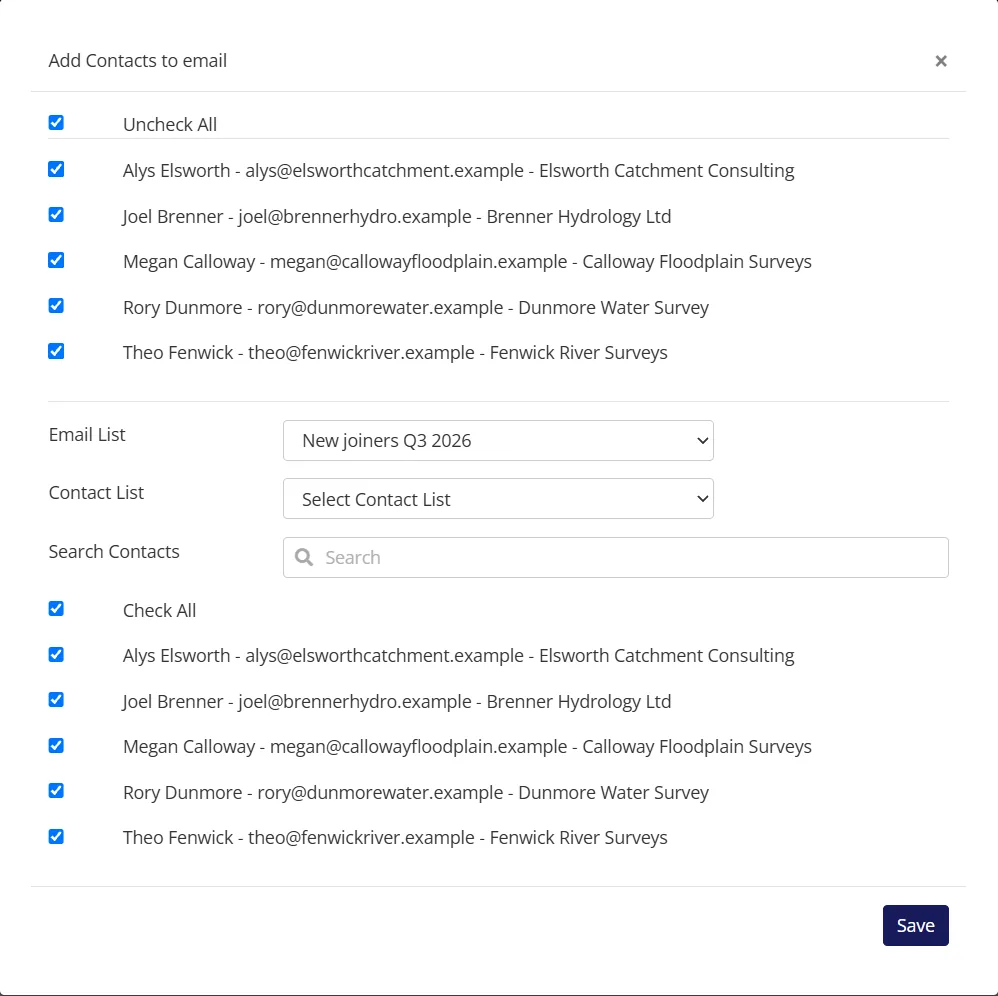
Colossus screen, demonstration data Step 3 of 6Invite this quarter's joiners to a new members' evening
What you do: Add a campaign and click Add Email Template to choose the invitation. Under Audience, click Add Contacts, pick the email list of this quarter's joiners, tick Check All and click Save. Click Start Campaign and confirm.
What to notice: Merge fields put each contact's name in the email. The campaign counts Opens and Click Throughs against the template.
-
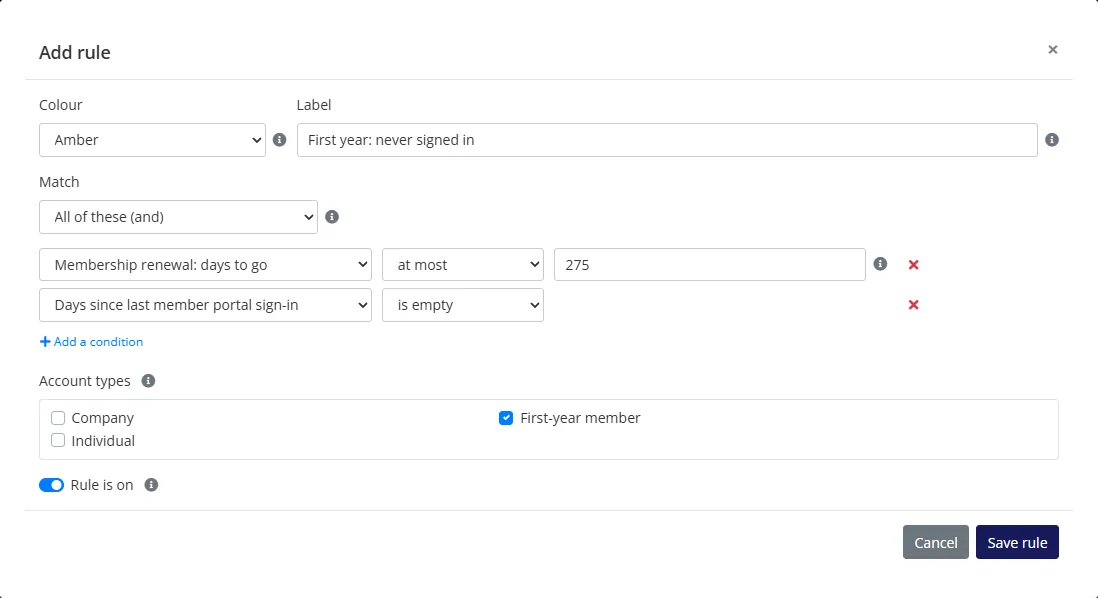
Colossus screen, demonstration data Step 4 of 6Write a rule for first-year members only
What you do: Choose Member Management and click Add rule. Set Amber and the label 'First year: never signed in'. Match All of these: 'Membership renewal: days to go' at most 275 and 'Days since last member portal sign-in' is empty. Tick only the First-year member account type.
What to notice: With renewal a year after joining, 275 days to go means three months in. A member who has never signed in has no sign-in value, so the rule uses 'is empty'.
-
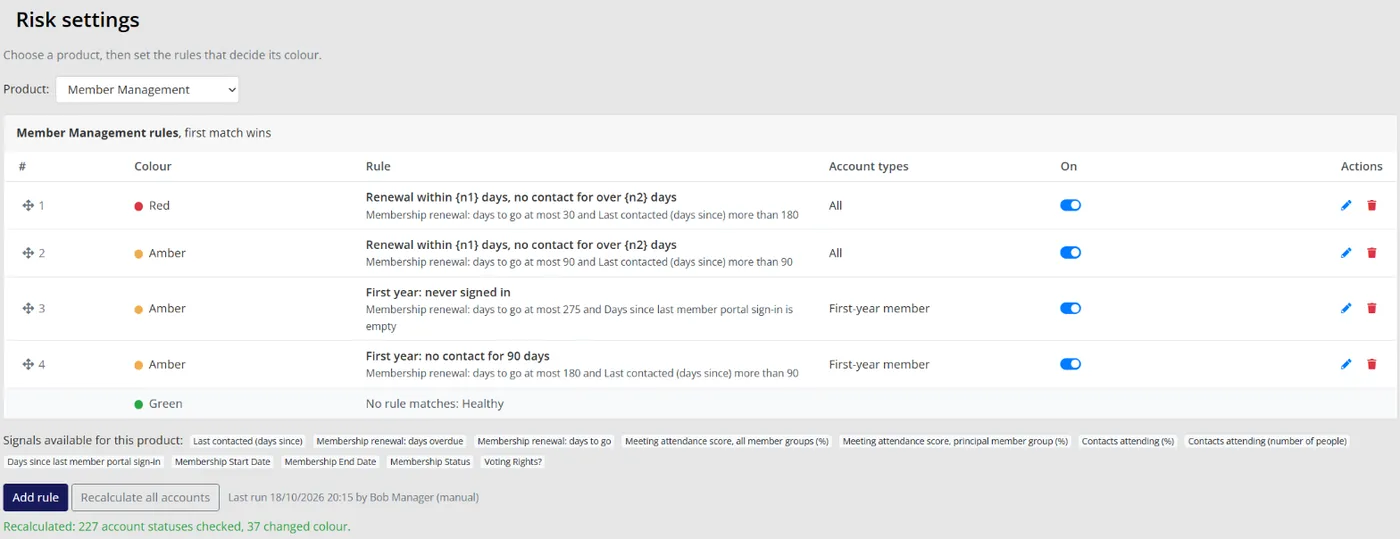
Colossus screen, demonstration data Step 5 of 6Add a six-month rule, then recalculate
What you do: Add a second amber rule for the same account type, labelled 'First year: no contact for 90 days'. Its conditions: 'Membership renewal: days to go' at most 180 and 'Last contacted (days since)' more than 90. Then click Recalculate all accounts.
What to notice: Recalculating applies the new rules straight away instead of waiting for the daily run.
-
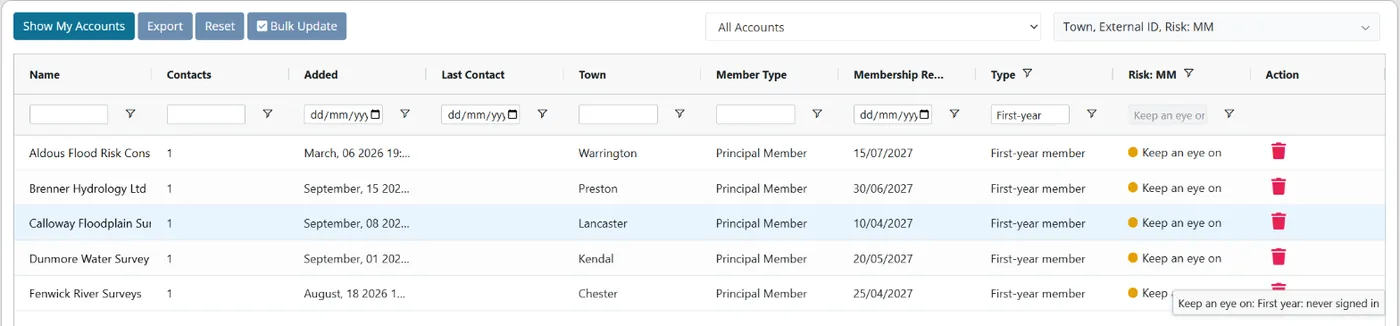
Colossus screen, demonstration data Step 6 of 6See which new members have gone quiet
What you do: Open Accounts, show the Type and Risk: MM columns, filter Type to First-year member and filter Risk to Keep an eye on.
What to notice: Hovering over a member's colour shows the rule's label, so the caller knows why they were flagged before picking up the phone.
The result
Every new member has a regional group, an invitation and two dated check-in calls with a named owner. Each week the team opens one filtered list of first-year members who are quiet, with the reason shown, months before their first renewal.
What to measure
Follow one full intake from joining to first renewal, and compare it with the intake before. The aim is a first year with no silent months, and a first-year renewal rate you can see on its own.
- First-year renewal rateMembers due their first renewal who renewed, reported separately from the overall rate.Higher is better
- New members welcomed personallyThe share of each month’s joiners who had a call or a personal note in their first fortnight, from their activity records.Higher is better
- New members connected within 90 daysJoiners added to a member group, or booked on an event, in their first three months.Higher is better
- Check-in calls made on time90-day and six-month calls completed by their due date, against those that went overdue.Higher is better
- First-year members flagged as quietHow many new members your first-year rule turns amber or red each month.Lower is better, once the rule is settled
Frequently asked questions
When does a new member decide whether to stay?
Is a welcome email enough?
How does Colossus know who is in their first year?
Can new members get their own emails?
Which Colossus plans include this?
Sources
- Marketing General Inc., 2024 Membership Marketing Benchmarking Report, 16th edition. 696 associations, mostly in the US; 333 answered the first-year renewal question and 567 the question on welcoming new members.
- Marketing General Inc., The Pulse of Association Membership: 2025 Membership Marketing Benchmarking Report update, presented by Tony Rossell, September 2025. Over 450 associations, mostly in the US; 234 answered the first-year renewal question.
See where your own systems stand
The Membership Systems Health Check is ten multiple-choice questions about your data, renewals, automation, reporting and member experience. You get your score out of 100 on screen straight away, with no email needed to see it.
Prefer to talk it through? Book a tailored demonstration and we will start from this problem, not a feature tour.