- Home
- Membership challenges
- Membership value
Our members can't see what they get for their subscription
Every renewal season, someone asks what they actually get for the fee. We send the benefits list, they compare it with something cheaper, and the conversation becomes about price. This guide covers how to make the value of membership visible to each member all year, with or without new software.
Does this sound familiar?
- Renewal conversations end up about price. Members compare the fee with a cheaper product, not with what they used.
- Your benefits page lists fifteen things, and most members can name two of them.
- Members have not heard about the consultation you answered or the standard you spent a year revising.
- Nobody can say quickly which benefits a particular member has used this year.
- A two-person firm and a national contractor get the same welcome pack and the same renewal letter.
A typical case: a member rings in March to say a buying group offers “the same thing” for a lower fee. The membership officer pieces the firm’s year together from the events system, the helpline inbox and the policy team’s notes. It had booked two events and used the helpline four times, but had never heard about the consultation won on its behalf.
Value is delivered all year but shown once
Value is explained at joining and renewal
The benefits are set out in the welcome pack and again beside the invoice. In between, members hear about deadlines and events, rarely about what they gained.
Use is recorded but never added up
Event bookings, meetings, helpline calls and guidance downloads sit in different tools. Pulling one member’s year together takes an afternoon, so nobody does it.
The most important work is out of sight
Lobbying, standards and committee work happen in rooms members never see. Policy staff report to the board, and nobody’s job is to tell members what changed.
When value is invisible, price decides
- Renewal becomes a price comparison. Without evidence of use, members weigh the fee against the cheapest alternative they can find.
- Staff build value cases by hand. Each wavering member gets a one-off email assembled from several systems, usually too late.
- Unused benefits keep their budget. Money goes on benefits few members know about, while the valued ones stay hard to find.
- The board sees totals, not segments. Reports show members gained and lost, not which kinds of member value what.
Marketing General’s 2024 benchmark covers mostly US associations. There, 66% of executives said prospects do not join because they do not see value in membership. The most common reason given for a weak value proposition was difficulty articulating it (48%). Source
In the 2025 edition, leaders most often believed members lapse through “lack of engagement with the organization/don’t use benefits” (52%). Lack of value was named by 24% and “too expensive” by 23%. These are the views of leaders at mostly US associations, not what members said. Source
ASAE surveyed 170 association executives, mostly in the US, in 2022. Of those, 77% were very confident their business model would keep fulfilling their mission. Only 61% were very confident it would keep giving members and stakeholders tangible value. Source
Five ways to make value visible
Write a value statement for each segment
Group members the way they buy, such as by size, trade or membership type. For each group, write two sentences on what membership does for them, then test them on five members.
Show each member what they used
Before renewal, send each member a short, factual summary of their year: events attended, meetings, helpline calls, guidance used. A list of what they used persuades more than a list of what you offer.
Report the invisible work every quarter
Send a short “what we did for you” update each quarter: the consultation answered, the standard revised, the minister briefed. Lead with what changed for members, not how many meetings it took.
Make the most-valued benefit easiest to reach
Ask members which one or two benefits matter most. Put those first on the members’ home page and in every renewal letter, and stop promoting the ones nobody uses.
Ask lapsed members why, and listen
Call members who leave within a month and ask what they used, what they expected and what was missing. Feed what you hear back into the segment statements.
Each member’s year, on one record
Colossus keeps each member’s meetings, events and contact history on one record, and sends updates to one segment at a time.
| What it does | How it works | Plans |
|---|---|---|
| A member’s year on their record | The account overview shows when the member was last contacted and how, beside their member type and member groups. The Meetings tab lists their meetings, and event attendance can count towards Last contacted. | Core (basic)GrowthScaleEnterprise |
| Members by segment | In the accounts list, show the Member Type and Last Contact columns, filter to one membership type and sort by date. Export the list to Excel for renewal calls. | CoreGrowthScaleEnterprise |
| Updates sent to one segment | A campaign holds one or more email templates and an audience drawn from an email list, a member group or contacts you pick. Merge fields add each contact’s details. Each template then shows its opens and click-throughs. | Core (standard)Growth (advanced)Scale (advanced)Enterprise |
| What members see in the portal | Signed-in members see their meetings and event tickets, and update their company details, contacts and branches themselves. | CoreGrowthScaleEnterprise Configured during implementation |
| A members’ forum | Boards for peer questions that members can follow, with email about new topics for those who opt in. Useful when peer advice is the benefit members value most. | GrowthScaleEnterprise |
| Courses in the members’ area | Courses built in the CRM from text, video, files and quizzes, for signed-in members in the members’ area. Useful when training is the benefit members value most. | GrowthScale (advanced)Enterprise Configured during implementation |
Colossus keeps the record. The segment statements, the quarterly updates and each member’s yearly summary are written by your team from it.
How a trade association showed members their year
Illustrative example. The Association of Grounds Care Contractors is a fictional trade association with about 750 member firms and a membership team of three. This is a composite scenario, not a customer story.
Renewal calls kept ending on price, with members comparing the fee to a buying group’s insurance scheme. The team had no quick way to show what each firm had used. A year of work on new herbicide rules had been reported to the board, but never to members.
The team agreed three segments: small contractors, larger contractors and associate suppliers. Each became a membership type and a member group, with two sentences of value written for it and tested on calls. Every quarter, a “what we did for you” email went to each group, with the herbicide consultation first.
Before renewals, account owners filtered the accounts list to small contractors and sorted it by Last Contact. A few dozen firms had no recorded contact all year, so they were called first and pointed to the contract templates. Calls now opened with what the firm had used, not with the invoice.
Show one segment its year, and tell it what you did
The Association of Grounds Care Contractors, a fictional trade association, wants renewal calls to start with what each firm used. Each segment should also hear about the association's work every quarter.
- Organisation
- The Association of Grounds Care Contractors (fictional), 750 member firms
- Goal
- Find the small contractors with no recorded contact this year, and send that segment its quarterly update
- Takes
- About 80 seconds, 7 steps
- Plan
- Core, Growth, Scale and Enterprise plans (email campaigns are advanced on Growth and above)
A walkthrough of real Colossus screens with a fictional organisation and demonstration data. Your own set-up, fields and wording will differ.
-
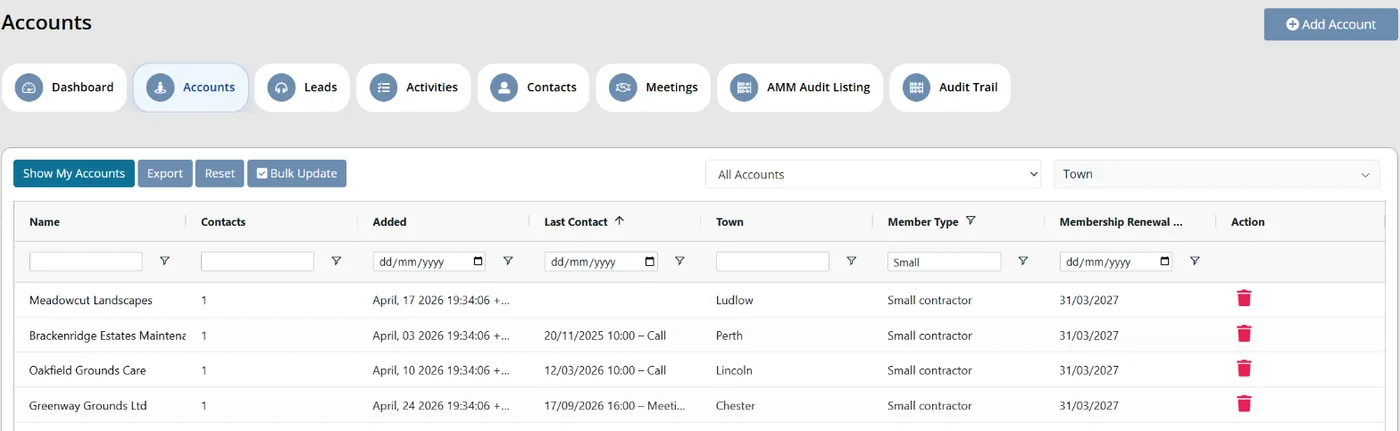
Colossus screen, demonstration data Step 1 of 7Pick one segment
What you do: Open Accounts, show the Member Type and Last Contact columns, and filter Member Type to Small contractor.
What to notice: Sorting by Last Contact puts the firms nobody has spoken to this year at the top.
-
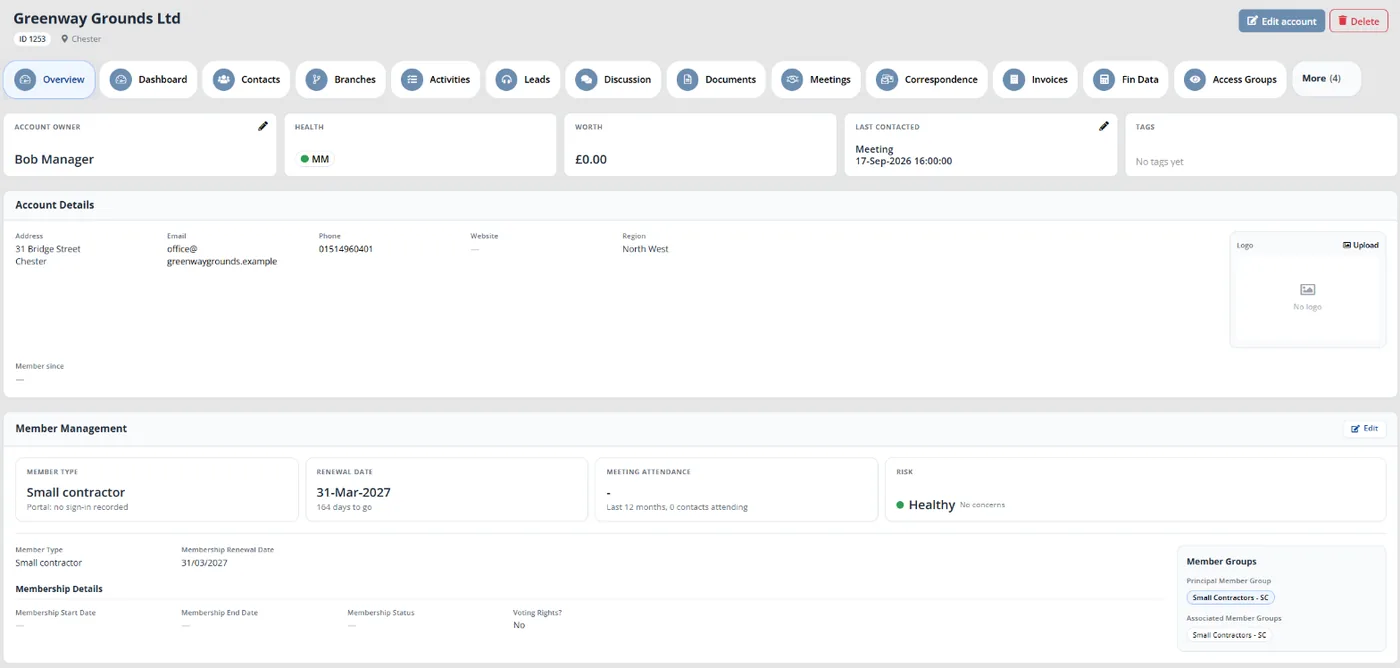
Colossus screen, demonstration data Step 2 of 7Open a member's year
What you do: Open one small contractor's account.
What to notice: Last contacted shows the most recent contact and what it was. The Member Management panel shows the member type and member groups.
-
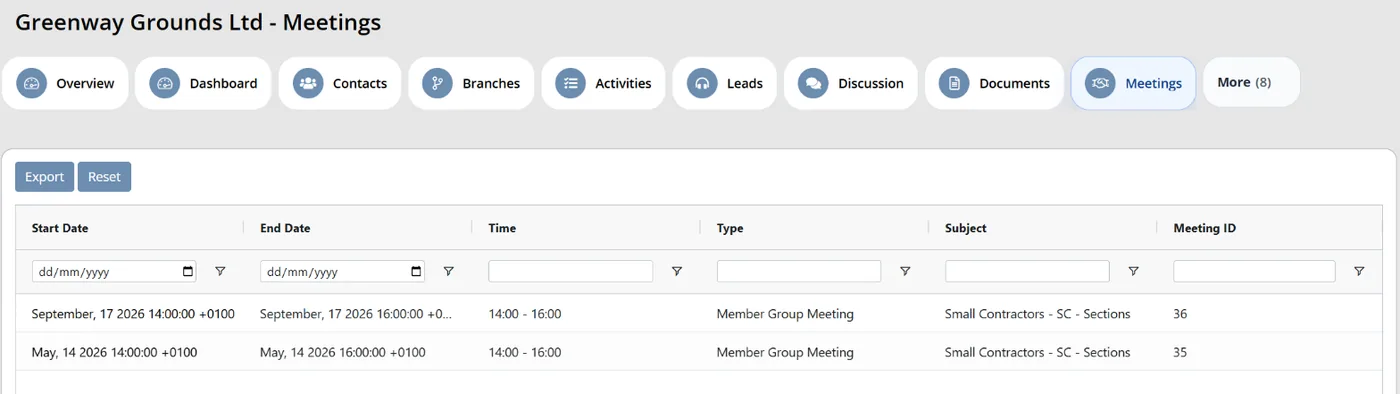
Colossus screen, demonstration data Step 3 of 7See the member's meetings
What you do: Open the account's Meetings tab.
What to notice: Each meeting shows its date, type and subject, so the call can start with what the firm has had from you.
-
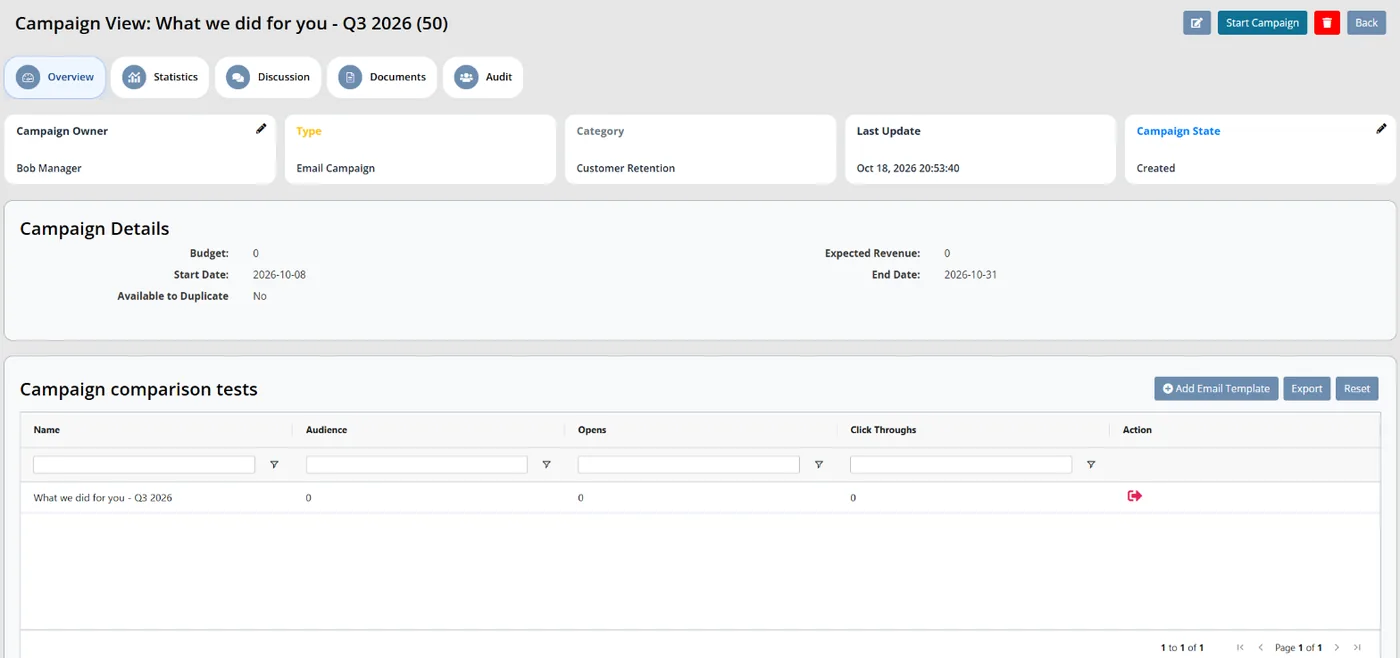
Colossus screen, demonstration data Step 4 of 7Attach the quarter's update
What you do: Open the quarterly campaign and click Add Email Template to attach the 'What we did for you' email.
What to notice: Merge fields fill in each contact's details when the email is sent.
-
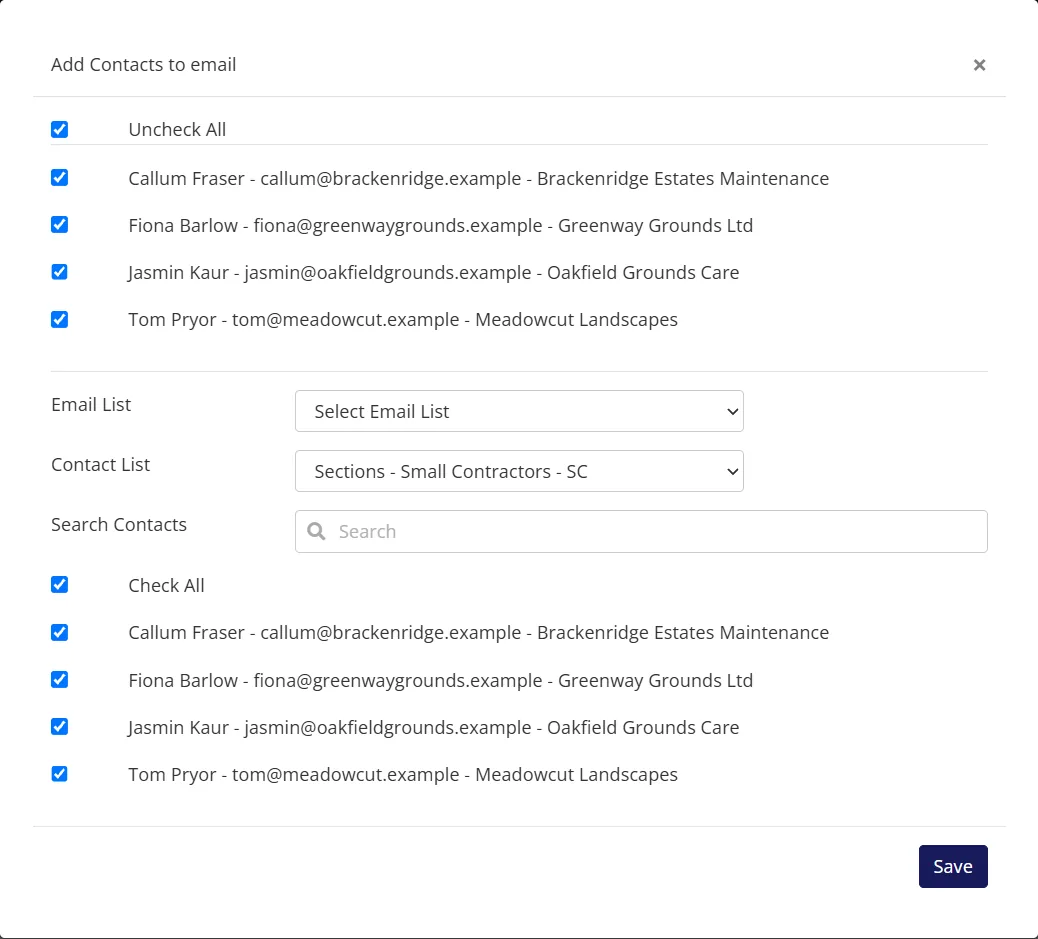
Colossus screen, demonstration data Step 5 of 7Send it to one segment
What you do: Click Add Contacts, choose the Small contractors member group from Contact List, tick Check All and click Save.
What to notice: The audience can also come from an email list, or from contacts you search for by name.
-
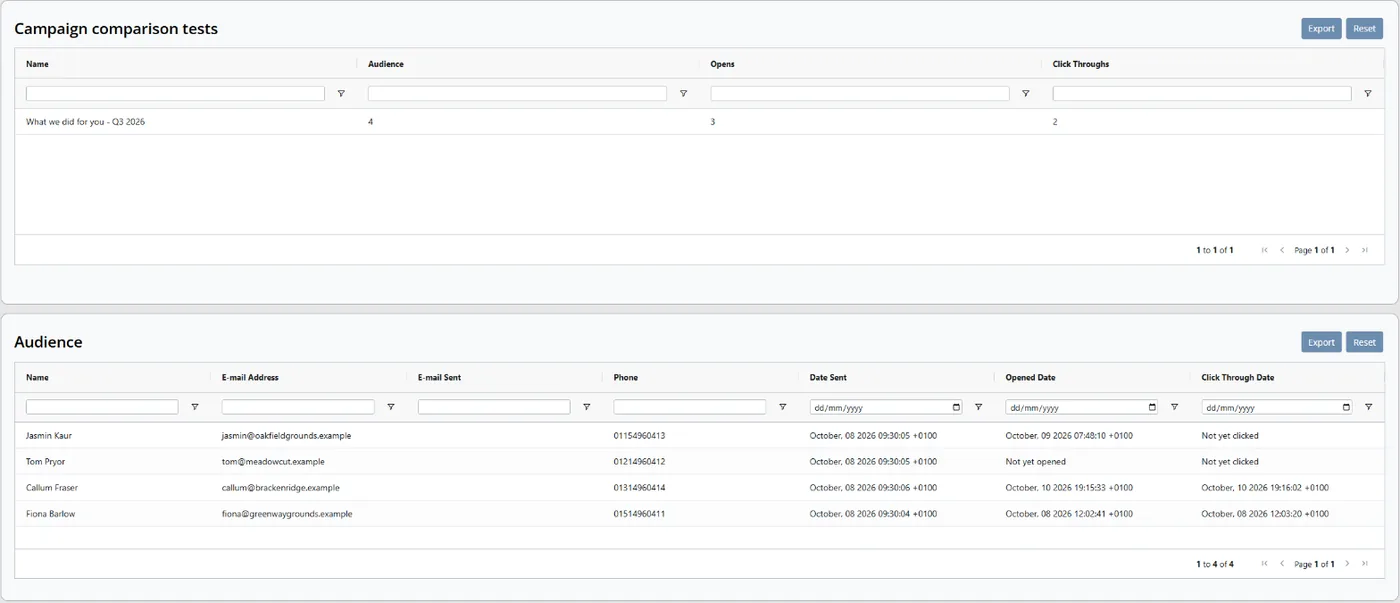
Colossus screen, demonstration data Step 6 of 7See whether the segment read it
What you do: After the send, check the template's Opens and Click Throughs.
What to notice: The Audience grid shows when each contact's email was sent, opened and clicked.
-
ScreenMember portal > Event tickets (/portal/portal-event-tickets/) and My meetings (/portal/my-meetings/)Step 7 of 7
Check what the member sees
What you do: Sign in as a test member and open their event tickets, then their meetings.
What to notice: Members can see the events and meetings they have had without asking staff.
The result
The membership team can show any small contractor its year from one record. Each segment gets a quarterly update on the association's work, with opens and click-throughs for each template.
What to measure
Measure these from one renewal cycle to the next, against your own starting point. The aim is members who can name what they used, and renewal conversations that are not only about price.
- Members who used at least one benefit this yearAccounts with a recorded meeting, event or staff contact in the last 12 months, counted by membership type.Higher is better
- Members with no recorded contact in a yearSort the accounts list by last contact before each renewal season and count the firms at the top.Lower is better
- Opens and clicks on “what we did” updatesCompare each quarterly update with the one before, segment by segment.Higher is better, over time
- Lapses put down to price or valueExit conversations where cost or value was the main reason, out of all exit conversations.Lower is better
- Time to show a member their yearMinutes for a colleague to answer “what have we had from you?” from the member’s record.Lower is better
Frequently asked questions
Isn’t a value statement just our benefits list?
How do we make lobbying visible without overclaiming?
Is tailoring updates by segment worth it for a small team?
What should we ask members who leave?
Which Colossus plans include this?
Sources
- Marketing General Inc., 2024 Membership Marketing Benchmarking Report, 16th edition, 2024. 696 associations, mostly in the US.
- Marketing General Inc., The Pulse of Association Membership: 2025 Membership Marketing Benchmarking Report update, presented by Tony Rossell, September 2025. Over 450 associations, mostly in the US.
- ASAE Association Insights Center, Next Generation Business Models for Associations, 2022. Survey of 170 association executives, mostly in the US.
- Higher Logic, 2025 Association Member Experience Report, news release, 4 December 2025. Vendor survey of 440 association members and 112 non-members; the release does not state their geography.
See where your own systems stand
The Membership Systems Health Check is ten multiple-choice questions about your data, renewals, automation, reporting and member experience. You get your score out of 100 on screen straight away, with no email needed to see it.
Prefer to talk it through? Book a tailored demonstration and we will start from this problem, not a feature tour.