- Home
- Membership challenges
- Online community
We built an online community and members don't use it
We launched our community with a big email and a welcome post from the chief executive. A few months on, the newest posts are ours, and most of them have no replies. This guide covers how to give a quiet community a reason to exist and keep it going, whatever platform you use.
Does this sound familiar?
- Most of the recent posts were written by staff, and most of those have no replies.
- Members still email the office with questions their peers could answer, and staff reply to each one privately.
- Several boards have had no new topic for months, but they still sit on the front page.
- Sign-ups were strong in the launch weeks, then activity fell away and never recovered.
- When the board asks whether the community is working, the only figure you have is page views.
A typical case: a trade body launched its forum at the annual conference, with twelve boards and a welcome video from the chair. For six weeks there were introductions and a few lively threads. By the summer the newest posts were event announcements, and the technical helpdesk was still answering the same questions by email.
It was launched as a place, not a purpose
The launch was the plan
Most of the effort went into launch day: the platform, the boards and the announcement. Nothing was planned for week six, when the novelty wears off and someone has to start conversations.
Members have to remember to visit
The community sits behind a sign-in, away from members’ inboxes. If nothing new reaches them where they already are, most will not come back to check.
Nobody’s job is to reply
Posting is added to busy roles in events or communications. Nobody is asked to answer new topics, recruit contributors or prune boards, so quiet spaces stay quiet.
A quiet community is not free
- Staff time goes on posting into silence. Announcements get no replies, while the same questions still arrive by email and are answered one at a time.
- A listed benefit looks empty. Anyone who follows the link from your membership page finds old posts and no conversation.
- The peer contact members joined for stays hidden, which weakens the case for renewing.
- The board cannot tell whether it is working. Page views say little about value, so the budget conversation becomes guesswork.
In ASAE’s 2025 research with association leaders, mostly in the US, 90% called community essential to their mission. Half said they invest too little in it, and only 30% had dedicated community staff. About 86% had no way of measuring its return. Source
In the UK, MemberWise’s Digital Excellence 2026 research found 47% of membership bodies host a dedicated online community, up from 29% in 2018/19. Source
Email is where many members meet the community. In Higher Logic’s 2025 community benchmark, vendor data from about 1,500 associations and nonprofits, community digest emails had open rates of 44% to 56%. Source
Five ways to give it a reason to exist
Start with one or two jobs
Pick purposes members already have: asking peers a technical question, a working group drafting guidance, or a regional group. Each board should finish the sentence “Come here to…”.
Recruit champions and a staff host
Ask eight to ten named members to post and answer in the first months, and tell them why you chose them. Give one member of staff the job of replying to every new topic within a working day.
Take the conversation to members
Most members will not visit just to check. Offer email alerts or a digest of new topics, link live threads from your newsletter, and answer emailed questions on the board, with permission.
Set a rhythm with recurring prompts
A prompt on the same day each week, such as “Problem of the week”, gives members a reason to return. Use quick polls for decisions a group can make in a few days.
Moderate for quality and retire empty spaces
Publish short guidelines and deal with reported posts the same day. Each quarter, merge or hide any board with no new topic in 90 days, and tell members why.
A forum your team can host from the CRM
Colossus includes a members’ forum with boards, following, polls and recurring topics. Staff moderate it from a page in the CRM.
| What it does | How it works | Plans |
|---|---|---|
| Boards with one job each | Staff add a board at CRM > Member forum > Boards, with a name, description and order. A board can be read-only for announcements, or hidden with its topics kept. | GrowthScaleEnterprise |
| Following and email | Members follow a topic, or click “Email me about new topics” on a board. Forum email is opt-in, and every message has a one-click way to stop. | GrowthScaleEnterprise |
| Polls | Any new topic can carry a poll: a question, up to twenty options, choices per member and an optional closing date. Staff can close or reopen it. | GrowthScaleEnterprise |
| Recurring topics from a staff host | At CRM > Member forum > Recurring posts, a topic is posted weekly or every few days under a staff host account. Host posts are marked as coming from staff. | GrowthScaleEnterprise |
| Reports and moderation | Members report a post, and it appears under Open reports at CRM > Member forum for staff to keep or remove. Staff can also pin, lock and restore topics, and pause a member’s posting. | GrowthScaleEnterprise |
| Portal sign-ins on the member record | Each member’s portal sign-ins are recorded on their record as an engagement signal, so you can see who signs in at all. | Core (basic)GrowthScaleEnterprise |
The forum provides the spaces and the tools. The champions, the prompts and the moderation decisions still come from your team.
How a trade body narrowed its forum to two jobs
Illustrative example. The Heritage Stonemasons’ Federation is a fictional trade body with 1,100 member firms and one technical officer. This is a composite scenario, not a customer story.
The federation launched a forum with fourteen boards, one for every committee. Within a few months the newest posts were staff announcements. Members still emailed the technical officer about lime mortar and listed building work, and each answer reached one person.
The team hid nine boards, keeping their topics, and kept two purposes: a technical questions board and four regional group boards. Ten experienced members agreed to answer questions in the first months. The technical officer became the forum’s host, with a recurring “Site problem of the week” post every Monday.
When a question arrived by email, the officer asked to post it on the board and answered it there. Members who followed a regional board got an email when a new topic started there. A reported post selling equipment was removed from the CRM moderation page the same morning.
Turn a quiet forum into two spaces members use
The Heritage Stonemasons' Federation, a fictional trade body, wants its forum to answer members' technical questions instead of carrying staff announcements that nobody replies to.
- Organisation
- Heritage Stonemasons' Federation (fictional), 1,100 members
- Goal
- Narrow the forum to technical questions and regional groups, give it a weekly rhythm and moderate it from the CRM
- Takes
- About 85 seconds, 6 steps
- Plan
- Growth, Scale and Enterprise plans
A walkthrough of real Colossus screens with a fictional organisation and demonstration data. Your own set-up, fields and wording will differ.
-
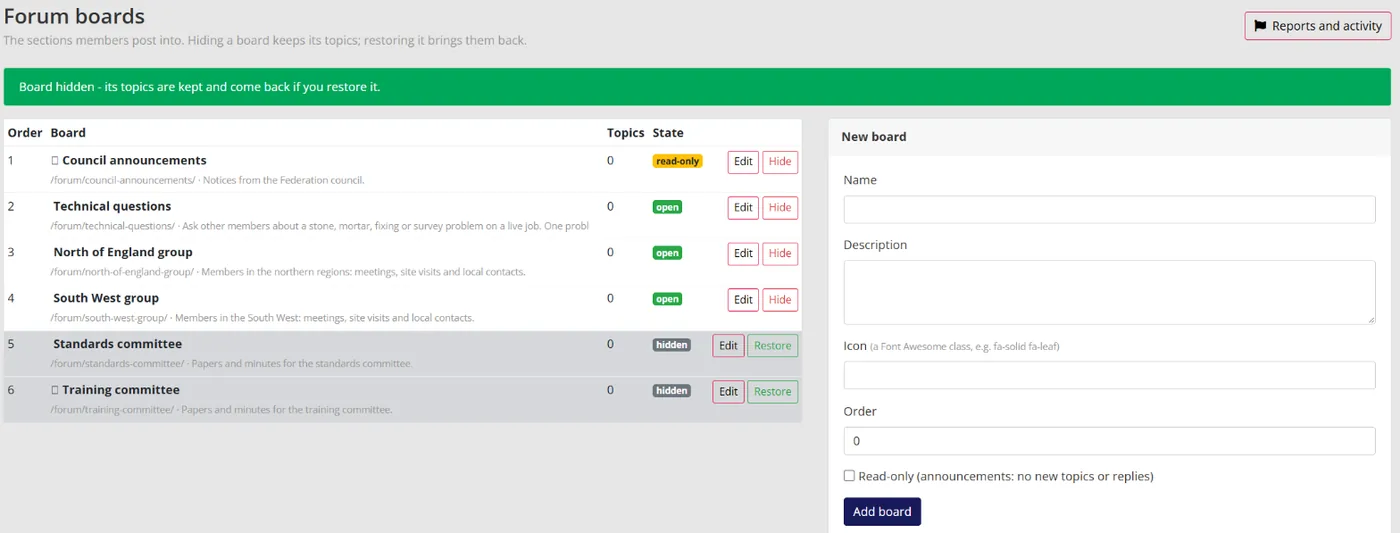
Colossus screen, demonstration data Step 1 of 6Give each board one job
What you do: Add a board called 'Technical questions' with a one-line description of what belongs there, then hide the committee boards nobody has used.
What to notice: Hiding a board keeps its topics, and restoring it brings them back, so pruning loses nothing.
-
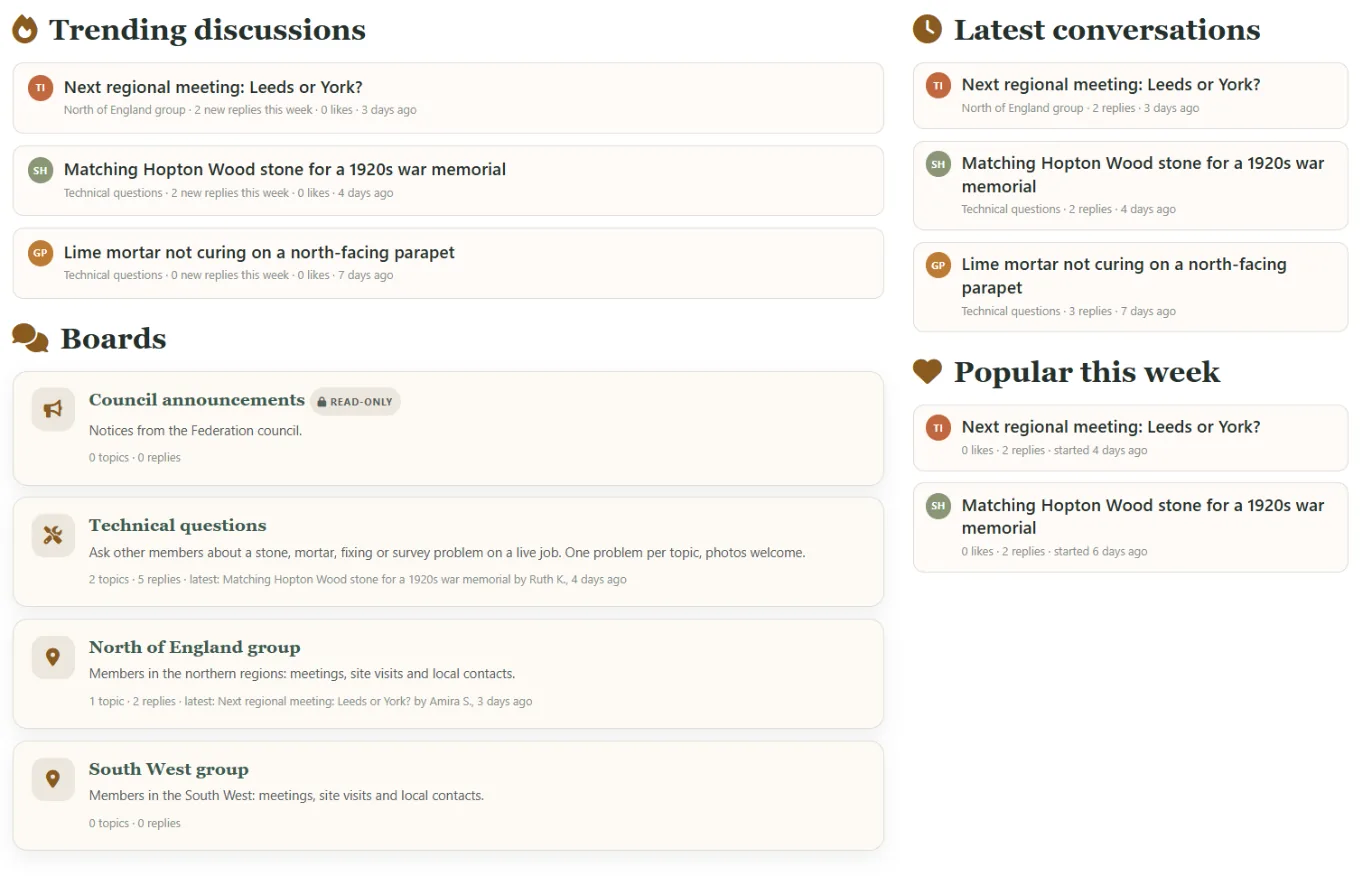
Colossus screen, demonstration data Step 2 of 6Check what members now see
What you do: Open the forum front page.
What to notice: Only the boards you kept are listed, beside the trending and recent discussions, so the purpose is clear at a glance.
-
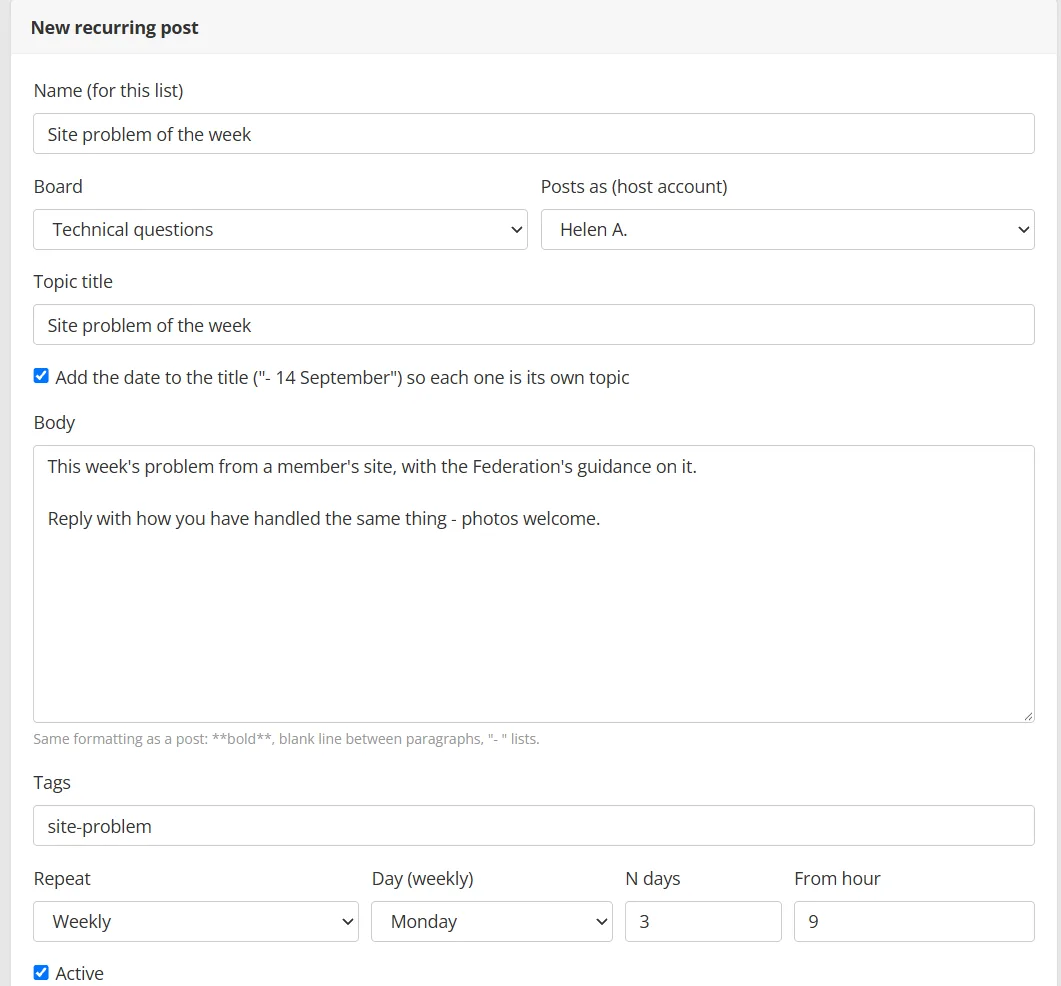
Colossus screen, demonstration data Step 3 of 6Set a weekly prompt
What you do: Make the technical officer's account a host on the Members screen, then add a recurring post called 'Site problem of the week' on the Technical questions board, weekly on Monday from 9:00, posted as that host.
What to notice: Tick 'Add the date to the title' so each week is its own topic. A host is a staff account that has opened the forum once, and its posts carry the Community Host badge.
-
ScreenMembers' forum > New topic (/forum/new/)Step 4 of 6
Ask a regional group a quick question
What you do: Start a topic on a regional board, click 'Add a poll' and offer three dates for the next meeting, one per line.
What to notice: Set 'Choices per member' and 'Closes after', so the poll ends when the decision is needed. Staff can close or reopen it from the topic.
-
ScreenMembers' forum > board and topic pagesStep 5 of 6
Follow from the member's side
What you do: On the Technical questions board click 'Email me about new topics', then open a topic and click Follow.
What to notice: Forum email is opt-in and every message has a one-click way to stop. Replying to a topic follows it too, so members hear back.
-
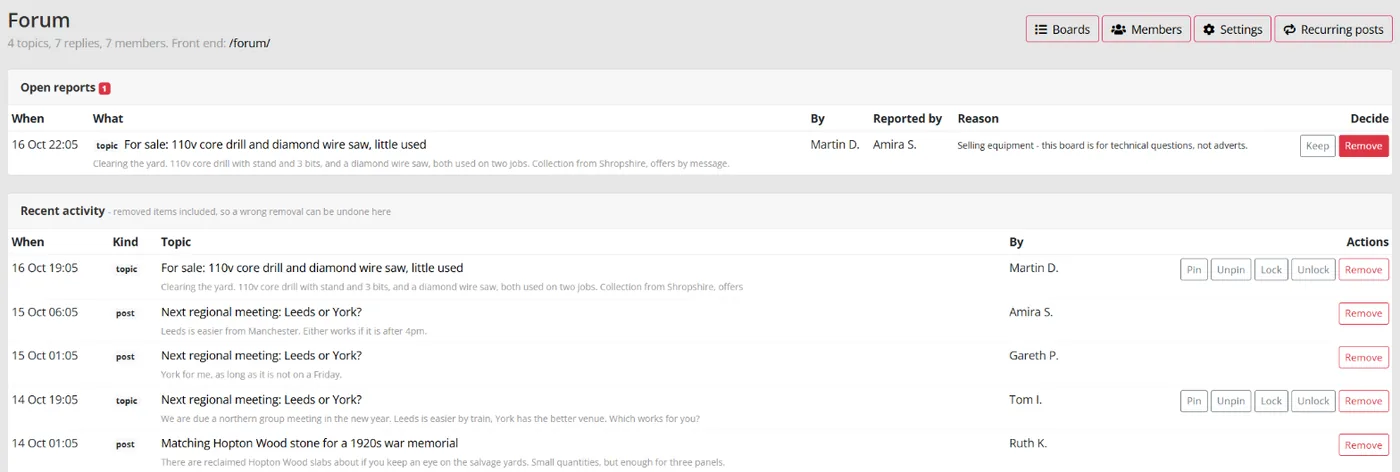
Colossus screen, demonstration data Step 6 of 6Deal with a reported post
What you do: Open the report on a post selling equipment, read the reporter's reason and click Remove.
What to notice: Keep closes the report and leaves the post up. Pin, lock and restore sit in the recent activity list on the same page.
The result
Members see two clear purposes at /forum/. A staff host posts a weekly prompt, followers hear about new topics by email, and reported posts are dealt with from the CRM.
What to measure
Page views show that people looked. Contributions show the community is doing its job. Track these monthly against your own starting point, and give any change a few months before judging it.
- Active contributors each monthMembers who started a topic or replied at least once in the month, not visitors.Higher is better
- Time to first replyHours between a new topic and its first answer, from anyone.Lower is better
- Topics unanswered after two working daysCount them weekly. Each one tells a member that nobody is listening.Lower is better
- Share of replies from members, not staffMember replies divided by all replies in the month.Higher is better, over time
- Boards with no new topic in 90 daysEach one is a candidate to merge or retire.Lower is better
Frequently asked questions
Should we close the forum and relaunch it?
How many boards should we start with?
Do we need a full-time community manager?
How do we stop it turning into adverts or arguments?
Which Colossus plans include the members’ forum?
Sources
- ASAE Association Insights Center, with McKinley Advisors, Strategic Guide to Building and Sustaining Community for Association Success, 2025. Survey of 146 association leaders, mostly in the US.
- MemberWise, Digital Excellence Report 2026. Around 480 UK membership organisations; findings as summarised by research partner Cantarus.
- Higher Logic, 2025 Association Community Benchmark Report, news release, 28 August 2025. Vendor benchmark from anonymised data on about 1,500 associations and nonprofits; the release does not state their geography.
See where your own systems stand
The Membership Systems Health Check is ten multiple-choice questions about your data, renewals, automation, reporting and member experience. You get your score out of 100 on screen straight away, with no email needed to see it.
Prefer to talk it through? Book a tailored demonstration and we will start from this problem, not a feature tour.