- Home
- Membership challenges
- Website updates
Every change to our website needs a developer
Our events page still lists last spring’s conference, and the benefits page describes a discount scheme we closed two years ago. Every change waits in a queue for the agency, or for the one colleague who knows how the CMS works. This guide covers how to give your website owners, a routine and trained editors, with or without new software.
Does this sound familiar?
- A two-line change to the events page waits a week for the agency, then arrives with an invoice.
- Only one person can log in to the CMS, so updates stop whenever they are on leave.
- The newest story on the news page is months old, so visitors assume nothing is happening.
- Member pages still describe a benefit you withdrew, and members ring up to ask for it.
- The contact and join forms email a shared inbox, and nobody is sure who answers them.
A typical case: a trade association moves its annual dinner to a new venue in March. The events officer emails the agency on Monday, gets a quote on Thursday and sees the page corrected the following week. Meanwhile members keep booking from a page showing the old venue, and she writes to each of them by hand.
The website sits outside the day-to-day work
Pages change only when someone complains
Most associations have no routine for checking their website. A page is updated when a member spots an error, so content drifts quietly between complaints.
Words and layout are tangled together
On many sites, changing a sentence means touching page code or a fragile template. Editors learn to avoid it, and every small change goes to the developer.
Everyone uses the site, nobody owns it
Events, membership and policy teams all depend on the website, but it belongs to whoever set it up. Without named page owners, each team assumes another will fix it.
An out-of-date site undersells the association
- Staff time goes on workarounds. Every wrong date or fee brings calls and emails a correct page would have answered, and each fix needs an agency brief.
- Members underrate what you do. A quiet news page and stale member pages make the association look less active than it is, which is hard to undo at renewal.
- Prospects judge you on the website. A firm weighing up membership checks the site first. Last year’s events and an old fees page give it a reason to wait.
- Enquiries can’t be counted. Forms that email an inbox leave no record of how many people asked, what they wanted or whether anyone replied.
In the UK, MemberWise’s Digital Excellence 2026 research found satisfaction with website content management systems rose from 37% in 2023/24 to 55%. The figure is for the CMS, not the membership system. Source
The Charity Digital Skills Report 2026 surveyed 807 UK charities and not-for-profits. Revamping the website is a priority for the year ahead for 36%, and 29% plan to develop content for visibility in AI search tools. Source
The same report found that almost a quarter of UK charities (24%) say their IT support is poor or non-existent. Source
Five steps that work with any system
Give every page and form an owner
List your pages and forms and put a name against each: events to the events officer, fees to membership, consultations to policy. Each form’s submissions should go to where its owner already works, not to a shared inbox.
Put updates on a calendar
Plan news, event and member-page updates a quarter ahead, around your own year: renewals, the conference, the AGM. Once a quarter, each owner reads their pages and confirms or corrects them.
Separate the words from the layout
Use a small set of page templates, so editors change text and images rather than structure. Forms and event lists should sit on the page as blocks that editing the words cannot break.
Train two editors, not one
Two trained people keep updates going through holidays and handovers. Write a one-page guide to how you word and publish pages, and agree which jobs still go to your agency.
Write pages around members’ questions
Use the questions members actually ask, such as “How do I add a colleague?”, as headings with the answer straight after. Plain questions and answers help members, search engines and AI search tools alike.
Pages your own staff can change, with forms that feed the CRM
Colossus keeps your website pages in the same platform as your CRM, so trained staff change them in the browser. Forms and event listings sit on pages as shortcodes and draw on the CRM.
| What it does | How it works | Plans |
|---|---|---|
| Pages edited in the browser | Every website page is stored in Colossus and listed on the content screen with its title, heading and URL. Staff with permission open a page, change its content in the editor and click Update. | Core (optional)GrowthScaleEnterprise |
| “Edit this page” on the live site | Signed-in staff who are allowed to update content see a bar at the foot of each website page. Edit this page opens that page’s content, and Save page puts the change live. Visitors and members see nothing. | Core (optional)GrowthScaleEnterprise |
| Page titles and meta descriptions | Each page has its own Title and Meta Description (SEO) fields on the content screen. The title appears in browser tabs and search results, and the description is the summary search engines can show. | Core (optional)GrowthScaleEnterprise |
| Previous versions kept | Each save, from the content screen or the Edit this page bar, first copies the page as it was into a numbered revision. The change is recorded in the audit trail with the name of the person who made it. | Core (optional)GrowthScaleEnterprise |
| Forms that create CRM leads | Build an enquiry or join form on the CRM’s Lead forms screen, copy its snippet and paste it into any page. Each submission arrives in the CRM as a lead with an owner, not as an email in a shared inbox. | CoreGrowthScale (advanced)Enterprise |
| Event listings from the CRM | Each published event has its own public page with its ticket tiers. An events shortcode on any page lists forthcoming published events, so a past event drops off without anyone editing the page. | Core (basic)GrowthScaleEnterprise |
Colossus does not decide what your pages say. Named owners, a calendar and trained editors are still what keep a website current.
How a small trade association took its website back
Illustrative example. The Association of Mezzanine Floor Installers is a fictional trade association with 260 member firms, a staff of five and no web staff. This is a composite scenario, not a customer story.
Every change went to an agency on a retainer, and only the office manager knew how to log in to the old CMS. The events page still advertised a technical seminar that had already happened. The join form emailed an inbox that nobody checked on Fridays.
After moving the site into Colossus, the team listed its 48 pages and gave each an owner. The office manager and the membership officer learned to edit pages, and the events officer to publish events from the CRM. The join form was rebuilt on the Lead forms screen, so enquiries now arrive as leads with an owner.
Now a fee change or a new council member goes live the day it is agreed, through the Edit this page bar. The events page lists only forthcoming events, drawn from the CRM. Each quarter, every owner reads their pages and corrects what has changed.
Update the website yourself, and send its forms to the CRM
The Association of Mezzanine Floor Installers, a fictional trade association with no web staff, wants its own staff to correct pages the day something changes, instead of waiting for an agency.
- Organisation
- Association of Mezzanine Floor Installers (fictional), 260 member firms
- Goal
- Correct an out-of-date page in-house, set its search title and description, and connect the join form to the CRM
- Takes
- About 85 seconds, 6 steps
- Plan
- Growth, Scale and Enterprise plans (the website CMS is optional on Core; lead forms are on every plan)
A walkthrough of real Colossus screens with a fictional organisation and demonstration data. Your own set-up, fields and wording will differ.
-
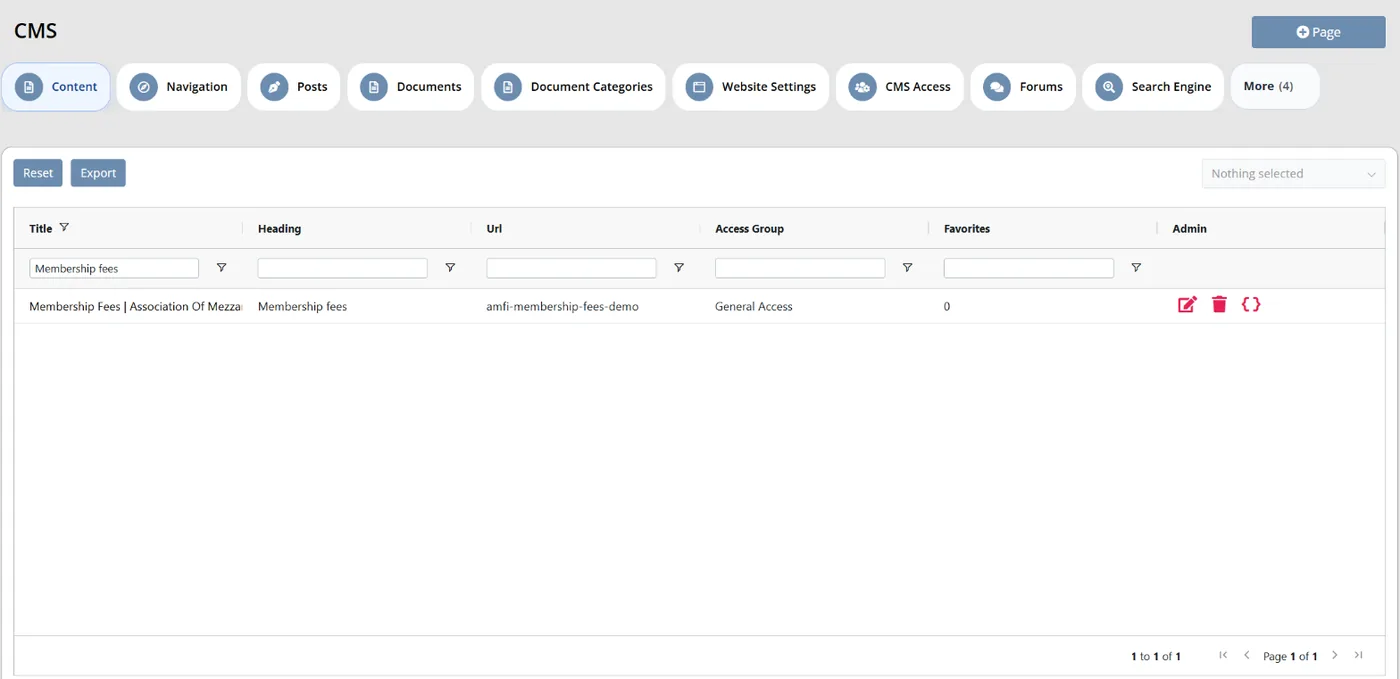
Colossus screen, demonstration data Step 1 of 6Find the page that is out of date
What you do: Open the page list and filter the Title column for 'Membership fees'.
What to notice: Each website page is a row here, with its title, heading and URL, so nothing is hidden in an agency's files.
-
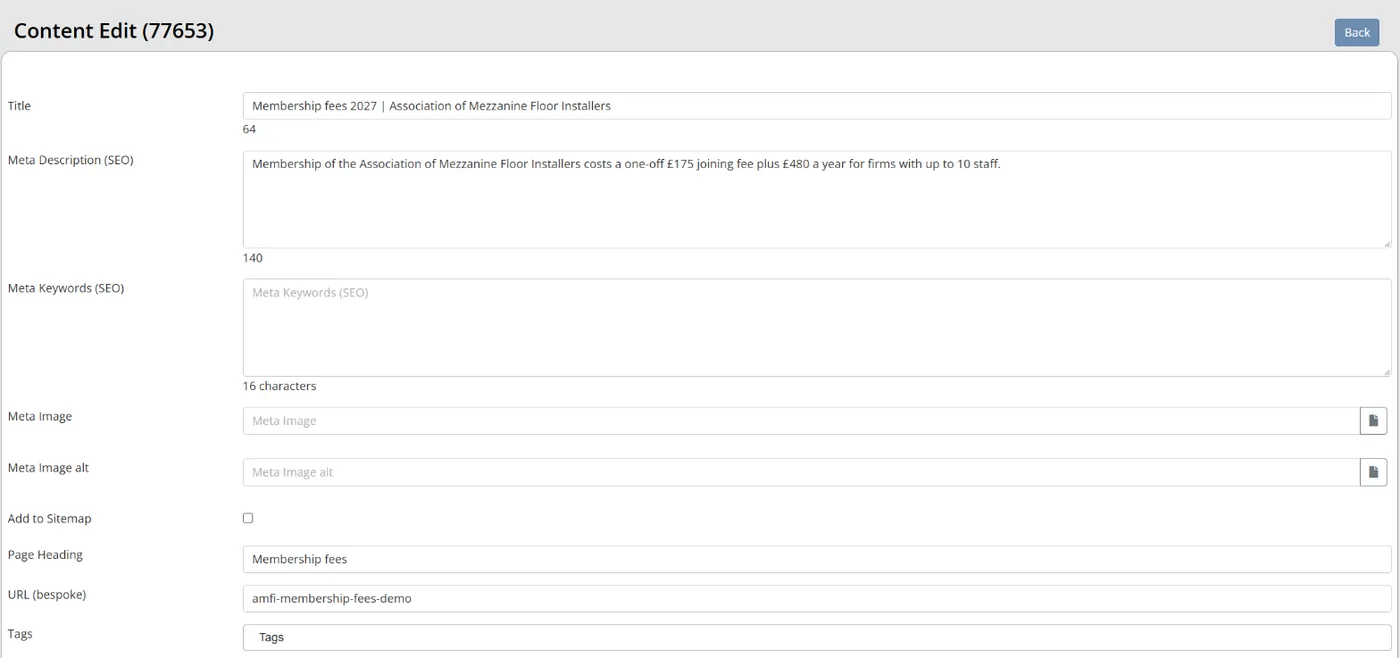
Colossus screen, demonstration data Step 2 of 6Set what search engines show
What you do: Open the page, rewrite the Title as 'Membership fees 2027' and the Meta Description (SEO) as one sentence answering what membership costs. Click Update.
What to notice: The title appears in browser tabs and search results, and the description is the summary search engines can show.
-
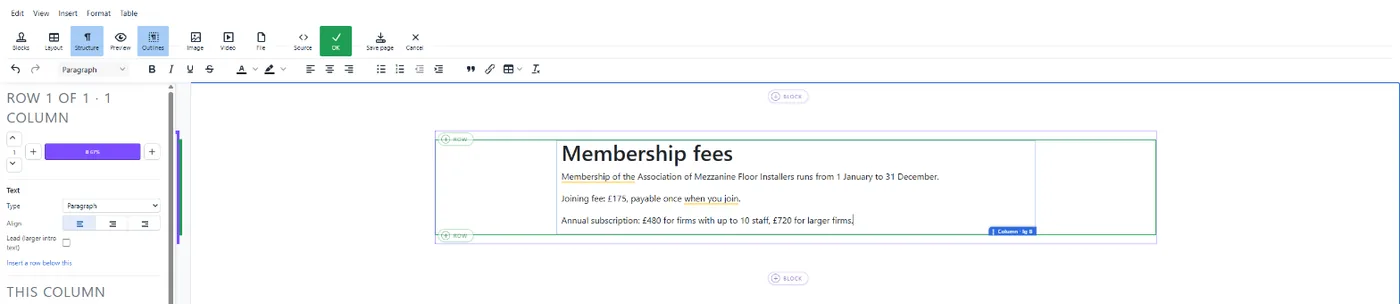
Colossus screen, demonstration data Step 3 of 6Correct the words on the live page
What you do: Signed in, open the fees page on the website, click Edit this page, change the joining fee in the text and click Save page.
What to notice: Only staff allowed to update content see the bar. Each save first stores the previous version as a numbered revision and records who made the change in the audit trail.
-
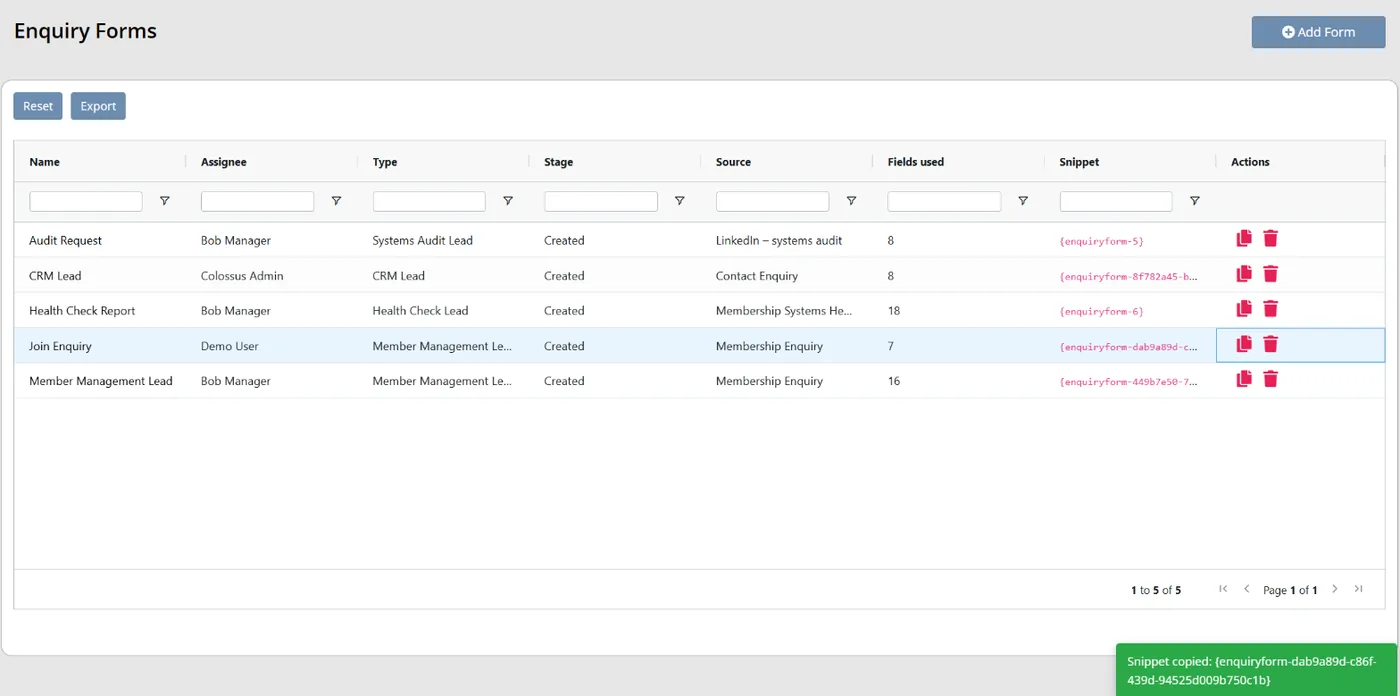
Colossus screen, demonstration data Step 4 of 6Copy the join form's snippet
What you do: Find the 'Join enquiry' form and click its Copy snippet icon.
What to notice: The form's assignee, stage and source are set here, so every enquiry arrives with an owner rather than in a shared inbox.
-
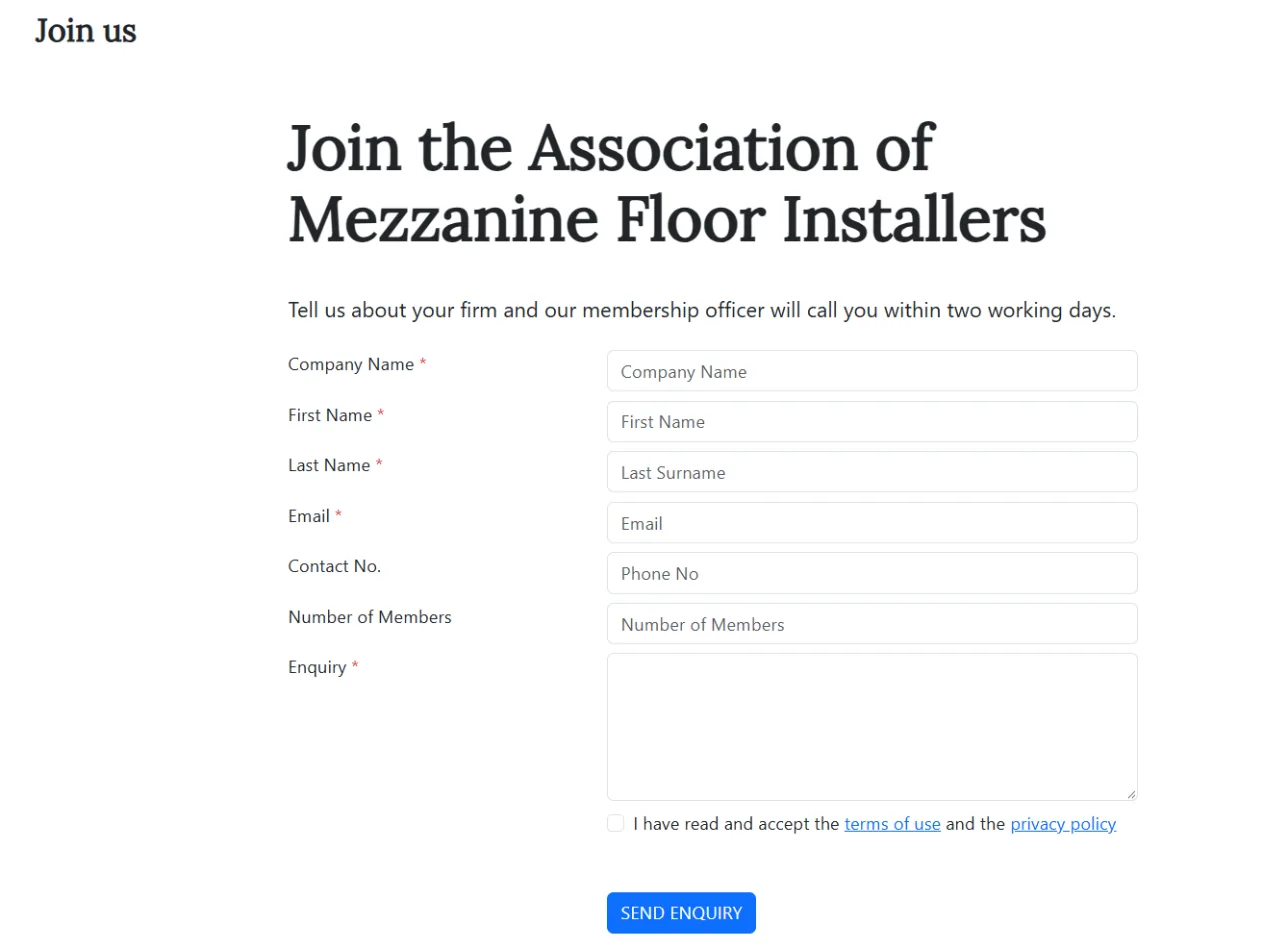
Colossus screen, demonstration data Step 5 of 6Put the form on the join page
What you do: Open the Join us page, paste the snippet into Page Content where the form should appear, and click Update.
What to notice: The form sits on the page as a snippet, so editors can rewrite the words around it without touching the form.
-
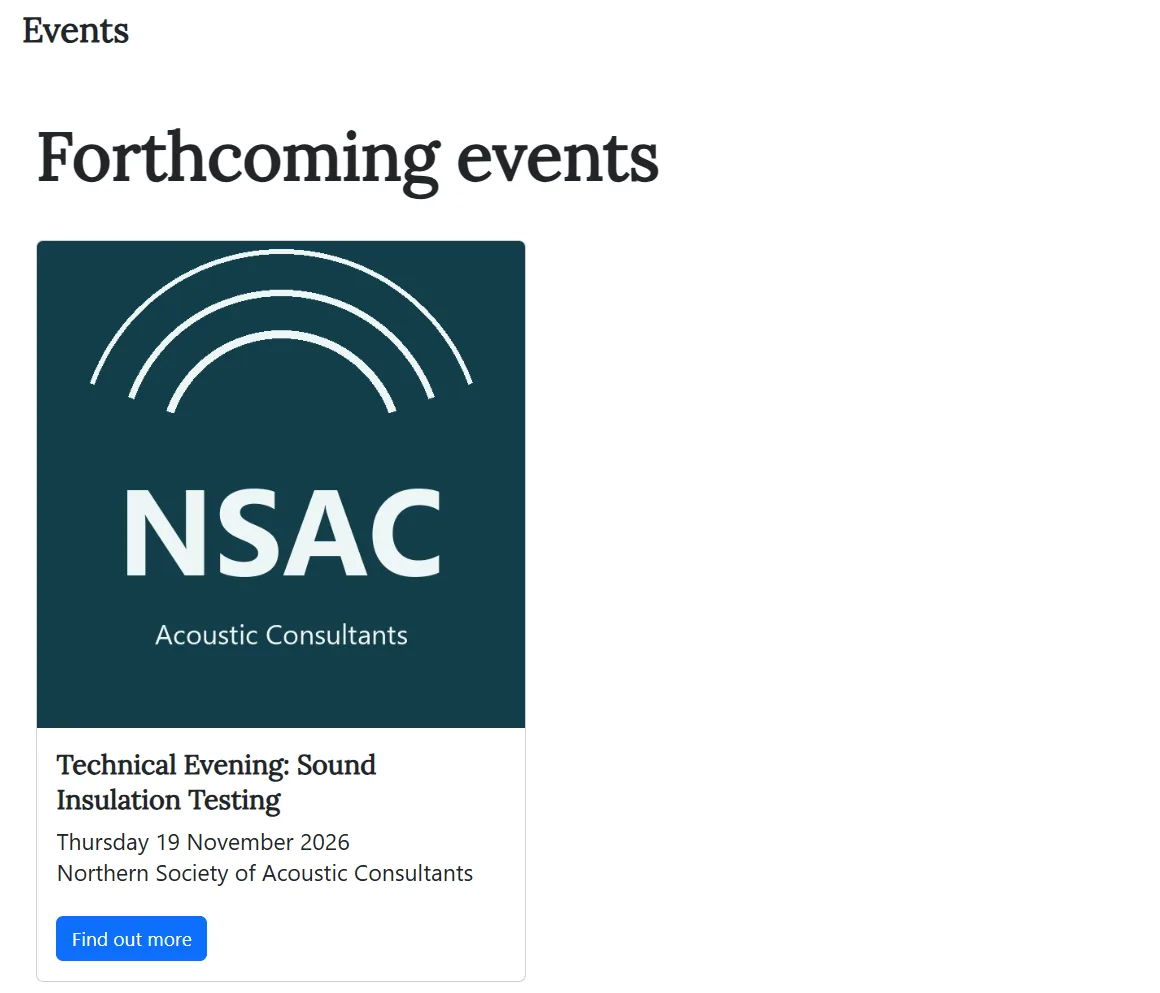
Colossus screen, demonstration data Step 6 of 6Check the events page looks after itself
What you do: Open the website's events page and follow a forthcoming event through to its own page.
What to notice: The events page is a CMS page with the events summary shortcode. It lists forthcoming events that are shown on the website and open for booking, not drafts, and each event page shows its ticket tiers, so nobody retypes dates or prices on the website.
The result
Trained staff change page content from the live site or the content screen, each save keeps the previous version, join enquiries arrive in the CRM as leads with an owner, and the events page lists forthcoming events from the CRM.
What to measure
Take a baseline in the first month, then compare each quarter with the last. The aim is a shorter wait for changes and fewer pages that nobody has checked.
- Time from request to live changeWorking days between someone asking for a page change and it appearing on the website.Lower is better
- Pages checked this quarterThe share of pages whose owner has read and confirmed them in the last three months.Higher is better
- Changes made in-houseRoutine page changes made by your own editors, against those sent to an agency or developer.Higher is better for routine changes
- Errors reported on the websiteOld dates, prices, names or links reported by members or staff, counted each month.Lower is better
- Form enquiries with an owner and a replyWebsite form submissions that have a named owner and a recorded response.Higher is better
Frequently asked questions
Do we still need a web agency?
How many people should be able to edit the website?
What if an editor breaks a page?
Should we be rewriting pages for AI search?
Which Colossus plans include the website CMS?
Sources
- MemberWise, Digital Excellence Report 2026, published 2026 from data collected March to September 2025. Around 480 UK membership organisations; findings as summarised by research partner Cantarus, 24 March 2026.
- Zoe Amar Digital and Think Social Tech, Charity Digital Skills Report 2026, chapters Priorities for the year ahead, IT provision, connectivity and services and Artificial intelligence, accessed 18 October 2026. 807 responses from UK charities and not-for-profits, collected 5 March to 20 April 2026 through a self-selecting online survey.
See where your own systems stand
The Membership Systems Health Check is ten multiple-choice questions about your data, renewals, automation, reporting and member experience. You get your score out of 100 on screen straight away, with no email needed to see it.
Prefer to talk it through? Book a tailored demonstration and we will start from this problem, not a feature tour.