- Home
- Membership challenges
- CPD tracking
Tracking members' CPD is a chore for everyone
Members are meant to log CPD as they go, but many rebuild a year of learning in the week before the deadline. We spend January chasing records and February checking a sample against old booking lists. A lot of the hours claimed are for our own events, and we still ask members to prove they came.
Does this sound familiar?
- Members keep CPD in their own spreadsheets, Word files or paper diaries, each laid out differently.
- The scheme has so many categories and weightings that members ring the office to ask what counts.
- Near the deadline, staff email everyone for their records and then chase the silent ones well into the new year.
- Evidence arrives as email attachments and photos of handouts, saved wherever the person opening it chose.
- Checking a claim for one of your own webinars means digging out a booking export from months ago.
A typical case: an engineering institute asks members for 25 hours of CPD a year. In January its standards officer requests records from a random sample of members. Many claims are for the institute’s own evenings and webinars, yet each one is checked against old sign-in sheets by hand.
The record gets built at the wrong end of the year
The deadline is the only prompt
Many schemes ask for one return at the end of the year, so that is when members start writing. They rebuild twelve months from memory, calendars and old emails.
The evidence sits in other places
Bookings, webinar platforms, course sites and members’ own files each hold part of the record. None of them is joined to the member record, so staff gather it by hand.
Nobody owns the member’s side
The standards team owns the rules and the audit, while events and learning staff run the activities. Nobody is asked to make the record easy for the member to keep.
A log nobody keeps costs everyone
- Staff time goes on chasing, not guidance. Requests, reminders and follow-ups fill the weeks after the deadline, every year.
- Members feel CPD is paperwork. A log rebuilt once a year feels like compliance, and the learning your organisation provides gets lost in it.
- Your own learning offer looks no different. If learning with you is no easier to evidence than learning elsewhere, members have one less reason to stay.
- The board sees a return rate, not a picture. Nobody can say which of your activities members count towards CPD, or which they never use.
In the UK, MemberWise’s Digital Excellence 2026 research found that eLearning and CPD functionality in member apps fell 18 points, to 9%. Event access is the main app function, at 65%. Source
In Marketing General’s 2024 benchmark of mostly US associations, continuing education ranked second among reasons to join, at 42%, behind networking at 67%. Respondents were association professionals, not members. Source
The same report found that rising professional development and certification activity went with membership growth and renewal. That is a correlation, not proof that learning causes renewal. Source
Five ways to make CPD easier to keep and to check
Keep the scheme simple
Choose one unit, hours or points, and three or four categories at most. A member should be able to explain the rules in a sentence. Change them as rarely as you can.
Record learning where it happens
Make logging part of things members already do. Ask for one line on what they took away in the event feedback, at the end of a course or after a mentoring session.
Credit what you already know
Your own events, meetings and courses already tell you who took part. Count that learning from your records, so members log only what they did elsewhere.
Publish the evidence rules, then sample
Put what counts as evidence on one page, with examples. Then check a random sample you can finish in a few weeks, rather than skimming every record.
Remind early, not at the deadline
Send the first reminder in the opening months of the CPD year, with a nudge at the halfway point. A deadline reminder only reaches people who are already behind.
Where the evidence already lives
Colossus holds the attendance and learning records a CPD scheme draws on. That covers attendance at your events and meetings, courses in your members’ area and evidence files on each account.
| What it does | How it works | Plans |
|---|---|---|
| Attendance at events and meetings | Staff mark each event booking as Attended (In person), Attended (Online), Apologies or Did Not Attend, and record each meeting contact the same way. Meetings are listed on the member’s account, and event attendance counts towards its last contacted date. | Core (basic)GrowthScaleEnterprise |
| Courses in the members’ area | Courses are built from modules, chapters and sections of text, video, files and discussion. Members click Mark complete as they finish each section. My Learning shows each course as Not started, In progress or Completed, and Completed means every section is done. | GrowthScaleEnterprise Configured during implementation |
| Automatically marked quizzes | True/false and multiple-choice questions are marked automatically. A member’s Check my score view shows their answer, the correct answer and the result for each question. | GrowthScaleEnterprise Configured during implementation |
| Evidence on the member’s account | Staff add a note with an attached file, such as a PDF or an image, on the account’s Documents tab. Each item shows the date it was added. | CoreGrowthScaleEnterprise |
| Saved attendance reports | Pivot reports over the activity log, which includes updates made on the event attendance screen. Choose the data points and a date range such as This Year, then save the report to reopen it later. | GrowthScaleEnterprise |
Attendance is marked by your staff, and course progress is recorded as members mark each section complete. The members’ learning area is switched on for your organisation during implementation.
How an inspectors’ institute stopped rebuilding its sample from booking exports
Illustrative example. The Mercia Institute of Building Inspectors is a fictional professional body with 2,300 members, each asked for 30 hours of CPD a year. This is a composite scenario, not a customer story.
Members logged hours in their own spreadsheets, under five categories with different weightings. Each January the two-person standards team requested a sample of records and checked every event claimed against old booking exports. Chasing missing evidence ran into March.
The institute cut its scheme to hours in three categories and published a one-page list of acceptable evidence. Its technical evenings and webinars now run as Colossus events, with attendance marked against each booking on the night. Two short regulation-update courses sit in the members’ area, each ending in a quiz, and members see their completed courses in My Learning.
The rules now count the institute’s own events from its attendance records, so members log only learning done elsewhere. When a member sends evidence of an outside course, staff attach it to the account’s Documents tab. In January the team opens its saved attendance report, samples 120 members and asks only for evidence it does not hold.
Have the evidence for a CPD sample on file before the sample is drawn
The Mercia Institute of Building Inspectors, a fictional professional body, wants the attendance and learning records its year-end CPD sample draws on to be in one place as the year goes.
- Organisation
- Mercia Institute of Building Inspectors (fictional), 2,300 members
- Goal
- Run a short course with a quiz in the members' area, mark attendance at a technical evening, file a member's outside evidence on their account and save the attendance report for the year-end sample
- Takes
- About 85 seconds, 7 steps
- Plan
- Growth, Scale and Enterprise plans for the learning area and saved reports, configured during implementation; event attendance on every plan (basic on Core); account documents on every plan
A walkthrough of real Colossus screens with a fictional organisation and demonstration data. Your own set-up, fields and wording will differ.
-
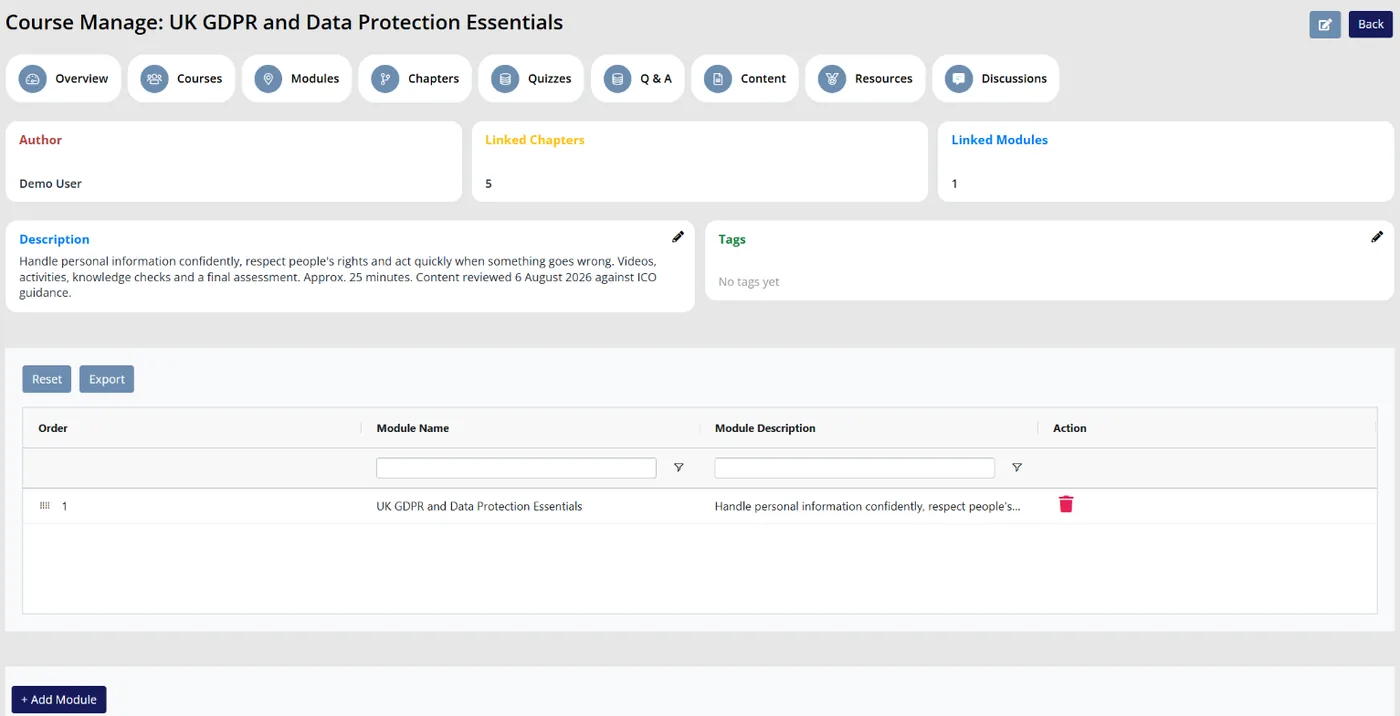
Colossus screen, demonstration data Step 1 of 7Check the course before members start
What you do: Open the course, for example the year's regulation update, and check its linked modules and chapters are in the right order.
What to notice: The overview shows the author and the number of linked chapters and modules. Modules can be dragged into a new order.
-
ScreenMembers' area > My Learning > course playerStep 2 of 7
Work through a section as a member
What you do: Signed in as a member, open My Learning, click Start course, read the first section and click Mark complete, then Next.
What to notice: The button turns to Completed, and the done count beside the progress bar includes the section on the next page.
-
ScreenMembers' area > course player > quiz sectionStep 3 of 7
Answer the end-of-course quiz
What you do: Answer the true/false and multiple-choice questions, then click Check my score.
What to notice: Answers save as they are chosen. The score view lists each answer beside the correct one, with a tick or a cross.
-
ScreenMembers' area > My LearningStep 4 of 7
Finish the course
What you do: Mark the last section complete, click Finish and choose the Completed filter.
What to notice: The course shows as Completed, with a full progress bar, once every section is marked complete.
-
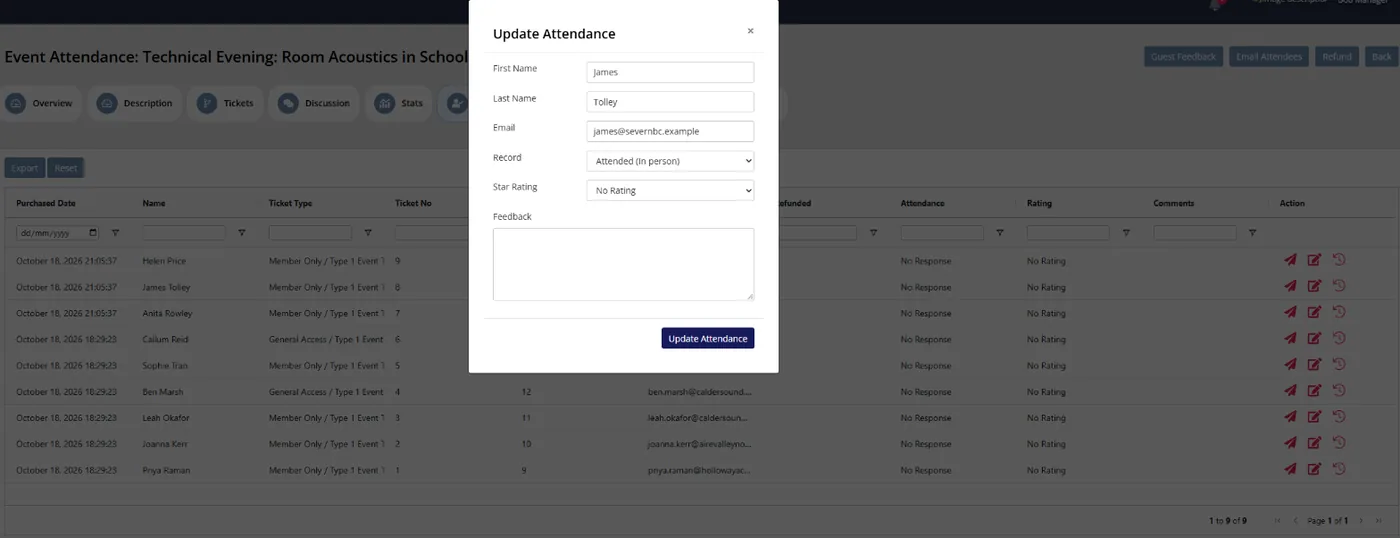
Colossus screen, demonstration data Step 5 of 7Mark who came to the technical evening
What you do: Open a booking in Update Attendance, set Record to Attended (In person) or Attended (Online) and click Update Attendance.
What to notice: Attendance is held against the booking, so the institute already has the record when the member claims the hours.
-
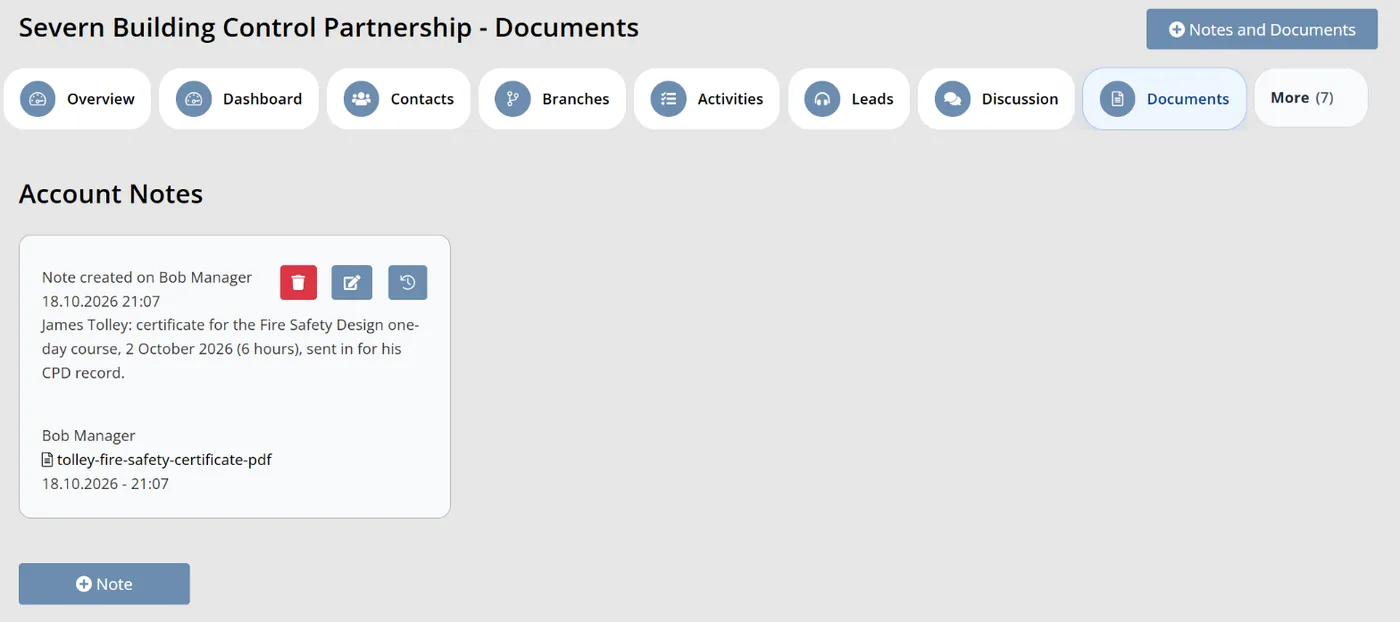
Colossus screen, demonstration data Step 6 of 7File evidence of an outside course
What you do: Open the member's account, go to Documents and click Notes and Documents. Add a short note, attach the PDF the member sent and click Save changes.
What to notice: The note and its file sit on the account with the date they were added, ready if the member is sampled.
-
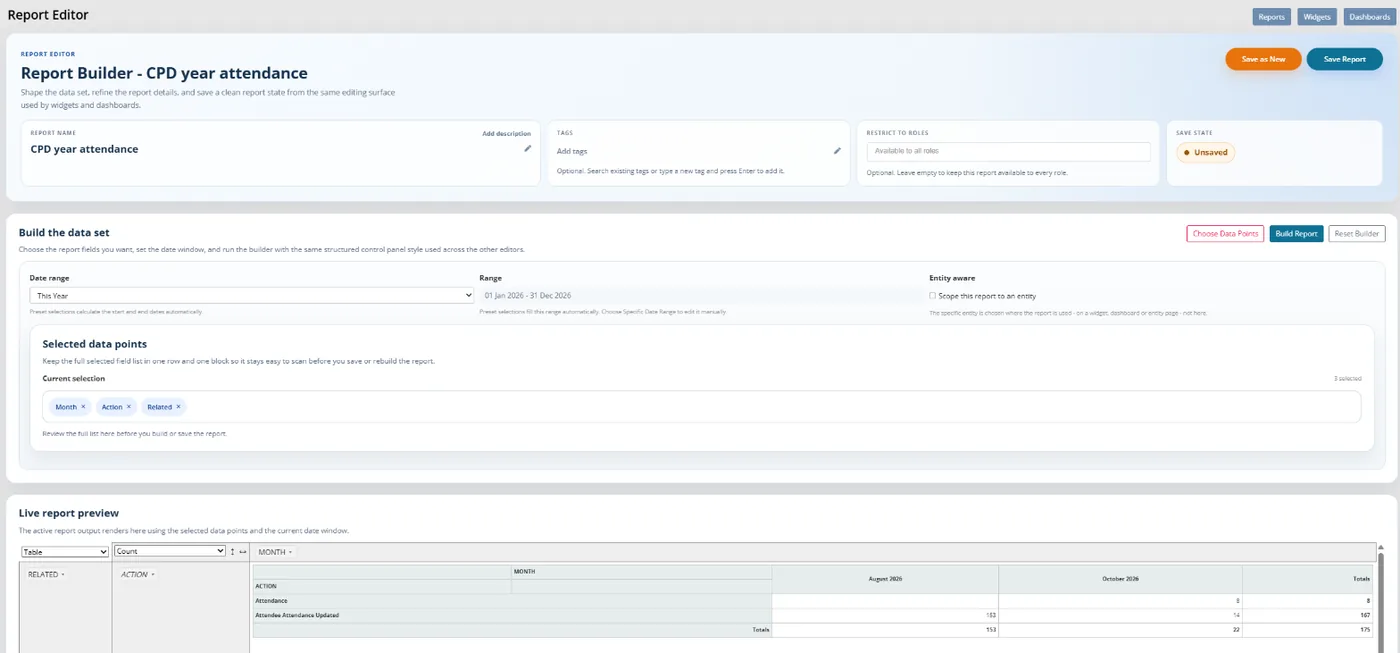
Colossus screen, demonstration data Step 7 of 7Save the attendance report for the sample
What you do: Click Create Report, choose data points such as Month, Action and Related, set Date range to This Year and click Build Report. Name it CPD year attendance and click Save Report.
What to notice: Attendance updates are in the audit data the report reads, so the team reopens this report at year end rather than rebuilding it.
The result
The member has a completed course in My Learning, attendance marked against their booking and their outside course evidence on their account. The standards team has a saved report of the year's attendance ready for the sample.
What to measure
Compare a full CPD year with the previous one before drawing conclusions. The aim is less chasing at the deadline, and records members can keep as they go.
- Records submitted on timeMembers who returned their CPD record by the deadline, as a share of those required to.Higher is better
- Hours counted from your own recordsThe share of credited hours that came from events, meetings and courses you already hold, rather than from members’ own logs.Higher is better
- Staff hours on chasingTime spent on requests, reminders and follow-ups for one CPD year, logged before and after.Lower is better
- Working days to close the sampleFrom drawing the sample to the last decision on a sampled record.Lower is better
- Sampled members asked twiceHow many sampled members needed a second request for evidence.Lower is better
Frequently asked questions
Should our scheme use hours or points?
How many CPD records should we check each year?
Can attendance at our own events count without members logging it?
What evidence should members keep for learning elsewhere?
Which Colossus plans include the learning area and attendance records?
Sources
- MemberWise, Digital Excellence Report 2026. Around 480 UK membership organisations; findings as summarised by research partner Cantarus.
- Marketing General Inc., 2024 Membership Marketing Benchmarking Report, 16th edition. 696 associations, mostly in the US; 521 answered the question on reasons to join.
See where your own systems stand
The Membership Systems Health Check is ten multiple-choice questions about your data, renewals, automation, reporting and member experience. You get your score out of 100 on screen straight away, with no email needed to see it.
Prefer to talk it through? Book a tailored demonstration and we will start from this problem, not a feature tour.