- Home
- Membership challenges
- Committee admin
Our committees and member groups run on email and spreadsheets
Who sits on which committee lives in one colleague’s spreadsheet, and the papers live in their sent items. We know roughly when each group last met, but not who came. Every spring we ring the same few people to fill an empty chair.
Does this sound familiar?
- The list of who sits on which committee is a spreadsheet one person keeps, and nobody is sure it is current.
- Papers go out as email attachments, so the latest version is whichever one was forwarded last.
- Attendance is a line in the minutes, if it is noted at all. Nobody can say who has missed the last four meetings.
- Nobody wrote down when each term of office began, so a chair who agreed to two years is still in post after six.
- When a seat falls empty, the same handful of people are asked again.
A typical case: a trade association’s board asks which of its committees and regional groups are actually working. The governance officer spends two days searching minutes, calendar invitations and email threads. Two regional groups have not met for a year, and one committee has relied on the same three people since 2019.
Every group is run its own way
Each group has its own clerk and habits
Every committee secretary keeps a list, a folder and a way of noting who came. When that person moves on, the history goes with them, and no two groups can be compared.
Groups sit outside the member record
The CRM knows the member firm. Its seats, papers and attendance sit in spreadsheets, inboxes and shared drives, so nobody sees a firm’s involvement next to its membership.
Volunteering runs on goodwill, not a plan
Nobody owns recruitment, induction or rotation. Seats go to people staff already know, thanks are informal, and volunteers drift off without anyone noticing.
Heavy admin, and value nobody can see
- Staff time goes on clerking. Chasing replies, resending papers and rebuilding membership lists fill the week before every meeting.
- Members’ involvement goes unseen. A firm with people on three committees looks the same at renewal as one that has never taken part.
- Weak groups decline quietly. A committee that struggles for a quorum is noticed when its chair resigns, not when attendance first fell.
- The board cannot see its own governance. Any report on which groups met, who came and which seats are empty is put together by hand.
A 2019 ASAE Foundation article on volunteer management reports that staff who work with boards and committees spend 31% of their time managing them. ASAE’s research covers mostly US associations. Source
ASAE Foundation research on volunteering, mostly in US associations, found that on average 70% of members have never volunteered. Of the non-volunteers, 31% said they did not volunteer because no one had asked them. Source
In England, the DCMS Community Life Survey 2024/25 found that 17% of adults had taken part in formal volunteering at least once a month. That is down from a high of 27% in 2013/14, and it covers all volunteering, not only membership bodies. Source
Five habits for groups that keep working
Keep one list of groups, seats and terms
List every committee, working group and regional section, each seat in it and who holds it. Record when each term starts and ends, so a vacancy is visible a year ahead.
Put the papers in one place
Store each meeting’s agenda, papers and minutes against the group, not in an inbox. Point people to that one copy, so nobody works from an old version.
Record attendance at every meeting
Mark attended, apologies or did not attend for every person, every time, within a day. A year of that record shows patterns nobody remembers.
Review every group once a year
Put meetings held, attendance and empty seats for each group side by side. Agree whether each one carries on, merges with another or closes.
Make the ask specific, then thank and rotate
Ask a named person for a named role, saying how much time it takes and for how long. Thank volunteers publicly when they step down, and rotate seats so newer members get a turn.
Groups, seats, papers and attendance in the CRM
In Colossus each committee, working group or regional section is a member group in the CRM. Its contacts, meetings, attendance and documents sit next to your member accounts.
| What it does | How it works | Plans |
|---|---|---|
| Groups and roles | Group types are your own list, such as committee, working group or regional section. Contacts are added by searching the CRM, and each can be given a role from your own role list. Each group has a communication email and its own Meeting Invite, Add Attendee and Meeting Update email templates. | Core (basic)GrowthScale (advanced)Enterprise |
| Meetings and attendance | When a meeting is added to a group, the group’s contacts become its invitees. On the meeting, staff record each reply: Accepted, Declined or Tentative. They then mark each person as attended in person, attended online, apologies or did not attend. | Core (basic)GrowthScale (advanced)Enterprise |
| Group papers | A group’s Documents tab holds notes with attachments, such as agendas, papers and minutes. Each entry has its own audit trail. | Core (basic)GrowthScale (advanced)Enterprise |
| Attendance and group health | Group attendance shows each member firm against every meeting in a period you choose, with its attendance for the period as a percentage. The group overview shows health over six months and the next meeting’s replies. Group Health compares every group of one type. | Core (basic)GrowthScale (advanced)Enterprise |
| Meetings in the member portal | Members see their meetings in the member portal, with dates, times and subject, and the meeting link where you choose to show it. | Core (basic)GrowthScale (advanced)Enterprise Configured during implementation |
| Attendance in renewal-risk rules | A firm’s meeting attendance score runs from 0 to 100 over the number of months you choose. It can be used in your renewal-risk rules, as can how many of the firm’s contacts attend. | ScaleEnterprise Configured during implementation |
Attendance is recorded by your staff, and the attendance and health figures are built from that record. Risk rules are written by your team and are not a prediction.
How a trade association brought 14 groups into one place
Illustrative example. The Federation of Industrial Door Installers is a fictional trade association with 480 member firms, nine committees and five regional groups. This is a composite scenario, not a customer story.
Each group had its own secretary, spreadsheet and email list. Papers went out as attachments, and attendance went in the minutes when someone remembered. Before each AGM, the governance officer spent days working out who held which seat.
The association set up Committee and Regional Group as group types, and Chair, Vice-chair, Secretary and Member as roles. Each group’s contacts went in with their role, and each meeting’s papers went on the group’s Documents tab. Secretaries marked attendance on the meeting page within a day.
After the first year, Group Health showed one regional group with few meetings and low attendance. The board merged it with its neighbour. The Technical Committee’s Attendance tab showed several firms that had sent nobody for months, and the membership manager rang each one before renewal.
Bring a committee's seats, papers and attendance into one place
The Federation of Industrial Door Installers, a fictional trade association, wants its committees and regional groups run from the CRM instead of spreadsheets and email.
- Organisation
- Federation of Industrial Door Installers (fictional), 480 members
- Goal
- Set up the Technical Committee with its roles, papers and attendance, then compare every committee at the end of the year
- Takes
- About 85 seconds, 7 steps
- Plan
- Core (basic), Growth, Scale (advanced) and Enterprise plans; the portal meetings page is configured during implementation
A walkthrough of real Colossus screens with a fictional organisation and demonstration data. Your own set-up, fields and wording will differ.
-
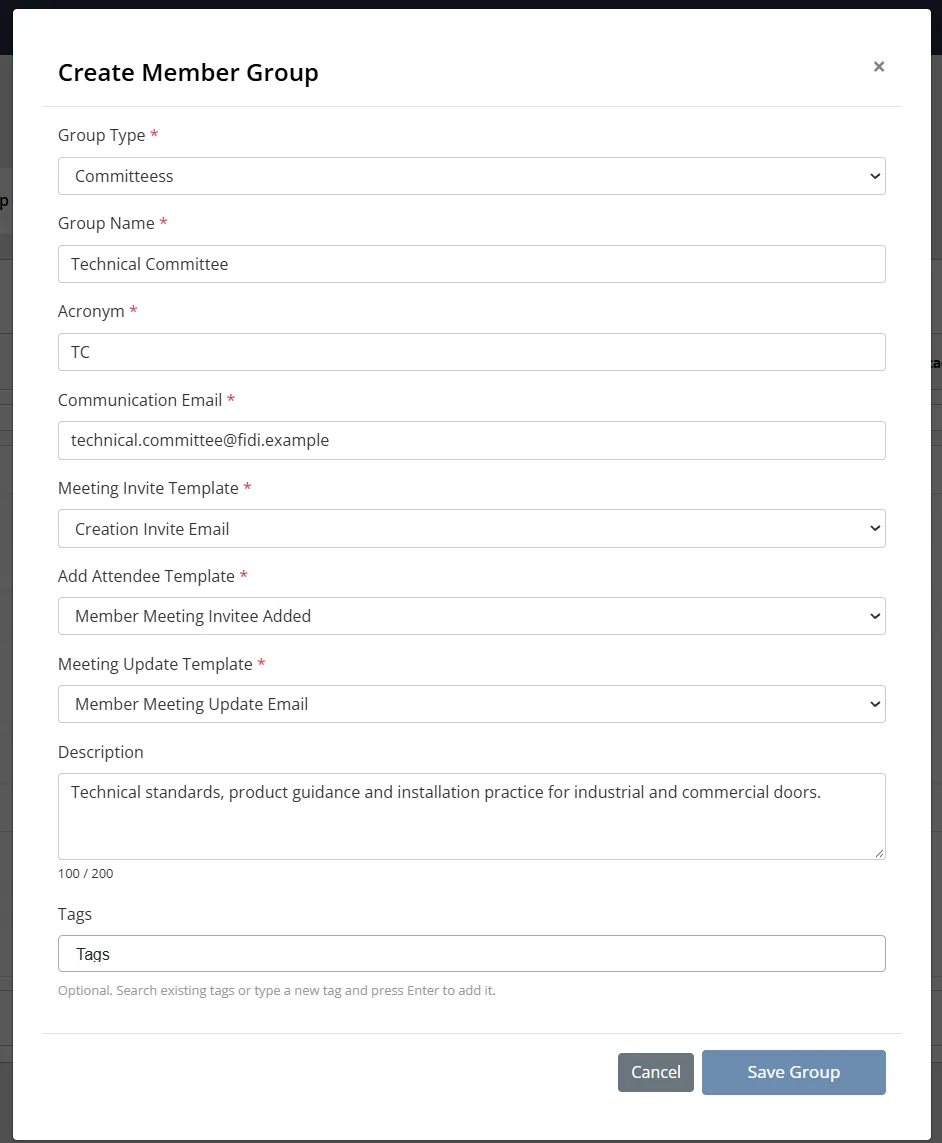
Colossus screen, demonstration data Step 1 of 7Create the committee
What you do: Click Create Group, choose the Committee group type, enter Technical Committee with the acronym TC, and pick the Meeting Invite, Add Attendee and Meeting Update templates.
What to notice: Group types and email templates are your organisation's own. The Groups list shows each group's members and contacts, and its previous and current year attendance.
-
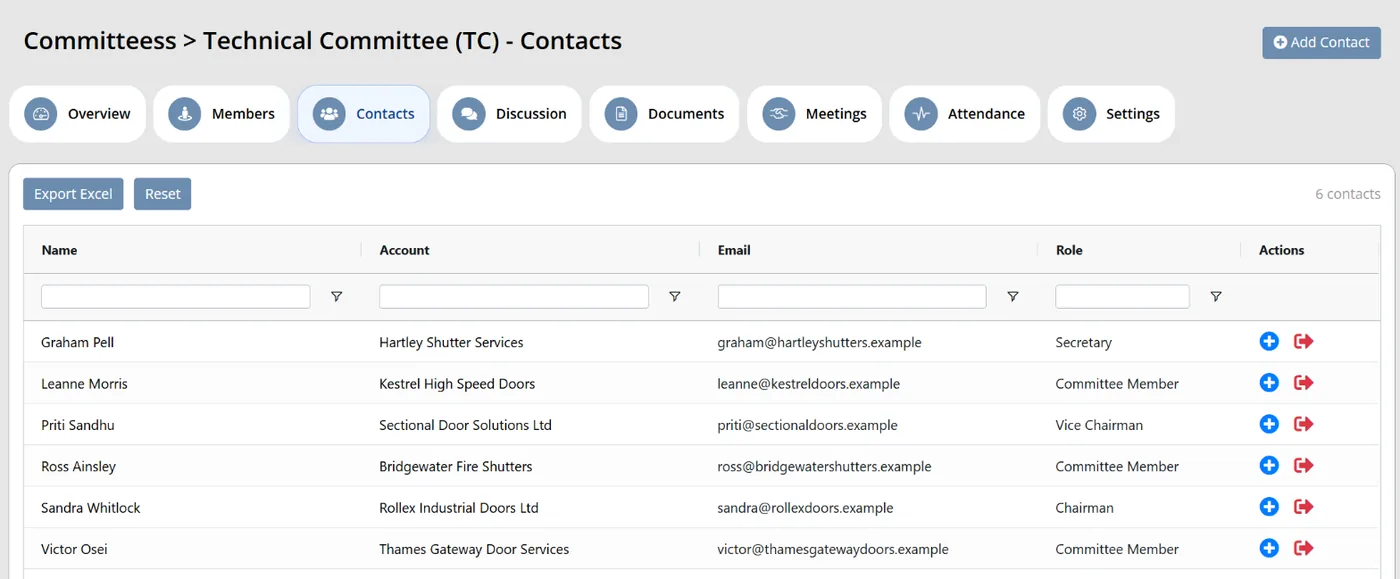
Colossus screen, demonstration data Step 2 of 7Add the members and their roles
What you do: Click Add Contact, search for the committee's members and save. Then use Assign role to make one contact Chairman and another Secretary.
What to notice: Roles come from your own list and show in the Role column, so the whole team can see who holds which seat.
-
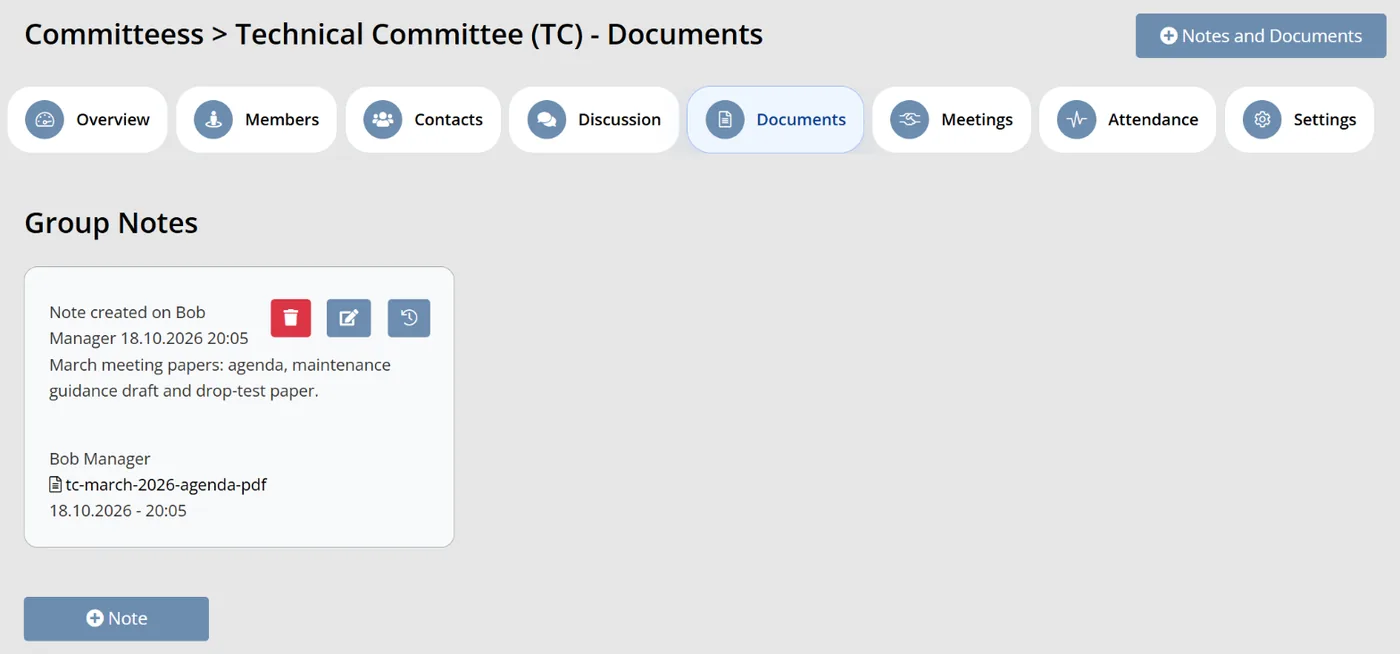
Colossus screen, demonstration data Step 3 of 7File the meeting papers
What you do: Click Notes and Documents, add a short note such as 'March meeting papers' and attach the agenda and papers.
What to notice: The papers sit with the group rather than in someone's sent items, and each entry keeps an audit trail.
-
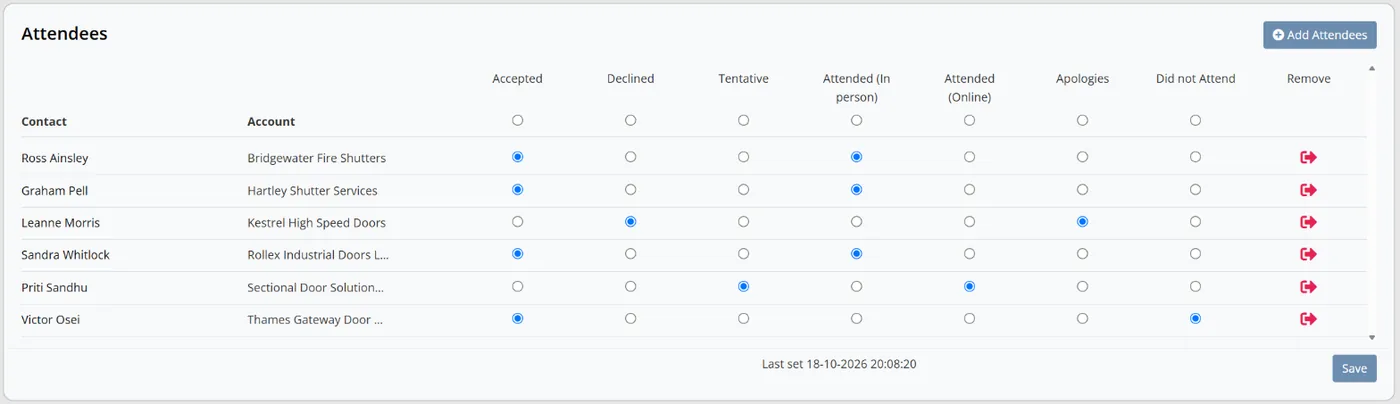
Colossus screen, demonstration data Step 4 of 7Record who came
What you do: Open the March meeting. For each attendee, mark Attended (In person), Attended (Online), Apologies or Did not Attend, then click Save.
What to notice: Replies to the invitation (Accepted, Declined, Tentative) are recorded separately from attendance, and the page shows when attendance was last set.
-
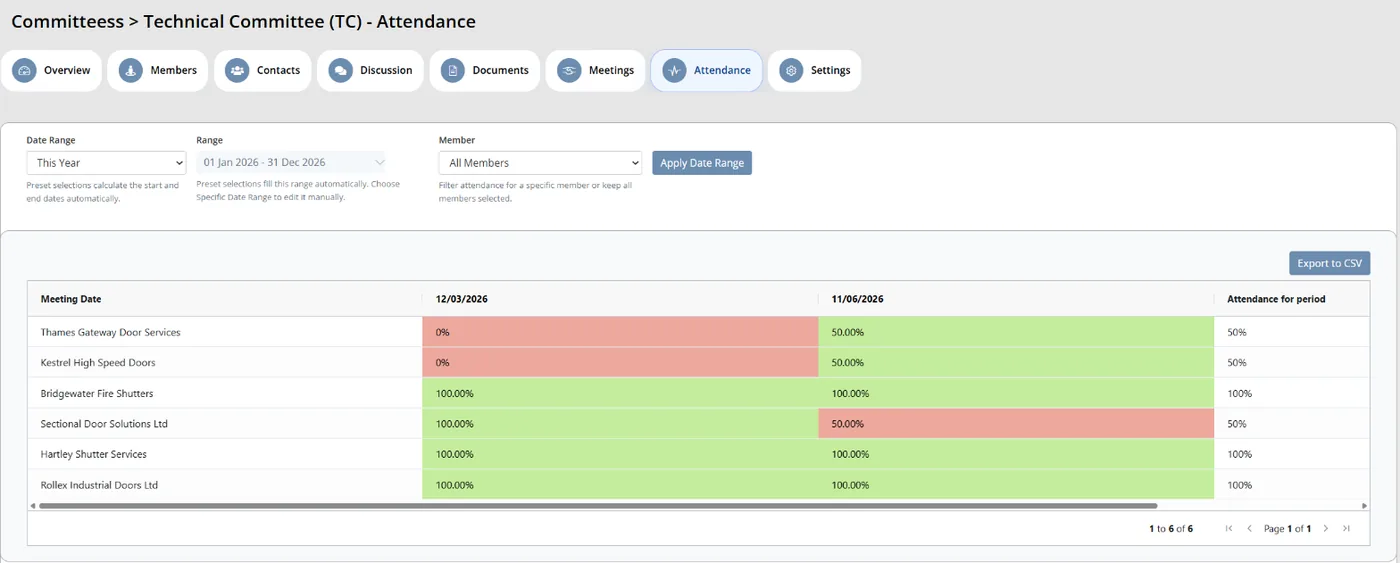
Colossus screen, demonstration data Step 5 of 7See each firm's record
What you do: Choose This Year in Date Range and click Apply Date Range.
What to notice: Each member firm appears against every meeting in the period, with its attendance for the period as a percentage. Staff with download rights can export it to CSV.
-
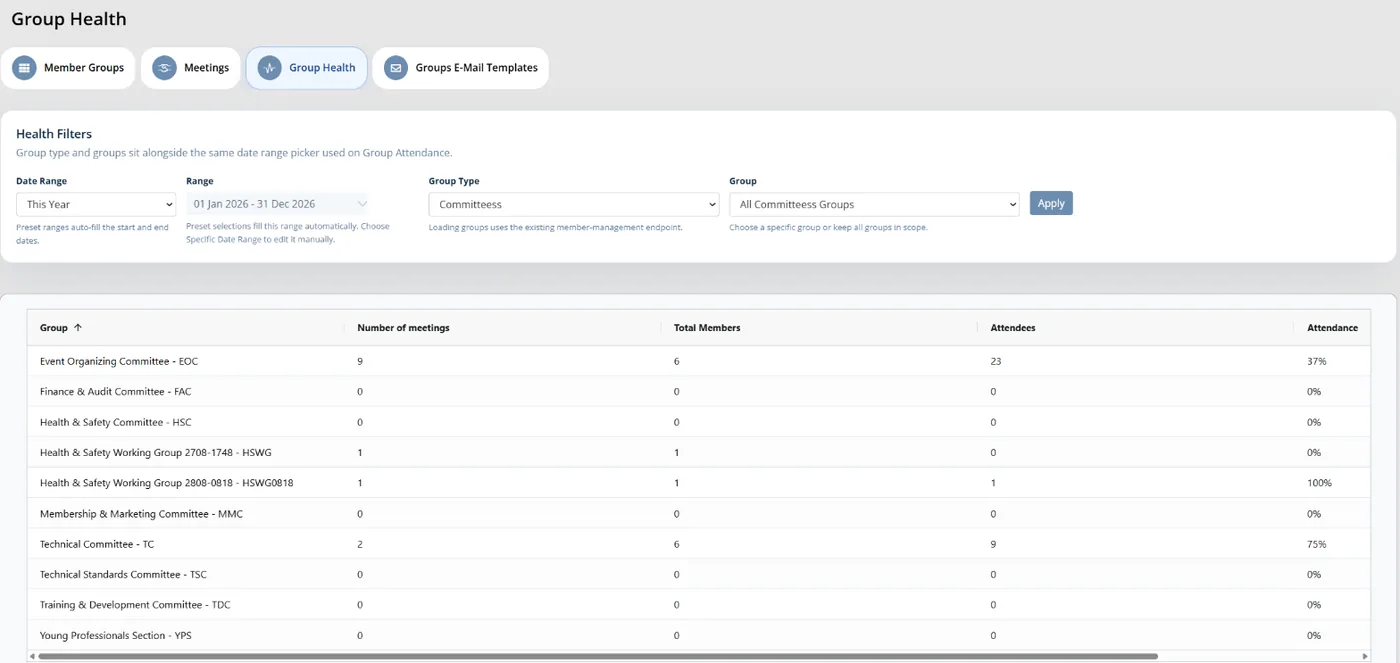
Colossus screen, demonstration data Step 6 of 7Compare every committee
What you do: Choose the Committee group type, keep all groups selected, pick This Year and click Apply.
What to notice: Number of meetings, total members, attendees and attendance sit side by side for every committee. A group's Overview adds its health over six months and the next meeting's replies.
-
ScreenMember portal > meetings pageStep 7 of 7
Check what members see
What you do: Sign in to the portal as a committee member and open the meetings page.
What to notice: Members see their meetings with dates, times and subject, and the meeting link where you choose to show it. The portal meetings page is configured during implementation.
The result
The Technical Committee's members, roles, papers and attendance record sit in the CRM. The membership team compares every committee's meetings and attendance on one screen, and members see their meetings in the portal.
What to measure
Track these for a full year of meetings against your own starting point. The aim is less clerking, and a clear view of which groups are working and who keeps them going.
- Groups with a complete seat listGroups where every seat has a named holder and term dates, as a share of all groups.Higher is better
- Meetings with attendance recorded within two working daysThe share of meetings where every invitee was marked attended, apologies or did not attend by the second working day.Higher is better
- Staff hours per meetingTime spent on invitations, papers, attendance and follow-up for one meeting, logged before and after.Lower is better
- Attendance by groupEach group’s attendance for the year, compared with the year before.A falling group needs a conversation
- First-time volunteersPeople taking a seat for the first time, as a share of all seats filled in the year.Higher is better
Frequently asked questions
How long should a committee term be?
Is it worth recording apologies separately from absence?
How do we tell whether a group is healthy?
Can members see their committee meetings?
Which Colossus plans include committee and member group management?
Sources
- ASAE, Be a More Effective Volunteer Manager, ASAE Foundation article, 6 February 2019. Sample size not stated; ASAE research covers associations mostly in the US.
- ASAE, Successful Volunteer Relationships Start With Creating the Right Fit, ASAE Foundation article, 21 March 2017, on the Mutually Beneficial Volunteerism study. Survey responses from thousands of association members and volunteer management staff, mostly in the US.
- Associations Now (ASAE), Why Volunteering Needs a Transformation, 13 February 2023, on the ASAE Research Foundation report A Holistic Approach to Volunteer Management. About 700 association professionals and more than 6,200 members across 49 associations, mostly in the US.
- Department for Culture, Media and Sport, Community Life Survey 2024/25: Volunteering and charitable giving, Official Statistics, updated 31 July 2026. National household survey of adults aged 16 and over, England.
See where your own systems stand
The Membership Systems Health Check is ten multiple-choice questions about your data, renewals, automation, reporting and member experience. You get your score out of 100 on screen straight away, with no email needed to see it.
Prefer to talk it through? Book a tailored demonstration and we will start from this problem, not a feature tour.