How to Set Up an E-Commerce Website: A Step-by-Step Guide

Setting up an e-commerce website comes down to eight jobs, done in this order: decide what you sell and to whom, choose a platform, secure a domain, build the store and add products, connect payments and shipping, cover the legal basics, test every step of the checkout, then launch and measure. None of them is difficult on its own. Most stores run into trouble because they start with design and leave the legal, payment and testing work to the last week.
This guide is written for organisations that want to sell online: associations, nonprofits, training bodies and small businesses selling products, tickets, courses or memberships. The steps apply to any store, and where UK rules matter we say so.
TL;DR
- Define your offer and buyer first. The platform choice follows from what you sell, not the other way round.
- Choose the platform with the best overall fit for your organisation, not the longest feature list, and check how well it connects to the tools you already use.
- Set up payments, shipping zones, returns information and privacy notices before launch, not after.
- Place test orders on several devices, then launch with analytics, a sitemap and order monitoring switched on.
- Budget for the platform, payment fees, domain and hosting, and the time it takes to keep products and content current.
Table of Contents
- Step 1: Decide what you are selling and who buys it
- Step 2: Choose the right e-commerce platform
- Step 3: Secure your domain, hosting and security basics
- Step 4: Design the store and add your products
- Step 5: Set up payments, shipping and customer communications
- Step 6: Cover the legal basics before you launch
- Step 7: Understand what it costs to set up and run
- Step 8: Test, launch and start attracting customers
- Our perspective: sell from where your members already are
- Put your store on one platform
- FAQ
- Sources
Step 1: Decide what you are selling and who buys it
A clear offer saves you rebuilding later. Before you open any software, write down four things:
- What you sell. Physical products, digital downloads, event tickets, course places, memberships or a mix.
- Who buys. Individual consumers, other businesses, or your own members who might get a different price.
- Where you deliver. UK only, or abroad as well. International selling brings extra tax and export rules.
- How you fulfil. Do you ship from your own premises, use a warehouse, or deliver digitally?
Guides on starting an online store, such as Stripe’s quick guide to creating an online shop, begin in the same place: define the business model and the products before choosing technology. If you are a membership organisation, this step also covers whether the shop sits inside your member portal or is open to the public. Our own walkthrough for setting up an ecommerce business for associations goes deeper on that question.
Step 2: Choose the right e-commerce platform
The platform is the most expensive decision to reverse, so spend your time here. Professional guidance on platform selection is consistent on one point: the best platform is the one with the strongest overall strategic and operational fit, not the one with the greatest number of features. International BSF’s lesson on e-commerce platforms also warns against picking on an attractive interface and points to scalability, international functionality and total cost of ownership as the tests that matter.
UK consultancy Right Partners recommends defining success criteria before you shortlist anything. In their ecommerce platform selection guide, the criteria cover commercial, operational, customer, technical and governance outcomes. Turn that into a short scorecard.
A practical scorecard
| Criterion | Question to ask |
|---|---|
| Fit with your offer | Can it sell what you actually sell: physical goods, tickets, courses, memberships? |
| Payments | Does it support the payment methods your buyers expect, with a gateway you trust? |
| Integration | Does it connect to your CRM, email tool and accounting software without manual exports? |
| Scalability | What happens when orders or product numbers double? |
| Total cost | What do the subscription, transaction fees, add-ons and developer time add up to over three years? |
| Control and reporting | Can you see sales, customers and campaign results in one place? |
There are broadly three routes. You can sell through an online marketplace, use a hosted store builder, or commission a custom build. Marketplaces are quick but you rent the customer relationship. Hosted builders suit most small and mid-sized stores. Custom builds make sense only when you have unusual requirements and the budget to maintain them.
For membership bodies there is a fourth route: sell from inside the platform that already holds your member records. That way a purchase updates the member profile, triggers the right email and feeds your reports with no copying between systems. Our guide to setting up online stores for membership organisations covers how this works in practice.
Step 3: Secure your domain, hosting and security basics
Your domain name is your shop’s address, so keep it short, easy to say aloud and consistent with your brand. Register a .co.uk or .com (or both) through an accredited registrar and make sure the registration is in your organisation’s name, not a freelancer’s.
Most hosted platforms include hosting and an SSL certificate, which gives you the padlock and HTTPS. If you build on your own hosting, you must arrange both yourself. Either way, a store that takes payments and personal data needs:
- HTTPS on every page, not just the checkout.
- Strong, unique passwords and two-step verification for every administrator account.
- Regular backups you have tested restoring.
- Only the staff who need admin access holding it.
If you want to understand the wider risks, this overview of why cybersecurity matters for e-commerce is a useful starting point before you set permissions.
Step 4: Design the store and add your products
Keep the design plain. Shoppers need to find a product, understand it, and pay. Everything else is decoration.
Structure and navigation
Group products into a small number of clear categories. If you sell more than one kind of thing, such as merchandise, event tickets and course places, give each its own route from the home page. Keep the main menu short and put a search box where people expect it.
Product pages that sell
Each product page should carry:
- A clear name and a plain description that says what the buyer gets.
- Good photographs, or for digital items a clear preview or outline.
- The full price, with any VAT treatment clear.
- Delivery options and costs, or how and when a digital item arrives.
- Stock status and any limits on quantity.
- A link to your returns information.
GOV.UK’s guidance for online sellers expects you to give a description of the goods or services with as much information as you can, plus the total price and delivery costs or how they will be calculated. You can read the full list in the government’s online and distance selling guidance. Writing product pages to that standard is good selling as well as good compliance.
Selling memberships, events and courses
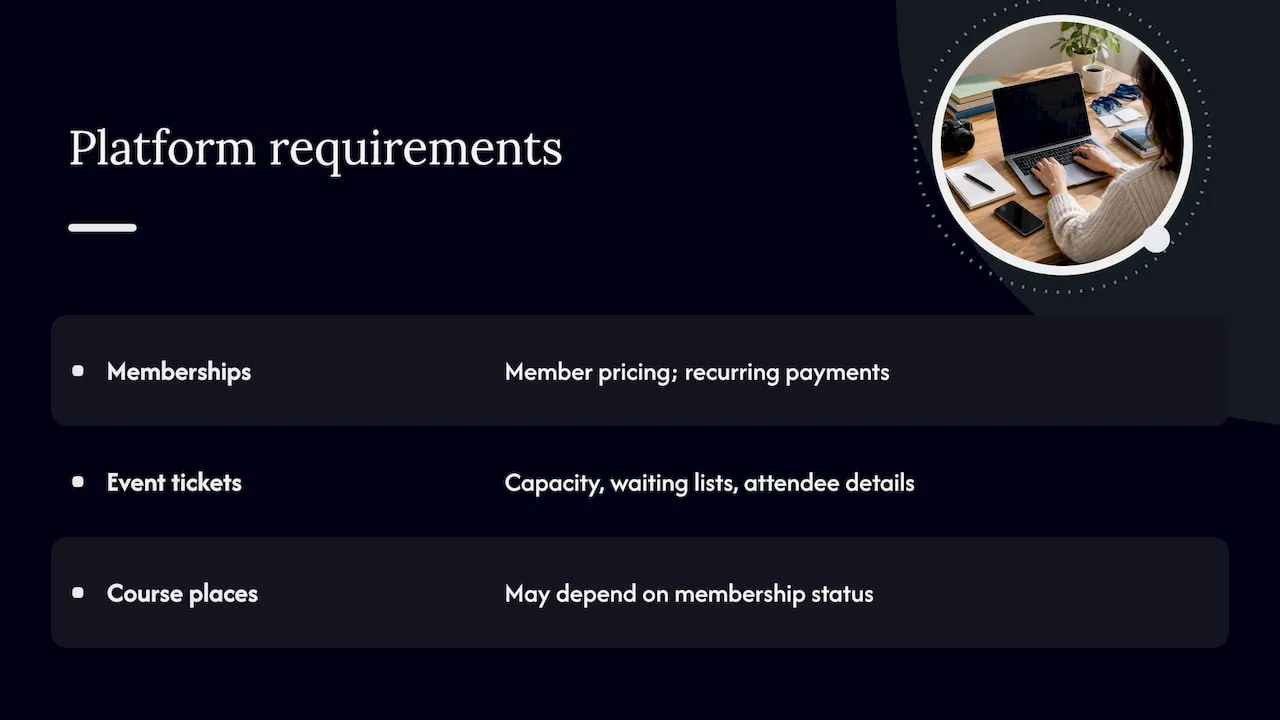
Not everything in an organisation’s shop is a physical product. Memberships renew, event tickets have capacity limits, and course places may depend on membership status. Check that your platform handles member pricing, recurring payments, waiting lists and attendee details. If it does not, you will end up with spreadsheets. Our guide to event planning websites for nonprofits shows what to look for on the event side.
Step 5: Set up payments, shipping and customer communications
Payments
Connect a payment gateway and switch on the methods your customers use: cards at minimum, plus digital wallets and bank-based options where your platform supports them. Stripe’s guide lists payment gateways such as Stripe and card options as the core of checkout setup. The Stripe quick guide also recommends clear return policies and customer support options as part of the same job.
Before going live, find out the gateway’s fees, how long payouts take, and how disputes and refunds are handled. Fees vary by provider and by payment method, so read the current fee schedule on the provider’s own site rather than relying on a summary.
Shipping and fulfilment
For physical goods, Stripe’s guidance breaks shipping strategy into three decisions: define your zones, choose between flat-rate, real-time or free-shipping rates, and set delivery times. Make each decision deliberately:
- Zones. Start with the UK mainland. Add Northern Ireland, the Highlands and Islands and international zones only when you have priced them properly.
- Rates. Flat rates are simple to explain. Free shipping above a basket threshold can raise order values, provided you have tested the margin.
- Delivery times. Promise only what your courier or warehouse can keep.
Customer communications
Automatic emails do much of the work: an order confirmation, a dispatch notice, a receipt, and a follow-up after delivery. Write them in the same voice as the rest of your site and include a real support contact. If you also email members and supporters, connect the shop to your email tool so buyers are segmented properly. Our guide to email marketing software for nonprofits compares the options.
Step 6: Cover the legal basics before you launch
The rules depend on where you trade. This section covers selling to customers in the UK; if you sell abroad, check the rules of each target market for product labelling, consumer protection and data privacy, and show return and refund information and privacy notices in the languages of your key markets, as DHL’s guidance on launching an international store advises.
For UK distance selling, GOV.UK sets out what you must provide before an order is placed. Based on the official guidance for online sellers, the essentials are:
- Tell customers they can cancel up to 14 days after the goods are delivered, with no reason needed. If you fail to tell them, the cancellation period can run for up to 12 months.
- Make it clear that clicking to order means paying, for example with a “pay now” button.
- Show payment and delivery options and costs clearly, and be honest about sales promotions.
- List the steps involved in placing an order and let customers correct errors before they confirm.
- Give your email address, and your VAT number if you are VAT registered.
- Let customers store and reproduce your terms and conditions.
The same page notes that downloads and streaming services follow different rules, so digital sellers should read that section specifically.
Beyond that, plan for these items and confirm each on the relevant official site:
- Privacy. Publish a privacy notice and a cookie policy, and collect marketing consent properly. Check the Information Commissioner’s Office guidance on UK data protection and whether you need to pay the data protection fee.
- VAT. Check the current registration threshold on GOV.UK and whether your products are standard-rated, reduced-rated or zero-rated.
- Charity and association status. Some sales by charities and membership bodies are treated differently for tax. Ask your accountant before you set prices.
- Payment security. Your gateway handles most card-data obligations if you use its hosted checkout, so avoid collecting card details on your own pages.
If the rules touch a particular situation, such as selling to consumers in the EU or selling regulated goods, speak to a solicitor or your accountant before you take the first order.
Step 7: Understand what it costs to set up and run
Published figures for set-up costs vary widely because stores vary widely, so build your own budget from these headings rather than from a headline number:
| Cost | What to check |
|---|---|
| Platform subscription | Monthly or annual fee, and what each tier includes |
| Payment processing | Percentage and fixed fee per transaction, plus refund and dispute charges |
| Domain and email | Annual registration and renewal prices |
| Design and content | Templates, photography, copywriting, or agency time |
| Integrations | Connections to CRM, accounting and email, and any extra fees |
| Ongoing work | Staff time to manage orders, update products and answer customers |
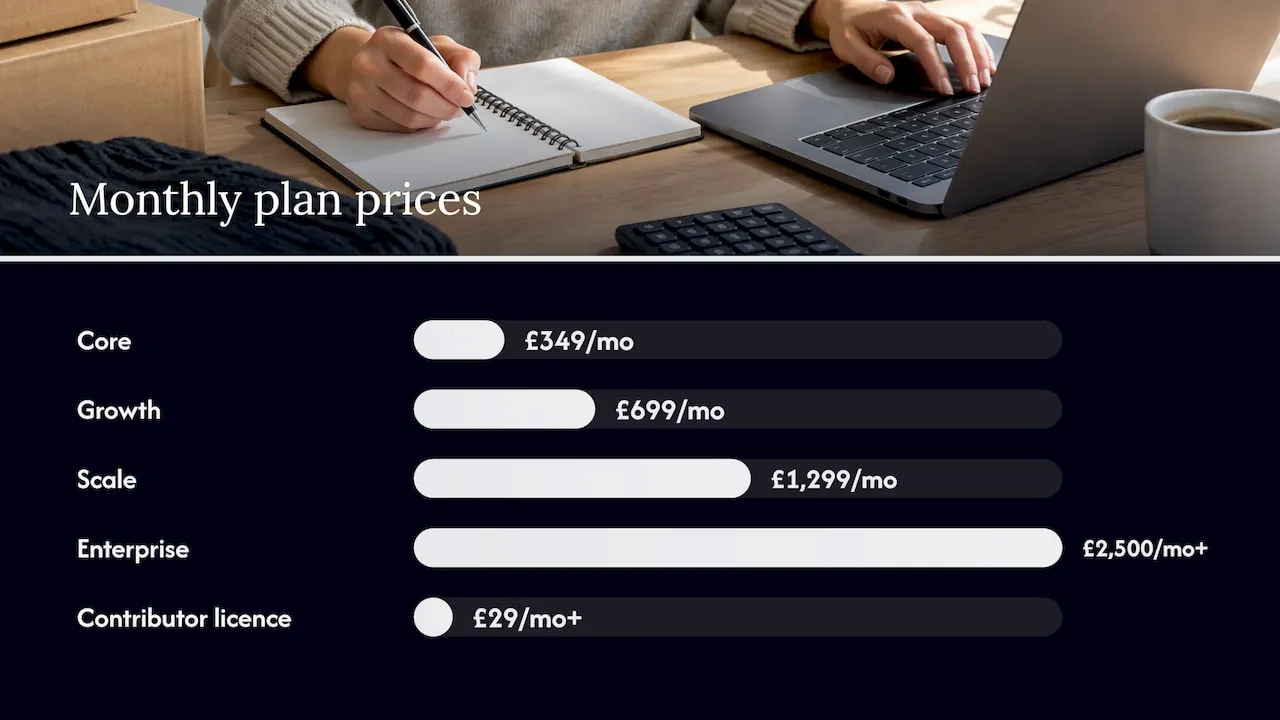
If you want a figure to anchor a comparison, our own plans are published openly. As of our pricing page, Core is £349 per month, Growth is £699 per month, Scale is £1,299 per month and Enterprise starts from £2,500 per month. A contributor licence starts from £29 per month. You can see what each tier includes on the pricing page.
When you compare, look at total cost over several years and not just the monthly headline. A cheaper store builder that needs separate tools for CRM, events, email and reporting can cost more in subscriptions and staff time than a single platform.
Step 8: Test, launch and start attracting customers
Test before you launch
Stripe’s advice is to test checkout with test orders, look for errors and try the store on different devices. Do exactly that, and add these checks:
- Place a test order for every product type and every delivery option.
- Complete a refund and a cancellation.
- Check that confirmation emails arrive, are not in spam, and look right on a phone.
- Try a failed payment and an incorrect address.
- Ask someone who has never seen the site to buy something while you watch.
MediaPlus Digital’s ecommerce launch checklist adds a useful technical layer: keep the store password-protected or on staging until it is ready, enable HTTPS, secure administrator access, back up the site, configure analytics and ecommerce events, submit a sitemap, and monitor orders and funnel performance after launch. A broader website creation checklist is handy for ticking off the non-shop pages too.
Launch and measure
Launch on a day when someone is available to watch orders come in. Announce it to the people most likely to buy first: your members, subscribers and existing customers. Then widen out through search, social posts and partnerships.
Set up analytics from day one so you can answer basic questions: where visitors come from, which pages lose them, how many reach checkout and how many finish. Review the funnel weekly for the first month and fix the biggest drop-off first. Basic search optimisation helps too: unique titles and descriptions for each product page, readable URLs and a sitemap.
If you sell internationally, DHL’s point stands: localisation goes beyond translation. Cultural fit, regional preferences, legal compliance and locally suitable payment and delivery options all affect conversion.
Our perspective: sell from where your members already are
Most organisations we talk to do not struggle to build a shop. They struggle to make the shop part of everything else they do.
A standalone store creates a second set of customer records. Someone buys a ticket, joins as a member and registers for a training session, and you end up with three versions of one person. Reporting takes days, email segments are out of date and renewals get missed.
That is why we built Colossus Systems as a single platform. Our system brings membership management, events, virtual training, CRM, email marketing, e-commerce and analytics together, so a purchase updates the member record, triggers the right communication and appears in the same report as everything else. Payment gateway integration, member and learner portals and customisable workflows let you shape the store around how your organisation actually sells.
If you run a membership organisation, association, nonprofit or educational body, our advice is to choose the platform that treats your shop as one part of the member relationship, not as a separate project.
Rob
Put your store on one platform
If you are setting up a shop for a membership organisation, our platform lets you sell products, event places and training alongside memberships, with payments, CRM and email in the same place. You can start by looking at how our membership management software works, or see all the tools on our features page.
If you already know what you need, compare the Core, Growth, Scale and Enterprise plans to see which one fits your member and event volumes.
FAQ
How long does it take to set up an e-commerce website?
A simple store with a handful of products on a hosted platform can be built quickly, but the work around it takes longer: product photography, legal pages, payment approval and testing. Plan for several weeks if you are doing it alongside other duties, and longer if you need integrations or a large catalogue.
Do I need a developer to set up an online store?
Not for most hosted platforms, which let you configure products, payments and shipping through an admin panel. You may want developer help for custom integrations, complex member pricing or data migration. Whatever you choose, make sure someone in your organisation owns the store after launch.
What legal information must an online shop show in the UK?
You must tell customers about their 14-day right to cancel, show prices, delivery costs and payment options clearly, and give your email address. VAT-registered sellers must also show their VAT number. The GOV.UK distance selling page lists the full requirements.
Can a membership organisation sell products and memberships from one website?
Yes, provided your platform supports member pricing, recurring payments and event or course registration alongside normal product sales. Using one system for both keeps member records and sales reports consistent.
Sources
- Create an online shop: a quick guide, Stripe
- Online and distance selling, GOV.UK
- E-commerce platforms and technology selection, International BSF
- Ecommerce platform selection guide, Right Partners
- Launch a Shopify store, DHL
- Ecommerce website launch checklist, MediaPlus Digital