- Home
- Membership challenges
- Starting with AI
We don't know where to start with AI
Several of our team already use free AI tools for drafting, and nobody has agreed what is allowed. The board now wants an AI strategy, and we worry about member data, wrong answers and how a mistake would look. We need a sensible first step, not a programme.
Does this sound familiar?
- Staff use free chatbots on personal accounts to draft and summarise, and nobody knows what has been pasted in.
- There is no written rule on what must never go into a public AI tool.
- The board has asked for an “AI strategy”, and nobody is sure whether that means a policy, a budget or a product.
- Two enthusiasts know a lot about AI. Everyone else is either wary of it or has not tried it.
- Suppliers promise AI in everything, and you cannot tell which claims would survive a month of real use.
A typical case: a policy officer pastes a member firm’s confidential consultation response into a free chatbot to summarise it. Nobody notices for months. When the board asks for an AI strategy, the team realises it cannot say who uses which tools, or for what.
AI arrives as habits, not decisions
No named task, no check
Staff try AI on whatever is in front of them. Without a named task and a person who checks the result, there is nothing to measure and nobody signs the work off.
Public tools sit outside your systems
A free tool’s terms can allow your inputs to be kept or used for training. Member data held in spreadsheets and inboxes is easy to copy into one, and hard to control once it is there.
Nobody owns it, and skills are thin
AI rarely sits in anyone’s job description. Boards are asked to approve a strategy they have little experience to judge, so the answer that feels safest is to wait.
Informal use brings the risks without the evidence
- Time saved is never measured. Some staff save time on drafting and others lose it correcting confident mistakes, and nobody knows the net result.
- Member trust is exposed. A confidential submission in a public tool is a data protection problem, and a reputational one for a body that speaks for its sector.
- The board decides on opinion, not evidence. Without a measured pilot, the strategy discussion runs on enthusiasm or alarm.
- Money goes on licences before skills. Tools bought before anyone knows which task they are for tend to go unused.
MemberWise’s Digital Excellence 2026 research, covering around 480 UK membership organisations, found AI adoption rose from 5% to 26% in two years. Only 6% have a formal AI strategy. Source
The Charity Digital Skills Report 2026, with 807 responses from UK charities and not-for-profits, found 79% using AI tools in some way. Only 18% have a formal AI policy, and 29% are developing one or have agreed good practice. Limited skills was the most-cited barrier, at 56%, and 43% cited data privacy, GDPR and security concerns. Source
The Trade Association Forum’s Smart Associations AI Benchmarking Report 2026, based on 126 UK trade associations, found 91% using AI in some form. This figure is from TAF’s own summary, as the full report is for members. Source
Five steps that work with any system
Write a one-page acceptable-use policy
Name the tools staff may use, and what must never go into a public one. That list starts with member records, complaints, contracts and anything shared in confidence. Ask every member of staff to read it.
Pick two or three low-risk internal tasks
Choose work where a mistake is cheap and stays in the office: first drafts, summaries, and sorting enquiries by topic. Time each task before and during a short pilot. Count the checking time too, or the saving will look bigger than it is.
Keep a person responsible for every output
Name who checks each output before it is used, and what they check for: facts, tone and anything that should not be there. The reviewer, not the tool, is accountable for the result.
Check data protection and supplier terms
Before a tool touches personal data, check where it is processed and whether your inputs are kept or used for training. Read the contract, ask your data protection lead to sign it off, and record the decision.
Brief the board, then build skills
Report the pilot’s risks and results, not suppliers’ claims. Ask for training before software, because skills decide whether any tool is used well. Buy tools once you know which tasks they are for.
AI in two specific steps, each checked by staff
Colossus uses AI in two specific, checked steps: reading a job description into the job form, and drafting a shop bundle. In both, staff review the result before anything is published.
| What it does | How it works | Plans |
|---|---|---|
| AI job import on the job board | Paste a job description, or upload a PDF, Word or text file. The AI pre-fills the job wizard as a draft job, choosing options only from your job board’s own lists. Staff check each step of the job wizard, and the job goes live only when someone clicks Make live. | GrowthScaleEnterprise |
| AI bundle builder in the online shop | On a bundle, Build with AI reads the name, short description, proposed price and your prompt. It writes a description and picks products from your own catalogue. Staff edit the result, and nothing is kept until they click Save bundle. | GrowthScaleEnterprise (tailored) |
| Secure hosting | Member records are held in the platform’s own hosted database, with backups and platform updates included. The two AI steps send only the job description, or the bundle details and your product list, to the AI model. Member records are not sent. | CoreGrowthScaleEnterprise |
Treat what the AI produces as a first draft. It can misread a document or pick the wrong option, which is why each step ends with a person checking it.
How a trade association started small with AI
Illustrative example. The Association of Commercial Kitchen Installers is a fictional trade association with 690 member firms and eleven staff. This is a composite scenario, not a customer story.
Several staff used free chatbots on personal accounts to draft news items and summarise consultations. One had pasted in a member’s complaint to tidy the wording. Then the board asked for an AI strategy by its next meeting.
The chief executive put a one-page policy in place first: no member records, complaints or contracts in public tools. The team chose three internal tasks: first drafts of news items, consultation summaries and sorting enquiries by topic. Each had a named reviewer, and staff logged their time for six weeks.
In Colossus, the officer who runs the job board stopped retyping the vacancies member firms emailed in. She imported each one with AI, checked the draft against the original and made it live. The board got a two-page note on what was tried, what reviewers caught and what training staff needed, and funded the training first.
Let AI draft a job advert, then check it before it goes live
The Association of Commercial Kitchen Installers, a fictional trade association, wants to try AI on one low-risk task where a person checks every result before members see it.
- Organisation
- Association of Commercial Kitchen Installers (fictional), 690 members
- Goal
- Turn a vacancy a member firm emailed in into a checked, live job advert, then draft a shop bundle the same way
- Takes
- About 80 seconds, 6 steps
- Plan
- Growth, Scale and Enterprise plans
A walkthrough of real Colossus screens with a fictional organisation and demonstration data. Your own set-up, fields and wording will differ.
-
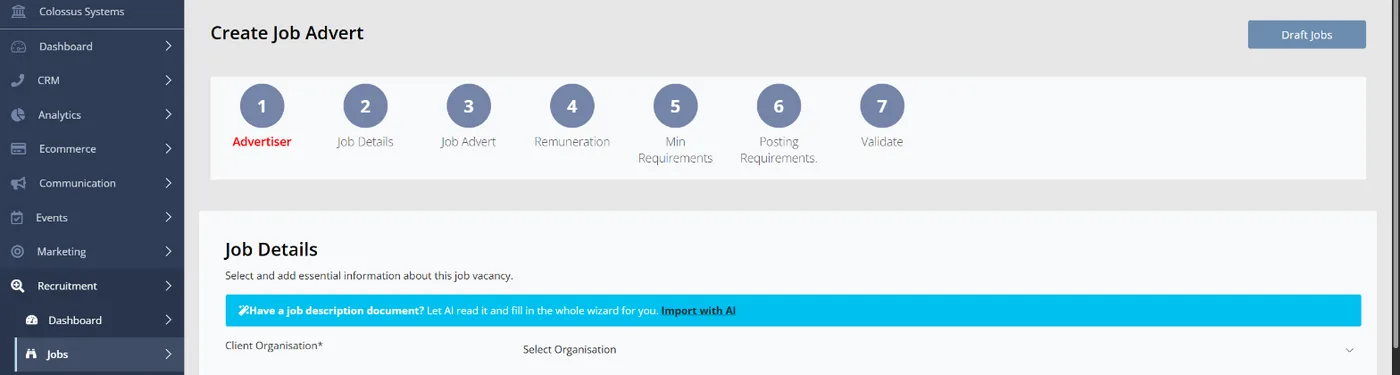
Colossus screen, demonstration data Step 1 of 6Start from the job description
What you do: Click Post a job. On the first step of the job wizard, choose Import with AI.
What to notice: Filling in the wizard by hand is still available, so using AI is a choice, not the only route.
-
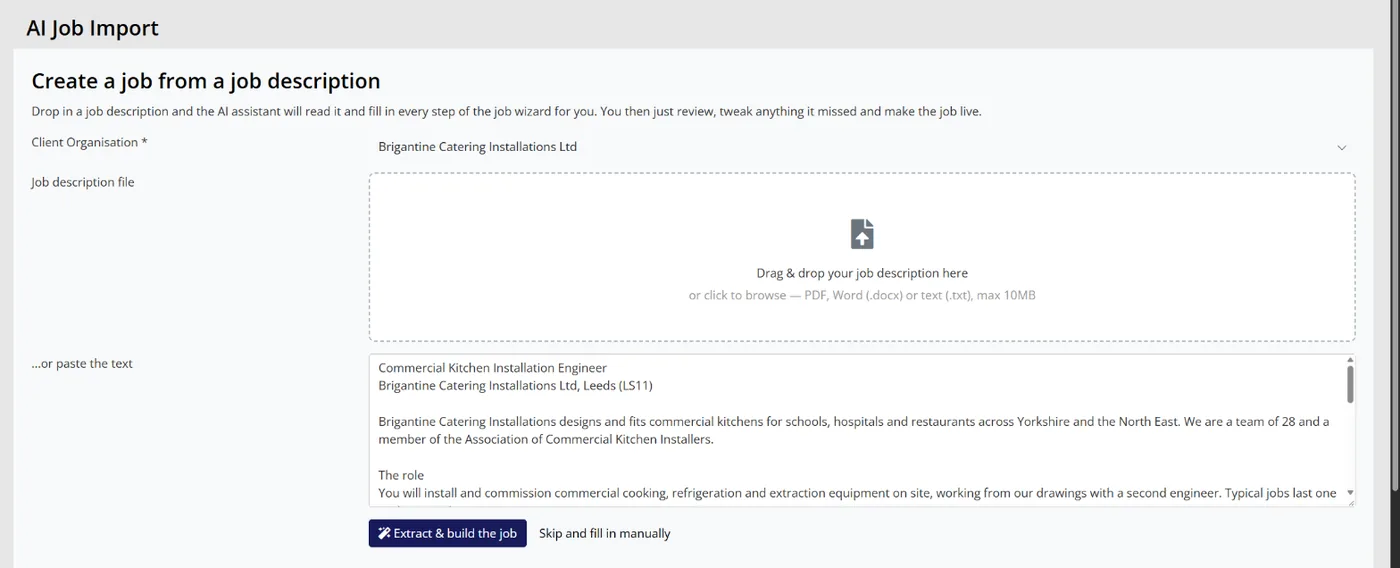
Colossus screen, demonstration data Step 2 of 6Hand it the advert
What you do: Choose the member firm in Client Organisation. Drop in the PDF they emailed, or paste the text, then click Extract & build the job.
What to notice: Only the job description and your job board's option lists are sent to the AI model. No member records go with it.
-
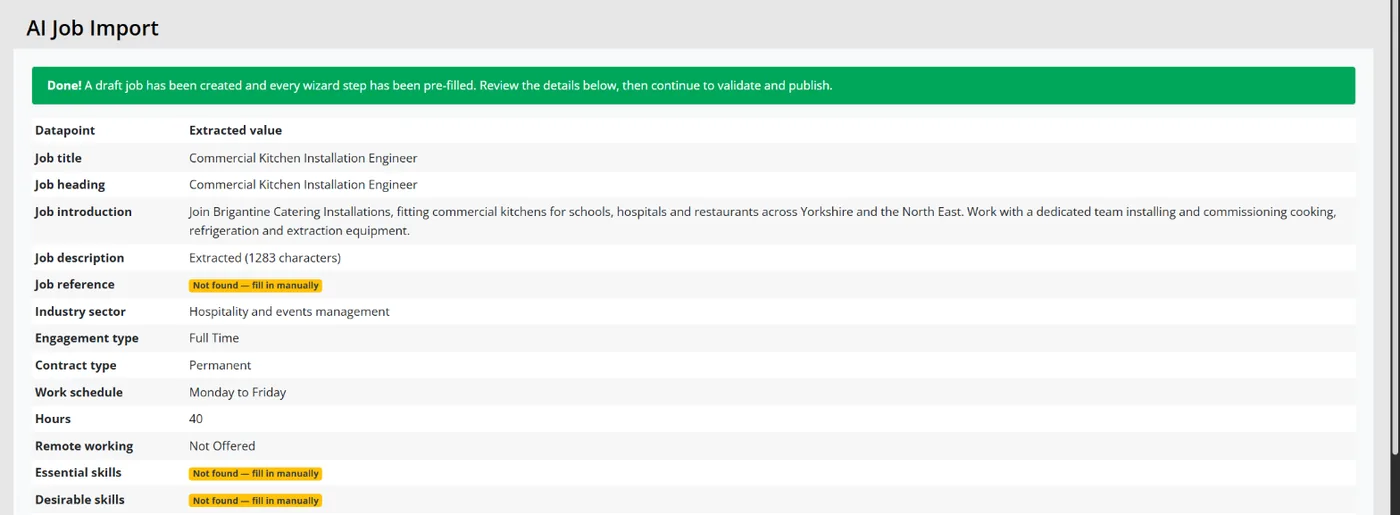
Colossus screen, demonstration data Step 3 of 6See what it extracted
What you do: Read down the table of datapoints and extracted values.
What to notice: A draft job has been created, not a live one. Sector, contract type and the other options are chosen only from your own lists, and anything it could not find is marked to fill in manually.
-
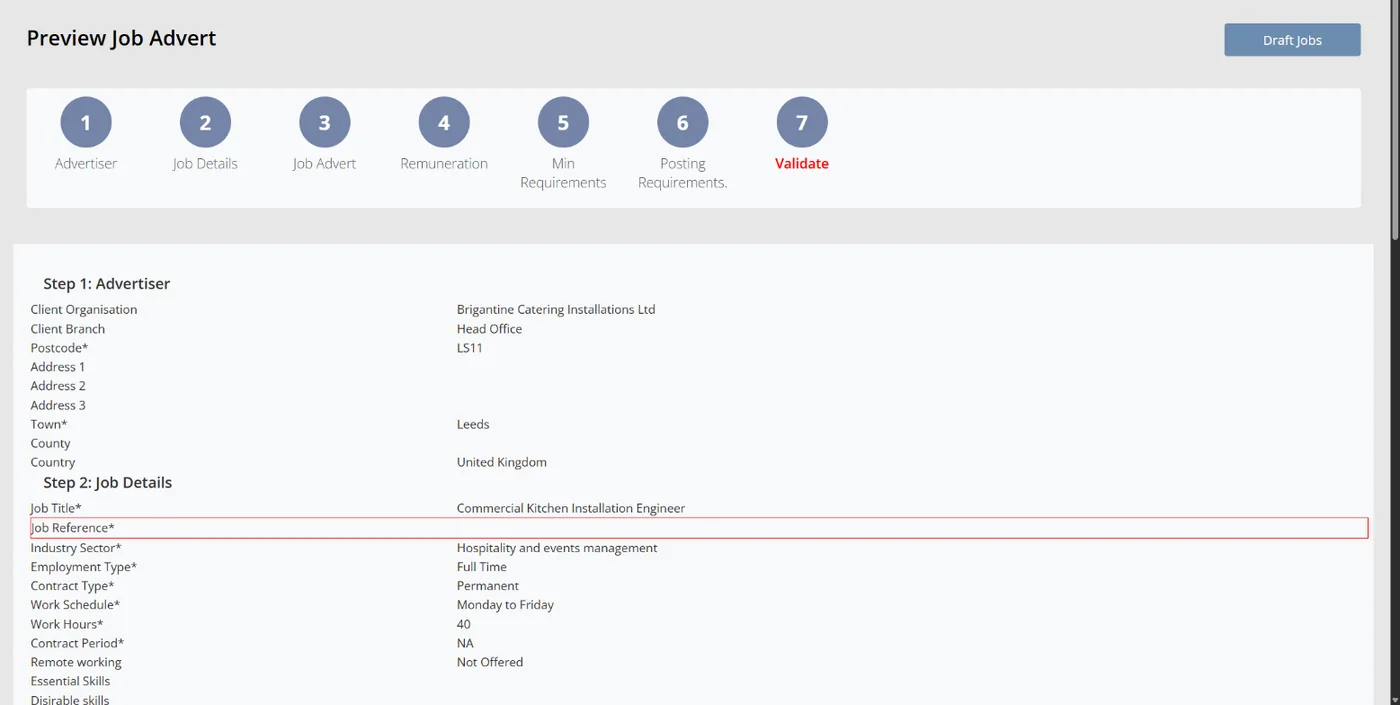
Colossus screen, demonstration data Step 4 of 6Check every step against the original
What you do: Click Review & complete the job. Compare each step with the member's original advert and correct anything that is wrong.
What to notice: Required details that are missing are outlined in red, and the approve and preview button stays hidden until they are filled in.
-
ScreenCRM > Recruitment > Jobs > Post a job > PreviewStep 5 of 6
Approve it and make it live
What you do: Click approve and preview, read the advert as candidates will see it, then click Make live and confirm.
What to notice: The job goes live only when a member of staff confirms it. The AI never publishes anything by itself.
-
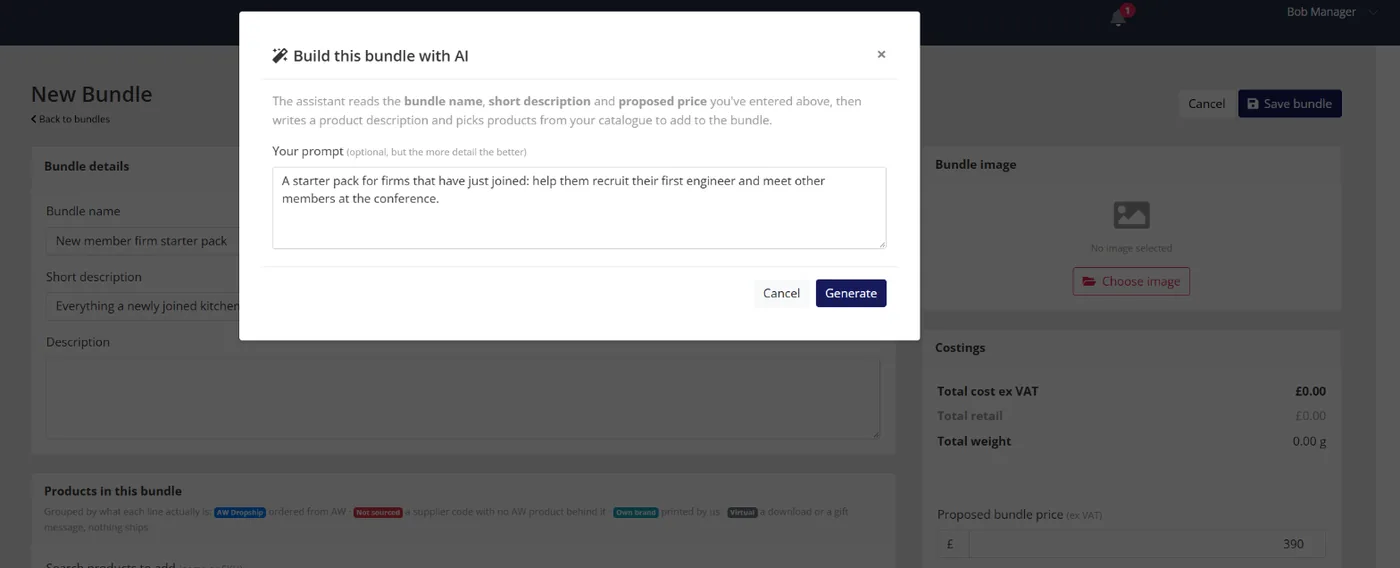
Colossus screen, demonstration data Step 6 of 6Draft a starter pack for new member firms
What you do: Enter the bundle name, short description and proposed bundle price. Click Build with AI, add a short prompt and click Generate.
What to notice: The AI writes a description and picks products only from your own catalogue. Nothing is kept until you edit the result and click Save bundle.
The result
The vacancy is live on the job board after a member of staff checked every step against the original. A draft starter-pack bundle is ready for review. Neither step read a member record, and neither published anything without a person deciding to.
What to measure
Measure the pilot against your own starting point, over several weeks rather than a few days. The aim is evidence the board can use: what was saved, what was caught and what was risked.
- Staff who have read the policyThe share of staff who have read and signed the acceptable-use policy.Higher is better
- Time per pilot task, including reviewMinutes per task before and during the pilot, counting the time spent checking and correcting.Lower is better
- Outputs changed at reviewHow often the reviewer corrects or rejects an output, with the reason recorded each time.Watch the trend and read the reasons
- Data incidentsTimes restricted information went into a tool it should not have, whether found at review or reported by staff.Lower is better
- Training before toolsStaff who have completed basic AI training, set against new AI licences bought.Training first is the aim
Frequently asked questions
Do we need an AI strategy or an AI policy first?
What should never go into a public AI tool?
How do we brief a board that is new to AI?
What does Colossus send to the AI model?
Which Colossus plans include the AI steps?
Sources
- MemberWise, Digital Excellence Report 2026, 10th edition, data collected March to September 2025. Around 480 UK membership organisations; findings as summarised by research champion Bluelight.
- Zoe Amar Digital and Think Social Tech, Charity Digital Skills Report 2026: artificial intelligence and charity trustees and leadership, 2026 edition, accessed 18 October 2026. 807 responses from UK charities and not-for-profits, collected 5 March to 20 April 2026.
- Trade Association Forum, Smart Associations: AI Benchmarking Report 2026, developed with The Research Concierge, as summarised by TAF; the full report is for members. 126 UK trade associations.
See where your own systems stand
The Membership Systems Health Check is ten multiple-choice questions about your data, renewals, automation, reporting and member experience. You get your score out of 100 on screen straight away, with no email needed to see it.
Prefer to talk it through? Book a tailored demonstration and we will start from this problem, not a feature tour.