- Home
- Membership challenges
- Admin overload
Our small team spends its days on admin, not members
There are two of us looking after 2,000 members, and most days go on typing the same details into three systems. The rest goes on answering the same requests and chasing forms, so the member calls we planned slip again. This guide shows how to find where the hours go and win them back, whatever system you use.
Where the week goes
- A new member’s details are typed into the CRM, then the mailing tool, then a finance spreadsheet.
- Much of the inbox is members telling you something small: a new address, a new employer, a colleague to add.
- Each of those requests gets a reply written from scratch, by whoever opens it first.
- Chasing lives in two inboxes and someone’s memory, so a missing form surfaces only when a member complains.
- The member work you planned, such as welcome calls and committee support, moves to next month again.
A typical Monday: the membership officer finds 40 emails from the weekend. Six are join enquiries to copy into three systems, a dozen are change requests and the rest need a chase or a check. By Thursday, that week’s welcome calls have slipped to the next.
Admin grows to fill a small team
Every request is a one-off
Routine changes arrive by email and are handled as they land, each with a fresh reply. Nobody has turned the common ones into a standard step.
The systems don’t share a record
When the CRM, the mailing tool and the finance spreadsheet each hold their own copy, every new member is typed in several times. Then each copy has to be checked against the others.
Tasks are added and never retired
Over the years a small team inherits jobs: a report for one committee, a list for reception, a check after one bad mailing. Nobody has the time, or the mandate, to stop them.
Admin crowds out the work members pay for
- Staff time goes on copying, not on members. Re-keying and checking add nothing a member would notice, unless they go wrong.
- Members wait for simple changes. An address update that sits in the inbox for a week tells a member the team is stretched.
- The work that keeps members is dropped first. Welcome calls and check-ins with quiet members are easy to postpone, so they give way to the inbox.
- The case for change is hard to make. Without a record of where the hours go, the board sees a busy team but no evidence of what to fix or fund.
MemberWise’s Digital Excellence 2026 research covered around 480 UK membership organisations. 77% reported an increase in cost and workload, and 64% feel pressure to generate more income without a proportionate increase in resource. Source
Momentive and Wakefield Research asked 500 managers at US nonprofits and associations which technology challenges cause the most frustration or inefficiency. 48% named time on repetitive administrative tasks, 46% manual data entry across multiple platforms and 41% too many disconnected systems. 82% agreed that inefficient or disconnected systems contribute to burnout at their organisation. Source
PARN and Buzzacott’s Financial Benchmarking 2026, drawn from the accounts of 500 UK professional bodies, puts staff costs at about 45–50% of income. Every hour spent re-keying comes out of that. Source
Five steps to win back the week, in any system
Log where the hours go for two weeks
Note what you did in 15-minute blocks under five headings: re-keying, routine requests, chasing, checking and member work. Two weeks catches the weekly and monthly jobs. Then mark each task keep, simplify or stop, starting with reports nobody reads.
Remove re-keying first
Find every detail that is typed twice, such as a joining form copied into three systems. Choose one place where it is entered, and have the others read from there or stop holding it. Each copy you remove also removes a check.
Let members make routine changes
List the requests that are only a member telling you something: a new address, a new employer, a new colleague. Give members a page where they can make that change, and point to it in every reply. Staff then deal with exceptions, not every change.
Batch the work and template the replies
Handle requests in two set blocks a day, not as they arrive. Write standard replies for the five questions you answer most, kept where you both can find them. Check new records once a week rather than before every mailing.
Keep one list of open tasks, each with an owner
Chasing slips when it lives in two inboxes and someone’s memory. Put every open item on one shared list with a named owner and a due date. Go through the overdue ones together for ten minutes each week.
Type it once, let members change it, track the rest
Colossus keeps each member organisation on one record used by the CRM, events, email and the shop. Members change routine details themselves, and the chasing that remains has an owner and a due date.
| What it does | How it works | Plans |
|---|---|---|
| Details entered once | Each member organisation is one CRM account with its contacts, branches, meetings and documents. Events, email campaigns and the shop use the same records, so a new contact is entered once. | CoreGrowthScaleEnterprise |
| Enquiries that arrive as records | A form built on the CRM’s Lead Forms screen goes on your website with its snippet. Each submission becomes a lead in the CRM with the person’s answers, owner and source, so nobody copies it from an inbox. | CoreGrowthScaleEnterprise |
| Members make routine changes | In the member portal, members update their organisation’s details on Account Profile and their own name, email and phone on My Profile. They can also add or update colleagues and update branch details. | CoreGrowthScaleEnterprise Configured during implementation |
| Bulk Update on the Accounts list | Filter the Accounts list, click Bulk Update and tick the accounts, or every account the filter matches. Edit Fields changes the fields you choose across the selection, and Assign Product adds a product. | CoreGrowthScaleEnterprise |
| Chasing with an owner and a date | Each follow-up is a call, email, meeting or task with an assignee and a due date, on the account or lead it concerns. Once a day, the bell shows each person how many of their activities are overdue. | Core (basic)GrowthScaleEnterprise Overdue notification configured during implementation |
| Templates for messages you send often | Save marketing email templates with merge fields. Add one to a campaign and send it to an email list, a member group or chosen contacts; unsubscribed contacts are left out. | Core (standard)Growth (advanced)Scale (advanced)Enterprise (bespoke) |
Existing spreadsheet data is brought in once by an administrator during implementation. The import lists the rows it won’t take, and why, before anything is written.
How a two-person team got its Tuesdays back
Illustrative example. The Society of Coastal Engineering Surveyors is a fictional professional body with 2,100 members and a membership team of two. This is a composite scenario, not a customer story.
For two weeks, both kept a time log in 15-minute blocks. It showed each new member’s details typed three times: into the CRM, the mailing tool and a finance spreadsheet. The inbox was full of requests to change an address, employer or phone number.
The team removed the re-keying first. Join enquiries now arrive through a lead form on the website, and members update their own details in the portal. When the council merged two regions, the membership officer changed every affected account in one Bulk Update instead of one by one.
They stopped retyping a monthly new-members list for council and now send the Accounts export instead. Each chase is now an activity with an owner and a due date, and anything overdue shows in the bell the next day. Tuesday mornings are kept for welcome calls to new members.
Take the routine admin off a two-person membership team
The Society of Coastal Engineering Surveyors, a fictional professional body, wants its two-person membership team to stop retyping details and chasing from memory.
- Organisation
- Society of Coastal Engineering Surveyors (fictional), 2,100 members
- Goal
- Remove re-keying, let members make routine changes themselves and give every chase an owner and a due date
- Takes
- About 85 seconds, 7 steps
- Plan
- Core, Growth, Scale and Enterprise plans (member portal pages and the Overdue activities notification configured during implementation; email campaigns standard on Core, advanced on Growth and Scale)
A walkthrough of real Colossus screens with a fictional organisation and demonstration data. Your own set-up, fields and wording will differ.
-
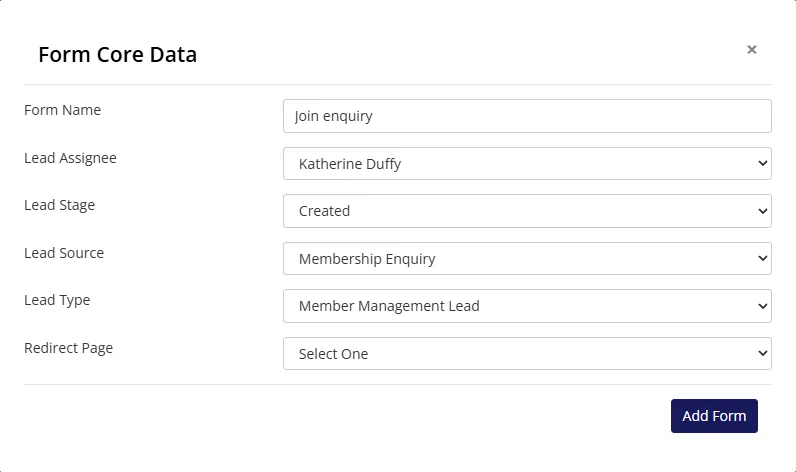
Colossus screen, demonstration data Step 1 of 7Take join enquiries straight into the CRM
What you do: Click Add Form, name it 'Join enquiry', set the Lead Assignee to the membership officer and choose the Lead Stage, Lead Source and Lead Type new enquiries start with. Then copy the form's snippet onto the join page.
What to notice: Each submission arrives in the CRM as a lead with the person's answers, so nobody types it in from an email.
-
ScreenMember portal > My ProfileStep 2 of 7
Let a member change their own details
What you do: Signed in as a member, change the Contact No. and click Update.
What to notice: The change is saved to the contact the membership team works from, with no email to answer and nothing to retype.
-
ScreenMember portal > Account contactsStep 3 of 7
Let a member add a colleague
What you do: Click Add Contact, enter the new colleague's name, email and phone, choose their branch and click Save.
What to notice: The colleague is added to the member's account. Before, this took an email, a reply and a retype by staff.
-
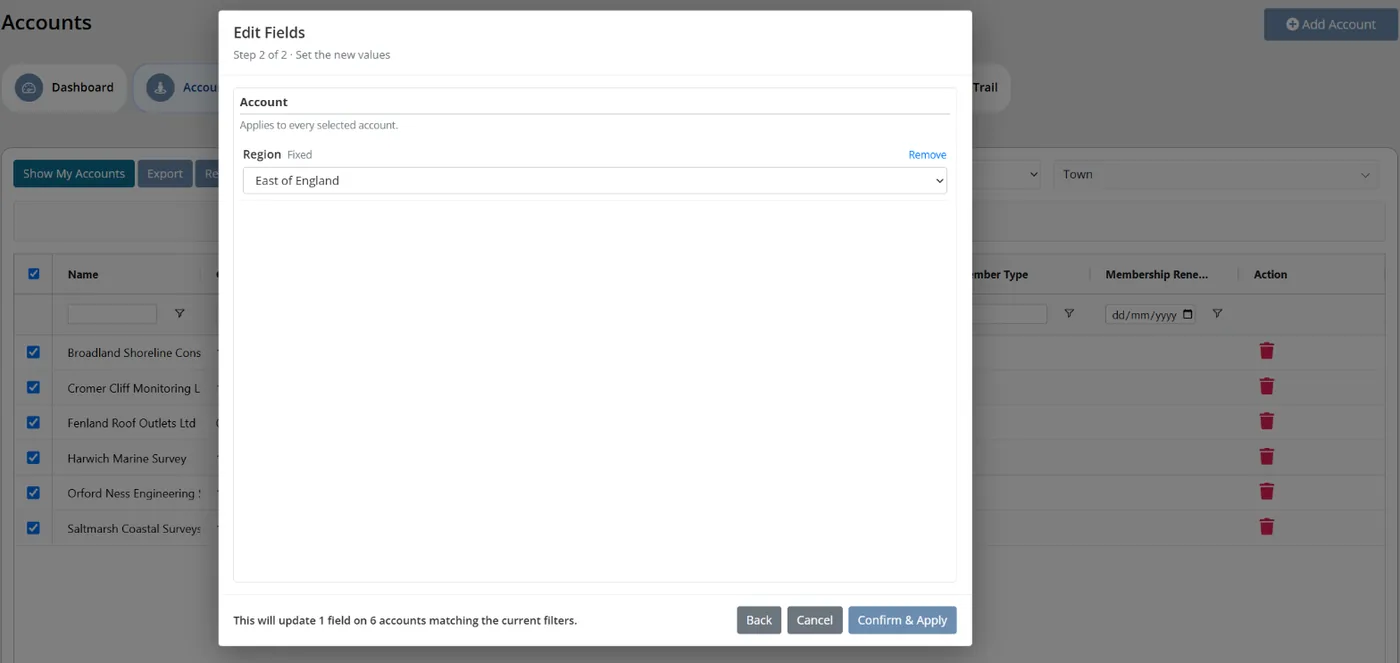
Colossus screen, demonstration data Step 4 of 7Change many accounts in one go
What you do: Filter the Region column to the region being merged, click Bulk Update and tick the select-all box. Choose Edit Fields, pick Region and click Continue, set the new region and click Confirm & Apply.
What to notice: The selection follows the filter, and the confirmation says how many accounts were updated. One action replaces dozens of single edits.
-
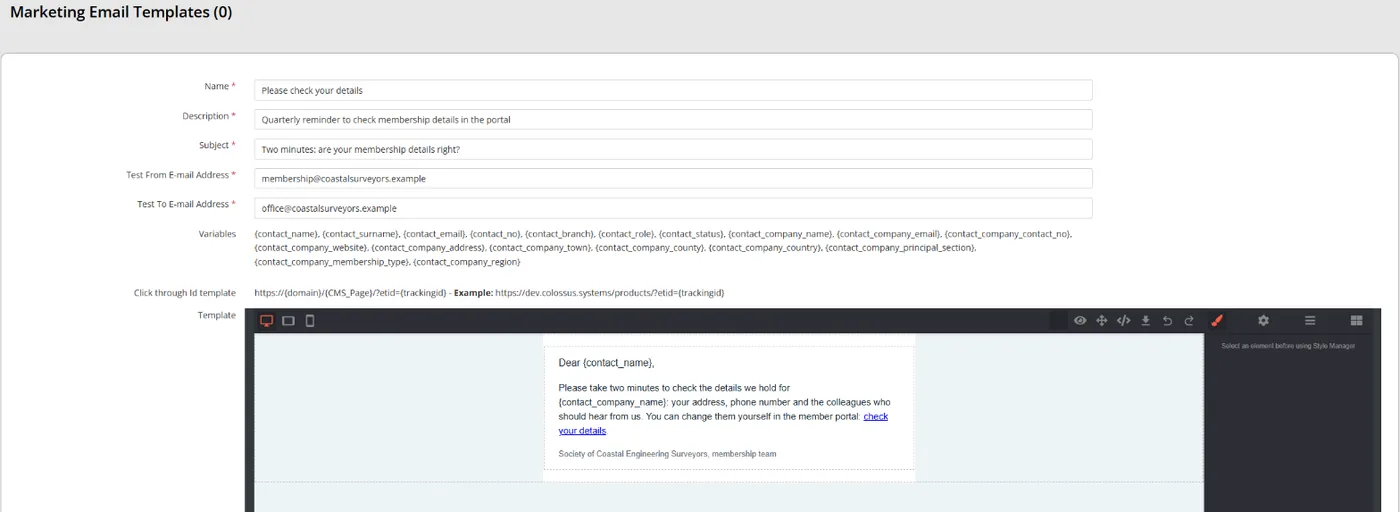
Colossus screen, demonstration data Step 5 of 7Write a message you send often, once
What you do: Click Add E-Mail Templates and save a 'Please check your details' template, with merge fields and a link to the member portal.
What to notice: The template is written once and reused each quarter, rather than drafted from scratch every time.
-
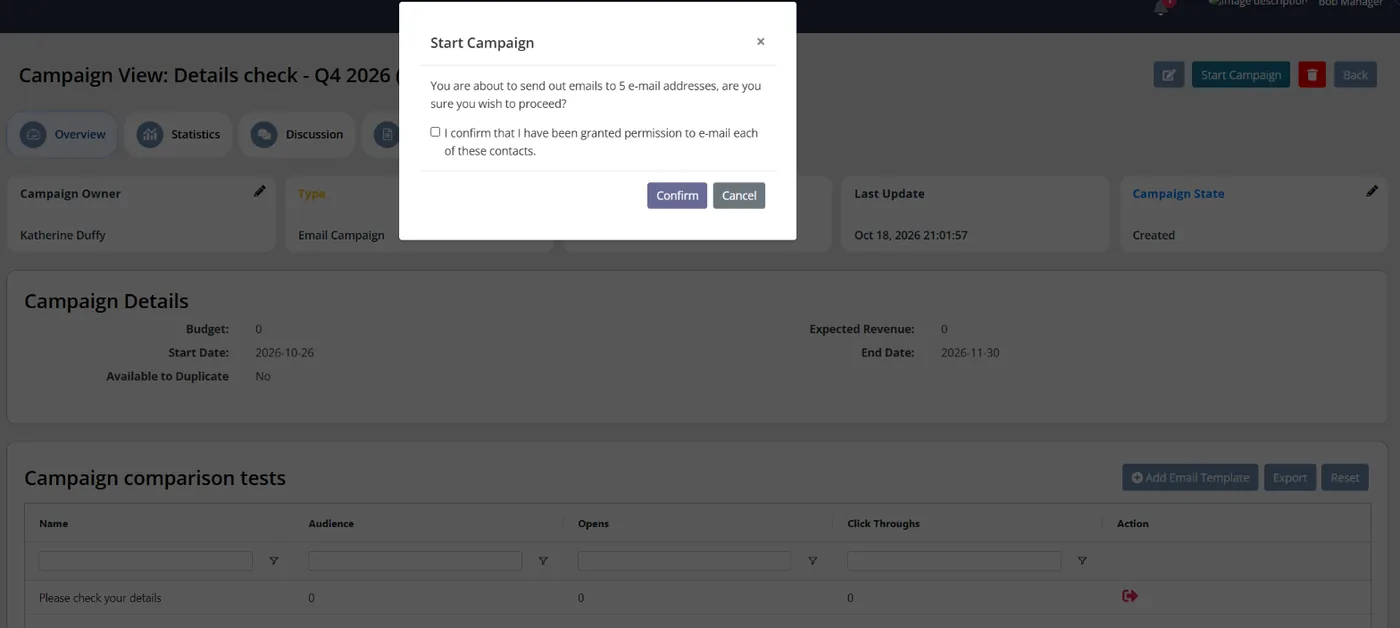
Colossus screen, demonstration data Step 6 of 7Send it to the right members
What you do: In a campaign, click Add Email Template and choose the template. Under Audience, add an email list, tick Check All and save, then click Start Campaign.
What to notice: Unsubscribed contacts are left out of the send.
-
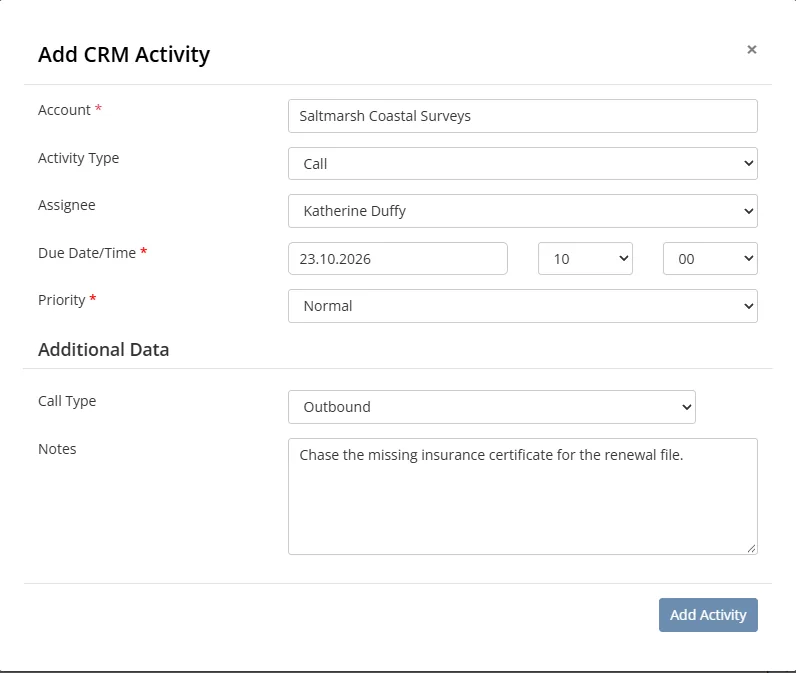
Colossus screen, demonstration data Step 7 of 7Give every chase an owner and a date
What you do: Click Add Activity and choose Call. Pick the account, set the Assignee, a Due Date/Time and a Priority, and click Add Activity.
What to notice: If the activity is still open after its due date, it is counted in the assignee's daily Overdue activities notification in the bell.
The result
Join enquiries arrive as leads, members change their own details in the portal and a change to many accounts takes one Bulk Update. Every open chase has an owner and a due date, and anything overdue shows in the bell.
What to measure
Use the two-week log as your baseline and repeat it each quarter. The aim is fewer hours on copying and chasing, and more on members.
- Hours a week on re-keying, checking and chasingFrom a repeat of the two-week time log, for each person on the team.Lower is better
- Times a new member’s details are typed by handThe number of systems a joining member’s details are entered into by staff.Lower is better; the aim is once
- Routine change requests handled by staffEmails and calls asking for a change members could make themselves, counted each month.Lower is better
- Open tasks past their due dateItems on the shared list, or activities in your CRM, still open after their date, counted each Friday.Lower is better
- Hours on member-facing workWelcome calls, member conversations and committee support, taken from the same log.Higher is better
Frequently asked questions
How do we log our time without it becoming more admin?
Which tasks should we stop first?
Will members really update their own details?
Can we change hundreds of records at once?
Which Colossus plans include this?
Sources
- MemberWise, Digital Excellence Report 2026, published 2026 from data collected March to September 2025. Around 480 UK membership organisations; findings as summarised by research partner Cantarus, 24 March 2026.
- Momentive Software, The State of the Mission-Driven Workforce in 2026, fieldwork by Wakefield Research, 4 to 15 December 2025. 500 manager-level staff at nonprofits and associations with annual revenue of at least $500k; US only.
- PARN and Buzzacott, Financial Benchmarking Report 2026, 16th edition. Accounts of 500 UK professional bodies.
See where your own systems stand
The Membership Systems Health Check is ten multiple-choice questions about your data, renewals, automation, reporting and member experience. You get your score out of 100 on screen straight away, with no email needed to see it.
Prefer to talk it through? Book a tailored demonstration and we will start from this problem, not a feature tour.