- Home
- Membership challenges
- Member emails
Our member emails get ignored
Our monthly newsletter goes to every member and runs to ten stories. Opens and clicks have drifted down for two years, and at regional meetings members still tell us “we never hear from you”. This guide covers how to send fewer, shorter emails that members act on, whatever system you send them from.
Does this sound familiar?
- One newsletter goes to everyone, from a student who joined last month to a fellow of thirty years.
- The item that matters most, such as a consultation or a change to fees, sits sixth in a list of ten.
- The board sees an open rate each quarter, but nobody can say which story anyone clicked.
- Members phone the office about things the last three emails covered.
- Every email starts “Dear member”, although you hold each member’s name, grade and region.
A typical case: a professional body sends its bulletin on the first Tuesday of each month. Every team adds an item, so it now needs a long scroll on a phone. A consultation on new practice standards ran in three bulletins and drew eleven responses.
One email is trying to do every job
Every team gets a slot
The newsletter became the only route to members, so each team adds an item and nobody takes one out. It grows every month, and no single story has a clear purpose.
The data and the sending are apart
Member type, region and interests sit in the membership database, while the email tool holds one big list. Segmenting means an export and a cleanup, so it rarely happens.
Nobody owns the inbox
No one decides what members receive, how often or why. Success is judged on whether the bulletin went out on time, not on what members did next.
Unread email costs more than it looks
- Staff time goes on items few people read. Teams write stories that sit at the bottom of the email, then answer the same questions by phone.
- Members miss benefits they pay for. An event, a guidance note or a discount at item eight is a benefit they never used.
- Silence feeds lapsing. A member who says “we never hear from you” has stopped noticing your emails, which weakens the case for renewing.
- Reports rest on the weakest figure. Opens can look steady while clicks fall, so the board sees a better picture than the real one.
Higher Logic’s 2025–26 association email benchmark found an average open rate of 33.54% and an average click rate of 2.68%. It is vendor data from about 1,500 associations and nonprofits in the US, Canada and Australia. Higher Logic notes that opens are becoming a less reliable measure. Source
MemberWise’s UK Digital Excellence 2026 research puts personalisation of the online member experience at 43%. That is up just one percentage point in five years. Source
Members expect it. In Higher Logic’s 2025 member experience survey of 440 association members and 112 non-members, vendor data, 84% said personalisation is important. Source
Five ways to get emails read and acted on
Give each email one job
Decide the one thing you want members to do: book, reply, read or update their details. Split the bulletin into shorter sends, and keep a brief digest for news that needs no action.
Send it only to the members it concerns
Segment by member type, region or stated interest. A regional meeting needs one region, not the whole list. Start with three or four segments you already hold.
Open with something true about the reader
Use real data in the first line, such as the member’s name or organisation. Check the field is filled in first, because a blank merge field reads worse than “Dear member”.
Put the action first
Most members see only the subject line and the first few lines on a phone. Say what to do and by when, then put the link straight under it. The reasons can follow.
Judge by clicks and keep the list clean
Apple Mail Privacy Protection loads images automatically, so many “opens” are not people reading. Judge each email on clicks. Honour unsubscribes at once, and ask long-silent members whether they still want your emails.
Campaigns for the members each email concerns
Colossus sends email campaigns from the CRM to an audience of email lists, member groups or chosen contacts. Each campaign reports its opens and click-throughs, down to the individual contact.
| What it does | How it works | Plans |
|---|---|---|
| Campaigns with a chosen audience | Staff add a campaign at CRM > Campaigns with a name, owner and send-from address. On the campaign, Add Contacts takes an email list, a member group or contacts found by search. | Core (standard)Growth (advanced)Scale (advanced)Enterprise (bespoke) |
| Templates with merge fields | Marketing templates are built in an email editor. Variables such as the contact’s name and company name are filled from each contact’s record when the campaign sends. | Core (standard)Growth (advanced)Scale (advanced)Enterprise (bespoke) |
| Segments from lists and groups | Static email lists and member groups make the segments, such as students, one region or a special-interest group. Saved filters on the CRM grids keep the views of members you return to. | Core (standard)Growth (advanced)Scale (advanced)Enterprise (bespoke) |
| Opens and click-throughs | The template grid on each campaign shows its Audience, Opens and Click Throughs. Opens are a count. Clicks are counted on links to your own site that carry the campaign’s tracking id. | Core (standard)Growth (advanced)Scale (advanced)Enterprise (bespoke) |
| Each contact’s response | The campaign’s Audience list shows each contact’s Date Sent, Opened Date and Click Through Date, so staff can see who acted. | Core (standard)Growth (advanced)Scale (advanced)Enterprise (bespoke) |
| Unsubscribes and opt-in respected | Every campaign email carries an unsubscribe link, and unsubscribed contacts are left out when a campaign starts. Sending can also be limited to contacts marked as opted in to marketing. | CoreGrowthScaleEnterprise Opt-in rule configured during implementation |
Colossus sends the campaigns and records who opened and clicked. Choosing the segments, writing shorter emails and following up the clicks still come from your team.
How a professional body split its bulletin
Illustrative example. The Society of Ecological Surveyors is a fictional professional body with 3,900 members and a communications team of two. This is a composite scenario, not a customer story.
The society’s monthly bulletin went to every member with up to ten items. From April to September most members read email on a phone between site visits. A call for volunteers to review new survey guidance ran in three bulletins and filled two of its eight places.
The team kept a short monthly digest and moved anything that needed action into its own campaign. They set up member groups for students and for each of four regions, and email lists for the bat, botany and marine interest groups. Each campaign opened with the member’s first name and put the link in the first two lines.
The first new campaign invited the northern region to a field identification day. The team checked its Audience list for who had clicked, and the regional organiser phoned a handful of members who had not. Later, members who had not clicked all year got one short email asking whether they still wanted the society’s news.
Send one short email to one segment and see who acted on it
The Society of Ecological Surveyors, a fictional professional body, wants to take an invitation out of its ten-story bulletin and send it only to the region it concerns.
- Organisation
- Society of Ecological Surveyors (fictional), 3,900 members
- Goal
- Send a one-purpose email with a personal opening to one member group, and judge it on click-throughs rather than opens
- Takes
- About 85 seconds, 7 steps
- Plan
- All plans: Core (standard), Growth and Scale (advanced), Enterprise (bespoke)
A walkthrough of real Colossus screens with a fictional organisation and demonstration data. Your own set-up, fields and wording will differ.
-
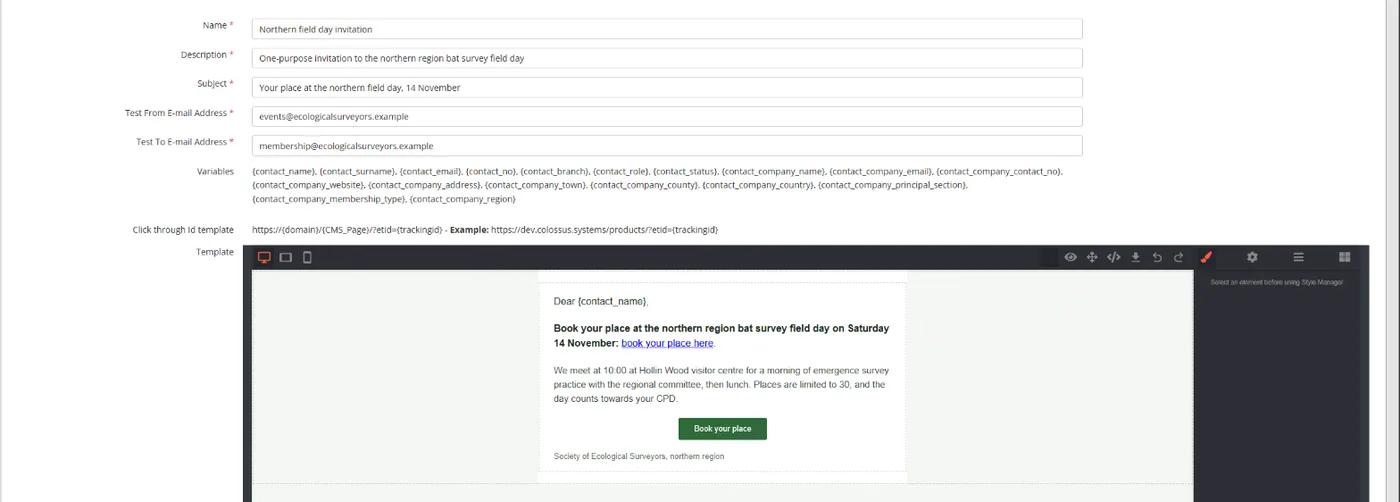
Colossus screen, demonstration data Step 1 of 7Write a short template with a personal opening
What you do: Click Add E-Mail Templates. Give the template a name and subject, start the body with the contact name variable and put the booking link in the first two lines. Save it, then click its Draft badge in the list to make it Active.
What to notice: The Variables list on the screen shows the merge fields, such as contact name and company name. Build the link as the Click through Id template shows, so clicks are counted. Only Active templates can be added to a campaign.
-
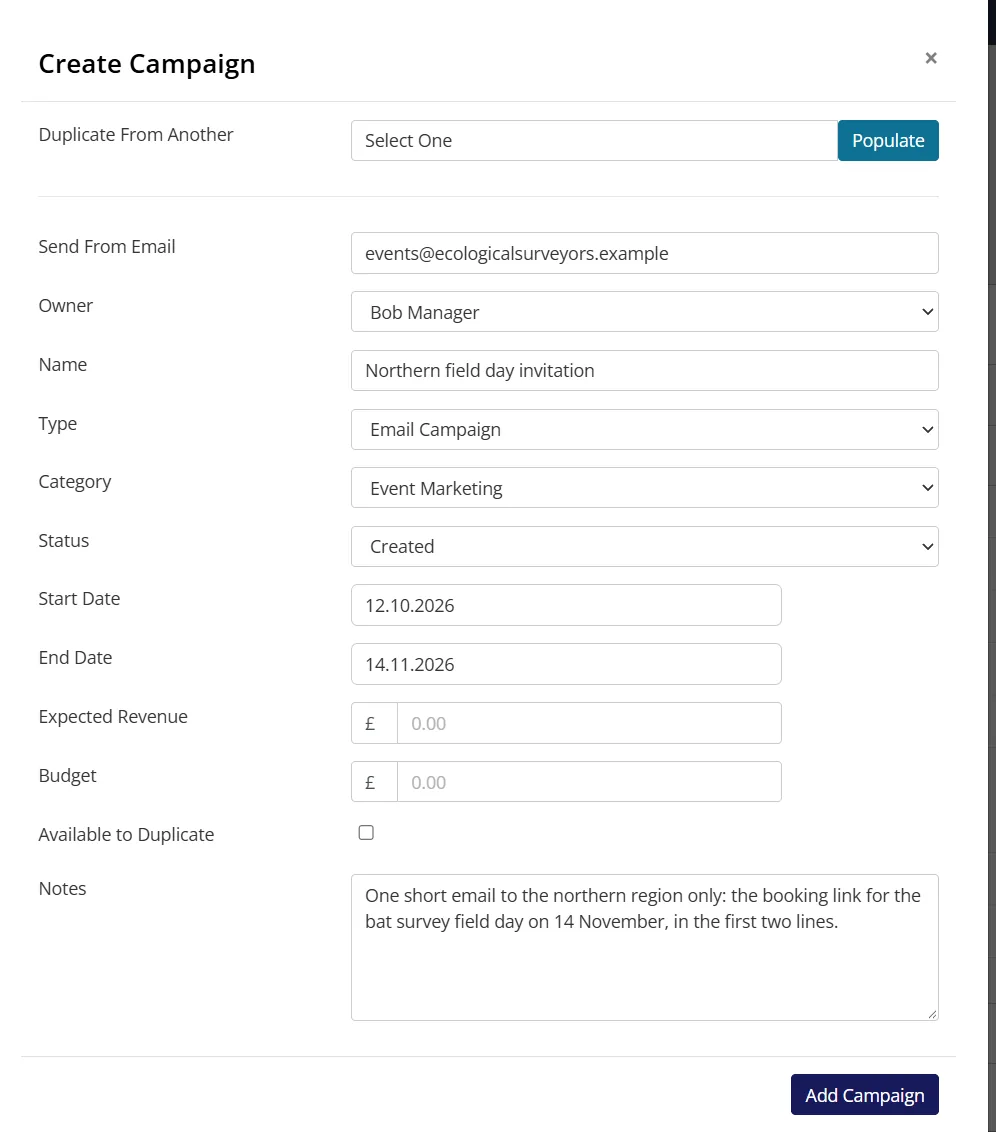
Colossus screen, demonstration data Step 2 of 7Create the campaign
What you do: Click Add Campaign, fill in the name, owner and Send From Email, then click Add Campaign.
What to notice: The new campaign opens on its Campaign View in the Created state, ready for a template and an audience.
-
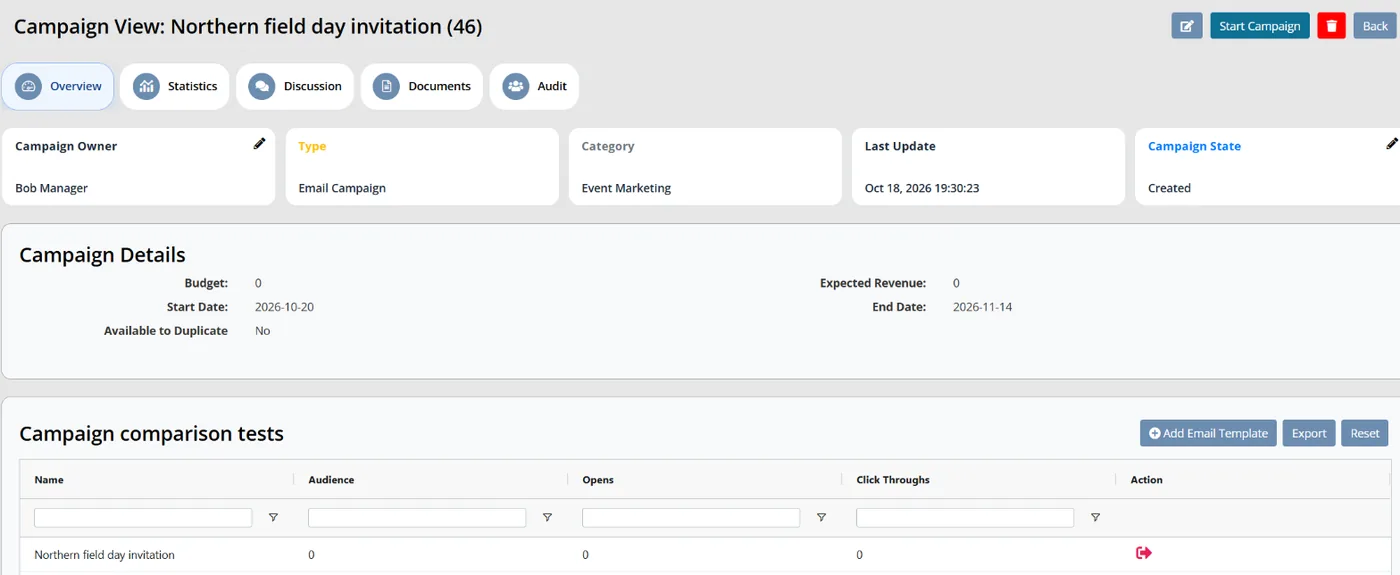
Colossus screen, demonstration data Step 3 of 7Attach the template
What you do: Click Add Email Template and choose the template you have just written.
What to notice: The template appears in the campaign's template grid, with columns for Audience, Opens and Click Throughs.
-
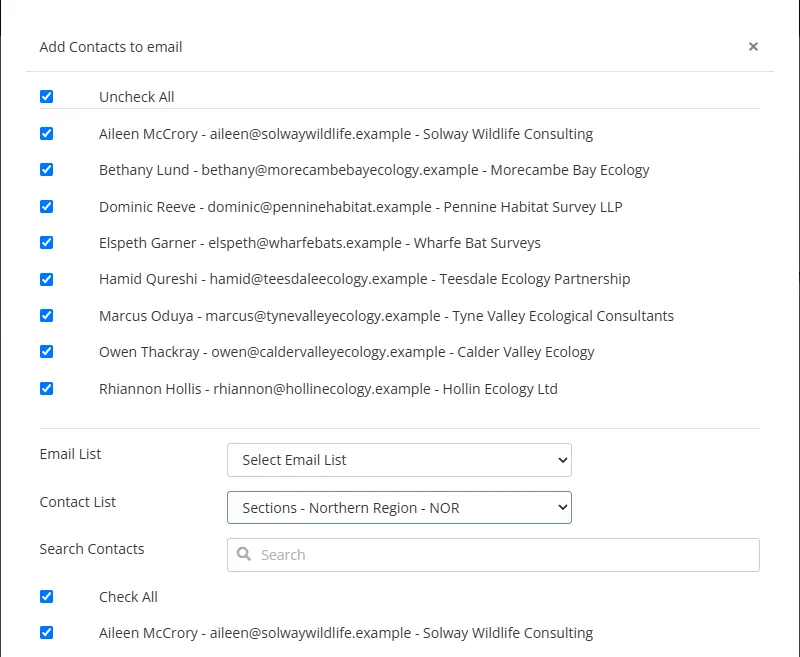
Colossus screen, demonstration data Step 4 of 7Choose the segment
What you do: Click Add Contacts, choose the northern region's member group under Contact List, tick Check All and click Save.
What to notice: An email list or a contact search works here too. Contacts are listed unticked, so only the ones you tick join the audience.
-
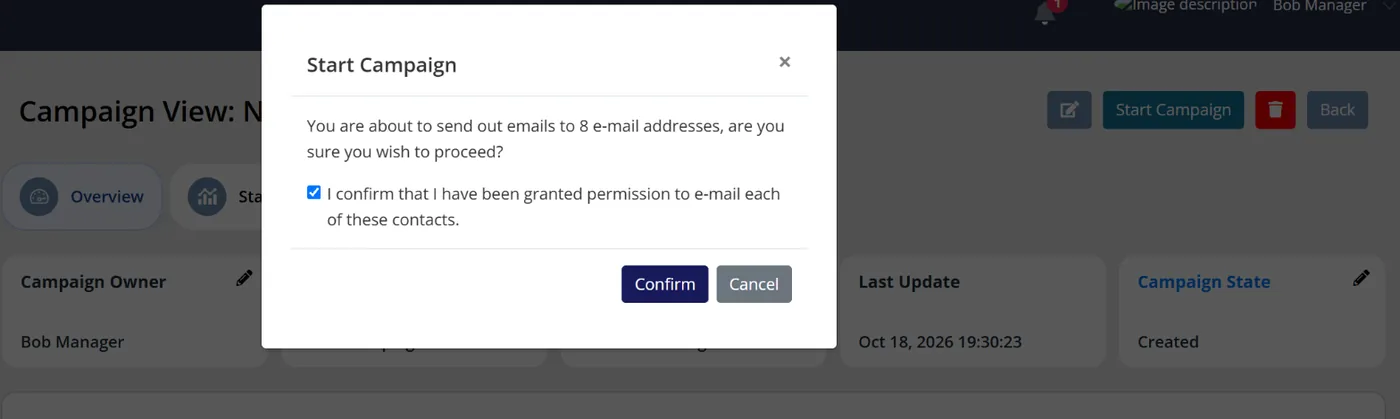
Colossus screen, demonstration data Step 5 of 7Start the campaign
What you do: Click Start Campaign, check the number of e-mail addresses, tick the permission confirmation and click Confirm.
What to notice: Unsubscribed contacts are not emailed. If any were left out, Colossus says how many once the campaign has started.
-
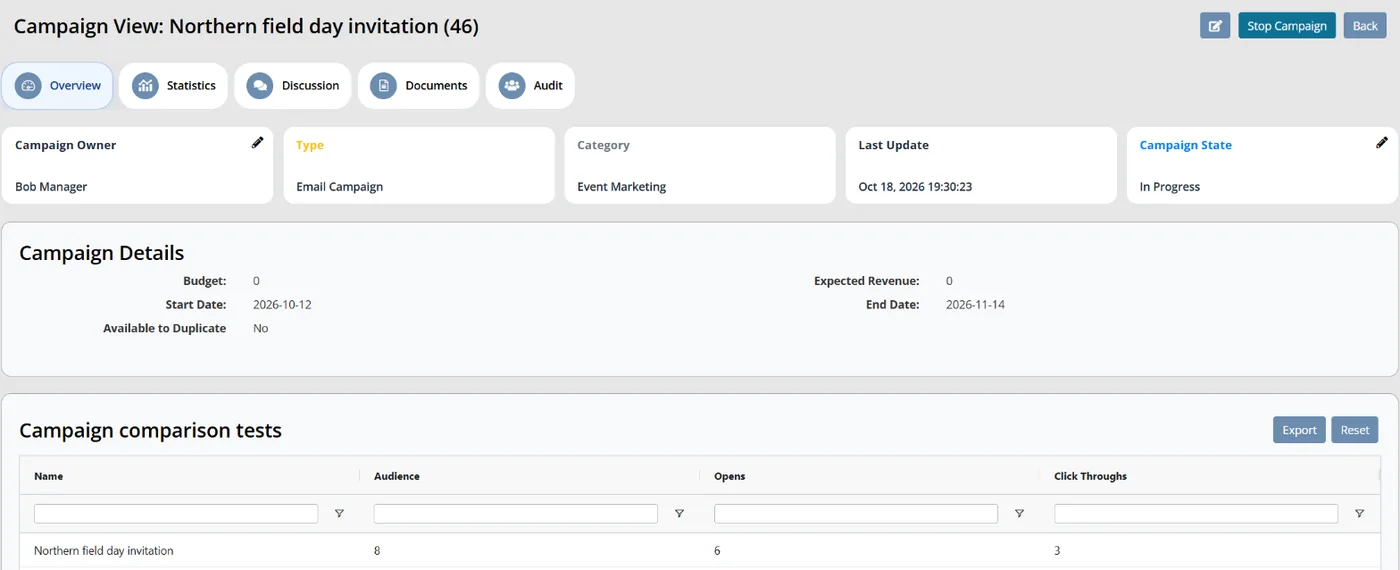
Colossus screen, demonstration data Step 6 of 7Read the results by clicks
What you do: Come back a few days later and read the template grid.
What to notice: Opens are a count and can include email apps that load images automatically. Click Throughs are the better sign that members acted.
-
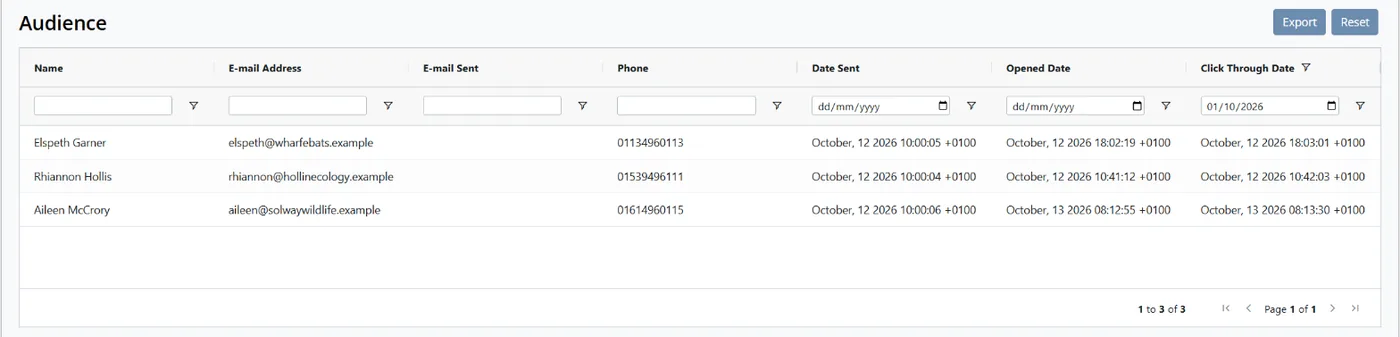
Colossus screen, demonstration data Step 7 of 7See who acted
What you do: Filter the Audience list on Click Through Date.
What to notice: Each contact shows Date Sent, Opened Date and Click Through Date, or 'Not yet clicked', so the regional organiser knows whom to phone.
The result
The northern region gets one short email with the booking link at the top. The campaign shows how many opened and clicked, and the Audience list shows which members clicked and when.
What to measure
An open shows only that an email was loaded. A click shows a member acted. Measure these each month against your own starting point, and give changes two quarters before judging them.
- Click rate for each emailMembers who clicked a link, divided by the members it was sent to.Higher is better
- Members who clicked in the last 90 daysThe share of your list who acted on at least one email in the period.Higher is better
- Share of sends that went to a segmentEmails sent to a list or group rather than everyone, as a share of all sends.Higher is better
- Emails each member receives a monthThe average across your main member types.Lower, as long as clicks hold up
- Questions about things you already sentCalls and emails to the office about items a recent email covered.Lower is better
Frequently asked questions
Is a monthly newsletter still worth sending?
How often should we email members?
Why do opens look healthy when nobody acts?
Should we worry when members unsubscribe?
Which Colossus plans include email campaigns?
Sources
- Higher Logic, Association Email Benchmarks: 7 Insights That Should Inform Your 2026 Strategy, blog post on the 2025–2026 Association Email Benchmark Report, 5 March 2026. Vendor benchmark from about 1,500 associations and nonprofits in the US, Canada and Australia.
- MemberWise, Digital Excellence Report 2026. Around 480 UK membership organisations; findings as summarised by research champion Bluelight, 29 April 2026.
- Higher Logic, 2025 Association Member Experience Report, news release, 4 December 2025. Vendor survey of 440 association members and 112 non-members; the release does not state their geography.
- M+R, M+R Benchmarks 2026: Email Messaging, 2026 edition. Benchmarks from 180 nonprofits, mainly in the US.
See where your own systems stand
The Membership Systems Health Check is ten multiple-choice questions about your data, renewals, automation, reporting and member experience. You get your score out of 100 on screen straight away, with no email needed to see it.
Prefer to talk it through? Book a tailored demonstration and we will start from this problem, not a feature tour.