Virtual training for members: engage, retain, and grow efficiently

Many membership organisation leaders assume virtual training strips away the human connection that makes learning stick. That assumption is costing them members. Well-designed virtual training consistently yields higher engagement and retention than traditional formats, provided the right methodologies are in place. This guide walks you through the core approaches, practical set-up considerations, integration strategies, and the pitfalls that trip up even experienced teams. Whether your organisation is just beginning its virtual training journey or looking to scale what already exists, the frameworks here will help you move forward with confidence.
Table of Contents
- Why virtual training is essential for member-based organisations
- Core methodologies for creating high-impact virtual training
- Structuring and scaling virtual training for diverse member needs
- Integrating virtual training with member management systems
- Overcoming common challenges in virtual training delivery
- A fresh perspective: Practical realities no one tells you about virtual training
- How Colossus Systems can power your virtual training
- Frequently asked questions
Key Takeaways
| Point | Details |
|---|---|
| Interactivity matters | Engagement rises sharply when sessions feature frequent interactivity and blended learning formats. |
| Accessibility and inclusivity | Successful programmes anticipate diverse member needs and provide multiple participation options. |
| Integrated systems boost results | Combining training with automation and your member management system improves retention and efficiency. |
| Preparation prevents pitfalls | Technical planning and session prep are the best guards against member fatigue or operational mishaps. |
Why virtual training is essential for member-based organisations
Member expectations have shifted dramatically. Professionals joining associations and membership bodies today expect flexible, on-demand access to learning, not a once-a-year conference or a printed manual. Organisations that fail to meet this expectation risk losing members to competitors who do. Virtual training is no longer a convenience; it is a core part of your value proposition.
Accessibility is one of the strongest arguments for virtual delivery. Members in regional areas, those with caring responsibilities, or those working across time zones can all participate without the cost and disruption of travel. This inclusivity directly supports retention because members who can actually use your training are far more likely to renew.
The operational benefits are equally compelling:
- Reduced delivery costs: No venue hire, catering, or printed materials
- Scalable reach: Train ten members or ten thousand with the same infrastructure
- Measurable outcomes: Track completion rates, assessment scores, and engagement data in real time
- Faster iteration: Update content quickly without reprinting or rebooking venues
“Virtual training, when well-designed, removes barriers rather than creating them. The organisations that thrive are those that treat it as a strategic asset, not a stopgap.”
For membership organisations specifically, virtual training also plays a direct role in member retention and long-term value. Members who regularly engage with your learning content feel a stronger connection to your organisation’s mission. When you boost member engagement through structured training pathways, you create habitual touchpoints that keep your organisation relevant between renewals.
Core methodologies for creating high-impact virtual training
Effective virtual training does not happen by accident. It requires deliberate design choices that account for how adults learn online, how attention spans behave in digital environments, and how to build genuine rapport without being in the same room.
Start every programme by establishing a learning agreement. This is a brief, shared understanding between the facilitator and participants about expectations, communication norms, and session goals. It sounds simple, but it dramatically reduces disengagement in the first twenty minutes, which is when most participants mentally check out.

Blending synchronous (live, real-time) and asynchronous (self-paced) content is one of the most effective structural decisions you can make. Here is how the two approaches compare:
| Feature | Synchronous learning | Asynchronous learning |
|---|---|---|
| Format | Live webinars, virtual classrooms | Recorded modules, e-learning courses |
| Flexibility | Low: fixed schedule | High: learn at own pace |
| Interaction | Real-time Q&A, polls, breakout rooms | Forums, quizzes, reflective tasks |
| Best for | Complex topics, community building | Foundational knowledge, compliance |
| Cost to deliver | Higher per session | Lower once produced |
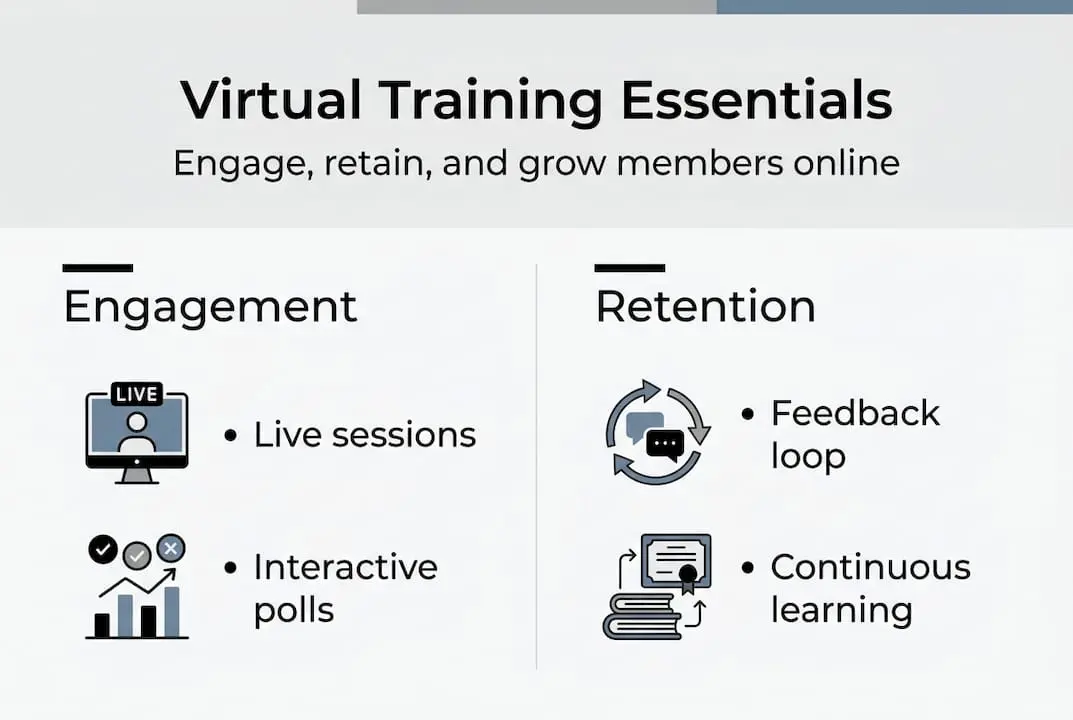
Interactivity is non-negotiable. Interactive elements such as polls, breakout rooms, and gamification foster enhanced engagement, and research consistently supports inserting an interactive moment every five to ten minutes. This rhythm prevents passive consumption and keeps participants cognitively active.
Here is a practical sequence for structuring a live session:
- Open with a two-minute poll or question to activate prior knowledge
- Deliver content in ten-minute blocks, not longer
- Insert a breakout discussion or collaborative task after each block
- Use a shared digital whiteboard for group contributions
- Close with a reflection prompt and clear next-step action
For ongoing improvement, use your platform’s analytics to track where participants drop off, which polls generate the most responses, and which modules score lowest on post-session assessments. These data points are your roadmap for iteration. Explore training strategies for engagement and virtual training best practices to build on these foundations.
Pro Tip: Rotate your interactive formats. If every session uses the same poll tool, participants stop responding with genuine attention. Vary between polls, chat storms, whiteboard tasks, and peer-to-peer breakouts to sustain energy throughout.
Structuring and scaling virtual training for diverse member needs
With the core methodologies in hand, structuring for different member needs becomes the next crucial challenge. Not all members arrive at your training with the same background, technical confidence, or learning preferences. A well-structured programme accounts for this from the outset.
Consider organising access into clear tiers:
| Access level | Features included | Compliance tracking |
|---|---|---|
| Open access | General modules, introductory content | Basic completion logging |
| Tiered membership | Role-specific pathways, advanced content | Progress tracking per tier |
| Certification-bound | Assessed modules, CPD credits | Automated certificate issuance |
Technical reliability underpins everything. Before scaling, establish a backup plan: a secondary platform, a pre-recorded version of live content, and a clear communication protocol for outages. Members who experience repeated technical failures disengage permanently, not just temporarily.
Accessibility and neurodiversity deserve specific attention. Multiple modes of interaction help support neurodiverse participants, and this means going beyond captions and transcripts. Offer chat as an alternative to speaking aloud, use visual summaries alongside verbal explanations, and allow asynchronous participation for those who process information more effectively outside live sessions.
Key considerations for inclusive virtual training:
- Provide materials in advance so members can prepare
- Use plain language and avoid dense slides
- Allow anonymous question submission via chat or Q&A tools
- Record all live sessions for later access
Automating compliance and continuing education tracking removes a significant administrative burden. When your platform logs completions, issues certificates, and sends reminders automatically, your team can focus on content quality rather than spreadsheet management. This is a core part of digital transformation for growth for modern associations.
Pro Tip: For quiet participants, assign a specific, low-stakes task during breakout rooms, such as note-taking or summarising the group’s discussion. This gives them a defined role without putting them on the spot.
Integrating virtual training with member management systems
Once structure is set, connecting virtual training to broader member management maximises organisational return on investment. Isolated training platforms create data silos, administrative duplication, and missed opportunities for personalisation.
The three key systems to connect are:
- LMS (Learning Management System): Hosts and delivers your training content, tracks completions and assessments
- AMS (Association Management System): Manages member records, renewals, and tier classifications
- CRM (Customer Relationship Management): Tracks member interactions, preferences, and engagement history
Integrating virtual training into your LMS with AMS and CRM for automated, tiered access boosts both retention and revenue, making integration a strategic priority rather than a technical nicety.
Here is how to map out your integration in a structured way:
- Audit your current systems and identify where member data lives
- Define the data points that need to flow between systems (completions, tier status, renewal dates)
- Choose integration tools or APIs that connect your platforms without custom development
- Test with a small member cohort before full rollout
- Set up automated triggers: enrolment on renewal, certificate on completion, reminder on inactivity
The pitfall most organisations fall into is overcomplicating the stack. Adding five platforms that each do one thing creates more problems than it solves. Prioritise a solution that handles multiple functions natively. When you use engagement software that already connects training, CRM, and member management, you eliminate the integration headache entirely.
Overcoming common challenges in virtual training delivery
Even the best integration and design can unravel without a plan for common training pitfalls. Technical issues are the most visible problem, but they are rarely the most damaging. Member fatigue and poor instructor preparation cause far more long-term harm.
Address technical issues proactively:
- Run a technical check with all facilitators 48 hours before each session
- Provide a simple one-page troubleshooting guide to participants in advance
- Assign a dedicated technical host separate from the content facilitator
- Always have a backup communication channel, such as email or SMS, ready for outages
Member fatigue is real. Sessions longer than 90 minutes without a meaningful break see sharp drops in participation and post-session recall. Structure your programmes with deliberate rest points, and consider splitting longer content across multiple shorter sessions rather than marathon single-day events.
Instructor skill in digital delivery is frequently underestimated. Pre- and post-session preparation is critical for higher retention, and this includes reviewing participant data before the session, preparing contingency activities, and following up with resources or a summary within 24 hours.
“The facilitator’s energy is the room’s energy. In a virtual environment, you have to work twice as hard to project presence, warmth, and authority through a screen.”
For compliance and certification programmes, the stakes of poor delivery are higher. A disengaged member who clicks through without genuinely learning puts both their professional standing and your organisation’s credibility at risk. Invest in facilitator training specifically for virtual environments, not just subject matter expertise.
Pro Tip: Prepare a contingency activity for every session, such as a discussion prompt or a short quiz, that can fill time if technology fails or a segment runs short. This keeps the session productive regardless of disruptions. Strong virtual networking tips and event promotion ideas can also support your wider virtual programme strategy.
A fresh perspective: Practical realities no one tells you about virtual training
Most guides focus on tools and tactics. What they rarely address is the human cost of running virtual training at scale. Facilitators burn out faster in virtual environments than in person because maintaining energy, monitoring chat, managing breakout rooms, and presenting simultaneously is genuinely exhausting. Organisations that ignore this end up with inconsistent delivery quality within months.
The second reality is that overengineering your platform is a common and costly mistake. Organisations invest heavily in sophisticated LMS features that members never use, while neglecting the basics: clear navigation, fast load times, and responsive support. The experience matters more than the feature list.
What actually sustains engagement over time is not the technology. It is the feedback loop. Members who receive personalised responses to their progress, small wins celebrated through certificates or badges, and prompt answers to their questions keep coming back. Organisations that have recovered from failed virtual training launches almost always point to the same turning point: they started listening to member feedback and responding quickly.
As we have seen when working with virtual event companies, the organisations that treat virtual training as a craft, not just a process, are the ones that build lasting member loyalty.
How Colossus Systems can power your virtual training
Implementing everything covered in this guide requires a platform that keeps pace with your ambitions without adding operational complexity.

Colossus Systems brings together membership management features, event management software, and CRM software within a single, unified platform. Our system automates enrolment, tracks member progress, issues certifications, and connects training data directly to your member records. We offer tools that scale with your organisation, whether you are running a single webinar or a full continuing education programme. If you are ready to streamline your virtual training and strengthen member engagement, explore our features or get in touch with our team to discuss a solution tailored to your organisation’s needs.
Frequently asked questions
What makes virtual training successful for member engagement?
Interactive training and blended learning drive engagement, so high-impact virtual training combines live sessions with self-paced content and clear learning expectations from the outset. Consistent interactivity and responsive facilitation are the two factors that separate successful programmes from forgettable ones.
How can organisations support neurodiverse members in virtual training?
Multiple modes of interaction help support neurodiverse participants, so include chat, reactions, anonymous Q&A, and asynchronous options to ensure every member can participate comfortably. Providing materials in advance also reduces cognitive load significantly.
What tools help automate certification and compliance during virtual training?
Automation via LMS, AMS, and CRM allows organisations to track, manage, and issue member certifications without manual administration. Connecting these systems ensures compliance records update automatically as members complete required modules.
How do you keep members engaged in a virtual environment?
Regular interaction such as polls, breakout rooms, and varied activities sustains engagement, so aim to change the activity or format every five to ten minutes during live sessions. Rotating your interactive formats prevents participants from switching to autopilot.
Recommended
- Virtual training strategies to boost member engagement|CS
- Virtual Training Best Practices for Membership Groups 2025|CS
- Virtual Learning: Boost Member Engagement 40% in 2026|CS
- Virtual Networking Tips to Boost Member Engagement Online|CS
- Player Development: Transforming High School Teams – Hoop Mentality
- Employee Retention Solutions, Lower Turnover | OpenElevator