Boost virtual event accessibility for diverse audiences

TL;DR:
- Virtual events can be more accessible but require deliberate planning and platform compliance.
- Testing with users with disabilities and continuous feedback are essential for genuine inclusion.
- Implementing practical solutions and measuring impact demonstrate accessibility benefits and improve ROI.
90% of attendees say virtual events offer better accessibility than in-person gatherings. That figure might surprise you, especially if your organisation has been wrestling with whether digital formats truly serve everyone equally. The reality is more nuanced. While virtual events remove many physical barriers, they introduce a distinct set of challenges around technology, communication, and inclusion. This guide cuts through the assumptions and gives event coordinators in membership organisations and nonprofits a clear, actionable path to making virtual events genuinely accessible for every participant, regardless of ability, language, or connectivity.
Table of Contents
- Core principles of virtual event accessibility
- Planning accessible virtual events: Key steps
- Practical solutions for diverse accessibility needs
- Beyond compliance: ROI, measurement, and continuous improvement
- Our take: What most event guides get wrong about accessibility
- Enhance your virtual events with accessible tools
- Frequently asked questions
Key Takeaways
| Point | Details |
|---|---|
| Accessibility starts with planning | Accessible virtual events require early role assignments and input from disabled users. |
| Solutions must fit varied needs | No single tool covers every accessibility gap—address neurodiverse, sensory, and technical barriers specifically. |
| Continuous feedback drives progress | Regular participant surveys and analytics lead to more inclusive and effective future events. |
| Benefits go beyond compliance | Accessible events are cost-effective, reach more people, and build your organisation’s reputation. |
Core principles of virtual event accessibility
True virtual event accessibility is not simply about switching from an in-person format to an online one. It means deliberately designing every element of your event so that no participant is excluded due to disability, language, technology, or environment. This distinction matters enormously for membership organisations, where your audience spans a wide range of backgrounds and needs.
The foundation begins with your platform. WCAG 2.1 AA compliant platforms with live captions, screen reader compatibility, keyboard navigation, and support for sign language interpreters form the essential baseline. WCAG, which stands for Web Content Accessibility Guidelines, is the internationally recognised standard for digital accessibility. Meeting level AA means your platform handles the most common accessibility barriers. But selecting a compliant platform is the starting point, not the finishing line.
Beyond the platform itself, several foundational tools reduce barriers for participants:
- Live captions allow participants who are deaf, hard of hearing, or processing language in a second tongue to follow along in real time
- Sign language interpretation serves Deaf communities who may not read captions fluently
- Screen reader support enables blind and low-vision participants to navigate interfaces using assistive technology
- Keyboard navigation removes reliance on a mouse, which many participants with motor impairments cannot use comfortably
- High contrast and adjustable font settings assist participants with visual impairments or dyslexia
Many event coordinators assume that choosing a well-known platform guarantees accessibility. That assumption regularly leads to gaps. You can explore virtual event accessibility strategies to understand how platform choice intersects with broader engagement outcomes, and also consider secure online event hosting as part of a trustworthy event experience.
Reviewing website accessibility insights can also reveal how online environments commonly fail users before they even reach your event registration page.
“No platform is fully accessible. Testing with real users who have disabilities is irreplaceable. What looks accessible in a feature list may fail entirely in practice.”
This is the most important principle to internalise. Recruit participants with a range of disabilities to test your chosen platform before your first event. Their feedback will reveal problems that no technical checklist can catch.
Planning accessible virtual events: Key steps
Once you understand the foundation, applying these principles begins with strategic planning. Accessibility cannot be retrofitted at the last minute. It must be structured into your planning timeline from the start, with clear ownership at every stage.
A practical planning process looks like this:
- Eight weeks before the event: Choose your platform based on accessibility criteria, not just price or familiarity. Review WCAG compliance documentation and check for known gaps.
- Six weeks before: Identify and assign dedicated accessibility roles within your team. Every accessible event needs a captioner, a sign language interpreter liaison, and an accessibility monitor who watches the event in real time for issues.
- Four weeks before: Book interpreters and captioners well in advance. Experienced professionals are in high demand, and last-minute bookings often mean lower quality or no availability at all.
- Three weeks before: Send a pre-event survey to registered participants asking about their accessibility needs. This removes the burden from participants to advocate for themselves on the day.
- Two weeks before: Prepare all materials in accessible formats. Slide decks should be readable by screen readers, with alt text on all images and sufficient colour contrast in charts.
- One week before: Conduct a full rehearsal with disabled users present. This is not optional. A dry run with participants who use assistive technologies reveals technical barriers that your team would otherwise discover mid-event.
- Post-event: Distribute a feedback survey specifically asking about accessibility experience. Use the responses to build a continuous improvement cycle.
Pro Tip: Include an open text field in your pre-event survey rather than only tick boxes. Participants often have specific needs that standard categories do not capture, such as requiring a particular caption font size or needing materials in Easy Read format.
Working with virtual event planning platforms that support structured registration workflows makes managing these steps considerably easier. If you are also developing your own skills, exploring event coordinator classes can build the knowledge base needed to lead accessible event planning confidently.
The post-event feedback loop deserves particular attention. Accessibility improvements compound over time when each event informs the next. Keep a living document recording what worked, what failed, and what participants requested. Over several events, this becomes a tailored accessibility playbook for your specific audience.
Practical solutions for diverse accessibility needs
Strong planning sets the stage, but accessible delivery depends on practical solutions for varied accessibility needs. Your participants are not a uniform group. They bring different disabilities, languages, devices, and internet connections to every event, and your solutions must reflect that diversity.
The table below matches common participant challenges to targeted solutions:
| Participant challenge | Practical solution |
|---|---|
| Deaf or hard of hearing | Live captions and sign language interpreter on screen |
| Blind or low vision | Screen reader compatible platform, alt text on all visuals |
| Neurodiverse (e.g., ADHD, autism) | Plain language, scheduled breaks, no flashing animations |
| Non-native English speaker | Bilingual sessions, translated materials, plain language |
| Low bandwidth or rural connectivity | Phone dial-in option, downloadable materials in advance |
| Motor impairment | Full keyboard navigation, no timed interactions |
| Multiple languages needed | Separate language sessions or interpreter channels |
AI-generated captions have improved dramatically, but they carry important limitations. AI captions have errors with accents, technical terminology, and proper nouns, so human editing as a backup is essential for high-stakes events. For a general membership webinar, AI captions with a human monitor may suffice. For a formal conference with complex subject matter or multiple accents, commission professional human captioners.
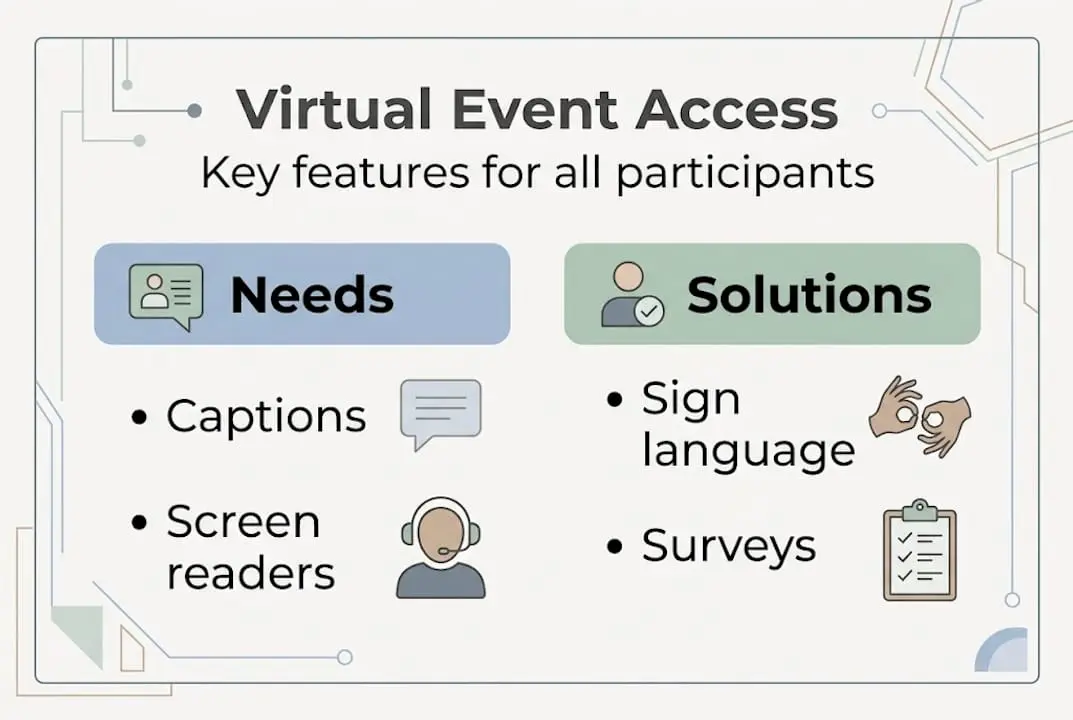
For accommodating diverse guest needs, a structured workflow before, during, and after the event makes all the difference in how included participants feel.
Additional practical solutions worth building into your standard process:
- Low-bandwidth workarounds: Offer audio-only dial-in numbers, share slide decks before the event, and enable low-definition video modes
- Plain language summaries: Provide a written recap in simple language after every session, particularly useful for neurodiverse participants and those whose first language is not English
- Alternative formats: Offer transcripts, audio descriptions, and Easy Read versions of key materials
- Flexible participation: Allow participants to contribute via chat, polls, or pre-submitted questions rather than requiring live verbal participation
These practical steps apply across the range of event planning website options your organisation might use, and they also strengthen your broader fundraising engagement by ensuring donors and community members with accessibility needs feel genuinely valued.
Beyond compliance: ROI, measurement, and continuous improvement
While tactical solutions ensure accessibility is possible, measuring impact and iterating drives future-proof success. Accessibility is not just the right thing to do. It is also a measurable driver of organisational outcomes.
Consider this: accessible virtual events deliver 82% less cost than in-person equivalents and generate 20% more leads, while improving participant retention across the board. For a nonprofit managing a tight budget, those figures represent a compelling case for sustained investment in accessibility rather than treating it as a one-time checkbox exercise.
The comparison below illustrates the broader difference between in-person and virtual event accessibility:
| Factor | In-person events | Virtual events |
|---|---|---|
| Physical accessibility | Venue-dependent, variable | Platform-dependent, more consistent |
| Geographic reach | Local or regional | Global |
| Cost per participant | High | Significantly lower |
| Caption availability | Rarely standard | Can be built in by default |
| Interpreter provision | Complex logistically | Easier to integrate digitally |
| Participant data and feedback | Manual collection | Automated analytics available |
Measurement is where many organisations fall short. Collecting accessibility data closes this gap. Track the following after every event:
- Caption usage rates (which tells you how many participants relied on them)
- Interpreter session attendance
- Accessibility-related support requests during the event
- Post-event survey scores specifically on accessibility satisfaction
- Attendance rates segmented by participant type
Pro Tip: Use your event platform’s analytics alongside a short post-event survey with three to five accessibility-focused questions. Combining quantitative data with open qualitative responses gives you a fuller picture than either method alone.
Your event promotion ideas should also reflect your commitment to accessibility. When you communicate accessibility features clearly in your promotional content, you signal to potential participants with disabilities that they are genuinely welcome, which directly improves attendance and trust. For deeper insight into the planning skills that underpin this kind of strategic thinking, the event planning key insights resource offers practical guidance worth reviewing.
Treat accessibility feedback as a continuous cycle rather than a post-mortem. Each event generates data that improves the next one. Over time, this approach builds institutional knowledge and a reputation for inclusion that sets your organisation apart.
Our take: What most event guides get wrong about accessibility
Most accessibility guides focus heavily on compliance checklists. Tick WCAG boxes, add captions, done. That framing misses the point entirely, and it often leads organisations to declare victory before real inclusion has been achieved.
Here is what we have observed working with membership organisations: the pursuit of a “fully accessible platform” frequently delays action. Coordinators spend months evaluating tools, waiting for a perfect solution that does not exist. Meanwhile, participants with disabilities are excluded from event after event. 91% report improved UX from accessibility improvements, and AI avatars have boosted accessibility by 60% for disabled users. Yet the average web page still carries 51 WCAG errors, and 94.8% of top sites fail some accessibility criteria. Perfection is not the standard. Progress is.
The organisations making the most meaningful accessibility gains are not the ones with the largest budgets or the most advanced platforms. They are the ones that act on small, actionable improvements and genuinely listen to participants with disabilities. Every rehearsal with a disabled user, every pre-event survey, every post-event feedback loop contributes more to real inclusion than any feature comparison spreadsheet.
Innovations like AI-generated avatars and automated translation are genuinely exciting and worth exploring through member engagement strategies. But they require ongoing human oversight. Technology evolves faster than its accessibility implications can be fully understood, which means a human feedback loop is always necessary. Progress on paper means nothing if the people you serve still feel excluded. Start where you are, improve consistently, and prioritise listening over ticking boxes.
Enhance your virtual events with accessible tools
Putting these strategies into practice requires more than good intentions. It requires reliable, integrated technology built for the complexity of modern membership events.

At Colossus Systems, our event management software supports the full event lifecycle, from accessible registration workflows and communication tools to post-event analytics that help you measure what actually matters. Our membership management features are designed to help your organisation grow while keeping participant experience, including accessibility, at the centre of every event. Whether you are running a small online workshop or a large-scale virtual conference, we can help you build accessible, engaging events that serve your entire community. Reach out to arrange a consultation and see how our platform fits your organisation’s needs.
Frequently asked questions
What does WCAG compliance mean for virtual events?
WCAG compliance means your event platform supports screen readers, captions, keyboard navigation, and meets essential accessibility standards, ensuring participants with disabilities can engage fully.
How can I make AI captions more accurate?
Pair AI captions with human editors, especially for complex terms and accents, to improve accuracy and ensure all participants follow the content without confusion.
Why should feedback surveys follow every virtual event?
Post-event feedback loops help identify specific barriers experienced by participants, enabling you to make targeted improvements that make future events more inclusive for everyone.
Does virtual accessibility really impact ROI?
Yes. Accessible virtual events deliver 82% less cost than in-person events, generate 20% more leads, and improve participant retention, making accessibility a sound strategic investment for nonprofits.
Are all virtual event platforms equally accessible?
No platform is fully accessible. Testing with real users who have disabilities and adapting based on their direct feedback is the only reliable way to identify and address genuine accessibility gaps.