Secure online event hosting: How nonprofits protect members

TL;DR:
- Nonprofits face rising web attacks, making secure online events essential for trust and compliance.
- Implementing strong access controls, encryption, and leadership oversight minimizes breach risks.
- Using specialized platforms and rehearsing security protocols ensure resilient, high-stakes virtual gatherings.
Online events have become the backbone of nonprofit member engagement, yet web attacks rose 33% to 311 billion incidents in 2024 alone. Many membership organisations are still running events on platforms chosen for convenience rather than security, leaving member data and organisational reputation exposed. This guide is written for event planners and administrators who want practical, actionable steps to host secure online events without sacrificing engagement. You will learn which risks matter most, how to choose the right platform, how to lock down access, and how to protect member data at every stage of your event lifecycle.
Table of Contents
- Understanding the risks: Why security matters for online events
- Selecting secure and compliant online event platforms
- Access control: Keeping intruders out
- Data protection and privacy: Safeguarding member information
- Advanced strategies for resilient and high-stakes events
- Why secure event hosting is a leadership issue, not just IT’s
- Simplifying secure event hosting with Colossus Systems
- Frequently asked questions
Key Takeaways
| Point | Details |
|---|---|
| Security is essential | Nonprofits face significant online event risks that require proactive planning. |
| Choose compliant platforms | Select event software with robust encryption, compliance certifications, and privacy features. |
| Use strict access control | Registration, unique links, and multi-factor authentication are critical for keeping intruders out. |
| Protect member data | Collect minimal data, encrypt information, and train staff to ensure member privacy and compliance. |
| Practice and lead | Effective, secure online events demand leadership and regular rehearsal, not just technical solutions. |
Understanding the risks: Why security matters for online events
Before we explore securing your events, let us look at why online event risks are so pressing for nonprofits. The scale of virtual events is enormous. Zoom hosted 6 million events with 268 million participants in 2024, and that volume creates an enormous attack surface for bad actors. Nonprofits are not exempt from these threats simply because they operate for social good.
“Security is not a feature you add at the end. It is a fundamental requirement that shapes every decision from platform selection to post-event data deletion.”
The most common threats your organisation faces include:
- Zoombombing: Uninvited guests crashing your event to disrupt proceedings or expose sensitive discussions
- Phishing attacks: Fake event invitations or registration pages designed to harvest member credentials
- DDoS attacks: Deliberate traffic floods that knock your event offline at the worst possible moment
- Unauthorised access: Attendees sharing links broadly, allowing non-members to join private sessions
- Data interception: Unencrypted streams that allow third parties to capture member information in transit
The consequences go well beyond a disrupted meeting. A single breach can erode years of member trust, trigger regulatory scrutiny under data protection law, and generate reputational damage that is difficult to recover from. For nonprofits, where trust is currency, that is a serious risk.
What makes this particularly challenging is that security is often treated as an IT concern. Event planners assume someone else is handling it. In reality, the decisions you make during event setup, from registration settings to link distribution, directly determine how secure your event is. Understanding online event platform engagement from a security perspective is the first step towards protecting your members.
Selecting secure and compliant online event platforms
Now that we understand the risks, how do you pick a secure platform that fits nonprofit needs? The starting point is knowing which security features are non-negotiable. Core mechanics for secure events include end-to-end encryption, granular access controls, recognised security certifications, and secure integrations with your existing tools.
Here is a comparison of three platforms commonly used by nonprofits:
| Platform | Encryption | Certifications | Nonprofit features |
|---|---|---|---|
| EventBuilder | End-to-end | SOC 2 | Registration controls, compliance tools |
| Zoom Webinars | End-to-end | ISO 27001, SOC 2 | Waiting rooms, role management |
| ON24 | In-transit | SOC 2, GDPR ready | Analytics, engagement tools |
Beyond encryption and certifications, look for platforms that offer GDPR-readiness, particularly important for UK and EU-based organisations. You also want robust member engagement tools, accessibility features such as closed captioning, and reliable integrations with your CRM or membership management system. A platform like BigMarker is worth reviewing for its webinar-focused security controls and engagement features.
Pro Tip: Always request a security summary or data processing agreement from any platform vendor before signing a contract. Reputable providers will supply this without hesitation.
When reviewing your options, also consider how well the platform supports your event promotion strategy. The best event planning sites for nonprofits combine security with seamless registration and communication tools. Strong event promotion for engagement only works if the underlying platform is trustworthy enough for members to feel safe registering and attending.
Access control: Keeping intruders out
Choosing the right platform is vital, but robust access control is equally critical at the event setup stage. Even the most secure platform can be compromised by poor configuration. The good news is that implementing strong access control is straightforward when you follow a clear process.
Here is a step-by-step approach to locking down your events:
- Require registration for every attendee. Never use open, public links for member-only events. Registration gates your audience and gives you a record of who attended.
- Generate unique, non-shareable links. Each registrant should receive a personalised link tied to their registration. This prevents link sharing and makes it easy to identify breaches.
- Enable waiting rooms. Hosts should admit attendees individually or in batches, reviewing names against the registration list before granting entry.
- Apply role-based permissions. Differentiate clearly between hosts, panellists, and attendees. Attendees should not have screen-sharing or recording rights by default.
- Require multi-factor authentication (MFA) for hosts and co-hosts. MFA adds a second verification step, making it significantly harder for an attacker to take over a host account.
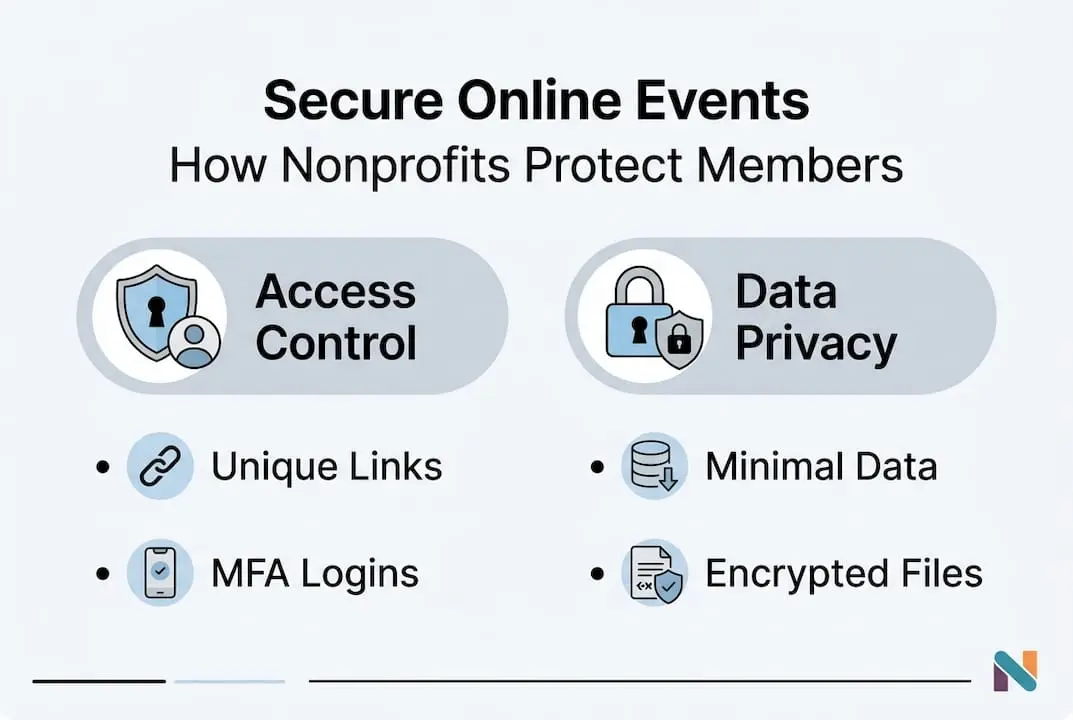
Access control best practices confirm that mandatory registration, unique links, role-based permissions, MFA, and waiting rooms are the five pillars of a secure event setup. Skipping even one of these creates a gap that bad actors can exploit.

Pro Tip: Run a brief pre-event check 15 minutes before going live. Confirm waiting rooms are active, screen-sharing is restricted to hosts, and your registration list is visible so you can verify attendees quickly.
Common pitfalls include using a single generic link shared via social media, disabling waiting rooms to speed up entry, and granting all participants equal permissions. Each of these shortcuts significantly increases your risk. Improving your event website engagement starts with building trust through secure, well-managed registration processes.
Data protection and privacy: Safeguarding member information
Even with access control in place, safeguarding your members’ information is essential. Data protection is not just about what happens during the event. It covers everything from the moment a member submits their registration form to the point where their data is securely deleted.
Data protection for events requires collecting minimal necessary data, encrypting data at rest and in transit, maintaining transparency with members, ensuring secure deletion, and training staff thoroughly.
Here is a practical overview of your data lifecycle responsibilities:
| Stage | Action required | Why it matters |
|---|---|---|
| Registration | Collect only essential fields | Minimises exposure if a breach occurs |
| During event | Encrypt all streams and chat | Prevents interception of live data |
| Post-event | Retain only what compliance requires | Reduces long-term liability |
| Deletion | Securely delete all surplus data | Meets GDPR and data minimisation rules |
Transparency is equally important. Members should know what data you collect, how long you retain it, and what rights they have under UK GDPR. A clear privacy notice on your registration page is not optional. It is a legal requirement and a trust signal.
Key actions to embed in your data protection approach:
- Conduct a brief data audit before each event to confirm you are only collecting what is necessary
- Use platforms with built-in encryption for recordings and chat logs
- Publish a clear retention policy and honour it consistently
- Brief all staff and volunteers on their data handling responsibilities before each event
Reviewing event data privacy approaches from sector peers can help you benchmark your current practices. For broader context, understanding digital transformation for nonprofits shows how data governance fits into a wider organisational strategy.
Advanced strategies for resilient and high-stakes events
For especially sensitive or high-profile nonprofit events, an extra layer of resilience is required. Annual general meetings, fundraising galas, and public townhalls carry greater risk because they attract larger audiences, handle sensitive financial discussions, or involve board-level governance.
High-stakes events require MFA, end-to-end encryption, IP and geo restrictions, DDoS mitigation, active monitoring and logging, and a tested incident response plan. These are not optional extras for mission-critical events. They are baseline requirements.
Advanced tools and strategies to consider include:
- IP and geo restrictions: Limit event access to specific countries or IP ranges if your membership is geographically defined
- DDoS mitigation services: Work with your platform or hosting provider to ensure traffic surge protection is active before large events
- Live monitoring: Assign a dedicated team member to monitor participant activity, chat, and system alerts throughout the event
- Backup and recovery: Test your failover plan before the event, not during it. Know exactly what happens if your primary stream drops
- Post-event audit logs: Retain access logs for compliance purposes and review them after every high-stakes event
“Rehearsal is the single most underused security tool available to nonprofit event teams. Running a full technical rehearsal, including a simulated breach scenario, reveals gaps that no checklist ever will.”
For events managed through a specialist online event agency, ensure your security requirements are written into the brief from the outset. Do not assume an agency will apply best practices automatically.
Why secure event hosting is a leadership issue, not just IT’s
These advanced tools raise an essential point: security is about people and leadership, not just technology. We have seen organisations invest in excellent platforms and still suffer breaches because no one at leadership level owned the security brief.
Relying solely on your IT team or platform vendor is a mistake. Event security decisions, from data collection policies to incident response authority, require sign-off from senior leadership. When a breach occurs during a live event, someone needs the authority to act immediately. That person cannot be a junior administrator.
Board-level involvement in security policy is not excessive caution. It is good governance. Organisations that conduct annual security reviews, rehearse incident responses, and hold post-event debriefs consistently outperform those that treat security as a one-time setup task. Investing in event coordinator leadership skills equips your team to make confident, informed decisions under pressure. Security culture starts at the top and works its way through every volunteer, staff member, and platform configuration.
Simplifying secure event hosting with Colossus Systems
Looking for help putting these strategies into practice? Here is how Colossus Systems makes it easier.
Our secure event management tools are built specifically for membership organisations and nonprofits, combining registration controls, access management, and compliance-ready workflows in a single platform.

Beyond events, our membership management features give you the ongoing visibility you need to monitor engagement, manage member data responsibly, and maintain audit-ready records. From encrypted payment processing to tailored communication channels, we offer the infrastructure to run secure, engaging events at scale. Speak to our team today to see how Colossus Systems can support your next event.
Frequently asked questions
Which online event platform is most secure for nonprofits?
Platforms such as EventBuilder, Zoom Webinars, and ON24 offer robust security and compliance features well-suited to nonprofit needs. Prioritise those with SOC 2 certification and GDPR-readiness.
How do I stop Zoombombing or uninvited guests at my event?
Mandate registration, issue unique non-shareable links, enable waiting rooms, and require multi-factor authentication for all hosts and co-hosts.
What is the minimum data I should collect from event registrants?
Collect only the information essential for event delivery and legal compliance. Minimal data collection reduces your exposure significantly if a breach occurs.
How can I respond to a security breach during a live online event?
Have a tested incident response plan ready before the event begins, with clear roles assigned and rehearsed so your team can act decisively under pressure.
Do I need to train volunteers and staff on online event privacy?
Yes. Everyone with access to event systems or member data should be trained in privacy protocols before each event, not just once at onboarding.