Best Board Management Software in 2026: Options Compared

The best board management software depends on who sits around your table. Small charity and school boards are well served by per-board tools such as BoardPro. Large listed companies tend to choose Diligent Boards or Nasdaq Boardvantage. If your board is part of a membership organisation, an association or a nonprofit, the strongest fit is often a platform that connects board work to the members, events and communications it governs. That is the gap we built Colossus to fill.
This guide compares the options readers most often shortlist, with the prices vendors publish, what each is built for and what to check before you sign.
TL;DR
- Board management software centralises agendas, board materials, decisions and follow-up actions, so they no longer live in email threads and spreadsheets.
- BoardPro, Boardable and BoardSite publish prices. Diligent, Nasdaq Boardvantage, OnBoard, BoardEffect and Govenda generally need a sales conversation.
- Check security certifications (ISO 27001, SOC 2 Type II), mobile access, minutes and action tracking, and training before choosing.
- Membership organisations gain most from a platform that links the board to member records, events and communications. Colossus plans start at £349 per month.
Table of Contents
- What board management software does
- What to compare before you shortlist
- Best board management software compared
- Is there free board management software?
- What publishing a price tells you
- Security and compliance checks
- How to match a platform to your organisation
- Our perspective
- See what Colossus plans include
- FAQ
- Sources
What board management software does
Board management software is the set of tools a board and its leadership team use to run the full governance cycle: planning meetings, sharing materials, capturing decisions and tracking follow-through. At a minimum it centralises agendas, board materials, decisions and the actions those decisions create. Better systems close the loop after the meeting by turning decisions into owned, dated action items.
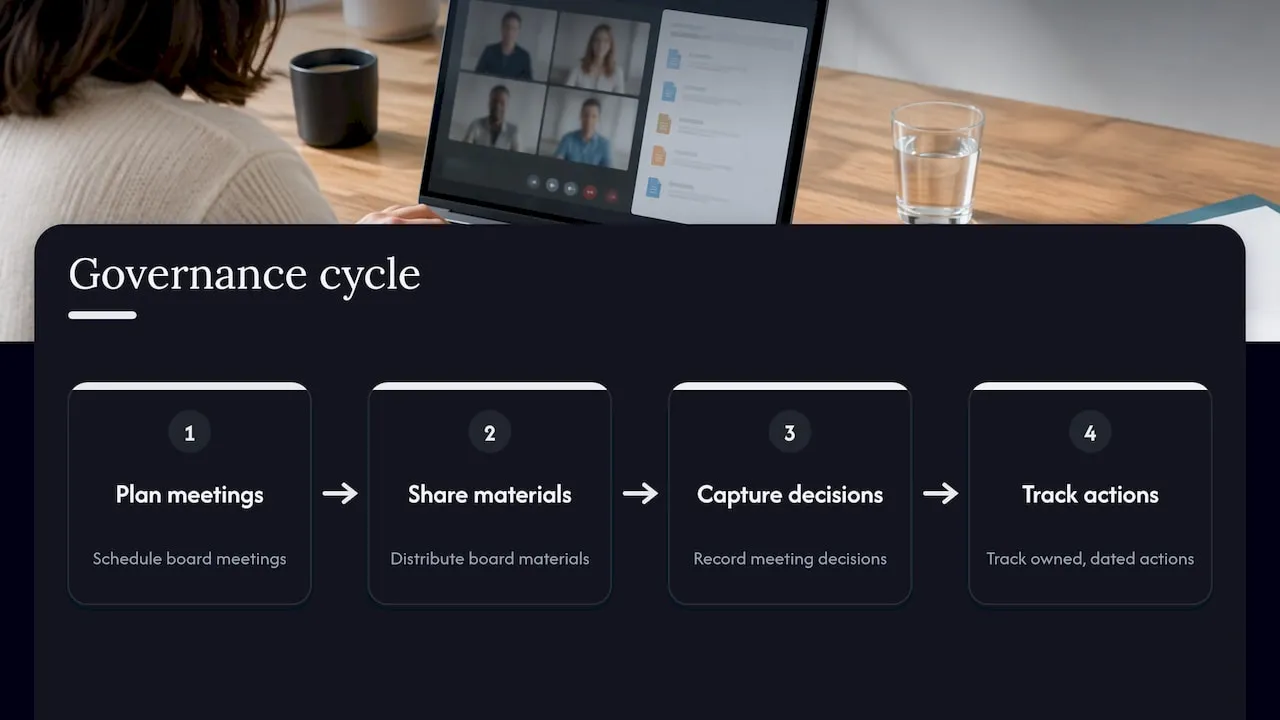
The market is growing as boards move away from paper packs. Research Nester valued the global market at over USD 2.9 billion in 2025 and projects growth of around 9.3% a year to 2035. The same report puts North America’s share at 51.8%, which explains why most vendors below are American.
What to compare before you shortlist
Infotech’s selection guide lists the core capabilities buyers should weigh:
- Agenda and packet management: building and distributing digital board books in real time.
- Document collaboration: sharing, annotating and storing materials securely.
- Meeting management: scheduling, voting and approving resolutions online.
- Minutes and action tracking: automating minutes and follow-up tasks.
- Compliance and audit trails: records for legal and regulatory requirements.
- E-signatures and approvals: remote sign-off.
- Security controls: encryption, multi-factor authentication and data residency safeguards.
The Governance Institute of Australia adds practical points: mobile accessibility, integration with existing applications, change management, training and support, and transparent pricing with no hidden costs. Its guidance is Australian, but the checklist applies to any UK board.
A useful habit is to score each shortlisted tool against these criteria with two or three directors present. Software that suits the company secretary but frustrates trustees will not be used. Boards that already review how they work will find the exercise easier, and the principles behind continuous improvement in nonprofit organisations are a good guide to what to measure after the switch.
Best board management software compared
The table summarises each option. Prices are those published by the vendors or reported by the sources named, in US dollars unless shown in pounds. Always confirm the current figure on the vendor’s own page.
| Option | Best suited to | Published pricing | Free option |
|---|---|---|---|
| Colossus | Membership organisations, associations, nonprofits and educational institutions | £349, £699 and £1299 per month for Core, Growth and Scale; Enterprise from £2500 per month | See our pricing page |
| BoardPro | Small companies, charities and schools with a handful of boards | Per board: $165, $275 or $440 per month | No |
| Boardable | Nonprofit and association boards of 8 to 40 people | Per user per month, billed annually: from US$20.99, US$29.99 or US$35.99 | 14-day trial |
| BoardSite | Small boards and committees | Free plan, then $149, $299 or $499 per month | Yes, limited |
| OnBoard | Boards wanting AI-assisted minutes and agendas | Custom quote | Trial listed |
| Diligent Boards | Public companies and large groups | Custom quote | No |
| Nasdaq Boardvantage | Corporate secretaries at listed and private companies | Quote only | No |
| BoardEffect | Foundations, universities, mission-driven organisations | Quote only | No |
| Govenda | Board professionals and company secretaries | Sales conversation | No |
Colossus: best for membership organisations
Most board tools stop at the boardroom door. Our platform is built for the organisation around the board. We bring membership management, event and virtual training hosting, CRM, email marketing, e-commerce, member and learner portals, online payment integration and analytics into one system, with workflows you can tailor to the way your organisation operates.
That matters because a membership board rarely governs in isolation. Trustees want to see membership numbers, event income and engagement alongside their own papers and decisions. When those figures sit in the same platform as your member records, reporting to the board becomes a matter of opening a dashboard rather than reconciling three exports.
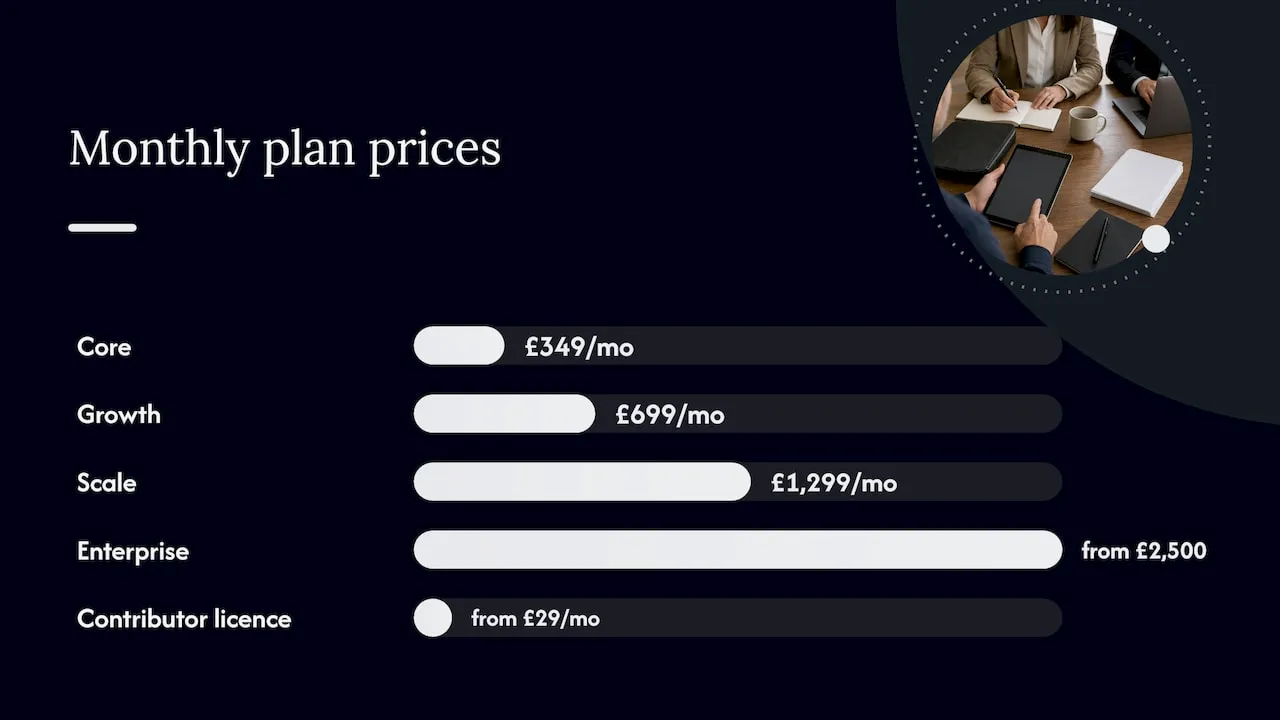
Our plans are published: Core at £349 per month, Growth at £699, Scale at £1299 and Enterprise from £2500 per month, with a contributor licence from £29 per month. You can see what each includes on our pricing page.
BoardPro: best for small boards on a predictable budget
BoardPro bills per board rather than per user. The commercial tiers are $165, $275 and $440 a month ($1,650, $2,750 and $4,400 billed annually), all with unlimited users. Not-for-profit and school buyers may qualify for up to 40% off when paying annually, according to RFP.wiki’s comparison. The same comparison reports 4.8 on both G2 (283 reviews) and Capterra (825 reviews).
Boardable: best for nonprofit and association boards
Boardable suits boards of 8 to 40 people and charges per user. It lists SOC 2 Type II, AES-256 encryption at rest and TLS 1.2 or higher in transit. Its 14-day trial gives full access to Professional features. Per-user pricing is simple to model for a fixed board, but it rises as you add committees and observers, so count every seat before you compare it with a per-board tool.
BoardSite: best for a low-cost start
BoardSite offers a free plan for up to 10 users and one committee, covering meeting basics, attendance, limited document storage and basic voting once a month. Paid plans start with Standard at $149 a month, which includes unlimited users and committees, agendas, minutes, RSVPs, mobile apps for iOS and Android, Zoom, Teams, Google Drive and Dropbox integrations, version history and task management, per its pricing page.
OnBoard: best for AI-assisted meetings
OnBoard says it serves 6,000+ customers and 175,000+ users and runs more than 100,000 meetings a year. Its AI Assist searches board books and minutes, drafts agendas from prompts and transcribes discussions, motions and votes. Pricing is by quote across Essentials, Premium and Ultimate. Premium and Ultimate include guided onboarding, migration and board training, while Essentials relies on self-guided training with 24/7 technical support.
Diligent Boards and Nasdaq Boardvantage: built for enterprise governance
Diligent says it serves 25,000+ customers across 130 countries and uses AI throughout the meeting lifecycle. Its platform adheres to ISO/IEC 27001 and SOC 2 Type II, with end-to-end encryption and 24/7 monitoring. Nasdaq Boardvantage is SOC 2 Type II audited and ISO 27001 certified, offers several multi-factor options and lets administrators remotely purge downloaded content. Both are priced by quote and are aimed at corporate secretaries who handle governance, risk and entity records.
BoardEffect and Govenda
BoardEffect focuses on nonprofits, healthcare organisations, associations and public entities. It does not publish prices: its pricing page lists Pro and Plus tiers with no amounts and invites you to ask for a custom quote. Govenda offers unlimited users, no implementation fees and 24/7 support, and its Gabii AI generates transcripts and drafts minutes, with scheduled transcript purges.
Is there free board management software?
Yes, but options are limited and usually bare-bones. BoardSite’s free plan is capped at 10 users and one committee. Boardable has a free Core tier capped at 50 documents and 3 groups, though it is not advertised on its pricing page. Most others offer trials instead. The Interregnum’s review found that none of the twelve tools it examined lists a free plan, and that trials ranged from 14 days at Boardable to on-request trials elsewhere.
Free tiers suit a small committee testing the idea. Once you need audit trails, e-signatures, several committees or the whole board using it daily, a paid plan is the realistic route. If your priority is getting trustees engaged, our guide to free board management software and engagement explains what to look for at the entry level.
What publishing a price tells you
Price transparency varies widely. Statwharf’s September 2026 comparison notes that only Boardable and BoardPro publish full per-tier pricing among the top ten board portals, while Diligent, Nasdaq Boardvantage, OnBoard, BoardEffect and Govenda require a sales conversation. For a volunteer board with a fixed budget, that is a practical reason to shortlist vendors who publish their numbers, so you can take a figure to your treasurer before anyone books a demo.
We publish ours for the same reason. For a broader view of what a membership platform costs and what drives the range, see our association software pricing guide.
Security and compliance checks
Board papers hold sensitive material: financial results, personnel matters, legal advice. Ask every vendor for:
- Independent certification. ISO 27001 and SOC 2 Type II are the most commonly cited. BoardPAC, for example, states ISO 27001, SOC Type 2 and 256-bit AES encryption, and Ideals Board lists ISO 27001/27701/27017, SOC 2/SOC 3, HIPAA and GDPR compliance.
- Access control. Multi-factor authentication, role-based permissions and the ability to remove a departing trustee instantly.
- Audit trail. A record of every action and file update.
- Data location. Where documents are stored, which matters for UK GDPR obligations.
- Remote wipe or purge. Useful when a device is lost.
If your platform also holds member data, the same discipline applies across the organisation. Our overview of member data security basics covers the practical steps.
How to match a platform to your organisation
Start with the size of the board and the number of committees, then the kind of organisation.
- A charity or school with one board: a per-board tool such as BoardPro, or a free plan to start.
- A nonprofit or association board of 8 to 40: Boardable or BoardEffect, or a membership platform if the board also oversees members, events and fundraising.
- A listed company or large group: Diligent or Nasdaq Boardvantage, with the security documentation your audit committee expects.
- A membership body or professional association: a platform that unites board reporting with member data. This is where Colossus sits.
Adoption matters as much as features. RFP.wiki’s analysis of BoardEffect observes that many teams succeed after training, but some directors still need prompting to log in regularly. Whichever tool you pick, plan a training session for trustees and appoint one person to own the system. Our guide to improving board engagement offers practical steps for that rollout.
Our perspective
Most buyers begin by asking which board portal has the longest feature list. We think the better question is what your board needs to see, and where that information lives.
In a membership organisation, the answers sit in your member records, your events and your finances. Trustees ask how many members renewed, how an event performed, which campaigns brought people in. When these figures are spread across separate tools, someone has to gather them by hand before every meeting.
That is why we built Colossus as one platform: membership management, events, CRM, email marketing, e-commerce, portals and analytics together, with workflows you can tailor. We believe a board is best served when the organisation’s data is joined up, and a unified platform reduces the operational complexity that slows reporting down.
If your organisation is a membership body, an association, a nonprofit or an educational institution, we would encourage you to look at the whole picture before choosing a point tool.
Rob
See what Colossus plans include
If you run a membership organisation and want your member data, events and communications in one place, our plans are published in full: Core at £349 per month, Growth at £699, Scale at £1299 and Enterprise from £2500 per month. Each is designed to help you streamline member management and give your leadership clearer reporting.
Compare the tiers on our pricing page, or explore the full feature list and our event management software. You can also start from colossus.systems.
FAQ
What is the best board management software for a small nonprofit?
For a small board, BoardPro (per-board pricing) and Boardable (per-user pricing, built for nonprofit and association boards) are the most commonly recommended. If your nonprofit also manages members, events and fundraising, a unified platform such as Colossus lets the board see that activity without separate tools.
How much does board management software cost?
Published prices range from a free plan at BoardSite to $165 to $440 a month per board at BoardPro and from US$20.99 per user per month at Boardable. Enterprise vendors such as Diligent, OnBoard and Nasdaq Boardvantage quote individually. Colossus plans run from £349 to £1299 per month, with Enterprise from £2500 per month.
Is there free board management software?
Yes, in limited form. BoardSite has a free plan for up to 10 users and one committee, and Boardable’s free Core tier is capped at 50 documents and 3 groups. Most other vendors offer time-limited trials rather than a permanent free plan.
What security standards should a board portal meet?
Look for ISO 27001 certification and a SOC 2 Type II audit, multi-factor authentication, encryption, role-based access and a full audit trail. Ask where data is stored so you can meet your UK GDPR obligations.
Sources
- What Is Board Management Software? | BoardKite Playbook
- Board Management Software Market Size & Trends Forecast | Research Nester
- Board Management Software Selection Guide | Infotech
- Choosing board software: What to look for, what to avoid | Governance Institute of Australia
- Aprio Board Portal vs BoardPro (2026) | RFP.wiki
- Best Board Management Software in 2026 | The Interregnum
- BoardSite pricing
- OnBoard board management software
- Board Management Software Pricing in 2026 | CostLoop
- Best Board Management Software 2026 | PickMySoft
- Diligent board management software
- Nasdaq Boardvantage information security
- BoardEffect Pricing 2026 | I’mBoard
- Govenda company secretarial software
- Govenda board management software
- Zeck Alternatives for Nonprofit Boards (2026) | I’mBoard
- Best Board Portal Software (2026) | Statwharf
- BoardPAC board management software
- Ideals Board nonprofit board management
- BoardEffect vs OnBoard (2026) | RFP.wiki
- Implementing Continuous Improvement in Nonprofit Organizations