Membership Admins: Single Source of Truth Checklist for Reporting

Integrated membership platforms with live dashboards, not static exports, are the recommended approach for most membership organisations in 2026. Colossus Systems is a direct option worth evaluating for organisations seeking this kind of integrated reporting. Whatever platform you choose, prioritise three things: a single source of truth, exportability for reconciliation, and secure payment integrations.
TL;DR:
- Integrated platforms with live dashboards are preferable as they provide real-time data updates instead of stale snapshots, enabling accurate decision-making.
- Reporting features should include standard reports like active members, transactions, revenue, renewals, churn, and demographics, with filtering and segmentation options.
- Export options must support CSV, Excel, and PDF formats, and the platform should have API access for seamless data integration and reconciliation.
- Choose platforms that maintain a single data source with role-based security, audit logs, and proper security documentation, avoiding systems that require manual data stitching.
- Most membership organizations benefit from an all-in-one platform for quicker setup and lower staff overhead, especially if reconciliation is a recurring challenge.
Table of Contents
- Core reporting capabilities to expect from membership reporting software
- Common reports and metrics boards and managers ask for
- Evaluation checklist: the questions to ask vendors and red flags to watch
- How Colossus Systems supports trustworthy membership reporting
- When to choose an all-in-one platform versus pairing a specialist BI tool
- Getting started with Colossus Systems
- FAQ
- Sources
Core reporting capabilities to expect from membership reporting software
A live dashboard pulls from current data every time someone opens it. A snapshot report, by contrast, is a frozen export that goes stale the moment a new member joins or a renewal lapses. For board reporting, this distinction matters: a board member looking at last month’s spreadsheet may be making decisions on numbers that no longer reflect reality.
Your reporting software should deliver certain standard report types without custom build work. These are the reports administrators request most often:
- Active members: current totals, segmented by membership type or tier.
- Transactions: payments, refunds and outstanding balances.
- Revenue: income by period, programme or membership category.
- Renewals and churn: who renewed, who lapsed, and when.
- Location and demographics: geographic spread and member profile data.
Beyond the report types themselves, you need filtering and segmentation: the ability to pull a date range, isolate a membership tier, or compare a cohort against the broader membership base. Scheduled automated reports (weekly digests, monthly board packs) save staff from manually rebuilding the same spreadsheet every cycle.
Export formats matter just as much as what is displayed on screen. CSV and Excel exports are the baseline for finance teams; PDF exports suit board packs. Underneath all of this, your platform needs API access or built-in connectors so the dashboard is actually fed by your membership, payment and event systems rather than by someone copying numbers between spreadsheets.
Common reports and metrics boards and managers ask for
Most of the reporting requests that land on an administrator’s desk fall into a handful of recurring categories. Knowing how to build and present each one saves time when a board member or funder asks for it unexpectedly.
- Active members time series. Track monthly or yearly totals and present them as a simple trend line. Boards respond better to a line showing growth or decline over twelve months than to a single static headcount.
- Transaction-level exports for reconciliation. Accounting teams need gross amount, fees, net value, tax and refund metadata in every export, not just a total. Ask to see a sample export during any demo, since transaction-level exports must include gross, fees and net values to reconcile cleanly against your books.
- Cohort-based renewal and churn metrics. Grouping members by join date or membership type reveals patterns that an overall churn figure hides, such as a particular tier renewing at a noticeably lower rate.
- Event participation linked to membership outcomes. Cross-referencing event attendance against renewal data often shows whether engaged members stay longer, which helps justify programme spend.
- Location and demographic breakdowns. Funders and grant bodies frequently ask for geographic or demographic reporting, so this data should be a filter option rather than a separate manual project.
Evaluation checklist: the questions to ask vendors and red flags to watch
Before signing anything, run each vendor through the same set of questions. Consistency here is what lets you compare platforms fairly rather than being swayed by whichever demo looked slickest.
- Does the platform maintain a single source of truth, and do membership, finance and events teams agree on the same definition of “active member” and “renewal”?
- What is the data latency: real time, hourly refresh, or overnight batch?
- What export types are available, and do transaction exports include the detail your accounting team needs for reconciliation?
- Are access controls role-based, and does the system keep an audit log of who viewed or changed reporting data?
- What security documentation is available for payment processing, including PCI guidance?
- How do integrations and imports work, is there API access, and what is the typical implementation timeline and ongoing support model?
Pro Tip: Ask every vendor to define “active member” out loud during the demo. If their own sales team hesitates, your staff will too.
Watch for red flags: vague answers about where data actually lives, no clear export path, or an admission that reconciliation still happens manually in a spreadsheet somewhere. A reporting system built on a single, association-aware data model is designed specifically to avoid that outcome, connecting membership, learning, events and finance data so reports do not depend on someone stitching systems together after the fact.
How Colossus Systems supports trustworthy membership reporting
We built our platform around the same principle the checklist above is testing for: one dataset feeding every report, rather than several systems that need reconciling by hand. Our modules cover the areas most membership organisations end up running separately:
- Membership management with centralised member records and renewal tracking.
- Event hosting and virtual training, with attendance data that feeds directly into membership reporting.
- A built-in CRM so member interactions and lifecycle stage sit in the same record as their membership status.
- Analytics and dashboards drawing on that same centralised schema, detailed on our features page.
- Integrated online payment processing, so transaction data lands in the same system as the membership record it belongs to.
Because every module writes to the same underlying data model, the metric definitions stay consistent across membership, events and finance views, which is the exact gap that causes reconciliation headaches elsewhere, similar to benefits explained in a cloud based yacht club platform. Our payment integrations follow standard security practice for handling card transactions, and our pricing page sets out the plan details for organisations ready to take a closer look.
When to choose an all-in-one platform versus pairing a specialist BI tool
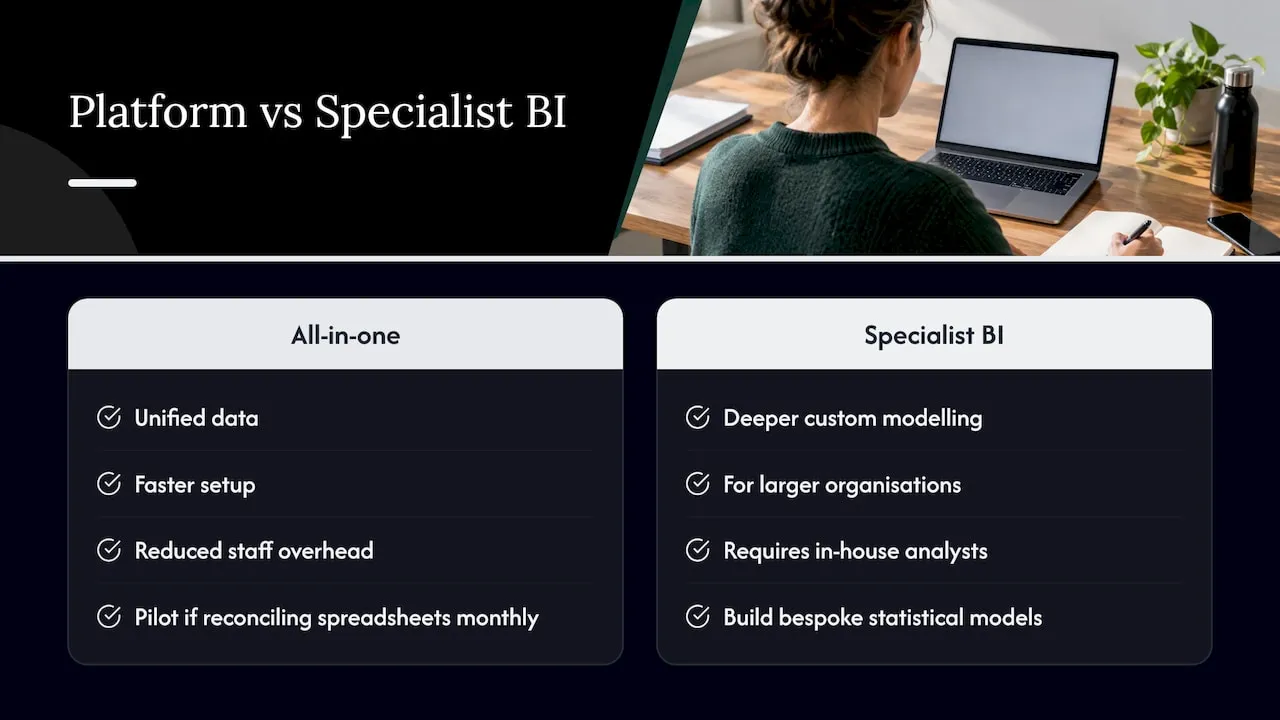
An all-in-one platform gives you unified data and a faster setup, since you are not stitching together separate connectors between your membership system, payment processor and a business intelligence tool. A specialist BI tool offers deeper custom modelling, which suits larger organisations with in-house analysts who want to build bespoke statistical models.
For most small and mid-sized membership organisations, the integrated route wins on speed and reduced staff overhead. If your team currently spends real time each month reconciling spreadsheets between systems, that is a strong signal to pilot an integrated platform before investing in a separate BI layer.
— Rob
Getting started with Colossus Systems
We designed our platform around the exact gaps this guide has covered: one data source feeding your dashboards, exports that reconcile cleanly, and payment data that lives alongside membership records instead of in a separate system. If reconciliation is eating into your team’s week, that is usually the clearest sign it is time to look at an integrated option.

Our Core, Growth, Scale and Enterprise plans are set out on our pricing page, starting at £349 per month for Core, with Enterprise available from £2,500 per month for larger organisations. A Contributor licence is also available from £29 per month for teams that need additional seats. Reach out through our contact page to ask about a demo and see how the reporting modules handle your own membership data.
FAQ
What is the best software for membership management?
The right choice depends on whether you need a standalone membership database or an integrated platform covering events, CRM and payments as well. Organisations that want board-ready reporting without manual reconciliation generally do better with an integrated platform like Colossus Systems, built around a single source of truth.
What is the best membership software for nonprofits in the UK?
UK nonprofits typically need the same core features as any membership organisation: member records, renewal tracking, event management and reporting that supports funder and board requirements. Our guide to CRM selection for UK membership organisations covers the specific criteria worth checking before you commit to a platform.
How much does MembershipWorks cost per month?
Pricing for third-party membership platforms is not something we publish or track, so check directly with that provider for current plans. Our own plans start at £349 per month for the Core tier, with Growth, Scale and Enterprise options above that.
What app can I use to track my memberships?
A dedicated membership management platform is usually a better fit than a general spreadsheet or standalone app once you need renewal tracking, segmented reporting and payment reconciliation in one place. Look for a tool with live dashboards, export options and a single source of truth connecting your membership, events and finance data, such as the modules described in our membership management software overview.
How do I know if reporting software will scale with my organisation?
Ask vendors directly about data volume limits, additional user seats and whether advanced reporting features require a higher plan tier. A platform built on one data model, rather than bolted-together tools, tends to scale more predictably as your membership base and reporting needs grow.