What is a nonprofit technology stack for fundraising?

A nonprofit technology stack is the full set of software, services and integrations an organisation uses to run fundraising, manage donor relationships, deliver programmes and keep operations running day to day. It’s the digital equivalent of your office. CRM, donation forms, email tools, payment processors, and the connections between them all belong in this picture.
Three things decide whether that stack helps or hinders you. First, your CRM should act as the system of record for every constituent, holding gift history and contact details centrally rather than scattered across spreadsheets. Second, integration determines usability far more than any single tool’s feature list. Third, the shape of your stack should match your size and staff capacity, not an aspirational version of your organisation three years from now.
Context matters here. There are over 1.8 million registered nonprofits in the United States alone, and the technology choices that suit a two-person local charity look nothing like those suiting a national federation. Platforms like Colossus Systems, resources like TechSoup, and automation tools like Microsoft Power Automate all play different roles depending on where your organisation sits on that spectrum.
- CRM is your system of record, not just a contact list
- Integration quality shapes reporting accuracy and staff workload
- Stack shape should follow organisational scale, not trends
Key Takeaways
A nonprofit technology stack works best when CRM anchors every other tool, integrations are planned deliberately, and the stack’s shape matches organisational scale rather than ambition.
| Point | Details |
|---|---|
| CRM is the anchor | Every fundraising, event and email tool should sync back to a single constituent record. |
| Match stack shape to capacity | Small teams favour all-in-one platforms; larger teams can absorb best-in-breed integration work. |
| Plan integrations before buying | Map data flow from donation to CRM to accounting before signing any new contract. |
| Budget beyond licence fees | Include integration, training and contingency costs, not just subscription pricing. |
| Consider an integrated platform | Colossus Systems combines CRM, events, email and payments to cut integration overhead for teams without dedicated IT staff. |
Table of Contents
- What does “technology stack” mean for a nonprofit?
- What are the core components of a nonprofit tech stack?
- Should you choose all-in-one or best-in-breed tools?
- How do integrations and data flow work in a nonprofit stack?
- What security and compliance basics does a nonprofit stack need?
- How much should a nonprofit budget for its tech stack?
- What’s a practical roadmap for building a nonprofit tech stack?
- What do example nonprofit tech stacks look like at different sizes?
- What questions should you ask vendors before buying?
- Where can nonprofits find trusted tech resources and discounts?
- Why an integrated platform often beats a patchwork of tools
- How does Colossus simplify your nonprofit tech stack?
- Sources
What does “technology stack” mean for a nonprofit?
Ask a software engineer what a “tech stack” is and they’ll describe programming languages, servers and frameworks. Ask a nonprofit director the same question and the answer is entirely different. For nonprofits, a technology stack means the operational software layers a team touches every day: the CRM, the donation platform, the email tool, the accounting system, and however those pieces talk to each other.
That distinction matters because it changes who should be making the decisions. A developer stack is chosen by engineers. A nonprofit stack is chosen by executive directors, development officers and finance managers who need tools that work without a computer science degree.
Most organisations settle into one of three shapes:
- Single platform (all-in-one): one vendor handles CRM, events, email and payments together, favoured by small teams with limited IT capacity.
- Best-in-breed constellation: specialist tools for each function, connected through integrations, favoured by organisations with distinct, complex programme needs.
- Hybrid: a core platform for most functions with one or two specialist tools bolted on for a specific gap, common among mid-sized, multi-programme organisations that outgrew a single platform but can’t justify full custom integration.
The practical framework nonprofit consultants use to evaluate stacks treats CRM as the anchor regardless of shape, with everything else built around it.
What are the core components of a nonprofit tech stack?
A workable nonprofit tech stack for fundraising and operations tends to draw from ten functional categories. Not every organisation needs all ten from day one, but understanding what each does helps you spot the gaps in your current setup.
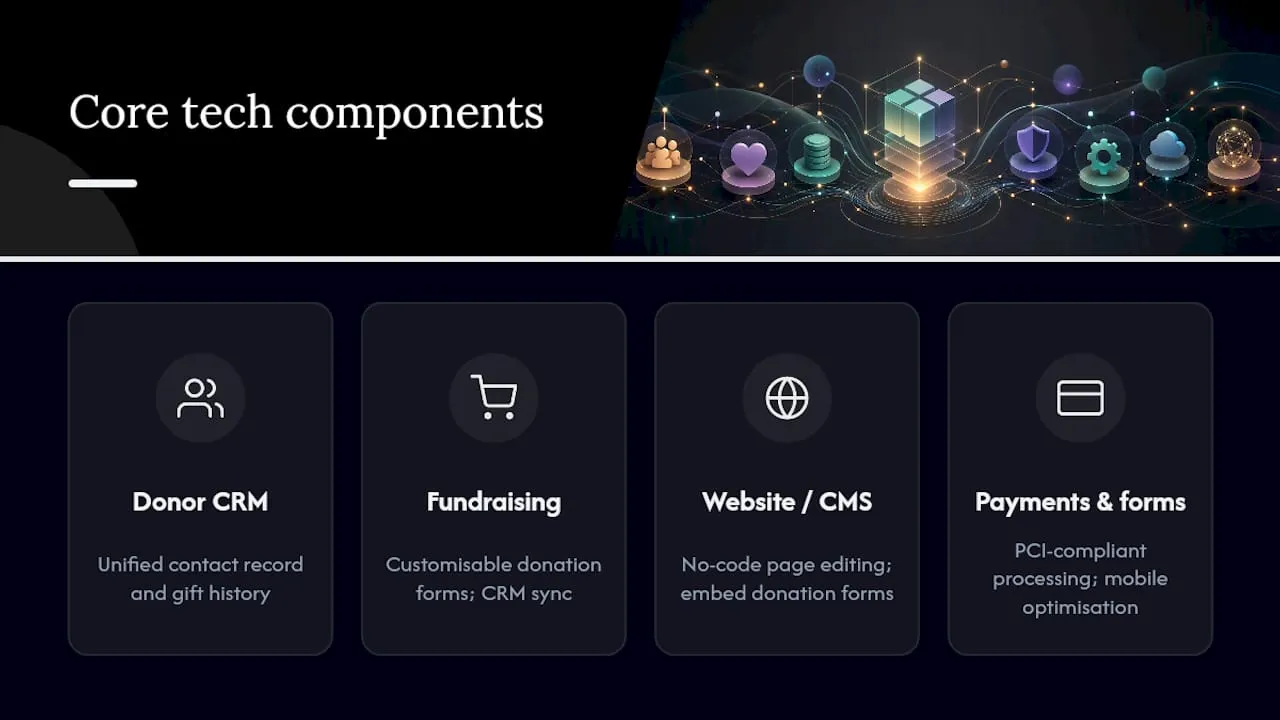
Donor CRM. This is your unified record of every supporter: contact details, gift history, communication preferences and relationship notes. Without it, your development team relies on memory and spreadsheets, and every departing staff member takes institutional knowledge with them.
Feature checklist: unified contact record, full gift and interaction history, segmentation and tagging, API or native connectors to other tools.
Fundraising and giving platforms. These handle donation forms, peer-to-peer campaigns, recurring giving and event ticketing. They capture the transaction; your CRM should capture the relationship.
Feature checklist: customisable donation forms, recurring gift management, campaign tracking, direct CRM sync.
Website and CMS. Your website is often the first and last touchpoint for a prospective donor. A content management system that non-technical staff can update without waiting on a developer keeps your messaging current.
Feature checklist: no-code page editing, mobile responsiveness, donation form embedding, analytics tagging.
Payments and forms. The processor that actually moves money, plus the forms that collect it. This layer needs to be secure and frictionless. Every extra field or redirect on a donation form costs conversions.
Feature checklist: PCI-compliant processing, multiple payment methods, mobile optimisation, fraud protection.
Email and marketing automation. Newsletters, appeal emails and drip campaigns for lapsed donors all live here. The best setups trigger automatically based on CRM data, such as a thank-you sequence firing the moment a gift is logged. Colossus Systems’ email marketing platform round-up covers this in more depth.
Feature checklist: segmentation by CRM field, automated workflows, deliverability tracking, template library.
Analytics, reporting and BI. Dashboards that pull data from your CRM and fundraising tools to show trends: donor retention, campaign performance, programme reach. Boards want this data quarterly; good tooling makes it a five-minute export rather than a two-day manual build.
Feature checklist: customisable dashboards, exportable board reports, real-time data refresh, cross-platform data pulls.
Volunteer and event management. Registration, scheduling, check-in and follow-up for volunteers and event attendees. Effective volunteer coordination depends heavily on this layer talking to your CRM, so a volunteer’s hours and a donor’s gifts sit on the same record if they’re the same person.
Feature checklist: shift scheduling, automated reminders, hour tracking, CRM sync.
Accounting and nonprofit finance. Fund accounting software that tracks restricted versus unrestricted funds, a distinction general small-business accounting tools often handle badly. Donation data should flow here automatically to avoid manual reconciliation.
Feature checklist: fund-level tracking, grant management, audit trail, CRM or payments integration.
File storage and collaboration. Shared drives and collaboration tools for grant documents, board materials and programme records. Unglamorous, but the difference between finding a signed grant agreement in ten seconds or an hour.
Feature checklist: version control, permission tiers, search functionality, mobile access.
Integration and middleware. The connective tissue, covered in more detail below, that moves data between everything above.
Pro Tip: Before buying a single new tool, audit which of these ten categories you already have covered, even badly. Gaps are cheaper to fix than duplicated or conflicting systems.
Should you choose all-in-one or best-in-breed tools?
This is the single biggest architectural decision a nonprofit makes, and there’s no universally correct answer.
An all-in-one platform puts CRM, events, email and payments under one vendor and one login. The advantage is obvious: less integration work, one contract to manage, one interface for staff to learn. Colossus Systems’ guide to unified nonprofit platforms walks through this trade-off in detail. The downside is that no single platform excels at everything. You may get a CRM that’s very good and an email tool that’s merely adequate.
Best-in-breed means picking the strongest tool for each function and connecting them. You get specialist features, but you now own the integration work, and every tool you add is another vendor relationship, another support contract, and another point of failure if a connection breaks.
Signals that point towards all-in-one:
- A small team (one to three staff managing the whole stack) with no dedicated IT resource
- A budget that favours predictable, bundled pricing over per-tool optimisation
- Straightforward fundraising needs without heavy customisation demands
Signals that point towards best-in-breed:
- High transaction volumes where a specialist payments tool measurably outperforms a generic one
- Distinct programme areas needing tools an all-in-one platform simply doesn’t offer
- In-house technical capacity to manage integrations and troubleshoot when they fail
The trade-off shows up fastest in reporting. Best-in-breed setups often produce richer per-function data but require someone to stitch it together for a board report. All-in-one platforms give you weaker per-function depth but a report that’s already assembled.
How do integrations and data flow work in a nonprofit stack?
Data flow is where good stacks separate from chaotic ones. Building an integrated stack rather than a patchwork of disconnected tools is what prevents duplicate donor records, missed thank-you emails and reporting nightmares.
Three integration patterns cover most nonprofit needs:
- Native connectors built by the vendor, the simplest option when your two tools already talk to each other out of the box.
- API integrations, where a developer or technical partner writes custom code to move data between systems that don’t natively connect.
- Middleware or iPaaS platforms, plus low-code tools such as Microsoft Power Automate, which let non-developers build automated workflows connecting cloud services without writing code.
A typical donation data flow looks like this: a donor completes an online form, the payments processor captures the transaction, the fundraising platform records the gift, that gift syncs to the CRM as the constituent’s updated history, the finance system pulls it into fund accounting, and an analytics dashboard reflects it in real time.
Pro Tip: Before connecting two systems for real donor data, map every field you’re transferring (name, email, gift amount, fund designation) and test the integration on a small batch first. A field mismatch discovered after a $50,000 gala is a very bad afternoon.
What security and compliance basics does a nonprofit stack need?
Donor data is sensitive, and a breach damages trust in ways that take years to rebuild. A working security checklist for any nonprofit stack includes:
- Encryption for data both at rest and in transit
- Least-privilege access, so staff only see the records their role requires
- Regular, tested backups with a documented recovery process
- A written incident response plan, even a one-page version
- Periodic security assessments of any vendor holding donor or payment data
If you accept card payments, your payment processor and any tool touching card data needs to meet PCI-DSS standards, the security requirement that governs card transaction handling. Privacy practice varies by jurisdiction, but sensible defaults apply everywhere: get explicit consent for marketing communications, set a data retention policy, and don’t hoard records indefinitely just because storage is cheap.
Vendor contracts deserve scrutiny too. Check who owns the data if you leave, who’s responsible for backups, and whether the contract specifies breach notification timelines. Nonprofits managing thousands of donor records, spread across more than 1.8 million registered organisations in the US, can’t treat these clauses as boilerplate.
- Confirm encryption standards in writing, not just marketing copy
- Ask for the vendor’s own backup and recovery documentation
- Clarify data export rights before signing, not after a problem arises
How much should a nonprofit budget for its tech stack?
Budget conversations go smoother when you break costs into distinct lines rather than one lump “software” figure:
- Licences and subscriptions (the recurring core cost)
- Payment processing fees (typically a percentage plus a fixed fee per transaction)
- Integration or middleware costs, whether a paid iPaaS tool or developer time
- Implementation and consultancy fees for initial setup
- Staff training time, which is real cost even when no invoice is issued
- Ongoing support and maintenance
- A contingency line, because migrations rarely go exactly to plan
Staffing needs are often underestimated. Even a modest stack benefits from a project sponsor (usually the executive director), a product owner who understands day-to-day fundraising workflows, an administrator for user management, someone covering integration or developer work, a data steward responsible for record hygiene, and a vendor manager who owns contract renewals. Digital teams that succeed tend to combine these skills deliberately rather than assigning them as afterthoughts.
For ROI, track time saved on manual data entry, improvements in donor retention rate, and any increase in average gift value after automation reduces friction in the giving process.
What’s a practical roadmap for building a nonprofit tech stack?
Building or overhauling a stack works best as a phased process rather than a single big-bang purchase.
- Assess and set goals. Define what success looks like: faster reporting, higher retention, less manual data entry. Vague goals produce vague stacks.
- Map current systems and gaps. Document every tool currently in use, however informal, and identify where data breaks down between them.
- Shortlist vendors and run pilots. Test two or three finalists with real (or realistic sample) data before committing.
- Migrate and integrate. Move historical data carefully, checking for duplicates and field mismatches, and build out the integrations mapped earlier.
- Train staff and manage change. Colossus Systems’ work on digital transformation for membership growth covers why adoption, not just installation, determines whether a rollout succeeds.
- Govern and review. Set a recurring review cadence, assign clear data stewardship, and establish a change control process for future additions.
A pilot’s acceptance criteria should cover three things: data fidelity (does the migrated data match the source), user tasks (can staff complete their daily work without workarounds), and reporting (does the board report still assemble correctly). If any of the three fails, don’t proceed to full rollout yet.
What do example nonprofit tech stacks look like at different sizes?
Small, local charity (one to three staff). An all-in-one platform covering CRM, donation forms, email and basic event registration, chosen specifically to avoid integration overhead. Budget is tight, so free or steeply discounted tools sourced through TechSoup often fill gaps. Reporting is simple but reliable, and donors experience a consistent, if unpolished, journey.
Medium regional charity (four to fifteen staff, established fundraising programme). A core CRM connected via native integrations or light middleware to a specialist fundraising platform, dedicated email tool, and separate accounting software. This profile can absorb some integration complexity in exchange for stronger fundraising features and more granular reporting.
Larger multi-programme organisation. A best-in-breed constellation: CRM, fundraising platform, marketing automation, BI dashboard and programme-specific tools connected through an iPaaS or dedicated integration developer. Budget and staffing are substantial, but the payoff is real-time, cross-programme reporting and a donor experience that feels coordinated even across multiple departments.
- Small orgs: prioritise simplicity and cost over feature depth
- Medium orgs: balance specialist fundraising tools against integration effort
- Larger orgs: invest in integration infrastructure to unlock cross-programme reporting
What questions should you ask vendors before buying?
Before signing any contract, put these questions to every shortlisted vendor:
- What native integrations exist, and what needs custom API work?
- What’s the service level agreement for uptime and support response time?
- Who owns the data, and what happens to it if we leave?
- What does onboarding and training actually include, versus what costs extra?
- How customisable are workflows, forms and reporting without developer help?
- What’s the exact process and cost for exporting our data if we migrate away?
Red flags to walk away from include a closed data model that makes export difficult, pricing that’s only available after a sales call, no sandbox or test environment to trial before committing, and documentation so thin that support tickets become your only training resource.
Pro Tip: Ask for a sandbox environment before you sign anything. A vendor confident in their product will let you test it with real workflows, not just a scripted demo.
- Get SLA terms in writing, not verbal assurances
- Confirm exit and data export terms before, not after, signing
- Test the actual admin interface, not just the sales presentation
Where can nonprofits find trusted tech resources and discounts?
A handful of resources consistently save nonprofits real money and time. TechSoup verifies your nonprofit status and unlocks discounted or donated software from major vendors, alongside managed IT services and training. Microsoft’s nonprofit programmes extend into tools like Power Automate for teams wanting to build simple automations without hiring a developer. For teams wanting to build internal technical capability, Colossus Systems’ list of free software development courses is worth reviewing before you hire out integration work.
Start by checking your TechSoup eligibility. It’s usually the fastest route to meaningful savings on your very first licence renewal.
- Verify nonprofit status with TechSoup before budgeting full-price licences
- Explore Microsoft’s nonprofit offers for automation and productivity tools
- Build internal skills before defaulting to paid consultancy for every integration
Why an integrated platform often beats a patchwork of tools
Having spent time analysing how nonprofit stacks succeed or fail, the pattern that stands out isn’t which individual tool an organisation picks. It’s how much time their staff spend reconciling data between systems that were never designed to talk to each other. A best-in-breed approach can be the right call for organisations with real technical capacity, but for most small and mid-sized teams, integration overhead quietly consumes the staff hours that should go into donor relationships.
That’s why Colossus Systems takes the integrated route seriously: combining membership management, events, CRM, email marketing, payments and analytics into one platform for organisations that want to centralise data rather than stitch it together after the fact. It won’t suit every organisation, but for teams without a dedicated integration developer, it removes a genuine, ongoing burden.
How does Colossus simplify your nonprofit tech stack?
If the sections above left you counting how many separate logins your team currently juggles, you’re not alone. That’s the exact problem an integrated platform solves. Rather than stitching together a CRM, an event tool, an email platform and a payments processor from four different vendors, Colossus consolidates unified constituent records, event and membership workflows, built-in email marketing, and payment processing into a single system.

The practical outcome is fewer manual imports, one login for staff to learn instead of four, and board reports that assemble from one source of truth rather than a spreadsheet stitched together the night before a meeting. Colossus’s full feature set covers exactly the components this guide walked through, from CRM to analytics, and the CRM product page details how gift history and member records sit on a single constituent record. If your team is spending more time reconciling data than using it, request a demo and see how much of your current stack could consolidate into one platform.
Sources
- TechSoup – Technology for nonprofits, charities, and libraries
- Evaluating Your Nonprofit Technology Stack: A Practical Framework
- How to Build an Integrated Nonprofit Tech Stack That Drives Growth and Operational Efficiency
- What makes nonprofit digital teams successful today