From £349/month: UK Membership CRM for GDPR, Direct Debit & Gift Aid

For most UK membership organisations, the right answer is an all-in-one membership CRM rather than a bolted-together stack of separate tools, and Colossus Systems is a strong fit for that category. The exception is very small volunteer-run groups or organisations tied to a bespoke legacy system, where a lighter tool may serve better. What follows covers the selection criteria, the UK-specific compliance and payment rules, and a practical migration checklist.
TL;DR:
- All-in-one membership CRM systems like Colossus are suitable for organizations managing multiple income streams and complex membership structures, while lightweight tools suit small volunteer groups.
- Essential features include a unified member database, automated renewals, event management, integrated payments, and self-service member portals, all critical for UK compliance and operational efficiency.
- Data migration requires careful planning, including deduplication, field mapping, testing, and a rollback plan, to avoid prolonged disruptions or data loss.
- Total ownership costs often exceed subscription fees, encompassing migration, integration, training, customization, support, and payment processing fees, which should be factored into budgeting.
- UK organizations with older members and strict accessibility needs should prioritize user-friendly portals, plain English, multi-language support, and WCAG compliance for member-facing systems.
Table of Contents
- What to consider: the right solution type for your organisation
- Selection criteria: essential features and questions to ask vendors
- UK-specific compliance and payments: GDPR, Gift Aid and Direct Debit
- Implementation and migration checklist (practitioner steps)
- Cost and total cost of ownership: subscription and hidden costs
- User experience and accessibility considerations specific to UK member demographics
- Scalability and customization options for different types of UK organizations
- Publisher perspective: why integration beats a patchwork of tools
- How Colossus Systems helps: short product pitch and next steps
- Sources
- FAQ
What to consider: the right solution type for your organisation
Not every membership organisation needs the same class of software, and buying the wrong category is the single most common procurement mistake in this sector. Broadly, three types of product compete for the same budget line.
All-in-one membership platforms combine a member database, event registration, payments, communications, and often a member portal in one system. CRM-first platforms with membership modules start life as general sales or donor CRMs, with membership features added as an extension. Lightweight club-management tools handle the basics for smaller organisations: a contact list, renewal reminders, and simple payment collection, with little else.
Which category fits depends less on sector and more on operational complexity:
- A small professional interest group with under 500 members and one part-time administrator rarely needs more than a lightweight tool.
- A national charity or professional body running events, training, and tiered membership across several income streams usually outgrows lightweight tools within 18 months.
- Associations managing branch structures, committees, or regulated CPD records tend to need the reporting depth of a full platform from day one.
Certain signals point clearly towards an all-in-one platform like Colossus rather than a patchwork of separate apps. If your team is exporting spreadsheets between a database, an email tool, and a separate events system every month, that’s a sign the data is already fragmented in ways that create errors and duplicate records. If renewals, event sign-ups, and payments all touch the same member record, keeping that record in one place rather than three reduces the reconciliation work considerably. Capterra’s overview of the membership management software category notes that the UK market genuinely spans distinct product types, from simple club tools through to mid-market platforms and enterprise CRM implementations, which is precisely why there’s no single universal winner. The right choice depends on your organisation’s size, structure, and how many separate income and communication channels you’re trying to unify.
Selection criteria: essential features and questions to ask vendors
A membership CRM lives or dies on a small number of core capabilities, and it’s worth testing each one against your actual workflow rather than a vendor’s demo script. Capterra’s guidance on membership systems frames the core requirement as a connected member database paired with billing, events, and website integration, which is a useful baseline to work from.
The essential feature checklist for a UK membership organisation includes:
- A single member or contact record that unifies profile data, payment history, event attendance, and communication preferences.
- Lifecycle and renewal automation, including reminder sequences, grace periods, and lapsed-member reporting.
- Event management covering registration, ticketing, waitlists, and attendance tracking.
- Integrated payments supporting one-off fees, recurring subscriptions, and Direct Debit collection.
- A member portal where individuals can update their own details, renew, and register for events without staff intervention.
- Reporting that breaks down retention, revenue by membership tier, and engagement trends without needing a separate analytics tool.
Beyond features, several operational checks matter just as much, including how the platform integrates with your existing website and email service, following best practices outlined in Email Marketing for SMEs: Strategies for Engagement & Sales. Confirm how the platform integrates with your existing website, email service, and finance software, since a system that can’t talk to your accounting package will just create a second manual reconciliation job. Ask about data security certifications, backup frequency, and what support level sits behind your contract, whether that’s a named account manager or a ticket queue with a stated response time. Customisability matters too: can you adapt membership tiers, custom fields, and workflows without paying for developer time every time your structure changes?
When you get vendors in a room, a short list of pointed questions separates the confident providers from the ones reciting a script.
Pro Tip: Ask every shortlisted vendor for two references from organisations of similar size and membership complexity to yours, not just their biggest logo client. A vendor that hesitates on this is telling you something.
Specifically, ask how they handle historical data migration, whether Direct Debit and Gift Aid processing are native or require a third-party bolt-on, what the data export process looks like if you ever leave, and for a documented rollback plan should a migration go wrong. Vendors that can answer all four without hedging are usually the ones worth shortlisting, and this is echoed by Capterra’s own advice to buyers to weigh setup, training, and support costs, not just the sticker price of a subscription.
UK-specific compliance and payments: GDPR, Gift Aid and Direct Debit
UK membership organisations carry compliance obligations that generic CRM reviews often skip entirely, and getting this wrong costs more than a bad software choice. Data protection remains the organisation’s responsibility, not the vendor’s, no matter how good the software’s security features are.
Sector guidance is clear that charities must document their lawful basis for processing member data, maintain clear consent provenance (a record of when and how someone agreed to be contacted), respond to subject access requests within statutory timelines, and hold proper processor contracts with any supplier touching that data. This GDPR guidance for UK charities treats compliance features in software as enablers rather than guarantees. A CRM can help you log consent and automate a subject access request, but it can’t decide your lawful basis for you.
Gift Aid adds another layer specific to UK charities. Membership fees can sometimes qualify for Gift Aid treatment depending on what the member receives in return, and the rules here are strict enough that getting it wrong risks a clawback from HMRC. Gov is the only authoritative source on this, and any vendor claiming their software handles Gift Aid “automatically” should be asked exactly what that means in practice.
Direct Debit is the default payment method for UK membership renewals, and it comes with its own operational demands:
- Mandate handling that complies with the Direct Debit Guarantee scheme.
- Clear refund workflows for cancelled or disputed payments.
- Bank reporting that reconciles against your finance system without manual re-entry.
Ask any vendor to demonstrate their Direct Debit failure and retry process before you sign, since a high proportion of avoidable churn in subscription-based organisations comes from failed payments that nobody follows up on.
Implementation and migration checklist (practitioner steps)
Migration is where most membership CRM projects lose time and goodwill, and the failure point is almost always data governance rather than the software itself. Getting the groundwork right before you touch a single record saves months later.
Three phases structure a sound migration:
- Pre-migration governance. Build a canonical data model defining what a “member record” actually contains, agree a retention policy for lapsed members, capture consent provenance with timestamps, and confirm supplier contracts specify data processing terms clearly. Sector guidance on charity data protection recommends mapping membership states and consent flags before any export begins, not during it.
- Migration execution. Deduplicate records first, since importing duplicates into a new system multiplies the cleanup work later. Map fields carefully between old and new systems, run small test imports before the full migration, validate a sample of records against the source system, and keep a documented rollback plan in case something breaks midway.
- Post-launch stabilisation. Train staff properly rather than assuming a walkthrough video is enough, confirm your support SLA in writing, establish a reporting baseline so trustees can see like-for-like comparisons, and keep an audit trail of what changed and when.
Pro Tip: Budget two to three months of parallel running for payments and renewals after go-live, checking that Direct Debit collections and Gift Aid claims reconcile correctly before switching off the old system entirely.
A rollback plan sounds like an admission of failure, but it’s the opposite: it’s the difference between a stressful evening and a genuine crisis if the migration doesn’t go to plan on the first attempt.
Cost and total cost of ownership: subscription and hidden costs
The subscription fee is rarely the biggest number in a membership CRM budget, and organisations that only compare list prices routinely underestimate first-year costs by a wide margin. A realistic total cost of ownership model breaks down into several components.
- Subscription fees, typically billed monthly and scaled by member count or feature tier.
- Data migration, which can range from a light lift for a clean small database to a substantial project for a fragmented legacy system.
- Integration work, connecting the CRM to your website, email platform, and accounting software.
- Payment processing fees, separate from the subscription and charged per transaction.
- Staff training, often underestimated as a one-off cost when it’s really an ongoing need as staff turn over.
- Customisation, for membership tiers, workflows, or reporting that doesn’t come out of the box.
- Ongoing support, which may be included in some tiers and charged separately in others.
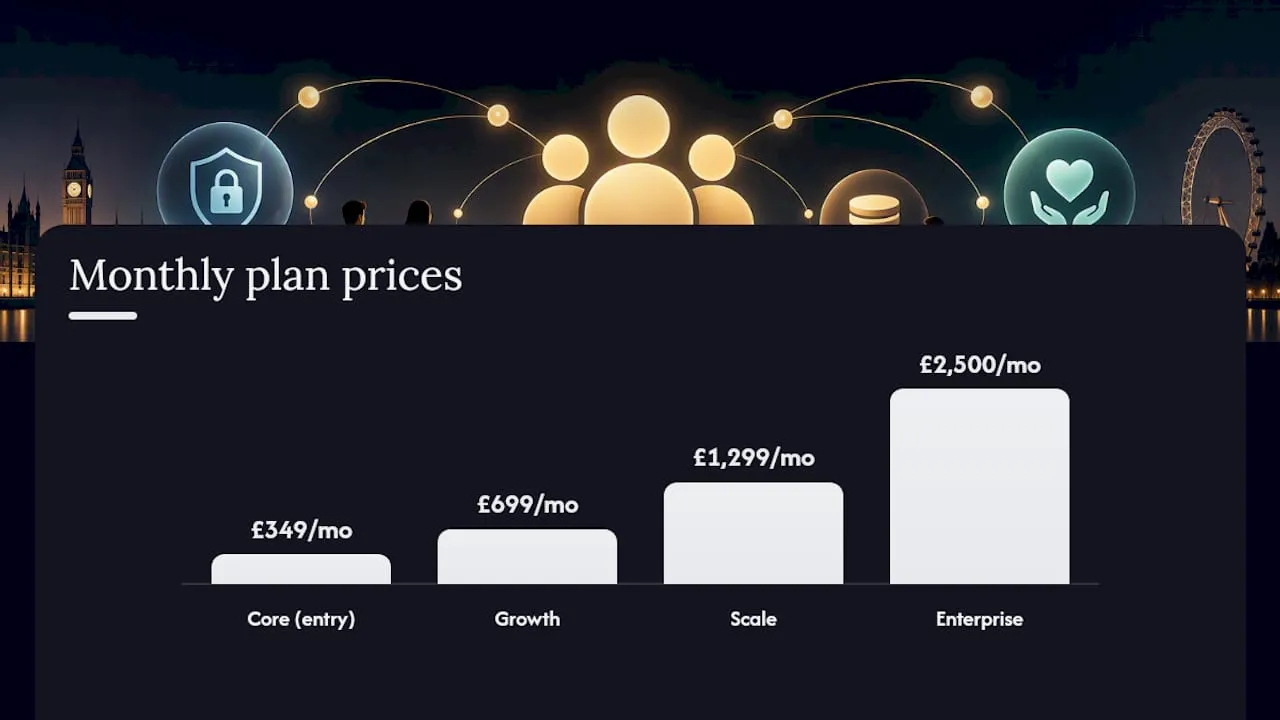
Capterra’s buyer guidance on the membership management category explicitly recommends including setup, training, and support in any cost comparison rather than judging vendors on subscription price alone. Colossus Systems publishes tiered pricing plans starting at £349 per month for its Core plan, rising through Growth at £699 and Scale at £1,299, with Enterprise available from £2,500 per month for larger, more complex organisations.
When comparing review scores between vendors, treat star ratings with some caution if the sample size is small. A product with a 4.8 rating from six reviews tells you far less than one rated 4.3 from two hundred, and asking a shortlisted vendor for reference clients of comparable size and complexity is a stronger signal than the rating itself.
User experience and accessibility considerations specific to UK member demographics
UK membership bases skew older in many sectors, particularly professional bodies, alumni associations, and heritage or community charities, and this has direct implications for how a CRM’s member-facing portal needs to work. A portal that assumes tech-savvy users will generate support tickets rather than reduce them.
Accessibility isn’t optional for many UK charities either. Public-facing digital services are expected to meet WCAG accessibility standards, and a member portal counts as a public-facing service if members use it to renew, register for events, or manage their details. Look for clear text sizing controls, keyboard navigation, and screen-reader compatibility rather than taking a vendor’s word that their product is “accessible.”
Simplicity matters as much as compliance. A renewal journey that takes four clicks and a clear confirmation screen will convert far better among an older membership base than one that requires creating a new password, navigating three menus, and re-entering payment details every year. Test the actual member-facing journey yourself during any trial period, not just the admin dashboard, since that’s the experience your members will judge you on. Multi-language support and clear, plain-English error messages also matter more than most procurement checklists account for, particularly for member bases spanning a wide age range or first-language diversity.
Scalability and customization options for different types of UK organizations
A charity, a professional body, and a members’ club have genuinely different structural needs, and a CRM that flexes to match those differences will outlast one that forces every organisation into the same rigid model. Charities typically need strong Gift Aid handling, donor and member records that can coexist, and reporting suited to trustee and Charity Commission requirements. Professional bodies often need tiered membership levels tied to qualifications or CPD records, committee and branch structures, and renewal cycles linked to professional registration deadlines. Clubs and smaller associations usually prioritise straightforward event and facility booking alongside simple payment collection.
The scalability question is really about whether a platform can grow with you without forcing a re-platform every few years. Look for custom fields you can add without developer involvement, workflow automation that adapts as your membership tiers change, and a pricing structure that scales in reasonably sized steps rather than forcing a jump from a starter tier straight to an enterprise contract. The platform offers multiple plans structured into tiers to accommodate organisations as complexity grows. A Contributor licence from £29 per month also allows organisations to extend limited access to volunteers or committee members without paying for a full seat, which matters for associations with a wide base of part-time contributors.
Publisher perspective: why integration beats a patchwork of tools
The strongest argument for an all-in-one platform isn’t a feature list, it’s what happens when a system fails to talk to itself. A membership renewal that doesn’t update the event registration system, or a Direct Debit failure that doesn’t flag in the communications tool, creates exactly the kind of silent data drift that erodes member trust over months rather than in one obvious incident.
Colossus Systems’ positioning centres on unifying member management, events, CRM, payments, and analytics in one environment, which matters most in the moments that cross departmental lines: a renewal that triggers an automatic event invitation, or a lapsed member report that feeds straight into a re-engagement campaign without anyone exporting a spreadsheet. Integration doesn’t eliminate admin work entirely, but it removes the reconciliation layer that consumes so much of a small team’s time.
— Rob
How Colossus Systems helps: short product pitch and next steps
Colossus is the alternative to running five disconnected tools for membership management, with one system covering the member database, renewals automation, event registration, payments, and reporting the checklist above sets out. Every feature discussed in the selection-criteria section, from lifecycle automation to member portals, maps directly onto the Colossus feature set, so you’re not left translating a generic checklist into a specific product yourself.

The platform’s CRM software centralises the single member record this article recommends, while its event management tools handle registration, ticketing, and attendance without a separate booking system bolted on. Pricing runs across four tiers, from Core at £349 per month up to Enterprise from £2,500 per month, published in full on the pricing page so you can budget accurately before committing to a demo. If your organisation is weighing a migration, book a demo to walk through your specific data model and get a clear view of what a move to Colossus would involve.
Sources
FAQ
What is the most used CRM in the UK?
There isn’t a single dominant CRM across all UK sectors, since usage splits heavily by industry and organisation size. Within membership organisations and charities specifically, Fundraising Magazine’s 2025 survey of 453 charities found that recommendation, cost, and ease of use matter more to buyers than any single platform’s market share.
What CRM do most gyms use?
Gyms and fitness clubs typically use lightweight club-management tools built around class booking and membership billing rather than full CRM platforms, since their operational needs are narrower than a charity or professional body. Larger fitness chains with multiple sites and complex membership tiers tend to move towards fuller membership CRM platforms as their reporting and integration needs grow.
What is the best membership software for nonprofits in the UK?
The best fit depends on your organisation’s size and complexity, but an all-in-one platform that unifies the member database, renewals, events, and payments tends to serve most UK nonprofits better than a patchwork of separate tools. Colossus Systems is built specifically for this integrated approach, with plans from £349 per month detailed on its pricing page.
What are the top 100 membership organisations in the UK?
There’s no single official ranked list, since membership organisations span charities, professional bodies, trade associations, and clubs tracked by different regulators. The Charity Commission register and sector bodies like the Trade Association Forum publish their own listings, but none constitute a definitive ranked list across all membership organisation types.
How much does a membership CRM cost in the UK?
Costs vary by organisation size and feature needs, with subscription fees being only one part of the total cost. Colossus Systems publishes tiered pricing from £349 per month for its Core plan up to Enterprise from £2,500 per month, listed in full on its pricing page, though migration, training, and integration costs should be budgeted separately.