What to look for in a CRM: a 2026 guide

TL;DR:
- Choosing the right CRM depends on matching core features, integration capabilities, and real-world usability. A structured pilot using actual data helps verify fit before purchase. Simpler systems often outperform complex ones for smaller membership organizations, increasing adoption.
A CRM, or Customer Relationship Management system, is defined as the software that centralises your organisation’s contact data, tracks member interactions, and drives the workflows that keep relationships active. Knowing what to look for in a CRM separates organisations that grow their membership from those that manage it reactively. The right selection criteria come down to three non-negotiables: core feature fit, integration quality, and real-data usability. Get those three right, and every other decision follows logically. This guide gives you a practical framework built for membership organisations and associations operating in 2026.
What to look for in a CRM: core features that matter most
The foundation of any sound CRM selection is contact and lead management. Your CRM must store member records, track every interaction, and surface the right information at the right moment. Without this, pipeline tracking and automation have nothing reliable to work from.

Organisations should prioritise 3–4 essential CRM features focused on operational bottlenecks, keeping evaluation focused and preventing feature bloat. This is one of the most practical pieces of CRM selection criteria available. A long wish list creates confusion during evaluation and leads to purchasing a system your team will never fully use.
The features worth treating as non-negotiable for membership organisations are:
- Contact and member management: A structured record for every member, prospect, and partner, with full interaction history and segmentation capability.
- Pipeline tracking: Customisable stages that reflect your actual membership journey, from prospect to active member to renewal.
- Workflow automation: Automated follow-ups, renewal reminders, and onboarding sequences that remove manual repetition from your team’s day.
- Reporting and forecasting: Dashboards that show membership growth, engagement rates, and revenue trends without requiring a data analyst to interpret them.
Beyond these four, you will encounter a longer list of “nice-to-have” features in every vendor demo. Event registration integration, e-commerce, and learning management are genuinely useful for associations. They belong on a secondary list, not your primary evaluation criteria. Keeping your must-haves to four prevents you from paying for capability you will not use for 18 months.
Pro Tip: Write your 3–4 non-negotiable features on a single page before you speak to any vendor. Share it with every stakeholder. If a vendor cannot demonstrate those four features clearly in the first 30 minutes of a demo, move on.
How do you evaluate CRM integration capabilities?
Integration claims are where vendor marketing and operational reality diverge most sharply. Every CRM vendor will tell you their platform “integrates with everything.” That statement is almost always technically true and practically misleading.
Evaluating CRM integrations requires defining testable criteria upfront, such as automated email engagement write-back within minutes and bidirectional synchronisation for finance records. Generic claims about integration are insufficient. You need to know whether a specific data point, from a specific system, flows into the CRM automatically and on what schedule.
The systems your CRM must connect with will vary by organisation, but the most common requirements for membership bodies include:
- Email marketing platforms: Engagement data such as open rates and click-throughs should write back to member records automatically.
- Calendar and event tools: Event registrations and attendance records should update member profiles without manual data entry.
- Finance and payment systems: Membership fee payments, renewals, and outstanding balances should synchronise bidirectionally so your team sees accurate financial status on every record.
- Marketing automation tools: Segmentation and campaign triggers should pull from live CRM data, not a static export from last Tuesday.
Poor integration creates data silos. A member who renewed their subscription last week should not appear as lapsed in your email platform. That kind of mismatch erodes trust in your data and, eventually, in the CRM itself. Define your integration requirements as a written list of testable scenarios before you enter any evaluation process. Then ask vendors to demonstrate each one live, not via a pre-recorded walkthrough.
What practical steps ensure successful CRM adoption?
Adoption is where most CRM projects succeed or fail. A system that your team does not use consistently delivers no value, regardless of how well it performed in a vendor demo.
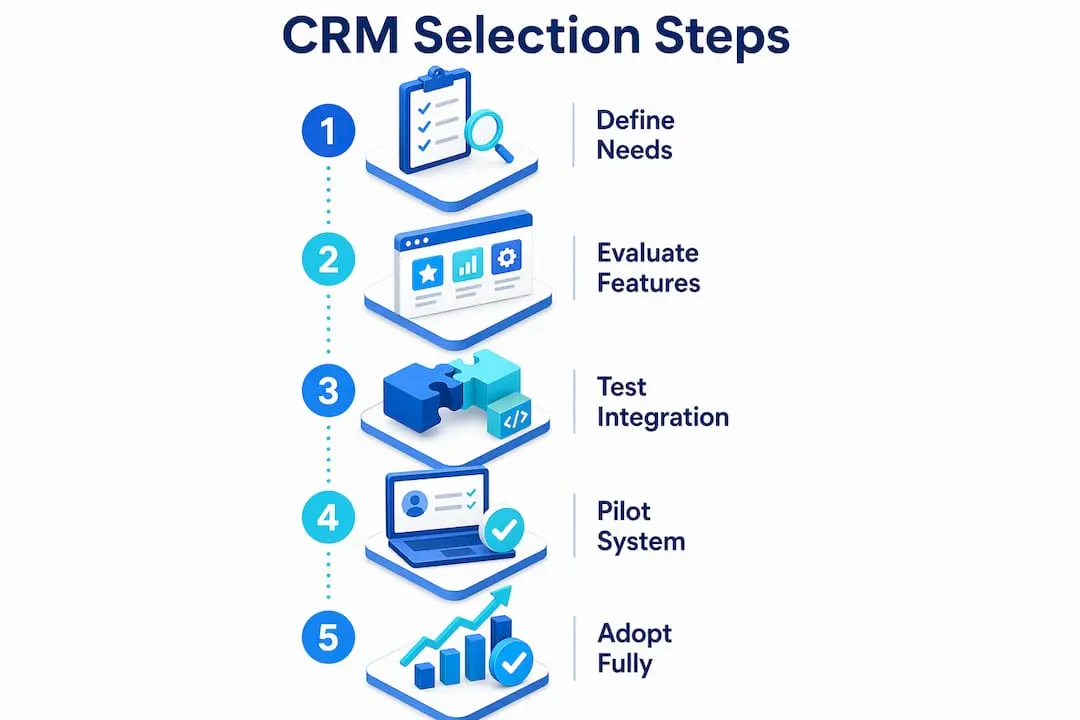
The most reliable method for assessing real-world usability is a structured pilot. A two-week pilot using real organisational data significantly improves usability assessment compared to extended demos. The distinction matters because demos are optimised by vendors to show the system at its best. A pilot forces the CRM to perform under your actual conditions.
Follow these steps to run a pilot that reveals genuine fit:
- Select a representative group of end users. Include the people who will use the CRM daily, not just managers or IT leads. A membership coordinator’s experience of data entry is more revealing than a director’s impression of the dashboard.
- Load real data. Import a sample of your actual member records, including messy, incomplete, or duplicate entries. Clean data in a demo environment hides problems that will surface immediately in production.
- Simulate your core workflows. Run a membership renewal sequence, log a member enquiry, and generate a standard report. These three tasks will expose the majority of usability issues.
- Gather structured feedback. Ask users to rate specific tasks, not the system overall. “How easy was it to update a member’s contact details?” is more useful than “Did you like the CRM?”
- Assess integration live. During the pilot, test whether your email platform and finance system actually exchange data as promised.
Implementation complexity and administration overhead are key hidden challenges that derail CRM adoption after purchase. Factor in the time required for data migration, configuration, and staff training before you commit. Total cost of ownership must account for licence fees plus migration, configuration, and ongoing administration costs to avoid stalled projects.
Pro Tip: Ask your shortlisted vendors for a list of their three most common post-implementation support requests. The answer tells you more about real-world friction than any sales presentation.
Simplicity vs capability: which CRM approach wins for your organisation?
More features do not equal a better CRM. This is the insight that most evaluation processes fail to act on, even when the evidence is clear.
Bloated CRM systems consistently lead to user fatigue and poor uptake among staff, particularly in smaller teams. When a system requires users to navigate ten fields to log a single member interaction, they stop logging interactions. The data degrades, reports become unreliable, and the CRM loses its value within months of launch.
Smaller organisations benefit from simpler, purpose-built CRM tools rather than complex enterprise suites. A membership association with 15 staff does not need the same CRM architecture as a multinational corporation. The right tool for your organisation is the one your team will actually use every day.
When assessing whether a CRM matches your complexity level, consider these factors:
- Data model clarity: The CRM’s object and relationship structure directly influences reporting quality and automation ease. A CRM that treats members, prospects, and event attendees as fundamentally different record types will create reporting headaches later.
- Workflow alignment: Does the CRM’s default pipeline structure match how your organisation actually works, or will you need extensive customisation before it becomes useful?
- Administrative overhead: Who will maintain the system day to day? A CRM that requires a dedicated administrator is a significant ongoing cost for a small team.
- User interface simplicity: If a new team member cannot complete a basic task within their first hour, the learning curve is too steep for your context.
The goal is to find a CRM that fits your core deal type and membership workflow without requiring your team to adapt to the software’s logic. The best CRM for membership organisations is the one that mirrors your processes, not the one with the longest feature list.
Key takeaways
Selecting the right CRM requires defining 3–4 non-negotiable features, testing integration with real data, and running a structured pilot before committing.
| Point | Details |
|---|---|
| Limit your non-negotiables | Define 3–4 essential features before evaluation to maintain focus and avoid purchasing unused capability. |
| Test integrations specifically | Require vendors to demonstrate live data synchronisation for email, finance, and event systems, not generic claims. |
| Run a real-data pilot | A two-week pilot with actual member data and end users reveals friction that demos conceal. |
| Match complexity to team size | Simpler, purpose-built CRM tools deliver higher adoption for smaller membership organisations than feature-dense enterprise systems. |
| Account for total cost | Factor migration, configuration, and ongoing administration into your budget alongside licence fees. |
Why I think most organisations choose a CRM backwards
After working with membership organisations on software selection for years, the pattern I see most often is this: the team spends weeks evaluating vendor demos and almost no time defining their own processes first.
Pre-work defining internal processes is more impactful than software choice alone. That finding does not surprise me. I have watched organisations purchase expensive, feature-rich CRM platforms and then spend six months trying to configure them around workflows that were never clearly documented in the first place. Good software cannot fix a process that does not exist on paper.
My honest advice is to spend the first two weeks of your CRM project mapping your membership journey from first contact to renewal, before you open a single vendor brochure. Define your pipeline stages, your key data points, and your reporting requirements. Then evaluate CRM systems against that specification.
Vendors present impressive demo features, but the underlying data model is what determines whether the system will serve you in two years. Ask to see the object structure. Ask how custom fields affect reporting. Ask what happens to your data if you cancel. Those questions separate a confident purchase from an expensive mistake.
The organisations I have seen get CRM selection right share one trait: they treated the process as a business analysis exercise first and a software evaluation second.
— Rob
How Colossus supports your CRM selection and beyond

Colossus is built specifically for membership organisations that need CRM, member management, and engagement tools in one place. Our CRM software gives you pipeline tracking, automated workflows, and member record management without the complexity of enterprise platforms designed for entirely different use cases. Every feature connects to the broader platform, so your event registrations, email campaigns, and payment records all feed into a single member view.
If you are ready to see how a purpose-built platform performs against your actual requirements, explore our full membership management features or get in touch with our team to arrange a pilot using your own data. We work with associations and nonprofits at every stage of their CRM journey, from first evaluation to full implementation.
FAQ
What are the most important features of a CRM for membership organisations?
Contact management, pipeline tracking, workflow automation, and reporting are the four features that deliver the most operational value. Prioritise these before evaluating any additional functionality.
How do I choose a CRM without being overwhelmed by options?
Define your 3–4 non-negotiable requirements before speaking to vendors, then evaluate only systems that meet those criteria clearly. Limiting your must-haves keeps the process focused and prevents decision fatigue.
Why does CRM integration matter so much?
Poor integration creates data silos where member records in your CRM do not match records in your email or finance systems. Accurate, synchronised data is the foundation of reliable reporting and effective member communication.
How long should a CRM pilot last?
A structured pilot of approximately two weeks, using real organisational data and involving actual end users, gives you enough time to assess usability, integration, and workflow fit before committing to a purchase.
Is a simpler CRM better for small associations?
For teams of fewer than 20 people, a simpler, purpose-built CRM typically delivers higher adoption and better outcomes than a feature-dense enterprise platform. The right system is the one your team will use consistently, not the one with the most capabilities.