What is CRM experience and why does it matter?

TL;DR:
- CRM experience involves both daily use of CRM systems and the skills individuals develop for managing customer relationships.
- Effective CRM depends on workflow fit and user proficiency, which directly impact customer engagement and retention.
CRM experience is defined as the practical, day-to-day interaction between your organisation and its customers, made possible by a customer relationship management system. The term covers two distinct things: how your teams use CRM software in their daily workflows, and the professional skills individuals develop when managing customer relationships through those platforms. Understanding this distinction is what separates organisations that get real value from their CRM investment from those that simply pay for a licence. Platforms like Salesforce, HubSpot, and Microsoft Dynamics are powerful tools, but the software alone does not create results. The quality of your CRM experience determines whether those tools translate into stronger engagement, better retention, and measurable revenue growth.
What are the two main meanings of CRM experience?
CRM experience has two distinct meanings that professionals frequently conflate, and that confusion creates real organisational problems. Getting clear on both is the first step towards using your CRM effectively.
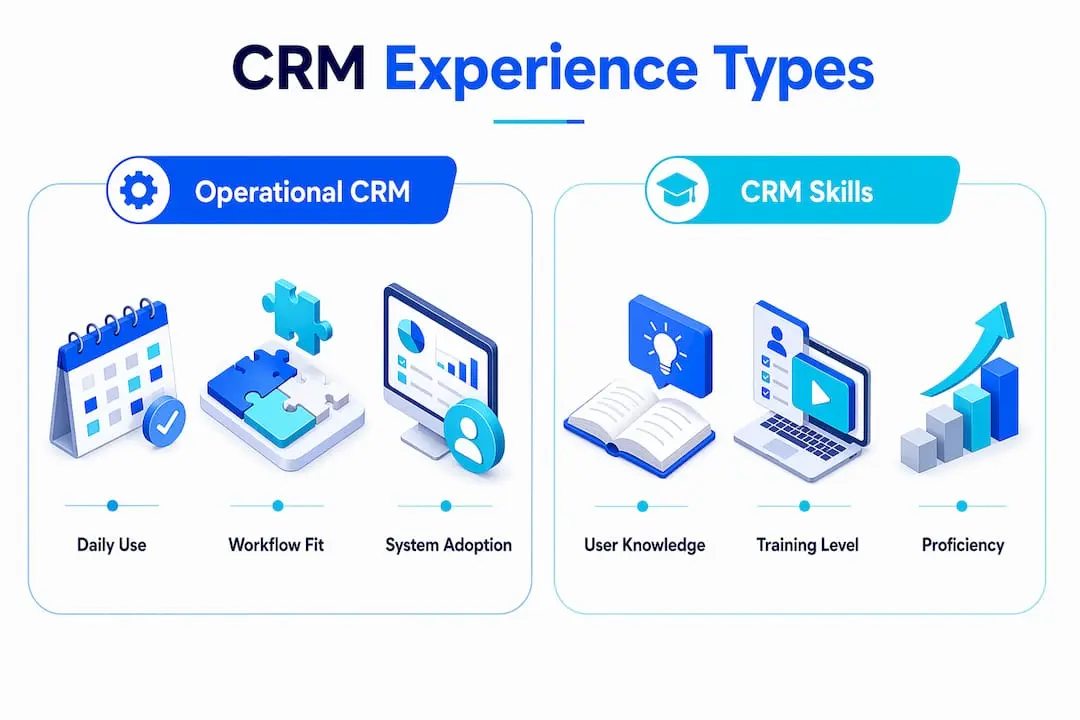
Operational CRM experience refers to the day-to-day use of a customer relationship management system by revenue teams. This includes how sales representatives log calls, how marketing teams segment contacts, and how support staff retrieve customer histories. The quality of this experience depends on interface design, workflow alignment, and how well the system fits the way your teams actually work.
Professional CRM experience refers to the skills and knowledge an individual builds over time when managing customer relationships through CRM platforms. This is what a hiring manager means when they ask for “CRM experience” on a job specification. It covers data management, pipeline oversight, reporting, and the ability to draw insights from customer data.
The practical difference matters enormously at a leadership level. When a sales director says the team lacks CRM experience, they may mean the system is hard to use. Or they may mean the team lacks the skills to use it well. Those are two very different problems requiring two very different solutions.
- Operational CRM experience: workflow design, system usability, and daily adoption by frontline teams
- Professional CRM experience: individual skills in data management, pipeline reporting, and customer analysis
- Misaligning the two leads to poor adoption, wasted investment, and conflicting expectations between departments
Pro Tip: When auditing your CRM programme, ask two separate questions: “Does the system fit our workflows?” and “Do our people have the skills to use it?” Treating these as one question is where most organisations go wrong.
Common confusion arises from conflating CRM skills with operational CRM experience, causing conflicting expectations among stakeholders and ultimately undermining the business case for the system.
How does CRM experience enhance the customer journey?
CRM experience harnesses CRM tools to deliver the best possible customer interaction at every touchpoint, using data on activity and preferences to tailor each conversation. The result is a customer who feels known, valued, and consistently well served.

The foundation of this is a single, centralised customer profile. When a member contacts your organisation, the person handling that interaction should immediately see the full history: past purchases, previous support queries, event attendance, and communication preferences. CRM consolidates customer data across channels including website visits, emails, and social media to build these 360-degree profiles. That consolidation is what makes coherent, consistent communication possible across your entire team.
Here is how strong CRM experience improves the customer journey at each stage:
- First contact: The CRM captures lead source and initial interest, so your first response is relevant rather than generic.
- Onboarding: Automated workflows trigger welcome communications and follow-up tasks, reducing the chance of new members falling through the gaps.
- Ongoing engagement: Segmented contact lists allow targeted communications based on behaviour, ensuring members receive content that matches their interests.
- Retention: CRM data flags disengaged members early, giving your team the opportunity to re-engage before a lapse becomes a cancellation.
- Renewal and upsell: Purchase history and engagement scores inform timely, personalised renewal prompts and relevant upgrade offers.
CRM experience shifts responsibility from IT teams to customer-facing process owners in sales, marketing, and support. That shift is significant. When the people closest to the customer own the CRM experience, improvements happen faster and with greater relevance to actual customer needs.
Centralised data across multiple touchpoints enables teams to deliver fast, consistent conversations with customers. Speed and consistency are the two qualities customers most consistently associate with excellent service.
Does usability determine whether CRM experience succeeds or fails?
CRM experience cannot be judged solely by feature lists. Usability and workflow fit drive adoption, and adoption drives value. A CRM with every feature imaginable but a clunky interface will be abandoned within months.
Poor CRM usability including difficult navigation, excessive manual data entry, and unclear information architecture are the primary barriers to effective CRM adoption. When staff spend more time fighting the system than serving customers, data quality deteriorates and the business case collapses.
| Focus area | CRM feature focus | CRM experience focus |
|---|---|---|
| Primary concern | What the system can do | How easily teams can use it |
| Success metric | Feature completeness | Adoption rate and data quality |
| Ownership | IT and implementation teams | Sales, marketing, and support leaders |
| Risk | Over-engineering | Under-adoption |
| Outcome driver | Technical capability | Workflow alignment |
Workflow alignment is the factor most organisations underestimate. A CRM configured to match how your team already works will be adopted. A CRM that forces your team to change every process to suit the software will be resisted. The CRM experience breakdown includes interface intuitiveness, information accessibility, manual entry workload, and alignment with sales processes. Each of these elements directly affects whether your team uses the system consistently.
Pro Tip: Before selecting or reconfiguring a CRM, map your team’s five most common daily tasks. Then test whether the system completes each task in three clicks or fewer. If it cannot, the workflow fit is poor regardless of the feature set.
TechTarget defines CRM as technology plus practices, with the human side and adoption deciding ultimate success. The technology is the starting point, not the finish line.
What strategies improve CRM experience for better outcomes?
Improving your organisation’s CRM experience requires deliberate action across training, system design, and measurement. The following approaches consistently produce better adoption and stronger customer outcomes.
-
Invest in structured training. Skills gaps are the most common cause of poor CRM adoption. Structured onboarding for new users and refresher sessions for existing teams build the professional CRM skills that translate into better data and better customer interactions. Training should cover not just how to use the system, but why each field and workflow matters to the customer outcome.
-
Involve frontline users in CRM design. The people who use the system daily know where it breaks down. Involving sales representatives, membership coordinators, and support staff in workflow design produces a system that fits real working patterns. Improving CRM experience requires engaging frontline users and focusing on adoption metrics tied to business outcomes.
-
Use CRM data to personalise communications. Segmentation based on behaviour, purchase history, and engagement scores allows your team to send the right message at the right time. Automated triggers, such as a follow-up email after an event registration or a renewal reminder 30 days before expiry, remove the manual burden while maintaining a personal tone.
-
Integrate your CRM with other channels. A CRM that sits in isolation from your website, email platform, and event management system creates data gaps. Integrating your website into a membership CRM closes those gaps and gives your team a complete picture of every member interaction.
-
Measure adoption and iterate continuously. Track login frequency, data completeness rates, and task completion alongside customer satisfaction scores. These metrics reveal where the experience is breaking down before it affects revenue. Set a quarterly review cycle and treat CRM improvement as an ongoing process, not a one-time implementation.
Effective CRM customer experience treats data integration and workflow access as foundational, not just front-end messaging. Organisations that build on that foundation consistently outperform those that treat CRM as a contact database.
Key takeaways
CRM experience is the combination of operational workflow fit and professional skills that determines whether a customer relationship management system delivers real business value.
| Point | Details |
|---|---|
| Two distinct meanings | CRM experience covers both daily operational use and individual professional skills in managing customer data. |
| Usability drives adoption | A system that fits existing workflows will be used; one that does not will be abandoned regardless of its features. |
| Centralised data is the foundation | Aggregating data from all channels into one profile enables consistent, personalised customer interactions. |
| Ownership belongs to customer-facing teams | Sales, marketing, and support leaders should own CRM experience outcomes, not IT departments. |
| Continuous improvement is required | Measuring adoption, data quality, and customer satisfaction on a regular cycle produces lasting gains. |
CRM experience: what most leaders get wrong
The most persistent mistake I see in organisations investing in CRM is treating implementation as the end of the project. The system goes live, the IT team signs off, and leadership moves on. Six months later, adoption is low, data is incomplete, and the original business case looks optimistic.
The real work starts after go-live. CRM experience is not a feature you configure once. It is a practice you build over time, shaped by how your teams use the system and how consistently they update it. The organisations I have seen get the most from their CRM are the ones where a senior leader in sales or membership takes personal ownership of the experience and reviews it regularly.
There is also a tendency to over-invest in features and under-invest in training. A CRM with 50 fields that nobody fills in correctly is less valuable than a simpler system used consistently. The best CRM software for your organisation is the one your team will actually use, not the one with the longest feature list.
My honest view is that CRM experience is a leadership issue as much as a technology issue. If your leadership team does not model good CRM habits, your frontline teams will not either. Set the standard from the top, review the data regularly, and treat every gap in adoption as a signal worth investigating.
— Rob
How Colossus supports your CRM experience
Colossus is built specifically for membership organisations, associations, and nonprofits that need CRM to do more than store contacts.

Our CRM software is designed around the workflows your teams actually use, with member profiles that consolidate data from events, email campaigns, and payment history into a single view. The result is a system your team will use consistently, because it fits the way they work. Colossus also connects CRM directly to event management, email marketing, and member portals, so data flows across your organisation without manual effort. Explore our full platform features to see how each tool connects to deliver a better experience for your members and your team.
FAQ
What is CRM experience in simple terms?
CRM experience is the practical use of a customer relationship management system to manage and improve customer interactions. It covers both how well your team uses the system daily and the skills individuals develop in managing customer data.
What is a CRM in business?
A CRM in business is a software platform that centralises customer data, tracks interactions, and supports sales, marketing, and support teams in managing customer relationships. It acts as a single source of truth for all customer-facing activity.
How does CRM experience improve customer retention?
CRM experience improves retention by giving teams a complete view of each customer’s history, enabling timely and personalised communications. Early warning signals from engagement data allow teams to re-engage members before they lapse.
What is the difference between CRM software and CRM experience?
CRM software is the technical platform. CRM experience is the human and workflow dimension that determines whether the software delivers real business impact. A strong platform with poor adoption produces weak results.
Why do organisations struggle with CRM adoption?
Poor usability, excessive manual data entry, and misalignment with existing workflows are the primary causes of low CRM adoption. Involving frontline users in system design and investing in structured training are the most effective remedies.