Virtual meeting management: a practical guide for teams

TL;DR:
- Effective virtual meeting management involves deliberate planning, role assignment, and timely follow-up to ensure clear objectives are met. Structuring agendas 24 hours in advance, using frequent engagement prompts, and maintaining meeting durations of 25 or 50 minutes improve participation and accountability. Consistent post-meeting follow-up and norm reviews help sustain team productivity and inclusion in online collaboration.
Virtual meeting management is the deliberate planning, facilitation, and follow-up of online meetings to achieve clear objectives and active participation. With 52% of remote-capable employees working in hybrid arrangements and 26% fully remote, virtual meetings are now the default mode of collaboration for most knowledge workers. That shift makes structured meeting management a core professional skill, not an optional extra. Teams that treat online sessions as designed experiences consistently outperform those that improvise.
What are the essential components of effective virtual meeting management?
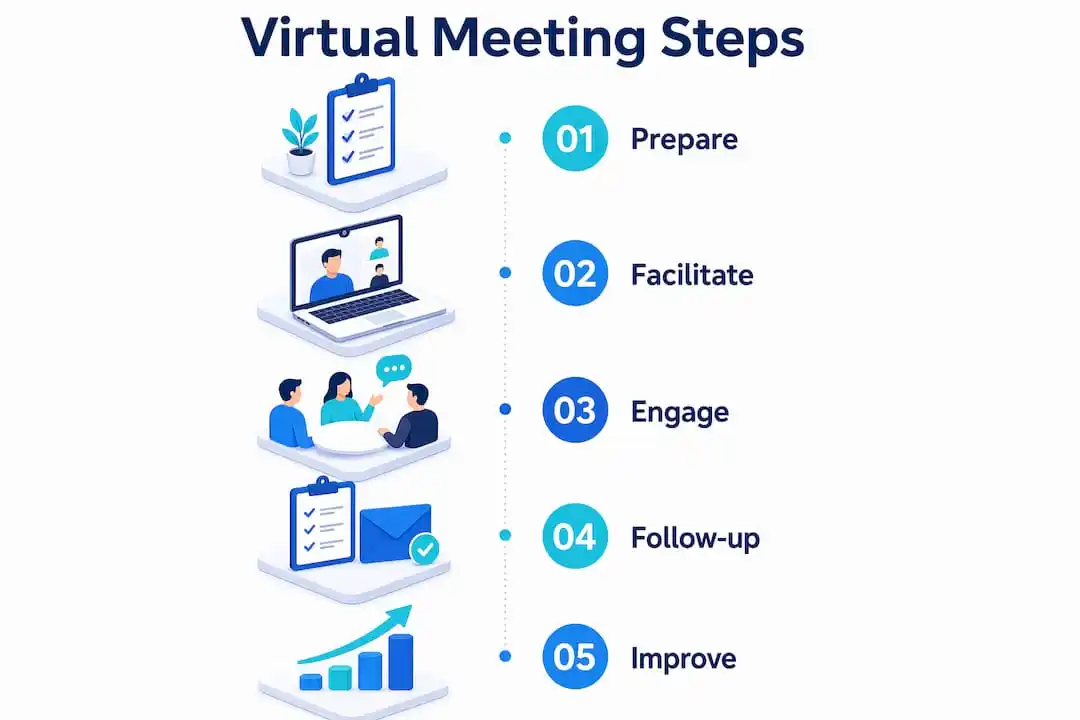
Effective virtual meeting management begins long before anyone joins a call. The preparation phase determines whether a session produces decisions or merely consumes time.
Agenda and role assignment
Agendas distributed at least 24 hours before the meeting give participants time to prepare contributions rather than arrive cold. Each agenda item should carry a time allocation and a named owner. Assigning roles such as facilitator, timekeeper, and note-taker increases accountability and prevents the meeting drift that derails so many virtual sessions. When everyone knows their role before the call starts, the session runs with far less friction.
Technical readiness
Technical failure is the single biggest credibility killer in online facilitation. Sending a tech-check communication 48 hours before a session, including a platform guide, eliminates 15–20 minutes of troubleshooting on the day itself. That recovered time compounds across every meeting your organisation runs. Pre-building virtual rooms with pre-populated whiteboards, timers, and templates before participants arrive further reduces confusion and keeps the session moving.
Meeting length and time zones
Back-to-back calls are a productivity drain that most teams accept without question. Using 25 or 50-minute meeting durations builds in buffer time, reduces cognitive fatigue, and signals respect for participants’ schedules. For distributed teams, always confirm time zones in the calendar invite and rotate meeting times periodically so the same people are not always joining at inconvenient hours.
- Distribute the agenda at least 24 hours in advance with timed items and named owners.
- Assign a facilitator, timekeeper, and note-taker before the session begins.
- Send a platform guide and tech-check prompt 48 hours ahead.
- Pre-build virtual rooms with whiteboards and templates before participants arrive.
- Use 25 or 50-minute slots to build in recovery time between calls.
- Confirm time zones in every calendar invite for distributed teams.
Pro Tip: Set your calendar tool to default to 25-minute and 50-minute meeting durations. This single change removes the need to negotiate buffer time on every individual invite.
How can facilitators maintain engagement during virtual meetings?
Participant attention drops faster in virtual settings than in person. The facilitator’s job is to design against that drop, not hope it does not happen.

Use interaction early and often
Virtual engagement should be integrated as the core format, with polling, chat responses, or whiteboard activities woven in from the opening minutes. Scheduling interaction every five minutes counteracts the attention drop-off that affects virtual presentations. A quick opening poll or a shared whiteboard prompt signals to participants that they are expected to contribute, not just observe. That expectation, set early, shapes behaviour for the rest of the session.
Include quieter voices deliberately
Inclusion requires active effort in virtual settings. Round-robin contributions and direct, named invitations bring quieter participants into the conversation without putting them on the spot unexpectedly. Phrasing such as “I’d like to hear from someone we haven’t heard from yet” works better than open questions that default to the loudest voices. For organisations focused on virtual audience participation, this inclusive approach directly improves the quality of output from every session.
Manage breakout rooms with precision
Breakout rooms are powerful for small-group work, but they require more structure online than in person. Breakout rooms need visible instructions and assigned leads because the facilitator cannot circulate between groups virtually. Post the task, expected output, and time limit in the chat or on a shared slide before sending participants into rooms. Assign a lead in each group to keep discussion on track and report back clearly.
- Open every session with a poll, chat prompt, or whiteboard activity.
- Schedule a participation touchpoint at least every five minutes during presentations.
- Use named invitations to bring quieter participants into the discussion.
- Post written instructions and assign a lead before launching breakout rooms.
- Manage time visibly and make explicit decisions to extend or park agenda items rather than silently running over.
Pro Tip: Keep a “parking lot” slide open throughout the session. When a topic runs over time, move it there visibly. Participants see their point is captured, and the agenda stays on track.
What technology supports successful online meeting facilitation?
The right technology stack for virtual meetings is simpler than most teams realise. Virtual meetings benefit from three distinct software layers: a video platform for presence, a collaborative visual surface for shared work, and optionally an async polling or reflection tool for before and after the session. Adding tools mid-session creates cognitive overload and pulls attention away from the content itself.
| Tool category | Primary function | When to use it |
|---|---|---|
| Video conferencing platform | Presence, audio, and video | Every session |
| Visual collaboration surface | Whiteboards, document co-editing | Working sessions and workshops |
| Polling and reflection tool | Async input, live voting | Webinars, large group sessions |
| Shared note-taking document | Live minutes and action capture | All meetings requiring follow-up |
Prioritise familiarity over features
The best platform for your team is the one everyone already knows. Switching tools mid-project introduces friction that undermines the session before it starts. Choose a stable, familiar tech stack and train your team on it thoroughly. Reserve new tools for low-stakes sessions where experimentation carries less risk.
Build in contingency from the start
Every well-run virtual session has a backup plan. Assign a co-host who can manage technical issues while the facilitator continues the session. Share a dial-in number as a fallback for audio failures. For hybrid meeting settings, where some participants are in a room and others are remote, test the audio and camera setup from the remote participant’s perspective, not just from the room.
How should organisations follow up and improve virtual meetings over time?
The meeting ends when the notes are sent, not when the call disconnects. Post-meeting follow-up is where accountability is either built or lost.
-
Circulate notes within 24 hours. Sharing meeting notes within 24 hours with decisions, action owners, deadlines, and next steps transforms a single event into organisational memory. Teams that receive timely notes act on them. Teams that receive notes three days later often do not.
-
Track action items actively. A list of actions with no follow-up system is just a document. Assign each action item a named owner and a specific deadline, then review open items at the start of the next relevant meeting. This single habit builds the credibility of your meeting process over time.
-
Run short retrospectives. A two-question survey after monthly or quarterly meetings (“What worked well?” and “What would you change?”) surfaces issues before they become norms. Teams that review their own meeting quality improve faster than those that assume the format is working.
-
Establish and refresh meeting norms. Write down your team’s agreements about cameras, response times, agenda formats, and note distribution. Review these norms every quarter. Norms that are never revisited quietly erode, and the meetings erode with them. For teams managing time in nonprofit settings, explicit norms are particularly valuable because volunteer schedules vary widely.
-
Protect meeting-free time. Schedule at least two blocks of uninterrupted time each week for deep work. Teams with protected focus time report higher well-being and produce better work between meetings, which in turn makes the meetings themselves more productive.
Key takeaways
Effective virtual meeting management requires deliberate preparation, structured facilitation, and consistent follow-up to produce real accountability and engagement.
| Point | Details |
|---|---|
| Prepare before the call | Distribute agendas 24 hours ahead and send tech-check prompts 48 hours before the session. |
| Assign clear roles | Name a facilitator, timekeeper, and note-taker before every meeting to prevent drift. |
| Design for engagement | Schedule a participation touchpoint every five minutes and use polls, chat, and breakout rooms. |
| Follow up within 24 hours | Send notes with named action owners and deadlines to convert decisions into accountability. |
| Review and improve | Run short retrospectives and protect meeting-free time to sustain team well-being and focus. |
What I’ve learned from years of watching virtual meetings fail
Most virtual meetings fail at the design stage, not the delivery stage. Teams spend hours in poorly structured calls and then blame the technology or the participants. The real issue is almost always that no one treated the session as something that needed to be designed.
Successful virtual facilitators treat sessions as designed experiences built on repeatable rituals, not improvised on the day. The facilitators I’ve seen run the best online sessions are not the most charismatic people in the room. They are the most prepared. They have a template for every meeting type. They pre-build their virtual rooms. They know exactly which question they will ask first to get the group talking.
The other thing I’ve noticed is that facilitator energy is a finite resource. Running three poorly structured meetings in a row is exhausting in a way that three well-structured ones simply are not. When you reduce friction, you protect your own capacity to show up well for the people in the room.
Psychological safety matters more online than in person. Quieter participants need explicit invitations because the social cues that prompt contribution in a physical room simply do not exist on a video call. The facilitators who build the most inclusive sessions are the ones who plan for inclusion, not the ones who hope it happens naturally.
My honest advice: pick one meeting each week and redesign it from scratch using the principles in this article. Run it that way for a month. The improvement will be obvious enough to justify doing the same for every other meeting on your calendar.
— Rob
How Colossus supports your virtual meeting and event management
Managing virtual meetings well requires more than good facilitation habits. It requires systems that handle the administrative work around those meetings, from registration and communications to follow-up tracking and member engagement.
Colossus brings event management, CRM, and member communication into a single platform, so your team spends less time on logistics and more time on the work that matters. Whether you are running a members-only webinar, a board session, or a large virtual conference, Colossus handles registration, automated follow-up, and engagement tracking in one place. Explore our event management software to see how it fits your organisation’s meeting workflows.
FAQ
What is virtual meeting management?
Virtual meeting management is the structured practice of planning, facilitating, and following up on online meetings to achieve clear outcomes. It covers agenda preparation, role assignment, technology setup, participant engagement, and post-meeting accountability.
How far in advance should a meeting agenda be sent?
Agendas should be distributed at least 24 hours before the meeting. This gives participants time to prepare contributions and reduces time wasted on orientation at the start of the call.
How often should facilitators prompt participation in virtual sessions?
Facilitators should schedule a participation touchpoint, such as a poll, chat response, or whiteboard activity, at least every five minutes during virtual presentations to counteract attention drop-off.
What should meeting notes include after a virtual session?
Meeting notes should include all decisions made, action items with named owners, deadlines, and next steps. Circulating these within 24 hours of the session maintains accountability and builds organisational memory.
How long should virtual meetings be?
The most effective virtual meetings run for 25 or 50 minutes rather than the standard 30 or 60. The shorter duration builds in buffer time between calls, reducing cognitive fatigue for participants.