Email marketing for charities: practical UK guide

Start with a consented welcome journey, verify your SPF/DKIM/DMARC records, and measure revenue per email from day one. Those three actions form the foundation of a programme that reliably converts supporter interest into donations. GetCharityWise’s step-by-step strategy guide confirms this sequence works for teams of all sizes, including those with no dedicated digital resource.
Three things your team can do today:
- Set up a two-to-three email welcome journey for every new subscriber, with a clear single ask in the final message.
- Run a free SPF/DKIM check using MXToolbox to confirm your emails are authenticated before your next send.
- Add a revenue-per-email column to your existing reporting spreadsheet so you can track income impact from the first campaign.
Those are realistic targets, not aspirational ones, for a charity that starts with a clean, consented list and a structured welcome flow.
Key takeaways
Effective email marketing for charities rests on three foundations: a consented, segmented list; automated journeys that treat supporters as whole people; and consistent measurement of revenue per email against sector benchmarks.
| Point | Details |
|---|---|
| Start with authentication | Verify SPF, DKIM, and DMARC before your next send to protect inbox placement. |
| Build a welcome journey first | A two-to-three email welcome sequence is the highest-ROI automation any charity can deploy. |
| Segment before you personalise | Three core segments (active donors, lapsed donors, non-donors) lift CTOR before any other change. |
| Measure revenue per email | This single KPI connects email activity to income and is the most useful figure for board reporting. |
| Use Colossus for joined-up data | Colossus connects CRM, email automation, events, and payments so consent records and donor journeys stay consistent. |
Table of Contents
- Why email is still the highest-value channel for UK charities
- The essential components of an effective charity email programme
- What campaign types should your charity be sending?
- How to grow an engaged, permissioned list in the UK
- Personalisation and segmentation techniques that actually lift donations
- Mobile-first design and deliverability essentials for charities
- What to measure, sector benchmarks and a testing roadmap
- How to choose an email platform and essential integrations
- Charity email case studies with concrete results
- Your 30/60/90-day implementation plan
- What actually matters most for charity email in 2026
- How Colossus supports your charity email programme
- Sources
Why email is still the highest-value channel for UK charities
Email costs less per contact than direct mail, social advertising, or paid search, and it reaches supporters directly without an algorithm deciding who sees your message. For most UK charities, that combination of low cost and direct access is difficult to match.
The DMA’s benchmarking commentary shows the not-for-profit sector posts a click-to-open rate of around 5.7%, compared with an overall cross-sector average of approximately 4.1%. That gap matters: it tells you that charity supporters who open an email are more likely to act on it than the average commercial subscriber. The implication is that the sector’s challenge is not persuasion once the email is opened; it is getting the email opened in the first place.
Inbox scale: Statista’s global email user data illustrates just how crowded the inbox has become. Charities are competing for attention alongside retailers, banks, and news publishers every single day.
Three strategic benefits make email the right channel to prioritise:
- Donor retention: regular, personalised emails keep your charity visible between campaigns, reducing lapse rates without the cost of a postal mailing.
- Direct stewardship: you can send an impact update to a donor within hours of a campaign closing, something no other channel matches for speed and personalisation at low cost.
- Repeat giving: email is the most reliable driver of second and third gifts, particularly when journeys are mapped to donor behaviour rather than calendar dates alone.
Charities that treat email as a broadcast tool rather than a relationship channel consistently underperform. The data and the case studies throughout this guide point to the same conclusion: frequency matters less than relevance.
The essential components of an effective charity email programme
A functioning programme has six components. Most small charity teams have some of them in place and gaps in others. Auditing against this list is the fastest way to identify where to focus first.
- Audience strategy: who you are writing to, what they care about, and how you have grouped them into segments.
- Consent and data flows: how you collect, record, and store permission, and how that data moves between your CRM, email platform, and donation system.
- Core journeys: the automated sequences that run without manual intervention — welcome, stewardship, re-engagement, and post-donation thank-you.
- Content mix: the balance between fundraising appeals, impact updates, advocacy asks, and event invitations across a rolling 12-week calendar.
- Testing and measurement: a scheduled cadence of A/B tests and a reporting dashboard that connects email activity to income.
- Technical deliverability and security: SPF, DKIM, DMARC, complaint-rate monitoring, and data security practices that protect both your supporters and your sender reputation.
In a team of two or three, the digital or communications officer typically owns audience strategy, content, and journeys. The database or CRM manager owns consent flows and data security. Deliverability often falls between the two, which is why it is the most commonly neglected component.
Pro Tip: Draw a simple one-page map showing how a new supporter moves from sign-up to first donation email. If you cannot draw it in under ten minutes, your journey architecture has gaps that will cost you income.
Charity Digital’s email marketing guide provides a useful framework for auditing these components against sector best practice.
What campaign types should your charity be sending?
Most charity email programmes need six campaign types running in rotation. Each has a distinct purpose, cadence, and primary call to action.
-
Welcome series (days 1, 3, 7 after sign-up): introduce your mission, share one powerful story, and make a soft ask. Subject lines of 40 characters or fewer perform best here. Measure: open rate and click rate on the ask email.
-
Fundraising appeals (two to four per year, plus emergency appeals): one clear donation CTA, a specific target or deadline, and a named beneficiary or story. Subject lines that include a number or a name consistently outperform generic ones. Measure: conversion rate and revenue per email.
-
Stewardship and impact updates (monthly or bi-monthly): tell donors what their money did. No ask, or a very soft secondary ask only. This is the campaign type most charities skip, and it is the one most responsible for donor lapse. Measure: open rate and unsubscribe rate as a proxy for satisfaction.
-
Event invitations (as needed, with a reminder sequence): one event, one registration link, a clear date and location. Send an initial invite, a reminder seven days before, and a last-chance email 24 hours before. Measure: registration conversion rate.
-
Advocacy and campaign asks (tied to campaign moments): ask supporters to sign a petition, write to their MP, or share content. These emails build engagement and loyalty without requiring a financial commitment. Measure: action completion rate and list growth from shares.
-
Re-engagement (quarterly, for subscribers inactive for 90-plus days): a short, direct message asking whether the supporter still wants to hear from you. Include a preference update link. Remove non-responders after two attempts to protect deliverability.
Pro Tip: Plan your campaign calendar 12 weeks ahead and map each send against your fundraising targets. Charities that plan this way send fewer, better emails and raise more per send than those who react to internal deadlines.
How to grow an engaged, permissioned list in the UK
List growth is only valuable if the people joining your list actually want to hear from you. A large list of disengaged subscribers damages deliverability and wastes resource. Focus on quality over volume.
Channels that reliably convert to consented sign-ups:
- Website sign-up forms with a clear value exchange (a free resource, a campaign update, or exclusive content).
- Post-donation thank-you pages with an explicit opt-in tick box.
- Event registration forms, where supporters are already engaged with your cause.
- Advocacy journeys: supporters who sign a petition are often willing to receive campaign updates if asked clearly.
- Partner campaigns and co-branded content, where a trusted third party introduces your list to their audience.
Practical GDPR steps for UK charities
The ICO requires that consent for marketing emails is freely given, specific, informed, and unambiguous. For UK charities, that means:
- Use a positive opt-in tick box (pre-ticked boxes are not lawful consent under UK GDPR).
- State clearly what the subscriber will receive and how often, at the point of sign-up.
- Record the date, source, and wording of consent for every subscriber in your CRM.
- Store a cookie notice and privacy policy that covers email data processing.
- Honour unsubscribe requests within ten working days (best practice is immediate, automated removal).
- Review your lawful basis annually and document it in your Records of Processing Activities (ROPA).
On the question of single versus double opt-in: double opt-in produces a smaller but more engaged list and reduces spam complaints. For charities building from scratch or recovering from deliverability problems, it is the safer choice. For established lists with strong engagement, single opt-in with a robust welcome journey is generally sufficient.
Oxfam’s Second Hand September campaign demonstrates what a well-optimised sign-up journey can achieve: 10,336 new subscribers and a very high email opt-in rate was achieved from a single campaign. The opt-in rate was that high because the post-sign-up journey was designed to convert interest into explicit permission immediately.
Personalisation and segmentation techniques that actually lift donations
Segmentation does not require a sophisticated CRM or a data science team. Three or four well-chosen segments, applied consistently, will outperform a single broadcast list every time.
Segmentation axes to prioritise first:
- Recency, frequency, value (RFM): group donors by how recently they gave, how often, and at what level. Your highest-value lapsed donors deserve a different message from your most recent first-time givers.
- Engagement behaviour: separate active openers and clickers from passive subscribers. Active supporters can receive more frequent and more direct asks; passive ones need re-engagement content first.
- Cause preference: if your charity works across multiple issue areas, segment by the cause a supporter first engaged with and tailor content accordingly.
- Geographic or cultural markers: relevant for charities with regional programmes or communities where timing (such as Ramadan for Muslim donors) significantly affects giving behaviour.
The Giving Analytics case study on Muslim Charity is one of the clearest demonstrations of what targeted personalisation can achieve: roughly a fourfold increase in average donations per email after implementing AI-driven personalisation during Ramadan. The mechanism was matching ask amounts, imagery, and send timing to individual donor profiles rather than sending a single broadcast appeal.
Personalisation tactics that deliver without large budgets:
- Tailor the suggested donation amount in the email body to the donor’s previous giving level.
- Use dynamic content blocks to show different impact stories to different cause segments.
- Test the sender name (a named individual versus your charity name) for high-value donor segments.
- Send at the time of day when each segment has historically opened, using your platform’s send-time optimisation if available.
Pro Tip: Start with three segments: active donors, lapsed donors, and non-donors (supporters who have never given). Write a distinct subject line and opening paragraph for each. That single change will lift your CTOR before you touch anything else.
An example workflow: pull RFM data from your CRM each month, assign each contact to one of your three to four segments, apply the relevant content block in your email platform, and record the CTOR and conversion rate per segment after each send. After three sends, you will have enough data to refine the segments further.
Mobile-first design and deliverability essentials for charities
Over half of all email opens now happen on mobile, which means an email designed primarily for desktop is already failing the majority of your audience before they read a word.
Mobile-first design principles:
- Keep subject lines to 40 characters or fewer so they display in full on a smartphone lock screen.
- Use a single-column layout that reflows cleanly on small screens.
- Place your primary CTA button above the fold, large enough to tap with a thumb (minimum 44px height).
- Limit images to one or two per email and always include descriptive alt text.
- Use a minimum 16px body font and 22px heading font for legibility without zooming.
Accessibility checklist
Accessibility in email is both a legal consideration under the Equality Act 2010 and a practical one: a significant proportion of your supporters will have visual, cognitive, or motor impairments.
- Write alt text for every image that describes the image’s purpose, not just its content.
- Maintain a minimum 4.5:1 colour contrast ratio between text and background.
- Use a logical heading hierarchy (H1, H2, H3) so screen readers navigate correctly.
- Avoid using colour alone to convey meaning (for example, a red button versus a green button with no text difference).
- Test every template in a screen reader before deploying it to your list.
Deliverability essentials
Deliverability is the technical foundation that everything else rests on. Without it, your best content never reaches the inbox.
- SPF (Sender Policy Framework): a DNS record that tells receiving mail servers which IP addresses are authorised to send on your domain’s behalf.
- DKIM (DomainKeys Identified Mail): a cryptographic signature that verifies your email has not been altered in transit.
- DMARC (Domain-based Message Authentication, Reporting and Conformance): a policy that tells receiving servers what to do if SPF or DKIM checks fail, and sends you reports on authentication results.
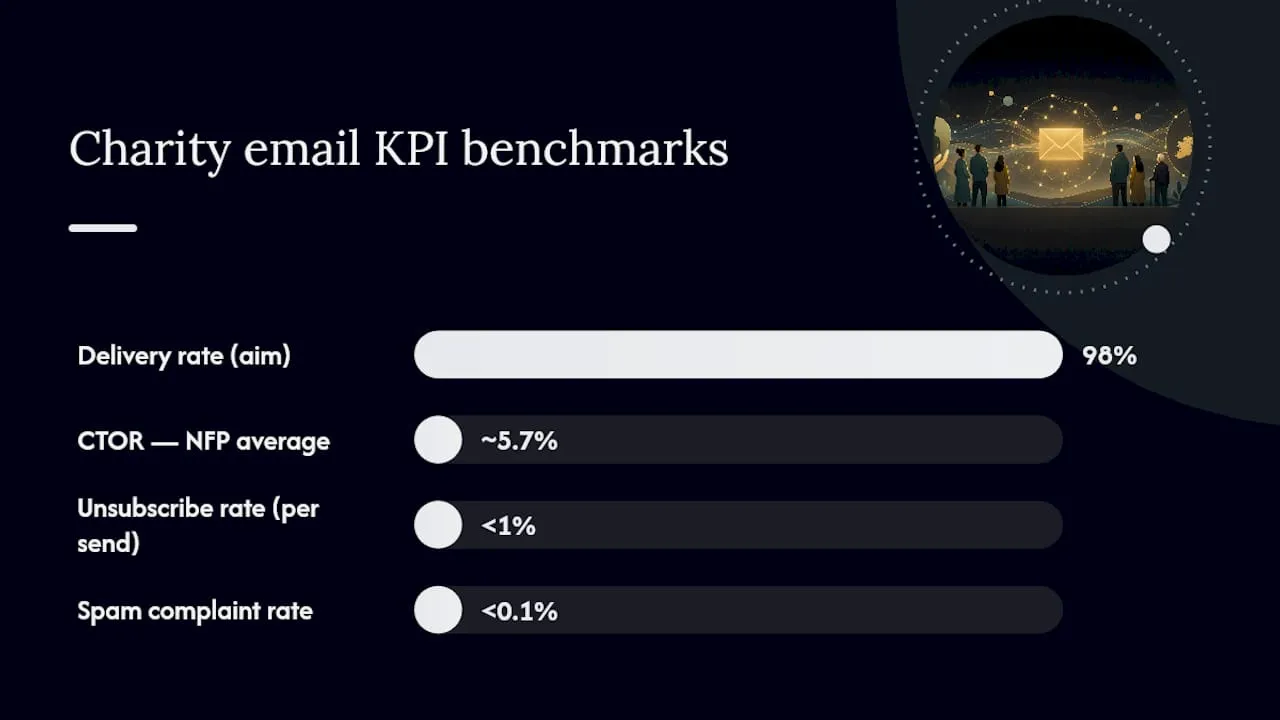
- Complaint rate: keep your spam complaint rate below 0.1% to maintain good standing with major inbox providers. Monitor this in Google Postmaster Tools and your email platform’s reporting.
- Preference centres: give subscribers control over frequency and content type. Supporters who can manage their own preferences are far less likely to mark you as spam.
- Domain warm-up: if you are migrating to a new sending domain or IP, increase volume gradually over four to six weeks rather than sending your full list immediately.
Pro Tip: Check your SPF, DKIM, and DMARC records today using MXToolbox’s free lookup tool. Many charity teams discover their authentication is incomplete only after a major send lands in spam folders.
What to measure, sector benchmarks and a testing roadmap
Measurement without a benchmark is just numbers. Use the DMA’s not-for-profit figures as your baseline and set internal targets that improve on your own previous performance quarter by quarter.
Primary KPIs for charity email programmes:
- Delivery rate: aim for 98% or above. Below 95% signals a list quality or authentication problem.
- Open rate: the not-for-profit sector average sits above the cross-sector mean; use your own historical average as the primary benchmark once you have three months of data.
- Click-to-open rate (CTOR): the DMA reports the NFP sector at approximately 5.7% versus a cross-sector average of around 4.1%. CTOR is a cleaner measure of content relevance than raw click rate.
- Conversion rate: the percentage of recipients who complete the desired action (donate, register, sign). Track this per campaign type, not as a single aggregate.
- Revenue per email: total income from a campaign divided by the number of emails delivered. This is the single KPI most useful for board reporting because it connects email activity directly to income.
| KPI | Sector benchmark | When to act |
|---|---|---|
| Delivery rate | 98%+ | Investigate immediately below 95% |
| CTOR (NFP sector) | ~5.7% (DMA) | Review content and segmentation below 3% |
| Spam complaint rate | Below 0.1% | Act at 0.08% to stay ahead of provider thresholds |
| Unsubscribe rate | Below 1% per send | Review frequency and relevance above this level |
Testing roadmap:
- Month 1: A/B test subject lines on your next fundraising appeal. Test one variable only (a question versus a statement, or a named person versus your charity name). Send to 20% of your list per variant, then deploy the winner to the remaining 60%.
- Month 2: Test send day and time. Split your stewardship email between Tuesday morning and Thursday lunchtime and compare open rates.
- Month 3: Test a content variable — a single beneficiary story versus an aggregated impact statistic in the email body. Measure CTOR and conversion rate, not just opens.
After three months, you will have directional data on subject lines, timing, and content format. Use those learnings to brief your next quarter’s calendar, not to declare permanent rules. Audience behaviour shifts, and what works in January may not work in September.
For deeper guidance on engagement metrics and how to report them to trustees, the Colossus engagement metrics guide covers KPI selection and dashboard design in practical detail.
How to choose an email platform and essential integrations
Platform choice shapes what your programme can do for years. The wrong choice means manual workarounds, data silos, and journeys that break when a team member leaves. The right choice means automation runs reliably and your CRM, donation system, and email platform share a single source of truth.
Selection checklist:
- Deliverability reputation: ask vendors for their average delivery rates across the not-for-profit sector specifically, not their overall platform average.
- Automation capabilities: can you build multi-step journeys triggered by donor behaviour (a donation, an event registration, a lapse in giving) without needing a developer?
- Segmentation depth: can you query your list by RFM score, engagement behaviour, and custom fields from your CRM in the same segment builder?
- API access: does the platform offer a documented API so your CRM, donation processor, and web forms can push and pull data in real time?
- Reporting: can you see revenue attributed to email at campaign level, not just opens and clicks?
- Cost model: many platforms offer discounted or free tiers for registered charities. Confirm eligibility before comparing list prices.
Integration priorities:
- CRM sync (two-way, real-time or near-real-time) so consent records, giving history, and contact data stay consistent.
- Donation and payment connector so a completed gift triggers an automated thank-you and updates the donor’s segment.
- Web form integration so new sign-ups enter the correct welcome journey immediately without manual import.
- Event system connection so registrations trigger event-specific email sequences automatically.
- Consent record storage that timestamps opt-in source and wording, accessible for ICO audit if required.
Pro Tip: Before signing a contract, ask the vendor three questions: Where is our data stored (UK or EEA)? What is your SLA for support response during a live campaign? Can you provide references from UK charities of a similar size to ours? The answers will tell you more than any feature comparison sheet.
For a detailed look at platform features and suitability for nonprofits, the Colossus guide to email marketing platforms for nonprofits covers selection criteria and integration considerations in depth.
Charity email case studies with concrete results
The tactics in this guide are not theoretical.
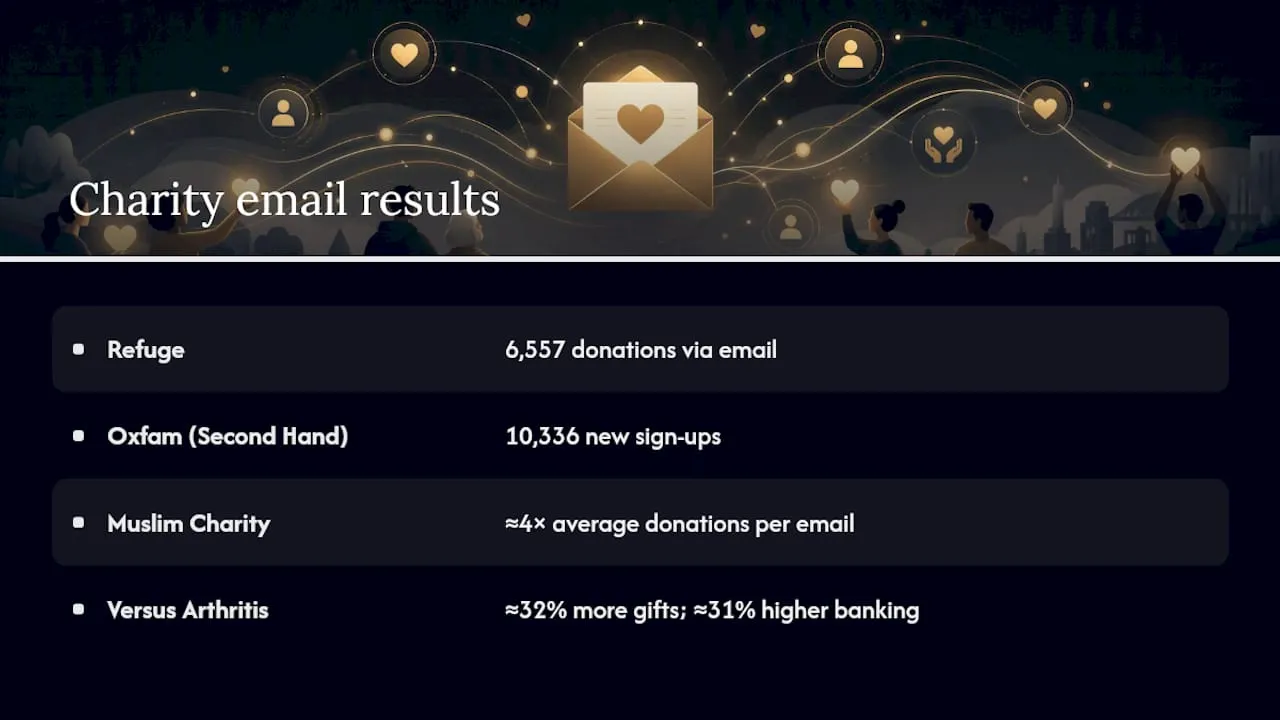
Refuge: Forward Action’s work with Refuge produced 6,557 donations via email in a single year. The programme was built on a regular send cadence, personalised content, and a single clear action per message. The operational learning: consistency and simplicity outperform sporadic, complex campaigns. Small teams can replicate this by committing to a fixed monthly send schedule and resisting the urge to include multiple asks in one email.
Oxfam (Second Hand September): The campaign generated 10,336 new sign-ups with a very high email opt-in rate was achieved. The opt-in rate was achieved by designing the post-sign-up journey to convert campaign interest into explicit email permission immediately. The learning for smaller charities: the moment after a supporter takes an action is the highest-intent moment you will ever have. Use it.
A very high email opt-in rate was achieved from Oxfam’s Second Hand September campaign, driven by an optimised post-sign-up journey.
Muslim Charity: The Giving Analytics case study reports roughly a fourfold increase in average donations per email after implementing AI-driven personalisation during Ramadan. Personalisation included tailored ask amounts, culturally relevant imagery, and send timing matched to individual donor behaviour. The learning: even modest personalisation, applied at the right cultural moment, produces outsized results.
Versus Arthritis: More Onion’s integrated journey work with Versus Arthritis found that supporters in integrated journeys gave approximately 32% more on average and had banking rates approximately 31% higher than those in standard journeys. The learning: mixing service content, advocacy asks, and fundraising appeals in a single coherent journey produces better long-term retention than siloing each ask type into separate lists.
What small teams can replicate without large budgets: a structured welcome journey, a fixed send cadence, a single CTA per email, and a post-action opt-in prompt. None of these require expensive tools or large teams. They require planning and discipline.
Your 30/60/90-day implementation plan
| Timeframe | Action | Owner | Success criteria |
|---|---|---|---|
| Days 1–30 | Verify SPF, DKIM, DMARC records | Digital/IT lead | All three pass MXToolbox check |
| Days 1–30 | Build a two-to-three email welcome journey | Comms officer | Journey live and triggering for new sign-ups |
| Days 1–30 | Define three core segments (active donors, lapsed donors, non-donors) | Database manager | Segments built and tagged in CRM |
| Days 31–60 | Run first A/B subject line test on a fundraising appeal | Comms officer | Test result documented; winner deployed |
| Days 31–60 | Set up preference centre and unsubscribe automation | Digital/IT lead | Preference centre live; unsubscribes process within 24 hours |
| Days 31–60 | Add revenue-per-email to monthly reporting | Database manager | First report shared with senior leadership |
| Days 90 plus | Map a full donor stewardship journey (post-donation to 12 months) | Comms + database | Journey mapped, first two emails live |
| Days 90 plus | Schedule quarterly re-engagement campaign for 90-day inactives | Comms officer | Re-engagement email drafted and scheduled |
| Days 90 plus | Review and document consent records for ICO compliance | Database manager | ROPA updated; consent source recorded for all active subscribers |
Quick wins for early momentum:
- Activate your welcome journey before any other automation. It is the highest-ROI journey in any charity programme.
- Check your authentication records this week. A failed DKIM check can silently route your emails to spam for months.
- Pull your top three donor segments from your CRM and write a single tailored subject line for each. Send your next appeal with those three variants and compare results.
For practical tips that complement this plan, the Colossus guide to nonprofit email marketing covers quick wins and iterative improvements in detail.
What actually matters most for charity email in 2026
The sector conversation in 2026 is dominated by AI personalisation, automation, and data ethics. All three matter, but charities that are still sending one broadcast email to their entire list are not ready for AI personalisation. They need the foundations first.
The single biggest priority right now is building integrated journeys that treat supporters as whole people rather than siloed ask types. Donors who receive a mix of impact updates, advocacy asks, and fundraising appeals in a coherent sequence give more, stay longer, and lapse less often. The Versus Arthritis data makes this concrete: Supporters in integrated journeys gave significantly more on average and had higher banking rates than those in standard campaigns.
The tension worth naming is this: the pressure to experiment with new tools and tactics is real, but so is the risk of eroding donor trust through over-communication, poor data practices, or personalisation that feels intrusive rather than relevant. The charities that get this right are the ones that test carefully, measure honestly, and treat their supporters’ inboxes with the same respect they would want for their own.
Data security deserves more attention than most charity teams give it. A breach that exposes donor data does not just create an ICO notification obligation; it damages the trust that took years to build. Encrypt data in transit and at rest, limit access to supporter records on a need-to-know basis, and review your data retention policy annually.
How Colossus supports your charity email programme
Running a charity email programme across disconnected tools — a separate CRM, a standalone email platform, a manual donation spreadsheet — costs your team hours every week and creates consent record gaps that create compliance risk.

Colossus brings CRM, email automation, event management, and payment processing into a single platform, so your welcome journeys trigger automatically when a supporter registers for an event, your donation records update your segments in real time, and your consent data is stored in one auditable place. For a small charity team, that means less time on data hygiene and more time on the content and relationships that actually move supporters to give.
Getting started with Colossus typically takes a few weeks: import your existing contacts, configure your consent fields, build your welcome journey, and connect your donation processor. The platform’s CRM tools are designed for organisations that rely on relationship data, not just transaction records.
Request a demo at Colossus to see how the platform maps to the programme components in this guide.
Sources
For teams who want to go deeper on specific areas, these are the primary sources used in this guide, organised by need:
- AI-Powered Email Personalisation: How Muslim Charity Boosted Their Ramadan Fundraising - Giving Analytics
- 10 email marketing best practices for nonprofits | NPTechForGood
- Number of e-mail users worldwide - Statista
- Unlocking engagement: Email strategies for charities - DMA
- Oxfam - Forward Action case story
- Creating an effective email marketing strategy - GetCharityWise
- The ultimate guide to email marketing - Charity Digital