Content marketing for events: your complete playbook

Treat your event as a planned content factory, and you will generate registrations, engagement, and pipeline value long after the final session ends. The core play is straightforward: set SMART goals before you write a single word, map every asset to a stage of the attendee funnel, and run a coordinated pre-, during-, and post-event publishing plan. Events generate exceptional volumes of repurposable content when capture is planned before the agenda is finalised, and a multi-week post-event publishing calendar is in place. Without that structure, recordings, slides, and speaker quotes end up in a shared drive no one revisits.
Here is your immediate action plan:
- Set one primary SMART goal (e.g., 300 paid registrations by a specific date) and link every content decision to it.
- Choose three priority content assets for the pre-event phase: a speaker teaser video, a “what to expect” landing page, and a segmented email sequence.
- Schedule capture on-site before the event date: assign roles for photography, session clipping, and live social posting.
- Launch two pre-event teasers within 48 hours of reading this, even if the full agenda is not yet confirmed.
- Build a 60–90 day post-event publishing calendar now, with placeholder slots for session recaps, highlight reels, and gated recordings.
Key takeaways
Effective content marketing for events requires a planned, three-phase approach that maps every asset to a goal, assigns clear ownership, and schedules republishing for 60–90 days after the event closes.
| Point | Details |
|---|---|
| Plan capture before the agenda | Assign roles and set up your media library before the event date to prevent the content graveyard. |
| Use a 60–90 day publishing calendar | Schedule post-event repurposing slots in advance; the 30-day post-event window drives long-tail visibility. |
| Owned lists convert best | Prioritise past attendees, newsletter subscribers, and speaker networks before investing in paid channels. |
| Gate recordings for lead capture | Connect gated session recordings to your CRM to generate MQLs and feed personalised follow-up sequences. |
| Colossus unifies the workflow | Colossus combines event registration, CRM, and email marketing so post-event sequences run automatically from attendance data. |
Table of Contents
- How do you start with content marketing for events?
- What pre-event content should you create and when?
- Which content formats give you the most reusable assets?
- How do you make your event pages rank and convert?
- Which social and paid tactics actually move registrations?
- What content should you capture while the event is running?
- How do you follow up and convert attendees after the event?
- Which KPIs prove your event content ROI?
- Your content production checklist: pre, during, and post
- Which tools support your event content workflow?
- How a unified platform supports your content marketing plan
- Three priorities every event marketer should act on first
- Colossus makes the post-event content workflow manageable
- Sources
How do you start with content marketing for events?
Start with SMART goals, segment your audience, and set a promotion timeline of at least one month for small events and three or more months for large multi-day events. That sequencing matters because every content decision downstream — which formats to produce, which channels to prioritise, how much budget to allocate per phase — should trace back to a measurable objective.
Setting SMART goals that connect to business outcomes
A SMART goal for an event is a specific, measurable registration or revenue target with a clear deadline. Each goal needs a linked metric:
- Registrations / ticket revenue: tracked via your registration platform and CRM.
- Marketing-qualified leads (MQLs): contacts who registered, attended a session, and met a lead-scoring threshold.
- Member renewals or upgrades: relevant for associations and membership organisations.
- On-demand views: post-event metric for gated recordings.
- Net Promoter Score (NPS): post-event survey data to inform the next event cycle.
Quick SMART-goals checklist:
- [ ] Specific: named outcome with a number attached.
- [ ] Measurable: a tool or report that will confirm it.
- [ ] Achievable: benchmarked against a previous event or industry norm.
- [ ] Relevant: tied to a business objective (revenue, pipeline, retention).
- [ ] Time-bound: a hard deadline, not “by the end of the year.”
Audience segmentation: three priority groups
Messaging that tries to speak to everyone converts no one. Segment into three groups and give each a distinct content focus:
- Prospective delegates: need social proof, speaker credibility, and a clear value proposition. Lead with speaker teasers and agenda highlights.
- Registered attendees: need preparation content, session guides, and community-building touchpoints. Lead with “what to expect” guides and pre-event networking prompts.
- Past attendees and sponsors: need evidence of improvement and early-access incentives. Lead with “what’s new this year” comparisons and loyalty offers.
Promotion timeline by event size
| Event type | Recommended lead time | Key phases |
|---|---|---|
| Small event (under 200 attendees) | 6–8 weeks | Weeks 6–4: awareness; Weeks 3–2: conversion; Week 1: urgency |
| Large multi-day event | 3+ months | Month 3+: awareness; Month 2: conversion; Month 1: final push |
Budget your content spend proportionally across awareness, conversion, and final push phases based on your event’s priorities.
Pro Tip: Write your post-event content plan at the same time as your pre-event plan. If you wait until the event is over, the team is exhausted and the content graveyard fills up fast.
What pre-event content should you create and when?
The weeks leading up to your event are your highest-leverage window for driving registrations and qualifying leads. Start with your owned list, launch with a teaser rather than a full agenda, activate speakers and sponsors as distribution partners, and run a focused sequence in the final 30 days. Owned audiences convert best; personalised speaker and sponsor assets multiply reach without multiplying budget.
Eight-week content calendar template
- Week 8: Publish the event landing page. Send a “save the date” email to your owned list. Announce on social with a single strong hook (the problem your event solves).
- Week 7: Release the first speaker teaser: a 60-second video clip or a pull-quote graphic. Publish a blog post on the event theme.
- Week 6: Open early-bird registration. Send a segmented email to past attendees with a loyalty offer. Share a sponsor spotlight post.
- Week 5: Publish a “what to expect” guide (gated or ungated depending on your MQL goal). Launch a LinkedIn or Instagram countdown.
- Week 4: Release a second speaker teaser. Send a mid-funnel email to prospects who visited the landing page but did not register.
- Week 3: Publish an agenda preview or session description blog post. Begin paid social retargeting to landing-page visitors.
- Week 2: Send a “last chance for early-bird” email. Share attendee testimonials from previous years. Activate speaker social assets.
- Week 1: Daily urgency posts on social. Final email to non-registrants. Confirm logistics content for registered attendees.
Content-to-funnel mapping
| Asset | Primary goal | CTA | Suggested channel |
|---|---|---|---|
| Speaker teaser video | Awareness | “See the full agenda” | LinkedIn, Instagram, email |
| “What to expect” guide | Consideration | “Register now” | Gated landing page, email |
| Sponsor spotlight post | Awareness / credibility | “Learn more about our sponsors” | Social, email |
| Session description blog | Consideration / SEO | “Reserve your seat” | Organic search, email |
| Retargeting ad | Conversion | “Register before prices rise” | Paid social, display |
| Attendee testimonial | Conversion | “Join them this year” | Social, email, landing page |
Which content formats give you the most reusable assets?
The formats that generate the most reusable assets are also the ones that require the least incremental effort per derivative piece. A single 45-minute recorded session, for example, can yield a highlight reel, three speaker quote graphics, a blog post, two email newsletter sections, and a LinkedIn article. A six-stage content lifecycle — Source, Promote, Capture, Create and Remix, Distribute, Measure — prevents the content graveyard and makes repurposing systematic.
High-impact formats
- Speaker teaser clips (60–90 seconds): the single highest-performing pre-event asset on LinkedIn and Instagram. Record during speaker briefings; no studio required.
- Highlight reels (2–4 minutes): post-event workhorse. Drives on-demand registrations and social sharing for weeks.
- Blog posts and session recaps (800–1,200 words): long-tail SEO value. A well-structured recap can rank for niche conference topics for months.
- Email sequences (150–250 words per email): the highest-converting channel for owned audiences. Keep each email to one CTA.
- Downloadable guides and session summaries: gated assets that generate MQLs from post-event traffic.
Three repurposing recipes
Recipe 1: From recorded session to five assets Recorded session → edited highlight reel → speaker quote graphics (×3) → blog post recap → email newsletter section.
Recipe 2: From panel discussion to social series Panel transcript → five key insights extracted → five LinkedIn posts (one per insight, published weekly) → one “top takeaways” infographic.
Recipe 3: From attendee survey to trust content Post-event survey responses → NPS summary blog post → two or three anonymised quote graphics → one email to prospects (“here is what attendees said”).
Pro Tip: Write your repurposing plan as a column in your content calendar before the event. Assign each captured asset a “derivative slot” so the editing team knows exactly what to produce from each recording.
Template prompts for rapid execution
Email subject line templates:
- “[Speaker name] will be at [Event name] — here’s why it matters”
- “You’re registered. Here’s what to do next.”
- “48 hours left: [Event name] early-bird closes tonight”
Social caption templates:
- “One question [Speaker name] will answer at [Event name]: [question]. Register: [link]”
- “Last year, [X] attendees left with [outcome]. This year, we’re going further. [link]”
How do you make your event pages rank and convert?
A well-structured event landing page does two jobs simultaneously: it ranks in search and converts visitors into registrants. AEO (Answer Engine Optimisation) aims to make content eligible to appear as direct answers in AI-generated search summaries. Concise two-sentence answers under H2 headings and structured data increase the chance of being used as an AI summary or featured answer.
Event landing page checklist
- [ ] One page, one CTA (register now). Remove all navigation links that lead away from the page.
- [ ] Clear who, what, why, when, and where in the first 200 words.
- [ ] Primary keyword in the H1, meta title, and first paragraph.
- [ ] Speaker names and session titles as text (not images) for indexing.
- [ ] Social proof: attendee count, testimonials, or sponsor logos above the fold.
- [ ] Mobile-optimised layout with a sticky registration button.
- [ ] Event JSON-LD structured data (name, date, location, organiser, URL) in the page
<head>. - [ ] FAQ schema for common questions (“Is this event in person?”, “What is the refund policy?”).
Meta title and description template
Meta title: [Event Name] | [Date] | [City or Online] — Register Now
Meta description: Join [X] professionals at [Event Name] on [Date] in [Location]. [One-sentence value proposition]. Secure your place today.
AEO copy tip
Under each H2 on your event page, write a two-sentence direct answer before expanding into detail. Example: “The conference runs over two days and covers [topic]. Sessions are available in person and on demand for registered attendees.” This structure is what AI search tools pull when generating summaries, and it also improves featured-snippet eligibility in conventional search.
Which social and paid tactics actually move registrations?
Organic social builds credibility; paid social closes registrations. The most effective programmes run both in parallel, with organic content warming the audience and paid retargeting converting the undecided. For UK-based events, VisitScotland’s marketing guidance and regional destination partnerships offer additional reach for tourism-adjacent or regionally focused events.
Platform selection by audience
- LinkedIn: B2B conferences, professional associations, corporate training events. Use single-image ads and document ads (carousel of session previews).
- Instagram and TikTok: consumer events, creative industries, younger professional audiences. Use Reels and Stories for speaker teasers.
- Facebook: community events, local and regional audiences, older demographics. Use event listings and boosted posts.
- Email: all event types. Highest conversion rate of any channel for owned lists.
For event advertising ideas tailored to membership organisations, a mix of boosted posts, retargeting, and email sequences consistently outperforms single-channel approaches.
Final two-weeks organic posting schedule
- Day 14: Speaker spotlight post with a pull quote.
- Day 12: “What’s on the agenda” carousel or thread.
- Day 10: Attendee testimonial from a previous year.
- Day 8: Sponsor or partner feature.
- Day 6: “Behind the scenes” preparation content.
- Day 4: Countdown post with a registration link.
- Day 2: “Last chance” urgency post.
- Day 0: “We’re live” or “doors open” post.
Paid-ad testing checklist
- [ ] Test two creative variants per ad set (one image, one video or one headline variant).
- [ ] Run separate ad sets for cold audiences and warm retargeting audiences.
- [ ] Set a minimum 7-day measurement window before pausing underperforming ads.
- [ ] Use UTM parameters on every paid link to attribute registrations accurately.
- [ ] Cap frequency at 3–5 impressions per user per week to avoid audience fatigue.
Activating speakers and sponsors
Provide each speaker with a pre-built social pack: two caption options, a branded graphic, and a suggested posting schedule. Sponsors respond better to co-branded assets than to generic “please share” requests. Influencer and partner activation works on the same principle: give partners ready-to-post assets and a clear ask, and distribution multiplies without additional spend.
What content should you capture while the event is running?
The on-site content window is short and chaotic, which is exactly why it needs a written workflow before the first delegate arrives. Assign roles, set a posting cadence, and brief the team on what “good capture” looks like.
On-site content workflow
- Content lead: oversees the capture schedule, approves posts before they go live, and manages the asset library in real time.
- Photographer/videographer: captures keynote moments, audience reactions, and speaker portraits. Delivers edited selects within two hours of each session.
- Social media manager: posts live updates, stories, and quote graphics on a 90-minute cadence throughout the day.
- Session clipper: records or clips 60–90 second highlights from each session for same-day or next-day distribution.
Sample live-post templates
- Story template: “[Speaker name] just said: ‘[quote]’ — live at [Event name]. [Hashtag]”
- Micro-clip caption: “60 seconds with [Speaker name] on [topic]. Full session on demand after the event. [Link]”
- Quote graphic caption: “‘[Quote]’ — [Speaker name], [Title], [Event name] [Year]. [Hashtag]”
UGC permissions and model release
Use model release forms and clear photo and quote permissions when publishing attendee images or recorded material. The Royal Photographic Society provides a model release template suited to UK practice. Collect consent at registration (via a tick-box in the registration form) and again on-site via signage at photography zones. Never publish an identifiable attendee image without written consent.
Pro Tip: Add a UGC prompt to your event app or registration confirmation: “Share your experience using [hashtag] and tag us — we may feature your post in our post-event highlights.” This generates organic content without any additional production cost.
Contingency checklist for live-event content crises
- Session delay: post a holding update on social within 10 minutes; do not go silent.
- Speaker cancellation: have a pre-written “programme update” template ready; announce a replacement or alternative session immediately.
- Technical failure (AV, streaming): post a brief, factual update; avoid speculation about timing.
- Venue issue: follow your event’s crisis communications plan; pause all scheduled promotional posts until the situation is resolved.
How do you follow up and convert attendees after the event?
The 30 days after your event are the highest-value window for pipeline conversion and long-tail content visibility. Post-event content drives long-tail discovery and attendee retention; session recaps and written content are among the highest-value formats. Most organisations publish a thank-you email and then go quiet. The ones that convert attendees into leads publish on a schedule for eight weeks.
Post-event email sequence
- Day 1: Thank-you email with a highlights video or photo gallery link. No sales ask.
- Week 1: “Top five takeaways” email linking to a session recap blog post.
- Week 2: Gated resource email: “Download the full session recordings” behind a short form.
- Week 3: Sponsor or partner follow-up email (if agreed in advance).
- Weeks 4–8: Drip sequence tied to session topics: one email per week, each linking to a repurposed asset (blog post, infographic, or short video clip).
For email marketing guidance tailored to membership organisations, segmenting the post-event sequence by session attendance significantly improves open rates and click-through.
Repurposing schedule: weeks 1–8
- Week 1: Publish event recap blog post and highlight reel on YouTube and LinkedIn.
- Week 2: Release gated session recordings. Share speaker quote graphics on social.
- Week 3: Publish individual session recap posts (one per major session).
- Week 4: Release a downloadable “key insights” PDF compiled from session notes.
- Weeks 5–6: Publish speaker interview blog posts or short Q&A videos.
- Weeks 7–8: Publish an NPS summary post and a “save the date” teaser for the next event.
Gating recordings for lead capture
Gate session recordings behind a short form (name, email, job title, organisation). Connect the form to your CRM so that every download creates or updates a contact record. Tag each contact with the session topic they accessed; this data feeds personalised follow-up sequences and informs next year’s agenda planning.
Survey and feedback
Send a post-event survey within 24 hours while the experience is fresh. Include an NPS question (“How likely are you to recommend this event to a colleague?”), two or three open-ended questions about session quality, and one question about intent to return. Survey responses are qualitative gold: anonymised quotes become social proof content, and NPS trends become a stakeholder reporting metric.
Which KPIs prove your event content ROI?
Reporting on event content ROI requires separating primary KPIs (the ones your finance and leadership teams care about) from secondary KPIs (the ones your marketing team uses to optimise). Conflating the two leads to reports that impress no one.
Primary vs secondary KPI checklist
Primary KPIs (report to leadership):
- [ ] Total registrations and revenue generated.
- [ ] MQLs generated from event content (gated downloads, session attendance, post-event form fills).
- [ ] Pipeline value attributed to event contacts (tracked in CRM).
- [ ] Member renewals or upgrades triggered by event engagement.
Secondary KPIs (report to marketing team):
- [ ] Email open rates and click-through rates by sequence stage.
- [ ] Landing page conversion rate (visitors to registrants).
- [ ] Social engagement rate and share count by asset type.
- [ ] On-demand video views and completion rates.
- [ ] Organic search impressions and clicks for event-related content.
Simple attribution example
A prospect clicks a speaker teaser LinkedIn post (first touch), visits the event landing page, downloads the “what to expect” guide (MQL trigger), registers, attends two sessions, and then books a product demo in week three post-event. The CRM records the full journey: first touch = LinkedIn organic, MQL trigger = gated guide download, pipeline entry = demo booking. That chain is your attribution story for the event.
Dashboard outline by stakeholder
| Stakeholder | Metrics to show |
|---|---|
| Finance / leadership | Revenue, pipeline value, MQLs, cost per registration |
| Marketing team | Email metrics, landing page CVR, social engagement, on-demand views |
| Programme team | Session attendance, NPS, speaker ratings, topic popularity |
Connect your registration platform to your CRM and your analytics tool (Google Analytics 4 or equivalent) using UTM parameters on every content link. This gives you a single source of truth for attribution without manual data reconciliation.
Your content production checklist: pre, during, and post
Pre-event tasks
- [ ] Event landing page live with JSON-LD structured data.
- [ ] SMART goals documented and shared with the team.
- [ ] Content calendar built with owner and deadline for each asset.
- [ ] Speaker social packs created and distributed.
- [ ] Email sequences loaded into your email platform and tested.
- [ ] Paid ad campaigns set up with UTM parameters.
- [ ] UGC consent language added to the registration form.
- [ ] Model release forms prepared for on-site use.
On-site tasks
- [ ] Content roles briefed and confirmed (lead, photographer, social manager, clipper).
- [ ] Asset library or shared folder set up and accessible to all team members.
- [ ] Live-post templates loaded and approved.
- [ ] Contingency communication templates saved and accessible.
- [ ] Session recordings started and monitored.
Post-event tasks
- [ ] Day-1 thank-you email sent.
- [ ] Highlight reel edited and published within 72 hours.
- [ ] Session recordings gated and linked to CRM.
- [ ] Post-event survey sent within 24 hours.
- [ ] Repurposing schedule activated (weeks 1–8).
- [ ] Attribution report pulled and shared with stakeholders.
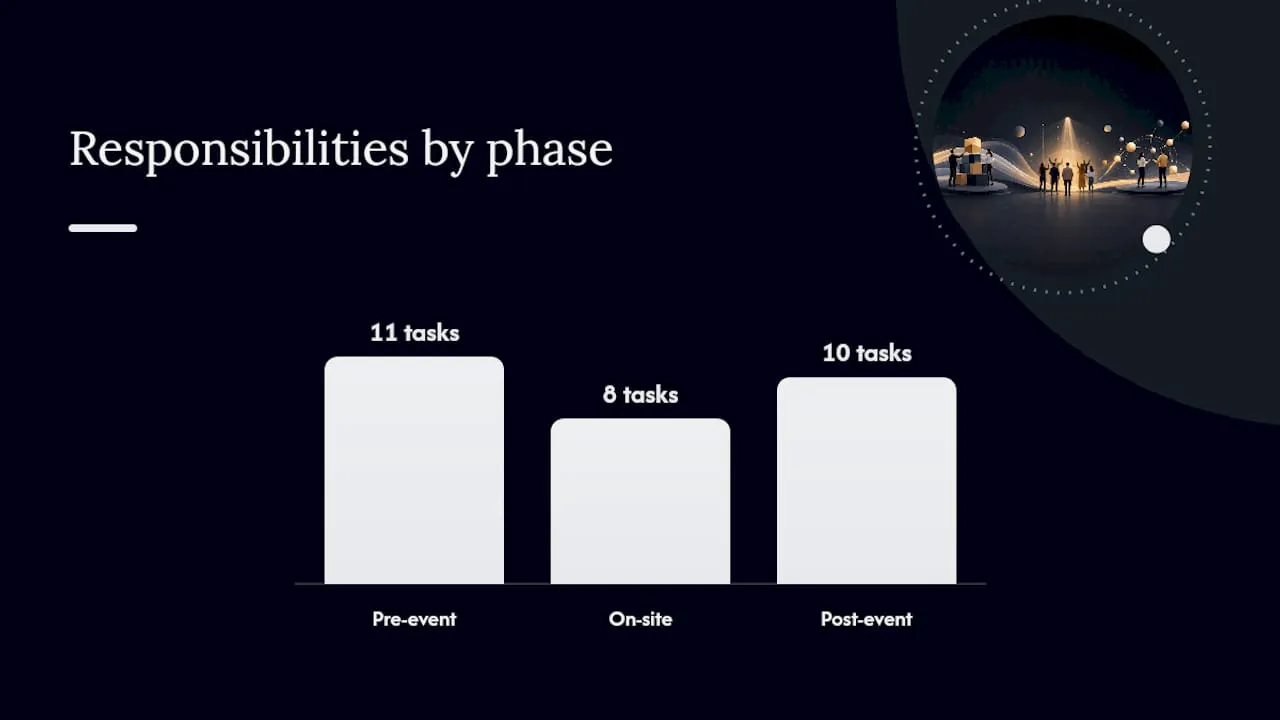
Roles and responsibilities
| Role | Pre-event | On-site | Post-event |
|---|---|---|---|
| Content lead | Strategy, calendar, approvals | Workflow oversight, approvals | Repurposing schedule, reporting |
| Designer | Graphics, social packs, landing page | Quote graphics, live assets | Infographics, PDF guides |
| Videographer | Speaker teasers | Session capture, live clips | Highlight reel, session edits |
| Social manager | Scheduling, paid ads | Live posting | Drip scheduling, community management |
| CRM / data | Segmentation, UTM setup | Registration monitoring | Attribution, pipeline tagging |
File naming convention: use [EventName]_[AssetType]_[Date]_[Version] (e.g., Summit2026_SpeakerTeaser_20260315_v1.mp4). Store all assets in a single, tagged media library with access permissions set before the event date.
Which tools support your event content workflow?
Choosing the right tools is less about finding the most feature-rich platform and more about ensuring your registration data, CRM, email, and content scheduling tools talk to each other. A disconnected stack creates manual reconciliation work that eats the time you should spend on content. For a broader market view of event management software options, independent reviews can help you compare platforms before committing.
Tool categories and UK-relevant options
- Registration and ticketing: Eventbrite, Ticket Tailor (UK-based), or a built-in event module within your membership platform. Key features: CRM integration, UTM tracking, custom fields for segmentation.
- Video capture and editing: Descript (transcript-based editing), CapCut (short-form clips), or Adobe Premiere Pro for full productions. Key feature: transcript search for pulling speaker quotes quickly.
- Social scheduling: Buffer, Hootsuite, or Later. Key feature: multi-platform scheduling with UTM link support.
- Email marketing: Mailchimp, Brevo, or a platform with native CRM integration. Key feature: behavioural triggers based on registration and attendance data.
- Analytics: Google Analytics 4 with UTM parameters, plus your CRM’s built-in reporting. Key feature: multi-touch attribution.
- Content calendar: Notion, Airtable, or a shared Google Sheet with columns for asset type, owner, deadline, channel, and status.
What to include in each template
- Content calendar template: asset name, type, owner, deadline, channel, status, repurposing derivatives.
- Email copy template: subject line, preview text, body (150–250 words), CTA button text, UTM link.
- Social pack template: two caption options per platform, branded graphic (1:1 and 9:16 formats), suggested posting date.
- UGC release form: attendee name, event name, description of content, consent statement, signature and date.
For email platform selection guidance specific to membership organisations, prioritise platforms that support behavioural segmentation based on event attendance data.
How a unified platform supports your content marketing plan
A connected programme record that tags sessions, speakers, and assets is the operational backbone of a repeatable event content strategy. A connected programme record reduces the content graveyard and makes repurposing systematic by ensuring every recording and transcript is findable, tagged, and assigned to an owner.
Example automation flow inside a unified platform
- Registration: attendee registers → CRM record created → tagged with event, ticket type, and segment.
- Pre-event: automated email sequence triggered based on segment tag (prospective delegate, returning attendee, sponsor).
- During event: session attendance logged → CRM record updated with sessions attended → content interest tags applied.
- Post-event: personalised follow-up email triggered based on sessions attended → gated recording links sent only for sessions the attendee did not attend in person.
- Pipeline: contacts who open the gated recording and click a product link are flagged as MQLs → sales team notified via CRM task.
GDPR and consent in UK practice
Under UK GDPR, you need a lawful basis for processing attendee data and explicit consent for marketing communications. Collect consent at registration via an unticked opt-in checkbox. State clearly what you will send and how often. For images and recorded material, obtain written consent before publishing using a model release form, and store signed forms in your media library alongside the relevant assets.
Practical implementation checklist
- [ ] All sessions tagged with topic, speaker, and format in the platform.
- [ ] Media library set up with folder structure matching the file naming convention.
- [ ] CRM fields created for event attendance, session tags, and content interest.
- [ ] Consent records stored and linked to each contact record.
- [ ] Repurposing owner assigned to each captured asset before the event date.
Colossus combines membership management, event registration, CRM, and email marketing in a single platform, so the registration-to-follow-up workflow runs without manual data transfers between disconnected tools. Asset tagging and personalised post-event sequences are configured once and reused across every event cycle.
Three priorities every event marketer should act on first
Most event content plans fail not because the strategy is wrong but because the execution collapses under the weight of the event itself. The team is exhausted, the recordings sit unedited, and the 30-day post-event window closes before a single recap is published.
Three priorities cut through that:
- Plan capture before you plan content. Decide what you will record, who will record it, and where it will be stored before the agenda is finalised. Everything else follows from that.
- Prioritise repurposing over new production. One well-captured session is worth more than ten pieces of pre-event content you scramble to produce. Build the repurposing schedule into the content calendar from day one.
- Measure to learn, not to report. Track which assets drove registrations and which drove post-event pipeline. That data is the brief for your next event’s content plan.
Use the production checklist and repurposing schedule in this guide as your operational foundation. The tactics work; the discipline to execute them consistently is what separates the events that build audiences from the ones that start from zero every year.
Colossus makes the post-event content workflow manageable
For membership organisations and associations running regular events, the biggest content challenge is not strategy — it is execution across a disconnected stack of tools. Colossus gives your team a single platform where event management, CRM, and email marketing operate from the same data set, so a delegate who registers, attends three sessions, and downloads a post-event guide is tracked as a single contact journey without any manual data reconciliation.

The practical difference is time-to-publish. When session attendance data flows automatically into CRM tags, your post-event email sequence can be personalised by topic interest and sent within 24 hours of the event closing, rather than waiting for a manual export and import cycle. Explore the full platform features to see how the registration-to-follow-up workflow is configured, or request a demo to walk through a live event content workflow with the Colossus team.
Sources
- How to plan, execute, and measure your event content strategy — Zoho Backstage
- How to Market an Event: 12 Tactics That Work in 2026 | Go Spread
- Model release form — Royal Photographic Society (RPS)