From £349: Colossus Membership for UK Charities & Clubs, Checklist

For most UK charities, clubs and associations, an all-in-one platform is the better long-term choice over stitching together separate tools for payments, events and communications. Some organisations need integrated membership, events, payments and CRM under one roof, though a lightweight specialist tool such as ClubRight or a free option like Zeffy can suit a small club or charity with simpler needs and a tighter budget.
TL;DR:
- Small clubs often start with lightweight tools like Zeffy or ClubRight, which focus on single tasks and have lower costs, but may outgrow them within a few years.
- All-in-one platforms like Colossus Systems combine membership management, events, payments, and CRM to streamline reporting and reduce manual reconciliation, suitable for larger or growing organizations.
- Ensuring support for Direct Debit, transaction-level Gift Aid records, live accounting integration, and comprehensive data protection compliance are critical for avoiding future audit or reconciliation issues.
- Organizations should budget extensively for data cleansing and migration, with timelines ranging from four weeks for small clubs to several months for large associations managing legacy data.
- Vendors must demonstrate reliable handling of failed payments, transaction-level Gift Aid exports, and complete audit logs during demos to confirm they meet UK charity compliance requirements.
Table of Contents
- Best membership management software UK: all-in-one vs lightweight tools
- Key features to prioritise in membership management software
- What UK compliance and payment checks matter before buying?
- Which solution fits which organisation size and type?
- Implementation, timeline and costs to budget for
- Evaluation checklist and exact questions to ask vendors
- How Colossus Systems meets these needs
- An honest editorial take on the UK membership software market
- Get started with Colossus Systems
- Sources
- FAQ
Best membership management software UK: all-in-one vs lightweight tools
Two distinct paths dominate the UK market, and picking the wrong one wastes months of migration effort later.
The all-in-one route gives you membership records, events, payments, CRM and reporting inside one system, with one login and one data set that never falls out of sync. Platforms in this category, including Colossus, Salesforce Nonprofit Cloud, CiviCRM, Tendenci and Glue Up, suit organisations juggling several income streams and reporting obligations at once.
The lightweight route keeps one job simple, usually membership renewals or event ticketing, and leaves everything else to other tools you already run. WebCollect, Join It, StarChapter and Admidio fall into this camp, alongside sector specialists like ClubRight for clubs and ChurchSuite for congregations.
Here is what each path actually delivers:
- All-in-one platforms solve: recurring billing plus CRM plus events plus email marketing without exporting spreadsheets between systems.
- Lightweight tools solve: a single, well-defined task (renewals, ticketing, or a member directory) at a lower price and with a shorter learning curve.
- All-in-one outcome: one dashboard for the board, one audit trail for funders, fewer reconciliation errors.
- Lightweight outcome: faster setup, less training, but manual bridging work between systems as you grow.
Small clubs with a handful of income streams often start lightweight and outgrow it within two or three years. Charities running fundraising campaigns alongside membership renewals usually need the reporting depth an all-in-one platform provides from day one. The “which fits which size” section below breaks this down by organisation type, and the checklist further on gives you the exact questions to put to any shortlisted vendor.
Key features to prioritise in membership management software
Missing any one of these areas creates work that someone on your team ends up doing manually, usually at renewal time or right before a trustee meeting.
Renewals and recurring payments need to support Direct Debit collection, not just card payments. Direct Debit failure rates and reconciliation matter more than most buyers expect: a platform that cannot automatically flag failed collections leaves your finance volunteer chasing bank statements every month.
Member directories, self-serve portals and communications cut admin load directly. A portal where members update their own address, renew their own subscription and download their own receipts removes the single biggest source of routine enquiries most membership teams field.
Event management, ticketing and e-commerce matter even for organisations that see themselves as “just” a membership body. Conferences, AGMs and merchandise sales all need the same payment rails as renewals, and running them through a separate tool means reconciling two systems every time.
Gift Aid record-keeping deserves particular scrutiny. Gov sets out conditions for claiming and the record-keeping charities must maintain, and a platform has to preserve transaction-level declarations, not just tag a donation as “Gift Aid eligible” and move on.
Integration priorities worth checking before anything else: accounting software (Xero, QuickBooks), email marketing, your existing website, single sign-on if your organisation uses it, and the payment gateway you or your bank already have a relationship with.
Reporting and analytics need to answer board and funder questions without a spreadsheet rebuild. Retention rate by membership tier, income by source, and event attendance trends are the three reports almost every trustee board asks for sooner or later.
- Confirm Direct Debit and card support together, not one or the other.
- Check whether the member portal is genuinely self-serve or still routes changes through staff.
- Ask whether Gift Aid declarations export at transaction level, not just as a summary total.
- Verify the accounting integration is a live sync, not a manual CSV export.
- Request a sample board report before you sign anything.
Pro Tip: Ask any vendor to show you a Gift Aid export during the demo, live, on a real (or dummy) dataset. If they can only describe it rather than show it on screen, treat that as a warning sign.
What UK compliance and payment checks matter before buying?
Gift Aid failures and data protection gaps are the two most common causes of a bad software purchase surfacing as a real problem, usually eighteen months after go-live when an auditor or the Charity Commission asks a question nobody can answer.
Gift Aid eligibility depends on accurate declarations and transaction records, not automatic labelling by a platform. Buyer research into UK membership platforms confirms that vendors vary widely in how well they preserve the audit trail HMRC expects, so ask specifically how declarations are stored and exported before assuming “Gift Aid support” on a feature list means what you think it means.
Direct Debit and recurring payment handling needs the same scrutiny. Failed collections happen every month in any organisation with more than a few hundred recurring payers, and a platform that cannot flag and retry these automatically pushes that reconciliation work back onto staff.
Data protection compliance is genuinely more layered than most vendor marketing suggests. UK GDPR, the Data Protection Act 2018 and PECR (the rules covering electronic marketing) can apply differently to a fundraising email versus a service message about a renewal, and a platform’s blanket claim of being “GDPR compliant” does not tell you whether consent capture and suppression lists are actually built correctly underneath.
A UK-region hosting option with explicit audit logs reduces governance friction considerably when trustees or auditors ask for an export, because you are not relying on a vendor’s goodwill to produce records on demand.
Questions worth asking every vendor before signing:
- Which payment processor handles Direct Debit, and what happens automatically when a collection fails?
- Where is our data physically hosted, and can we get a data residency statement in writing?
- Can you show us an audit log for a single member record, including who changed what and when?
- How long is data retained after we cancel, and can we get a full export before deletion?
- Does the platform capture lawful basis for each communication channel separately, or is consent treated as one blanket flag?
Which solution fits which organisation size and type?
The right category of software depends heavily on your organisation’s structure, not just its size. Buyer research confirms that fit varies by organisation type and treating every product as interchangeable is the single most common procurement mistake.
Small community clubs (sports clubs, hobby groups, social clubs) usually need renewals, a member directory and basic event booking, nothing more elaborate. A specialist tool like ClubRight or Coacha often gets these organisations live within weeks, and the quick win is simply automating the annual renewal chase that currently eats a volunteer treasurer’s evenings every January.
Small to medium charities face a hybrid problem: fundraising campaigns sit alongside membership or supporter renewals, and the two income streams need to appear on the same donor record. Zeffy’s zero-fee model can genuinely replace two or three paid tools for a charity at this scale, though it comes with functional trade-offs around custom workflow automation. Donorfy and Beacon occupy similar ground with slightly more configurability.
Professional associations carry governance requirements that clubs rarely face: role-based access for different committee levels, regional chapters with their own budgets, and CPD or accreditation tracking tied to membership status. ToucanTech, MemberClicks and iMiS by ASI are built with this structure in mind.
Large national associations need workflow automation and API access above almost everything else, because their membership teams are often coordinating dozens of local branches or chapters through one central system. This is where CiviCRM, Salesforce Nonprofit Cloud, Tendenci and Glue Up tend to appear on shortlists, alongside genuinely all-in-one platforms like Colossus and CiviPlus.
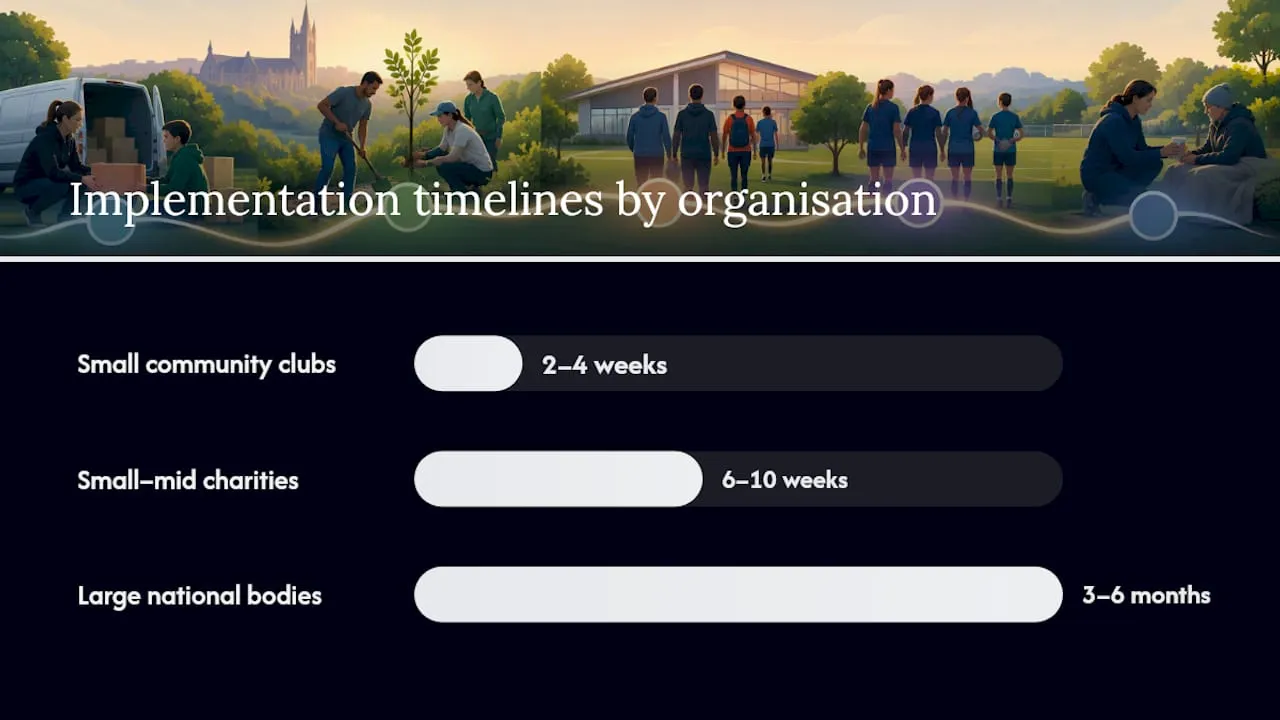
Migration time-to-value scales with this same hierarchy: a small club can be live in two to four weeks, a mid-sized charity in six to ten weeks, and a large national body with legacy data and multiple chapters should budget three to six months for a proper implementation.
Implementation, timeline and costs to budget for
Procurement rarely goes wrong at the contract stage. It goes wrong when nobody budgeted for data cleansing, or when the “go-live date” turns out to mean something different to the vendor than it did to the trustee board.
- Discovery — mapping your current data, income streams and integrations, typically one to three weeks.
- Data migration — moving member records, transaction history and Gift Aid declarations across, the phase most likely to overrun if your existing data is messy.
- Integration setup — connecting accounting software, email marketing and your website’s payment flow.
- Training — staff and volunteer sessions, usually run in parallel with the final weeks of migration.
- Go-live — a soft launch to a test group before opening renewals to the full membership.
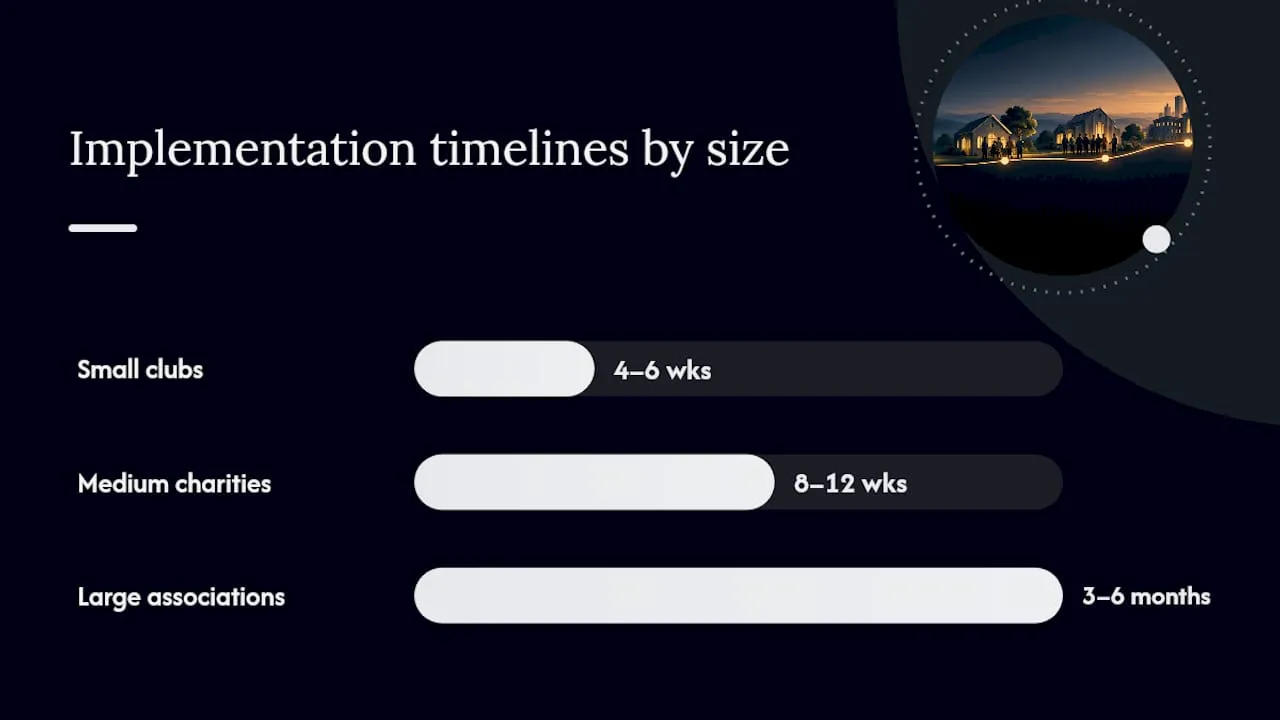
Small clubs typically complete this cycle in four to six weeks. Medium charities with two or three integrations should plan for eight to twelve weeks. Large national associations migrating from a legacy CRM often need three to six months, particularly where historic Gift Aid records need reconciling against HMRC submissions.
Budget across five cost categories: the recurring licence fee, a one-off onboarding fee, any custom configuration work beyond standard setup, ongoing payment processing fees (often separate from the licence), and data cleansing if your existing records are duplicated or incomplete. That last category catches almost every organisation out. Nobody budgets for the week someone spends merging 400 duplicate member records before migration can even start.
Pro Tip: Negotiate a defined pilot period with written success criteria before signing a multi-year contract. Something as simple as “process one full renewal cycle and one event without support intervention” gives you a fair test before committing.
Ask any shortlisted vendor for two or three reference customers of a similar size and organisation type, and actually call them rather than reading the testimonial on the vendor’s own site.
Evaluation checklist and exact questions to ask vendors
A shortlist of three platforms rarely gets fairly compared without a structured checklist, because every vendor demo is designed to show its strongest features first.
Request these proofs before scoring any vendor:
- Live demonstration of Direct Debit setup and a failed-collection scenario.
- A sample Gift Aid export at transaction level, not a summary report.
- An audit log showing a change history on a single member record.
- A full data export in a usable format (CSV or similar), with a stated timeline for delivery after contract termination.
Ask these questions directly in every demo:
- Which accounting, email and payment integrations are live today, versus “on the roadmap”?
- What does onboarding actually include, and what falls outside the standard package?
- What is the guaranteed response time for a support ticket, and does that change during renewal season?
- What happens to our data and our members’ Gift Aid history if we leave in three years?
Score each vendor against your must-have list out of ten rather than relying on gut feel after a polished sales demo. Set pilot success criteria in writing, such as completing one full renewal cycle and one ticketed event without vendor support, and treat any hesitation to commit to a written pilot as a signal worth taking seriously.
How Colossus Systems meets these needs
This kind of software typically offers features such as:
- Membership management with renewals, tiered membership types and a self-serve member portal.
- Events registration, ticketing and virtual training hosting through a common platform.
- Integrated online payment gateways handling recurring billing to avoid separate reconciliation.
- CRM that maintains a shared record of member interactions including event attendance, email engagement, and renewal history.
- Analytics providing board-ready reporting on retention, income by source and engagement trends.
- Integrations with accounting and marketing tools common to many organisations.
Onboarding follows the same discovery, migration, integration and training phases outlined earlier, with the platform’s feature set designed to reduce the number of separate systems a migration has to touch in the first place.
| Checklist need | How Colossus addresses it |
|---|---|
| Renewals and recurring payments | Integrated payment gateways with recurring billing |
| Member self-service | Member portal for updates, renewals and event booking |
| Events and ticketing | Built-in event registration and virtual training hosting |
| Reporting for boards and funders | Analytics and reporting inside the same platform |
| Growth tools | CRM and email marketing for member acquisition and retention |
Plans run from Core to Growth, Scale and Enterprise, with a Contributor licence available for organisations needing additional named access. Full pricing details are on the Colossus site, and the team can walk you through which tier fits your member count and feature needs directly via the contact page.
An honest editorial take on the UK membership software market
The conventional advice on this topic treats every membership platform as roughly interchangeable, differing only on price. That is the mistake worth avoiding. The real dividing line sits between organisations that need one system to run everything and organisations that need one thing done well and cheaply.
What gets underestimated is Gift Aid compliance. Buyers focus heavily on price and interface polish during demos, then discover eighteen months later that their “Gift Aid ready” platform never preserved declarations at the transaction level HMRC actually expects. That single gap causes more procurement regret than any pricing dispute.
Prioritise the boring proof points first: a live Direct Debit failure demo, an actual Gift Aid export, a real audit log. Any vendor confident in their product will show you these without hesitation. Any vendor who deflects the request is telling you something, whether they mean to or not.
— Rob
Get started with Colossus Systems
Colossus is the alternative to running separate tools for renewals, events and CRM: one platform replaces the spreadsheet-and-three-subscriptions setup most UK membership organisations default to, without forcing you into a rigid workflow you did not choose. If your organisation runs events alongside renewals, or reports to a board that wants retention figures without a manual pull from three systems, this is built for exactly that overlap.

Where a specialist club tool or a free platform suits a very small organisation with one income stream, Colossus fits once you are managing membership, events and payments together and need them to share one dataset. The platform’s CRM tools and event management features sit inside the same login your renewals already run through, so nothing needs reconciling by hand at month end.
Pricing runs from Core at £349 per month through Growth at £699, Scale at £1,299, and Enterprise from £2,500 per month, with full details on the pricing page. Reach out via the contact page for a walkthrough of which tier matches your member count and reporting needs.
Sources
- Membership Management Software for Gyms & Clubs | ClubRight
- Gov
- Zeffy reviews: Honest feedback from UK charities 2026 | Zeffy
FAQ
What is the best software for membership management?
The right choice depends on whether you need one integrated system or a single simple task solved cheaply. For organisations running renewals, events and CRM together, an all-in-one platform like Colossus Systems typically outperforms a bundle of disconnected tools on reporting accuracy and staff time saved.
What is the best membership software for nonprofits in the UK?
UK charities generally need a platform that handles Gift Aid record-keeping correctly alongside membership renewals and fundraising, which points toward all-in-one CRM options such as Colossus Systems or CiviPlus. Smaller charities with simpler needs and tighter budgets often start with Zeffy’s zero-fee platform, accepting fewer integration and workflow options in exchange for no licence cost.
What is the best free membership management platform?
Zeffy is the most established free option, used by charities and not-for-profits across the UK and used by 100,000 charities and not-for-profits more broadly, and it includes membership management and Gift Aid handling at no platform cost. The trade-off is less workflow automation and fewer integrations than a paid all-in-one platform offers.
What is the best software for managing gym memberships?
Gyms and sports clubs typically favour specialist tools built for scheduling and class bookings, and ClubRight is a widely used example, reporting UK-region hosting and processing over £182 million in member payments annually. Larger multi-site gym chains that also need events, CRM and detailed reporting sometimes outgrow a specialist tool and move to an all-in-one platform instead.
How much does Colossus Systems cost?
Colossus Systems offers four plans: Core at £349 per month, Growth at £699 per month, Scale at £1,299 per month, and Enterprise starting from £2,500 per month, all detailed on the pricing page. A Contributor licence is also available from £29 per month for organisations needing additional named user access.