Accessible virtual events: your 2026 planning guide

TL;DR:
- Accessible virtual events are designed to enable full participation for all attendees, regardless of disability or circumstance. Implementing features like captions, transcripts, sign language interpretation, and screen reader compatibility from the start enhances inclusivity and complies with evolving regulations such as WCAG 2.1 Level AA. Treating accessibility as a foundational design principle, rather than an afterthought, improves engagement, broadens audience reach, and aligns with diversity and inclusion goals.
Accessible virtual events are defined as online gatherings intentionally designed so that every attendee, regardless of disability, language, or circumstance, can participate fully from the start. Over 50% of adults regularly use captions even when audio is available, rising to 75% among younger adults. That figure alone tells you captioning is no longer a niche accommodation. It is a primary feature. Frameworks like Universal Design for Learning (UDL) and tools such as live captions, ASL interpretation, and screen reader compatibility are the building blocks of digital event accessibility. And with 96% of marketers reporting that virtual events support Diversity, Equity, and Inclusion goals, accessibility is now central to organisational strategy, not optional.
What are the essential features of accessible virtual events?
Accessible virtual events require a layered approach. No single feature covers every attendee’s needs, so organisers must build multiple access points into every session.
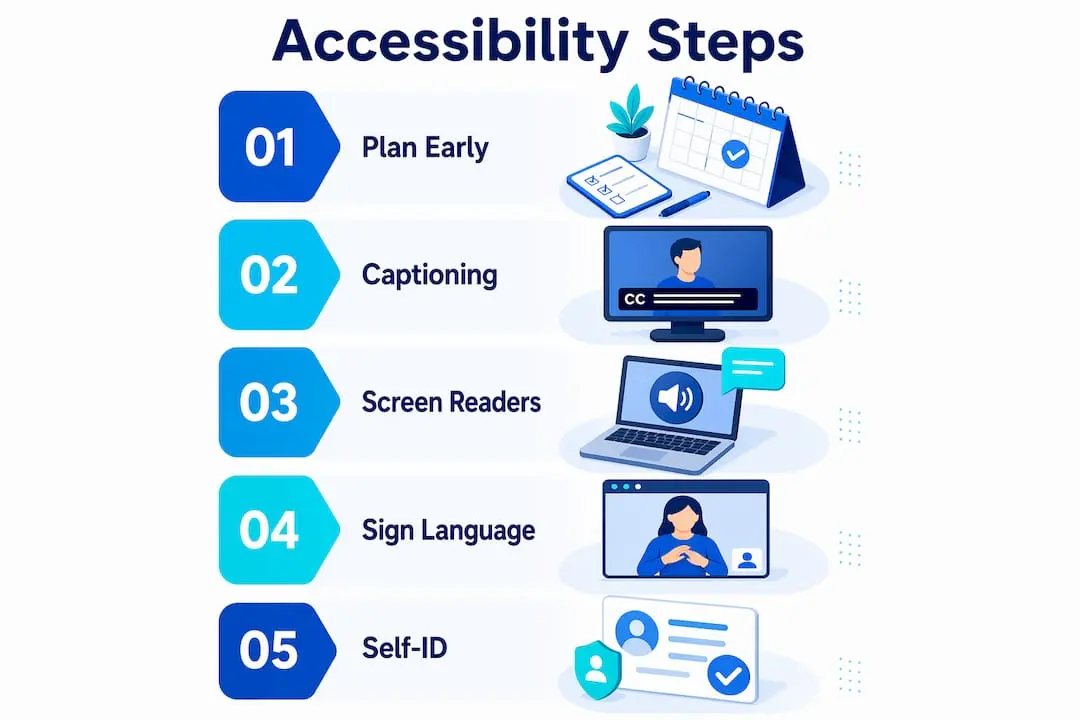
Captions and transcripts are the most widely used accessibility tools in virtual settings. Live captions support deaf and hard-of-hearing attendees, non-native speakers, and anyone in a noisy environment. Transcripts extend that value post-event, giving attendees a searchable record of everything said. Platforms like Zoom and Microsoft Teams offer built-in auto-captioning, though professional captioning services deliver significantly higher accuracy for formal events.
Screen reader compatibility is non-negotiable for blind or low-vision attendees. Accessible digital materials must be distributed in advance, not shared only via screen share during the session. A slide deck shared live through a presenter’s screen is invisible to a screen reader. Sending accessible PDF or Word files before the event allows attendees to follow content independently.
Sign language interpretation and real-time audio description serve attendees who rely on visual language or need narration of on-screen visuals. These services require advance booking and technical setup, so they must be planned early.
Here is a quick checklist of core features every organiser should confirm before going live:
- Live captions with a professional captioning service or high-accuracy auto-caption tool
- Transcripts made available during and after the event
- Accessible presentation files sent to attendees in advance
- Sign language interpretation arranged and visible on screen
- Audio description for visual content where relevant
- Platform navigation tested with keyboard-only and screen reader access
- Speaker briefing on self-identification and pacing
Speaker self-identification is one of the most overlooked low-tech practices. Every speaker should state their name each time they begin speaking. This aids blind and low-vision attendees and anyone joining audio-only.
Pro Tip: Brief all speakers at least 48 hours before the event. Send a one-page guide covering self-identification, speaking pace, and how to describe any visual content they plan to share.
How do current regulations and standards influence virtual event accessibility?
The regulatory environment for digital event accessibility has tightened considerably. Organisers who treat compliance as a box-ticking exercise are taking on real legal and reputational risk.
WCAG 2.1 Level AA compliance is now mandatory for US public educational and government digital content, with deadlines falling in 2026 and 2027. The Web Content Accessibility Guidelines (WCAG) set the technical standard for accessible digital content, covering everything from colour contrast to keyboard navigation. Meeting Level AA means your event platform, registration pages, and shared materials must all pass these criteria.
The table below summarises the key regulatory frameworks affecting virtual event organisers in 2026:
| Framework | Region | Core requirement | Deadline |
|---|---|---|---|
| WCAG 2.1 Level AA | United States | Digital content accessibility for public bodies | 2026–2027 |
| Americans with Disabilities Act (ADA) | United States | Equal access to digital services and events | Ongoing |
| European Accessibility Act (EAA) | European Union | Accessible digital products and services | June 2025 |
| Equality Act 2010 | United Kingdom | Reasonable adjustments for disabled people | Ongoing |
Compliance is not just about avoiding legal risk. Organisations that meet these standards consistently report broader audience reach and stronger attendee trust. The European Accessibility Act, which came into force in June 2025, now requires digital services sold across EU member states to meet accessibility standards. For UK-based organisations hosting events with European attendees, this has direct implications for platform selection and content delivery.
What are common challenges in making virtual events accessible?
Most accessibility failures in virtual events are not caused by lack of intent. They are caused by late planning, poor platform selection, and insufficient speaker preparation. Knowing where things go wrong helps you avoid the same mistakes.
The most damaging mistake is waiting for accommodation requests before acting. Treating accessibility as a default rather than a reaction means every attendee can participate without disclosing a disability or making a special request. Requiring people to ask for access is a barrier in itself. Many attendees will simply not attend rather than identify a need.
Here are the most common challenges and how to address them:
-
Platform limitations. Not every virtual event platform supports live captioning, accessible chat, or keyboard navigation. Evaluate platforms against WCAG 2.1 Level AA criteria before committing. Check whether the platform integrates with third-party captioning services if built-in accuracy is insufficient.
-
Speaker unpreparedness. Speakers who talk too fast, forget to describe visuals, or skip self-identification create barriers that no amount of technology can fix. Build speaker training into your event timeline, not as an afterthought.
-
Inaccessible materials. Screen-sharing slides without distributing accessible alternatives excludes screen reader users entirely. Send materials in accessible formats at least 24 hours before the event.
-
Resource constraints. Smaller organisations often cite budget as a barrier to accessibility. The Stone Soup model offers a practical answer: pool resources across partner organisations, share captioning costs, and divide accessibility responsibilities among a team. This community-based approach builds resilience and reduces the burden on any single organiser.
-
Poor communication of accessibility features. Attendees cannot use features they do not know exist. Publish a clear accessibility statement on your event registration page and send a pre-event email detailing every available accommodation.
Pro Tip: Create a dedicated accessibility contact for each event. Publish their name and contact details on the registration page so attendees can ask questions before the day, not during it.
How can you practically plan and execute an accessible virtual event?
Planning for inclusive online events works best when accessibility is built into the earliest stages of event design, not added on afterwards. The following steps give you a practical framework to follow from initial planning through to post-event delivery.

Start with platform selection
Choose a platform that meets WCAG 2.1 Level AA standards and supports third-party captioning integrations. Test the platform’s keyboard navigation, screen reader compatibility, and chat accessibility before booking. For nonprofit and membership organisations, the 2026 guide to virtual fundraising platforms offers a useful comparison of platform accessibility features.
Build accessibility into your event timeline
- Book captioning services and sign language interpreters at least four weeks in advance
- Send accessible presentation templates to all speakers six weeks before the event
- Publish your accessibility statement on the registration page at launch
- Conduct a full technical rehearsal with all accessibility features active at least one week before the event
- Send a pre-event email to all registered attendees detailing every accessibility feature and how to use it
Communicate clearly before the event
Clear, complete accessibility information communicated well before the event reduces attendee anxiety and removes barriers to registration. State which features are available, how attendees access them, and who to contact if they need additional support. This transparency directly improves attendance rates among disabled attendees.
Test and rehearse every feature
Run a full technical rehearsal with your captioning provider, interpreters, and at least one team member testing screen reader access. Identify failures before your audience does. Assign a dedicated accessibility monitor during the live event to watch for caption errors, interpreter visibility issues, or chat accessibility problems.
Post-event accessibility
Accessibility does not end when the session closes. Provide recordings with accurate captions, full transcripts, and accessible slide decks within 48 hours of the event. This extends the value of your event to attendees who experienced technical difficulties and those who could not attend live.
Key takeaways
Accessible virtual events succeed when accessibility is treated as a design principle from the outset, not a compliance requirement added at the end.
| Point | Details |
|---|---|
| Captions are primary, not optional | Over 50% of adults use captions regularly; treat them as a standard feature for every event. |
| Default accessibility removes barriers | Waiting for accommodation requests deters participation; build access in from the start. |
| Regulations are tightening | WCAG 2.1 Level AA deadlines and the European Accessibility Act require platform and content compliance now. |
| Speaker behaviour matters | Self-identification and clear speech are low-cost, high-impact practices often overlooked in planning. |
| Community collaboration reduces cost | The Stone Soup model allows organisations to share accessibility resources and responsibilities effectively. |
Why I think most organisers are still getting accessibility backwards
After years of working with event planners and membership organisations, I keep seeing the same pattern. Accessibility is treated as a checklist item that gets reviewed in the final week before an event. A caption service gets booked. An accessibility statement gets copied from a template. Speakers get a two-line email. Then the organiser wonders why disabled attendees do not return.
The shift that actually changes outcomes is treating accessibility as a design constraint from day one, in the same way you treat budget or audience size. When you choose your platform, accessibility criteria should be on the evaluation sheet. When you brief speakers, the accessibility guide should be in the first email, not the last. When you write your registration page, the accessibility statement should be above the fold, not buried in the footer.
The UDL framework makes this point well. Accessibility is the foundation of inclusion, not a compliance add-on. When you design for the full range of human ability, you create a better experience for everyone. Captions help non-native speakers. Accessible materials help attendees on slow connections. Speaker self-identification helps anyone who stepped away briefly and returned.
The organisations I have seen do this well are not necessarily the ones with the largest budgets. They are the ones that made accessibility a shared responsibility across their team, built it into their standard operating procedures, and stopped treating it as someone else’s problem. That mindset shift costs nothing and changes everything.
— Rob
How Colossus supports accessible event management
Running truly inclusive online events requires more than good intentions. It requires the right tools behind the scenes.

Colossus is built for membership organisations and associations that host virtual events at scale. Our event management software supports accessible registration workflows, multi-modal attendee communication, and integrations with captioning and interpretation services. You can manage speaker materials, send pre-event accessibility briefings, and track attendee engagement, all within one platform. For organisations looking to align their member management features with accessibility best practices, Colossus gives you the infrastructure to make inclusion a standard part of every event you run, not an afterthought.
FAQ
What makes a virtual event accessible?
An accessible virtual event includes live captions, transcripts, screen reader-compatible materials, sign language interpretation, and clear pre-event communication about available accommodations. Accessibility should be built into the event design from the start, not added in response to individual requests.
Are captions required for virtual events?
Captions are legally required for many public sector and government-hosted digital events under WCAG 2.1 Level AA standards, with US deadlines falling in 2026 and 2027. Beyond legal requirements, captions benefit over 50% of adults who use them regularly, making them a standard feature for any professional event.
How do I choose an accessible virtual event platform?
Evaluate platforms against WCAG 2.1 Level AA criteria, checking keyboard navigation, screen reader compatibility, and support for third-party captioning integrations. Test all accessibility features in a full rehearsal before your event goes live.
What is the Stone Soup model for event accessibility?
The Stone Soup model is a community collaboration approach where multiple organisations pool resources to fund and deliver accessibility features, such as shared captioning costs or divided interpreter responsibilities. It is particularly effective for smaller organisations with limited budgets.
How do virtual events support DEI goals?
96% of marketers report that virtual events directly support Diversity, Equity, and Inclusion objectives. Accessible virtual events extend that impact by removing participation barriers for disabled attendees, non-native speakers, and those in varied technical environments. For more on this, see how accessibility supports DEI in practice.