What is CRM integration? A guide for organisations

TL;DR:
- CRM integration connects your CRM to internal and external systems for seamless, real-time data exchange across teams. It improves operational efficiency for membership organizations by automating workflows, unifying member data, and enhancing the member experience through accurate, timely information. A well-planned, governed strategy focusing on ownership, conflict resolution, and monitoring ensures successful and scalable integration regardless of the chosen technical approach.
CRM integration is defined as the process of connecting a customer relationship management platform with other internal and external systems to enable automatic data exchange and real-time workflow synchronisation. Rather than treating your CRM as a standalone database, integration makes it the operational centre of your organisation, pulling and pushing data across email marketing tools, event platforms, e-commerce systems, and support applications. For membership organisations, associations, and nonprofits, this matters enormously. When member data flows freely between systems, your teams spend less time on manual entry and more time on genuine engagement.
What is CRM integration and how does it work?
CRM integration, known formally as CRM system integration, is the technical and architectural practice of linking a CRM platform to other software so that data moves automatically between them without human intervention. IBM defines this as connecting CRM solutions with internal and external systems to improve coordination and customer experience. The result is a single source of truth (SSOT), where every team works from the same accurate member or customer record regardless of which tool they are using.

The mechanics rely on several core technologies. Application programming interfaces (APIs) allow systems to communicate directly, passing structured data in real time. Integration Platform as a Service (iPaaS) tools, such as MuleSoft or Zapier, act as middleware layers that orchestrate data flows between multiple systems without requiring custom code for every connection. Native integrations are pre-built connectors that CRM vendors like Salesforce bundle directly into their platforms for common tool pairings.
Understanding CRM integration also means recognising what it is not. It is not simply exporting a spreadsheet from one system and importing it into another. True integration is continuous, governed, and bidirectional where needed. When a member updates their contact details in your membership portal, that change propagates instantly to your CRM, your email marketing list, and your event registration records.
What are the main methods of CRM integration?
CRM integrations fall into four primary categories, each suited to different technical environments and organisational capabilities. Choosing the wrong method creates fragility; choosing the right one creates a foundation you can build on.
| Method | How it works | Pros | Cons | Best for |
|---|---|---|---|---|
| Native integration | Pre-built connectors within the CRM platform | Fast to deploy, low technical overhead | Limited to supported tools only | Small teams with standard toolsets |
| Third-party connectors | Tools like Zapier or Make linking apps via UI | No-code setup, broad app coverage | Less control, potential latency | Organisations with limited developer resource |
| API-based custom | Direct API calls between systems via custom code | Maximum flexibility and control | Requires developer expertise | Complex or unique data requirements |
| iPaaS / middleware | Platforms like MuleSoft orchestrating multiple flows | Scales across many systems, centralised monitoring | Higher cost and setup complexity | Enterprise or multi-system environments |
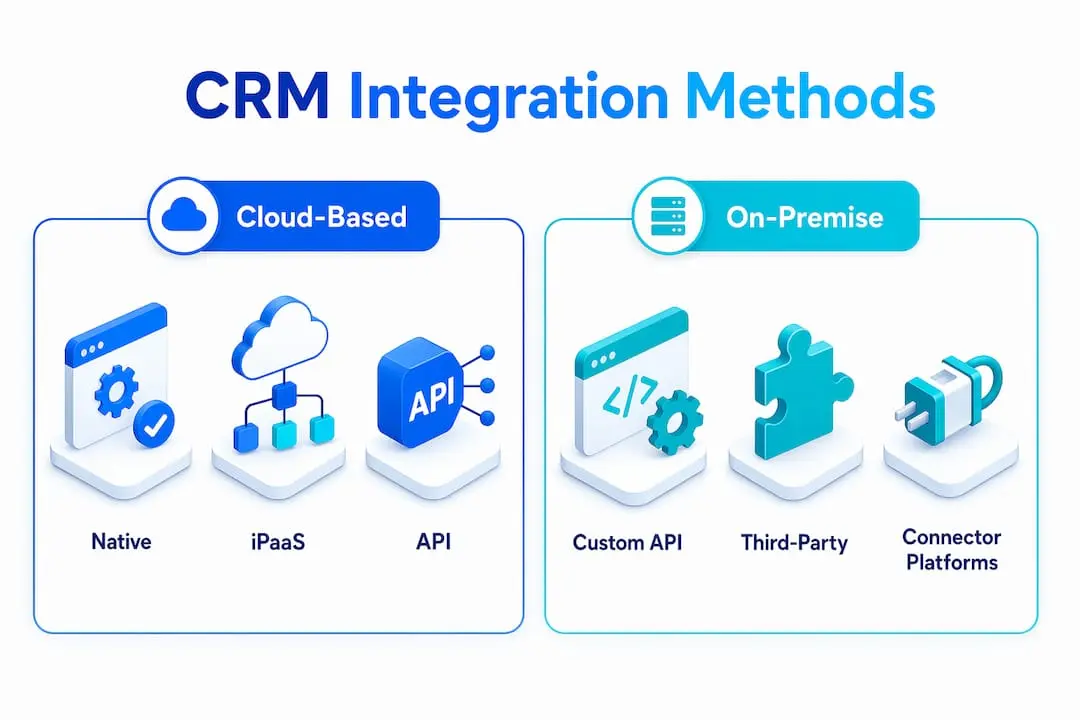
Cloud-hosted CRMs integrate most easily with other cloud tools via APIs. On-premise systems introduce additional complexity, often requiring middleware to bridge network boundaries securely. Hybrid environments, where some systems are cloud-based and others are on-premise, are common in larger membership organisations and demand careful architectural planning.
Pro Tip: Before selecting an integration method, audit your existing systems and identify where data currently lives. If your team has no developer resource, a third-party connector platform will deliver results faster than a custom API build. If your data flows are complex or your member base is large, invest in iPaaS from the outset rather than retrofitting later.
What are the key benefits of CRM integration?
Properly implemented CRM integration centralises data, automates workflows, reduces errors, and gives teams a real-time view of every member or customer. These are not marginal gains. For a membership organisation managing renewals, events, communications, and donations simultaneously, the operational impact is significant.
The five most direct benefits are:
- Unified member data: All member records are synchronised across systems, eliminating duplicate entries and outdated contact details that cause failed communications.
- Automated workflows: Routine tasks such as renewal reminders, welcome sequences, and event confirmations trigger automatically based on CRM data, freeing staff from repetitive manual work.
- Real-time visibility: Every team, from membership services to finance, sees the same current data, reducing the internal back-and-forth that slows decision-making.
- Improved member experience: When your CRM knows a member’s event history, communication preferences, and renewal status, your outreach becomes relevant rather than generic.
- Better analytics and reporting: Consolidated data from multiple integrated systems produces richer reports, enabling more accurate forecasting and targeted engagement strategies.
The analytical benefit deserves particular attention. Organisations that rely on siloed data make decisions based on incomplete pictures. Integration removes those silos, and the resulting insight quality is qualitatively different from what any single system can produce alone.
How to choose the right CRM integration strategy
Selecting the right approach to CRM system integration requires honest assessment of your organisation’s current state before evaluating any tools or platforms. Many integration projects fail not because of technical limitations but because the strategy was chosen before the requirements were understood.
Follow these steps to build a sound integration strategy:
- Map your current systems. List every platform your organisation uses, including your CRM, email tool, event software, payment gateway, and any member portal. Identify where data originates and where it needs to flow.
- Define data flow direction. Determine whether each integration needs to be uni-directional (data flows one way only) or bi-directional (data flows both ways). Bi-directional syncing is significantly more complex and requires explicit source-of-truth rules per data field to resolve conflicts.
- Assess your technical capability. Be realistic about whether your team can maintain custom API integrations. If not, a managed iPaaS solution or native connectors reduce ongoing risk.
- Set scalability and security requirements. Consider how your member base is expected to grow and whether your integration architecture can handle increased data volumes. Review data protection obligations relevant to your organisation, particularly where member personal data is involved.
- Establish governance from the start. Assign ownership of each integration, define service level agreements (SLAs) for uptime and data freshness, and document change control procedures. Integration governance treated as an afterthought is the leading cause of integration failure in production environments.
- Start with high-impact, lower-complexity connections. Integrate your CRM with your email marketing platform first. This delivers immediate value and builds team confidence before tackling more complex flows such as ERP or payment system synchronisation.
What challenges should you expect in CRM integration?
Even well-planned CRM integration projects encounter operational and technical friction. Knowing where the risks concentrate helps you prepare rather than react.
Data quality is the most common early obstacle. When two systems have been operating independently, they accumulate inconsistencies. Member records may exist in both with slightly different names, email addresses, or membership statuses. Deduplication must happen before synchronisation begins, not after. Separating identity matching from sync direction is a proven approach: resolve which record is the master first, then establish the sync rules.
Bi-directional synchronisation introduces conflict resolution requirements that many organisations underestimate. If a member updates their address in the membership portal at the same moment a staff member edits the same record in the CRM, a “last write wins” default will silently overwrite one change. Conflict resolution logic must be explicit, with source-of-truth assignment defined per field rather than per system.
Operational reliability is a separate challenge. APIs have rate limits, meaning your integration can only make a set number of requests per minute or hour. Production-grade integrations require monitoring, retry logic, and runbooks so that when a vendor changes their API, your team knows immediately and has a documented process for response. Treating integrations as production services rather than background utilities is the single most effective shift an organisation can make.
Security and compliance deserve explicit attention. Member data passing between systems must be encrypted in transit and at rest. Access controls should follow the principle of least privilege, meaning each integration only has permission to read or write the specific data it requires. For nonprofits and membership organisations handling personal data, this is not optional. Reviewing your member data security practices before expanding integrations is a sound precaution.
Pro Tip: Treat every integration as governed infrastructure from day one. Assign a named owner, document the data flows, set up alerting for failures, and schedule quarterly reviews. Integrations that run unmonitored for months become the most expensive problems to fix.
How does CRM integration apply to member management?
For membership organisations, the practical value of CRM integration becomes clearest when you map it to the actual workflows your team runs every day. Removing data silos between your CRM and the tools your members interact with directly transforms both operational efficiency and member satisfaction.
The most impactful integration points for membership organisations include:
- Email marketing: Connecting your CRM to your email platform means segmentation is always current. Members who attended a recent event, lapsed on renewal, or joined within the last 30 days can be targeted accurately without manual list exports. Colossus offers email marketing guidance specifically for nonprofits navigating this challenge.
- Event management: When event registrations feed directly into your CRM, attendance history becomes part of the member record. This data informs future communications and helps identify your most engaged members.
- E-commerce and payments: Integrating payment gateways with your CRM means membership purchases, donations, and event fees are recorded automatically against the correct member record, removing the reconciliation burden from your finance team.
- Support and ticketing: When a member contacts your support team, an integrated CRM surfaces their full history instantly, enabling faster and more personalised responses.
- Website and member portal: Integrating your website with your membership CRM creates a continuous data loop where member self-service actions update the central record in real time.
Automating renewal workflows is a particularly high-value use case. Rather than relying on staff to identify lapsing members and send manual reminders, an integrated CRM triggers a renewal sequence automatically based on membership expiry dates, reducing both administrative effort and member churn.
Key takeaways
CRM integration succeeds when it is treated as governed infrastructure, not a one-time technical project, with clear ownership, conflict resolution rules, and monitoring in place from the start.
| Point | Details |
|---|---|
| CRM integration definition | It connects your CRM to other systems for automatic, real-time data exchange across all teams. |
| Choose the right method | Match your integration approach to your technical capability, from native connectors to iPaaS platforms. |
| Governance is non-negotiable | Assign ownership, set SLAs, and monitor every integration as you would any production service. |
| Bi-directional sync needs rules | Define source-of-truth per data field to prevent silent overwrites and data conflicts. |
| Member management gains most | Integrating CRM with email, events, payments, and portals directly improves engagement and reduces manual work. |
Why integration strategy matters more than integration tools
Having worked with membership organisations across different sectors, the pattern I see most often is this: an organisation selects a capable CRM, adds a few integrations, and then six months later finds that their member data is messier than before they started. The tools were not the problem. The absence of a strategy was.
The organisations that get the most from CRM integration are not necessarily the ones with the most sophisticated technology. They are the ones that decided, before connecting anything, what their single source of truth would be for each data type. They assigned someone accountable for each integration. They built in monitoring. When something broke, they had a runbook rather than a panic.
There is also a tendency to chase the most technically impressive integration rather than the most operationally useful one. A bi-directional sync between your CRM and ERP sounds impressive. But if your most pressing problem is that your email list is always out of date, a simple one-way sync from CRM to your email platform will deliver more member value in a week than a complex ERP integration will in a quarter.
The future of CRM integration is moving towards event-driven architectures and AI-assisted data matching, which will reduce the manual configuration burden significantly. But the governance principles do not change. Technology evolves; the need for ownership, monitoring, and clear data rules does not.
— Rob
See how Colossus brings CRM integration together

Colossus Systems is built specifically for membership organisations that need their CRM, event management, email marketing, and e-commerce tools to work as one. Our CRM software is designed to connect with the tools your organisation already uses, giving your team a single, accurate view of every member. From automated renewal workflows to integrated event registration, we make it straightforward to put integration into practice without requiring a dedicated technical team. Explore our full suite of membership management features or speak with our team to see how Colossus can be configured for your organisation’s specific workflows and growth goals.
FAQ
What is CRM integration in simple terms?
CRM integration is the connection of your CRM platform to other software systems so that data moves automatically between them without manual exports or re-entry. The result is a single, accurate record for every member or customer across all your tools.
What are the main types of CRM integration?
The four main types are native integrations, third-party connector platforms, custom API-based integrations, and iPaaS middleware solutions. Each suits different levels of technical complexity and organisational scale.
What are the biggest benefits of CRM integration for membership organisations?
The primary benefits are unified member data, automated workflows such as renewals and event confirmations, real-time visibility across teams, and improved member experience through accurate, timely communications.
How do you handle data conflicts in bi-directional CRM sync?
Bi-directional sync requires explicit source-of-truth rules assigned per data field, not per system. A “last write wins” default will silently overwrite legitimate changes, so conflict resolution logic must be defined before the integration goes live.
How do I start integrating my CRM with other systems?
Begin by mapping all your current systems and identifying where data originates. Start with a high-impact, lower-complexity integration such as connecting your CRM to your email marketing platform, then build towards more complex flows once governance processes are in place.