Virtual events for teams: your 2026 planning guide

TL;DR:
- Virtual events for teams are planned online activities that foster collaboration and connection among remote employees. They range from quick icebreakers to immersive experiences like escape rooms, supporting varied group sizes and goals. Regular short activities and quarterly large events, combined with proper platform use and engagement measurement, strengthen team culture effectively.
Virtual events for teams are planned online activities designed to build collaboration, engagement, and connection among remote employees through interactive, purpose-driven experiences. Also known as virtual team building, these events range from five-minute icebreakers slotted into existing meetings to fully produced, vendor-led game shows running for two hours. The right format depends on your team’s size, energy, and goals. Platforms like Gather Town, Zoom, and dedicated event management tools each support different activity types. This guide covers what works, what doesn’t, and how to plan events your team will actually want to attend.
What types of virtual events for teams are most effective?
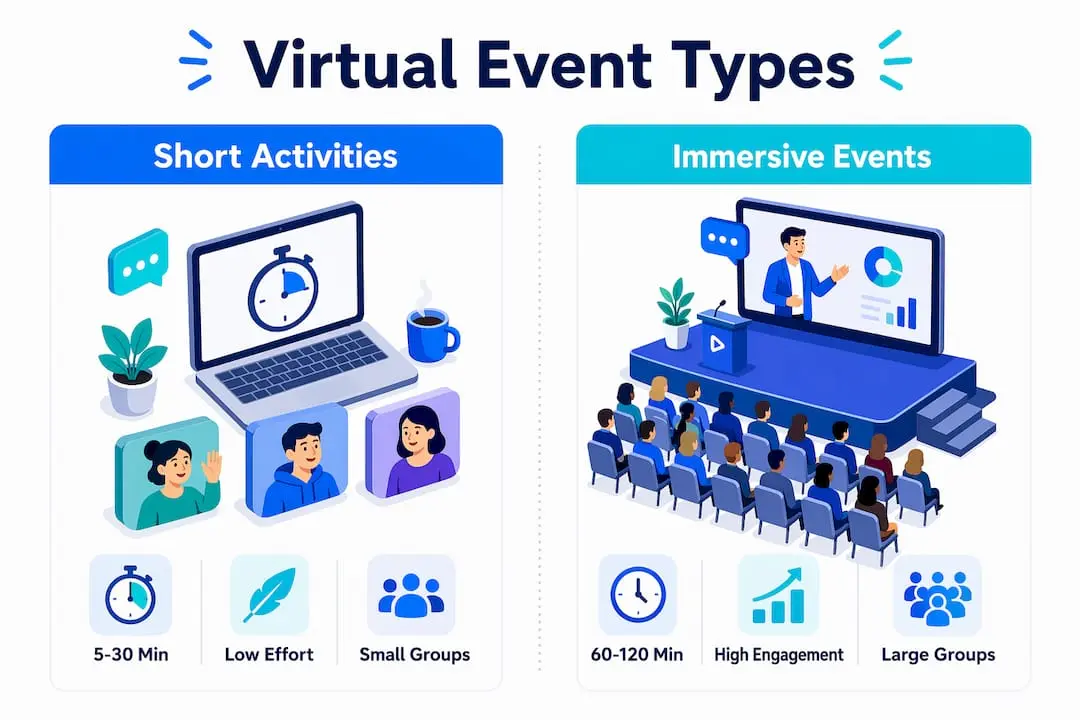
The most effective virtual team events fall into two broad categories: short, low-effort activities and longer, immersive experiences. Each serves a different purpose, and the best programmes combine both.
Low-effort activities run for 5–30 minutes and slot directly into existing meetings or asynchronous workflows. “This or That” takes under ten minutes and requires no preparation. “Connection Bingo” runs in 15–30 minutes and works well as a meeting opener. “Virtual Scavenger Hunt” and “Show and Tell” sit in the same range and keep energy high without demanding significant organiser time. These formats are the backbone of consistent team culture.
Immersive experiences like virtual escape rooms and game shows typically run for 60–120 minutes and can accommodate up to 1,000 participants per session. Game shows tend to run 60–90 minutes; escape rooms usually need 90–120 minutes. These events require more planning and often benefit from a specialist vendor, but they deliver a shared memory that short activities cannot replicate.
| Activity type | Duration | Typical group size | Effort level |
|---|---|---|---|
| Icebreakers (This or That, Bingo) | 5–30 minutes | 5–50 | Low |
| Virtual lunch or coworking jam | 30–60 minutes | 5–20 | Low |
| Virtual escape room | 90–120 minutes | 10–1,000 | High |
| Virtual game show | 60–90 minutes | 10–1,000 | High |
| Skill-sharing workshop | 45–60 minutes | 10–100 | Medium |
Pro Tip: Run at least one short activity every week and one immersive event each quarter. This tiered rhythm sustains culture without burning out your team.
How can virtual events maximise team engagement and participation?
Active participation is the single biggest predictor of a successful virtual team event. Passive observation produces far weaker results than collaborative puzzle solving or small-group competition. The difference between a forgettable webinar and a memorable team event is whether participants do something together, not just watch.
Several design choices drive active involvement:
- Poll your team before the event. Using team polls to select preferred activities increases buy-in and attendance. People show up for events they helped choose.
- Use breakout rooms. Small groups of four to six people replicate the dynamics of real work collaboration. Automated breakout room assignment removes the awkward pause of manual sorting.
- Activate live chat and Q&A. These features give quieter team members a low-pressure way to contribute without speaking on camera.
- Use a mobile event app. Apps that provide schedule access, personalised attendee profiles, and on-demand content keep participants engaged between segments.
- Set a clear goal for every session. Skill-sharing, collaborative problem-solving, and friendly competition all give participants a reason to focus.
Timing matters too. Mid-week sessions between 10am and 2pm consistently outperform Friday afternoon slots for attendance and energy. Keep the total running time within the planned window. Overrunning is the fastest way to erode goodwill for the next event.
Pro Tip: Virtual social fatigue is a real and growing problem. Replace unstructured virtual happy hours with goal-oriented formats. A 45-minute skill-sharing session produces more connection than a 90-minute open video call.
What practical virtual team building activities can managers implement easily?
The best virtual team building activities for employees share three qualities: they require minimal preparation, they produce visible energy, and they work across time zones. The list below is ordered from quickest to most involved.
-
This or That. The facilitator reads paired options (“mountains or beach?”, “early bird or night owl?”) and participants respond in chat or by holding up fingers. Takes five minutes. No materials needed.
-
Virtual Scavenger Hunt. Participants race to find household objects matching a list. Works in ten minutes and generates genuine laughter. Quick activities like this integrate cleanly into the first ten minutes of a weekly all-hands.
-
Two Truths and a Lie. Each person shares three statements; the group guesses which is false. Runs in 15–20 minutes for groups up to 15. Excellent for onboarding new hires into an existing team.
-
Virtual lunch or coffee break. Schedule a 30-minute video call with no agenda. Provide a loose conversation prompt (“what are you reading?” or “best meal you cooked this month?”). Works best for teams of five to twelve.
-
Coworking jam. Team members join a shared video call and work silently on individual tasks for 45–60 minutes. The social presence reduces isolation without requiring conversation. Tools like Gather Town support this format natively.
-
Virtual book club. Monthly, asynchronous-friendly, and self-directed. Members read the same chapter or article and discuss it in a 30-minute call. Builds intellectual connection beyond day-to-day work.
-
Vendor-led virtual game show. A specialist host runs a quiz, trivia battle, or team challenge for 60–90 minutes. Scales to large groups and removes all facilitation burden from the manager. Outback Team Building and similar providers offer off-the-shelf formats that require only a booking and a calendar invite.
-
Virtual escape room. Teams solve puzzles collaboratively in breakout rooms. Runs 90–120 minutes and works for groups from ten to several hundred. The competitive element and shared narrative make it one of the most memorable remote team activities available.
Frequency matters as much as format. Short activities work best when they happen weekly. Immersive events lose their impact if they occur more than once per quarter. Build both into your team calendar rather than treating them as one-off experiments.
What technology and platforms support successful virtual team events?

Standard video conferencing tools work for small, informal sessions. For events with 50 or more participants, dedicated platforms with automated breakout room management and real-time polling are necessary. Basic tools cannot manage participant movement, simultaneous small-group activity, or live data collection at scale.
Key features to look for in a virtual event platform:
- Automated breakout rooms. Removes manual sorting and allows the facilitator to monitor all groups simultaneously.
- Live polling and Q&A. Drives active participation and gives managers instant feedback on sentiment and engagement.
- Mobile event app. Event management software with a mobile app improves participant experience through personalised schedules, attendee profiles, and on-demand content access.
- Scheduling and registration tools. Automated reminders and calendar integration reduce no-shows significantly.
- Analytics dashboard. Tracks attendance, participation rates, and poll responses so managers can measure impact after the event.
Gather Town uses a spatial video format that mimics a physical office, which works well for coworking jams and informal networking. Zoom and Microsoft Teams handle standard video calls but require third-party add-ons for polling and breakout room automation at scale. Dedicated event management platforms like those offered by Colossus provide scheduling, registration, attendee engagement, and analytics within a single system, which reduces coordination overhead for managers running events across large or distributed organisations.
Pro Tip: Test your platform with a small pilot group before running a large event. Technical issues in the first five minutes of a 200-person session are very difficult to recover from.
How can team leaders measure the success of virtual events?
Measurement turns a one-off event into a repeatable programme. Without data, managers cannot improve format, timing, or content choices. The most useful metrics combine quantitative tracking with qualitative observation.
Practical ways to measure virtual event success:
- Post-event survey. Send a three to five question survey within 24 hours. Ask participants to rate enjoyment, relevance, and likelihood to attend again. Keep it short so completion rates stay high.
- Attendance and participation rate. Track the ratio of invitees to attendees, and the ratio of attendees who actively participated (used chat, answered polls, joined breakout rooms) versus those who stayed silent.
- Poll and chat activity. High chat volume and poll response rates indicate active engagement. Low rates signal that the format or topic missed the mark.
- Qualitative observation. Note whether team members reference the event in subsequent meetings, whether cross-team connections form, and whether morale visibly improves in the days following.
- Repeat attendance. The clearest signal of a successful virtual team building experience is whether the same people return for the next one.
Platforms with built-in analytics make this process significantly easier. Colossus, for example, provides attendance tracking, engagement metrics, and post-event reporting within its event management software, removing the need for manual data collection. Reviewing these metrics after each event and adjusting the programme accordingly is what separates organisations with strong remote cultures from those that run events as a box-ticking exercise.
Key takeaways
The most effective virtual events for teams combine short weekly activities with quarterly immersive experiences, supported by platforms that automate logistics and measure engagement.
| Point | Details |
|---|---|
| Use a tiered activity approach | Run short icebreakers weekly and immersive events quarterly to sustain engagement without fatigue. |
| Prioritise active participation | Breakout rooms and live polling outperform passive formats; design for doing, not watching. |
| Match platform to group size | Events with 50 or more participants need dedicated platforms with automated breakout and polling features. |
| Measure every event | Post-event surveys, attendance rates, and chat activity reveal what works and what to change. |
| Poll your team first | Letting team members choose activities increases attendance and buy-in before the event begins. |
What I’ve learned from running virtual events that actually work
The most common mistake I see managers make is treating virtual events as a single category. They are not. A five-minute icebreaker and a two-hour escape room serve completely different purposes and require completely different levels of energy from participants. Conflating them leads to either under-investment in the big events or over-engineering the small ones.
The second mistake is running events without a goal. “Virtual happy hour” is not a goal. “Help the new starters meet three colleagues they don’t yet know” is a goal. When you design around a specific outcome, the format almost selects itself.
I’ve also seen organisations abandon virtual team building after one low-turnout event. One poor result usually reflects a timing or format problem, not a fundamental lack of interest from the team. The fix is to boost remote member engagement by polling your team, adjusting the format, and trying again. Consistency over months builds the habit. A single event, however well designed, does not.
The tiered approach is the most reliable framework I know. Small rituals weekly, medium activities monthly, large experiences quarterly. It respects your team’s time, prevents fatigue, and gives people something to look forward to at each scale. Start there and iterate from what the data tells you.
— Rob
How Colossus supports your virtual event programme
Running virtual team events consistently requires more than a calendar invite and a video link. Scheduling, registration, attendee engagement, and post-event reporting all need to work together.

Colossus provides event management software built for organisations that run events regularly and need everything in one place. The platform handles automated scheduling, attendee registration, live engagement tools, and analytics reporting, so your team spends time on the event itself rather than on coordination. For managers running remote team building ideas across distributed teams, Colossus removes the operational friction that causes programmes to stall. Explore the full feature set at Colossus Systems to see how it fits your organisation’s needs.
FAQ
What are virtual events for teams?
Virtual events for teams are planned online activities designed to build collaboration, engagement, and connection among remote employees. They range from five-minute icebreakers to two-hour immersive experiences like virtual escape rooms and game shows.
How long should a virtual team building event last?
Short activities like “This or That” run for 5–10 minutes and fit within existing meetings. Immersive formats such as escape rooms and game shows typically run for 60–120 minutes.
How often should teams run virtual events?
A tiered approach works best: short activities weekly, medium activities monthly, and larger immersive events quarterly. This rhythm sustains culture without causing fatigue.
What is the best platform for large virtual team events?
Events with 50 or more participants require dedicated platforms with automated breakout rooms and live polling. Standard video conferencing tools lack the features needed to manage participant movement and interaction at scale.
How do you measure the success of a virtual team event?
Post-event surveys, attendance rates, poll response rates, and repeat attendance are the most reliable indicators. Platforms with built-in analytics dashboards make tracking these metrics straightforward.