Virtual event accessibility tips for organisers

TL;DR:
- Hosting a virtual event without a clear accessibility plan risks excluding attendees and reducing engagement. Ensuring platform compliance, assigning an accessibility lead, and providing live captions and pre-event guides promote inclusivity and meet legal standards. Post-event practices like captioned recordings and targeted feedback further improve access and demonstrate organizational commitment.
Hosting a virtual event without a clear accessibility plan means some of your attendees will struggle to participate fully, regardless of their level of interest or expertise. For membership organisations, associations, and nonprofits, that cost is real. It shows up in poor engagement, negative feedback, and missed opportunities to serve your entire community. The virtual event accessibility tips in this guide are designed to help you build inclusion into every stage of your event, from the initial platform selection through to post-event content delivery, in line with 2026 legal standards and audience expectations.
Table of Contents
- Key takeaways
- Virtual event accessibility tips: pre-event planning
- Delivering accessibility on the day
- Post-event accessibility practices
- Common mistakes and how to avoid them
- My perspective on accessible virtual events
- Accessible event management with Colossus
- FAQ
Key takeaways
| Point | Details |
|---|---|
| Start with platform compliance | Verify WCAG 2.2 and keyboard navigation support before purchasing any virtual event platform. |
| Assign an accessibility lead | One dedicated person managing accommodation requests keeps communication clear and deadlines met. |
| Use hybrid captioning | AI captions alone are insufficient for complex sessions; combine with human editors for accuracy. |
| Share pre-event guides | Simple technical instructions reduce attendee anxiety and improve engagement from the start. |
| Evaluate and improve | Post-event surveys and accessibility metrics inform continuous improvement across future events. |
Virtual event accessibility tips: pre-event planning
Getting accessibility right starts well before the event goes live. The decisions you make during planning, particularly around platform selection, directly determine what is possible on the day.
Know your legal obligations
WCAG 2.2 Level AA compliance is now a legal requirement for digital event content under several major frameworks, including the European Accessibility Act and ADA Title II in the United States. These standards cover everything from colour contrast ratios in slide design to keyboard-only navigation within your event platform. If you are running events for a membership organisation in the UK or EU, non-compliance carries real legal and reputational risk. Review these requirements early so they can shape your platform and content decisions from the outset.
Choose the right platform
Your event platform is the foundation of your accessibility plan, and accessibility must be built in at procurement. Poor keyboard navigation or screen reader incompatibility cannot be corrected after you have already committed to a contract. Ask vendors for a Voluntary Product Accessibility Template (VPAT), a standardised document that details a product’s accessibility features against recognised criteria. This single step filters out platforms that would require expensive workarounds later. You can also review platform options for membership events to find tools built with attendee engagement and inclusion in mind.
Plan your accessibility essentials
Before you open registration, work through this checklist:
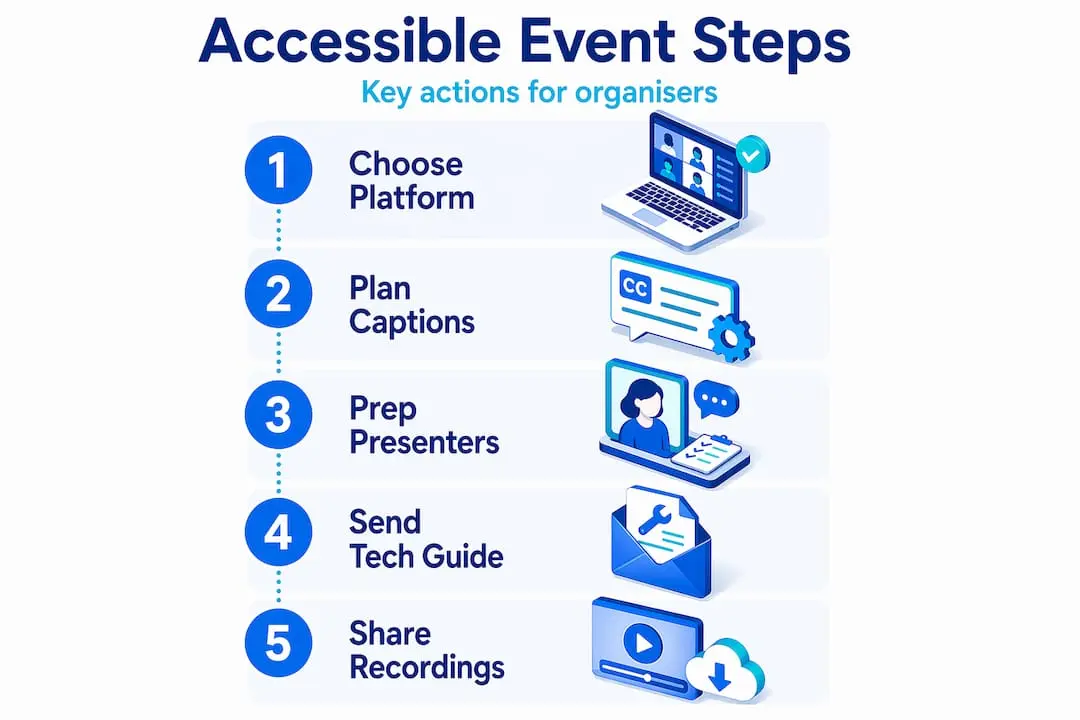
- Designate an accessibility lead. One named person should own all accommodation requests, respond to queries, and liaise with service providers. This prevents requests from falling through the gaps.
- Set accommodation deadlines. Standard practice is at least 5 business days before the event date to allow time to arrange British Sign Language interpretation, accessible file formats, or other services.
- Design accessible slides. Use sans-serif fonts at a minimum of 24pt, maintain sufficient contrast ratios, and avoid conveying meaning through colour alone. Every image should carry a written description.
- Plan for captions and transcripts. Decide whether you will use automated captions, a hybrid model, or professional Communication Access Real-time Translation (CART) services. Build this cost into your budget.
- Consider multi-language needs. If your audience includes non-native speakers, simultaneous interpretation or multilingual captions extend participation further.
Pro Tip: When building your event budget, line-item accessibility separately. Treating it as an add-on leads to it being cut when costs rise. A dedicated budget line signals that accessibility is non-negotiable.
The table below outlines the key planning tasks and their recommended timing:
| Planning task | Recommended timing |
|---|---|
| Platform VPAT review | 8 to 12 weeks before event |
| Accessibility lead assigned | 8 weeks before event |
| Accommodation deadline for attendees | At least 5 business days before event |
| Accessible slide templates distributed to speakers | 4 weeks before event |
| Caption service provider confirmed | 4 weeks before event |
| Pre-event tech guide sent to attendees | 1 week before event |
Delivering accessibility on the day
Preparation means nothing if the execution falls short. Real-time accessibility requires structured delivery and clear communication throughout the live event.
Follow this sequence to manage accessibility during your event:
- Open captions from the first moment. Do not wait for attendees to request captions. Displaying them by default normalises accessibility and benefits everyone. Research shows that over 50% of adults use captions even when audio is available, rising to 75% among younger attendees.
- Use hybrid captioning for key sessions. AI-powered captions need human supplementation for sessions involving technical terminology, heavy accents, or fast-paced speakers. Invest in professional CART services for keynotes and panel discussions where accuracy matters most.
- Provide sign language interpretation. Arrange for a British Sign Language interpreter to be visible in a pinned video window for deaf and hard of hearing attendees. Brief interpreters on your agenda, acronyms, and any specialist terminology in advance.
- Configure accessible interaction tools. Moderated chat, Q&A panels, and live polls can all create barriers if not set up thoughtfully. Use Q&A tools that support keyboard navigation and screen readers, and allow attendees to submit questions in advance for those who need more processing time.
- Communicate features clearly. At the start of each session, verbally describe the accessibility features available, including how to turn captions on or off, how to access sign language interpretation, and who to contact for assistance.
- Station an accessibility monitor. Have a dedicated team member monitoring the event chat and a support inbox throughout the live programme. Attendees with access needs should never have to wait long for a response.
- Provide audio descriptions when presenting visual content. Train all presenters to narrate slides and describe graphs, images, or demonstration videos as they present. A brief speaker briefing document before the event is usually sufficient.
Pro Tip: Send a pre-event tech guide to all attendees at least five days before the event. Include visual instructions on text resizing, keyboard shortcuts, and how to access captioning settings. This reduces inbound support queries on the day significantly.
The most overlooked step is briefing your presenters. You can have the best platform and caption service available, but if a speaker races through slides without describing the visuals, a significant portion of your audience loses the thread. A one-page accessibility briefing distributed to all speakers four weeks out resolves this reliably.

Post-event accessibility practices
Accessibility does not end when the live event closes. What you do in the days following has a direct impact on your long-term inclusion record and on the value attendees can extract from the content.
Here is what to prioritise after the event:
- Publish captioned recordings promptly. Accessible recordings and transcripts extend your event’s reach and ROI considerably. Attendees who could not follow certain sessions live can revisit them at their own pace.
- Provide downloadable transcripts. Offer transcripts in multiple formats, including plain text and Word documents, so screen reader users and those with cognitive disabilities can navigate them easily.
- Run an accessibility-specific feedback survey. Do not bury accessibility questions in a general satisfaction survey. Ask directly: Were captions accurate? Was sign language interpretation clear? Did you encounter any barriers? Targeted questions produce usable data.
- Analyse engagement by accessibility feature. If your platform tracks caption usage, transcript downloads, or sign language stream views, review these figures. Low usage does not mean the features were unnecessary. It may mean they were hard to find.
- Repurpose accessible content. Transcripts become blog posts, articles, and resource pages. Captioned recordings become training materials. Accessible content repurposing broadens your audience and makes each event work harder for your organisation.
The table below summarises key post-event deliverables and their impact:
| Post-event deliverable | Primary benefit |
|---|---|
| Captioned recordings | Supports deaf, hard of hearing, and non-native speaker attendees |
| Downloadable transcripts | Aids screen reader users and those with cognitive disabilities |
| Multi-format slide decks | Increases usability for low-vision and neurodivergent attendees |
| Accessibility feedback survey | Generates data for continuous improvement |
| Accessibility report for stakeholders | Demonstrates compliance and organisational commitment |
Common mistakes and how to avoid them
Even well-intentioned organisers make avoidable errors when managing virtual event accessibility. Understanding these pitfalls in advance puts you in a much stronger position.
- Leaving accessibility to the last minute. Adding captions or requesting interpreter services two days before the event is too late. Accessibility embedded in event strategy from the start produces better results and costs less than retrofitting.
- Relying solely on automated captions. Auto-captions frequently mis-transcribe specialist terms, names, and accented speech. They are a starting point, not a complete solution.
- No clear accommodation request process. If attendees cannot easily find where or how to submit an accessibility request, they will not submit one. Build a dedicated form into your registration process and publicise the deadline.
- Ignoring attendee tech anxiety. Neurodivergent attendees or those less familiar with virtual platforms may disengage due to technical uncertainty rather than lack of interest. Pre-event guides that reduce access anxiety are a straightforward fix.
- Skipping presenter training. Platform accessibility features are rendered less effective if presenters do not know how to describe visual content or pace their delivery appropriately.
“Inclusive design reflects an organisation’s commitment and enhances the user experience for every attendee, not just those with disabilities.” — Access all areas: why inclusive events are a brand opportunity
If your accommodation request process is vague, visit Colossus’s guidance on improving member accessibility for practical steps on building clearer registration workflows.
My perspective on accessible virtual events
I have worked with membership organisations long enough to know that accessibility conversations usually start with compliance. Teams scramble to tick boxes ahead of a launch, treat accessibility as a liability issue, and move on. That approach misses the real opportunity entirely.
Accessibility is a brand differentiator. When an association demonstrates that it has genuinely considered every attendee’s ability to participate, that signals something far more powerful than legal diligence. It signals that you actually want people there.
In my experience, the organisations that integrate accessibility systematically from the planning stage consistently report higher engagement scores and lower attendee drop-off. Not because their content is better, but because fewer people hit a wall and give up. The captions, the guides, the sign language interpretation. These features are not burdens. They are the infrastructure of good hosting.
What I find most telling is how often I encounter organisers who assume accessible features are only used by attendees with disabilities. The data does not support that. The majority of adults using captions have no hearing impairment. They are in noisy environments, they are second-language speakers, they simply prefer reading along. Designing for the edge cases improves the experience for everyone.
The expectation in 2026 is also shifting. Audiences now expect accessibility as standard. The organisations treating it as optional are already behind.
— Rob
Accessible event management with Colossus
Putting these virtual event accessibility tips into practice is significantly easier with the right tools behind your organisation. Colossus was built specifically for membership organisations that need to manage events, communications, and attendee data in one place, without manual workarounds.

Our event management software supports accommodation request tracking, attendee communication workflows, and registration customisation so your accessibility processes are built into the event itself, not added on afterwards. Combined with our CRM capabilities, you can record and manage individual access needs across your entire member base, making every event more prepared than the last. Speak to our team to see how Colossus can support your accessible events programme.
FAQ
What are the most important virtual event accessibility tips?
Prioritise platform compliance with WCAG 2.2, provide live captions (ideally hybrid AI and human), share pre-event tech guides, and assign a dedicated accessibility lead. These four measures address the majority of common access barriers.
How early should accommodation requests be collected?
Accommodation requests should be submitted at least five business days before the event to allow time to arrange sign language interpretation, accessible file formats, and other services.
Do automated captions meet accessibility standards?
Automated captions alone are generally insufficient for complex or technical sessions. A hybrid model combining AI captions with human editors or CART services is recommended to meet accuracy standards and legal requirements.
Why are post-event transcripts important for accessibility?
Transcripts and captioned recordings allow attendees to revisit content at their own pace and in their preferred format, extending the event’s reach to those who faced barriers during the live session.
What is a VPAT and why does it matter?
A VPAT (Voluntary Product Accessibility Template) is a document from a software vendor that outlines how their product meets recognised accessibility standards. Requesting one before purchasing an event platform ensures you are selecting a tool that can support your compliance requirements from day one.