How to segment membership lists for better engagement

TL;DR:
- Segmentation divides member databases into targeted groups based on shared traits, boosting communication relevance. Dynamic segments, which update automatically, improve engagement compared to static lists, especially for growing memberships. Regular quarterly reviews ensure segments remain aligned with current data, member behavior, and organizational goals.
Membership list segmentation is the practice of dividing your member database into distinct, meaningful groups based on shared characteristics, behaviour, or preferences. Done well, it is the single most effective way to improve the relevance of your communications. Segmented, targeted, and triggered campaigns generate 77% of total email marketing ROI compared to generic broadcasts. That figure alone explains why membership managers who still send one message to everyone are leaving significant engagement on the table. This guide walks you through how to segment membership lists from the ground up, covering the data you need, the steps to follow, and the strategies that consistently produce results.
What data and tools do you need to segment membership lists?
Effective segmentation starts with clean, trustworthy data. If your member records contain duplicates, outdated contact details, or missing fields, your segments will reflect those gaps. Before you build a single group, audit your database and resolve inconsistencies.
Four categories of data form the foundation of any segmentation effort. Demographic data covers age, location, job title, and membership tier. Behavioural data captures email opens, link clicks, event attendance, and last login. Engagement history tracks how recently and how often a member has interacted with your communications. Preference data records self-declared interests, communication frequency choices, and topic preferences gathered through sign-up forms or surveys.
Most membership management platforms offer two segment types: static and dynamic. Static segments are fixed lists you build manually and update yourself. Dynamic segments automatically update membership groups based on real-time behaviour and data changes. Dynamic segments reduce list staleness and are far more practical for organisations with active, growing member bases.
| Data type | What it captures | Tool feature required |
|---|---|---|
| Demographic | Age, location, membership tier | Rule-based filters |
| Behavioural | Opens, clicks, event attendance | Activity tracking |
| Engagement history | Recency, frequency of interaction | Dynamic segment rules |
| Preference | Interests, communication choices | Custom fields, survey integration |
Pro Tip: Start with two or three data fields you already collect reliably. Build your first segments from those, then add complexity once you understand how members respond.
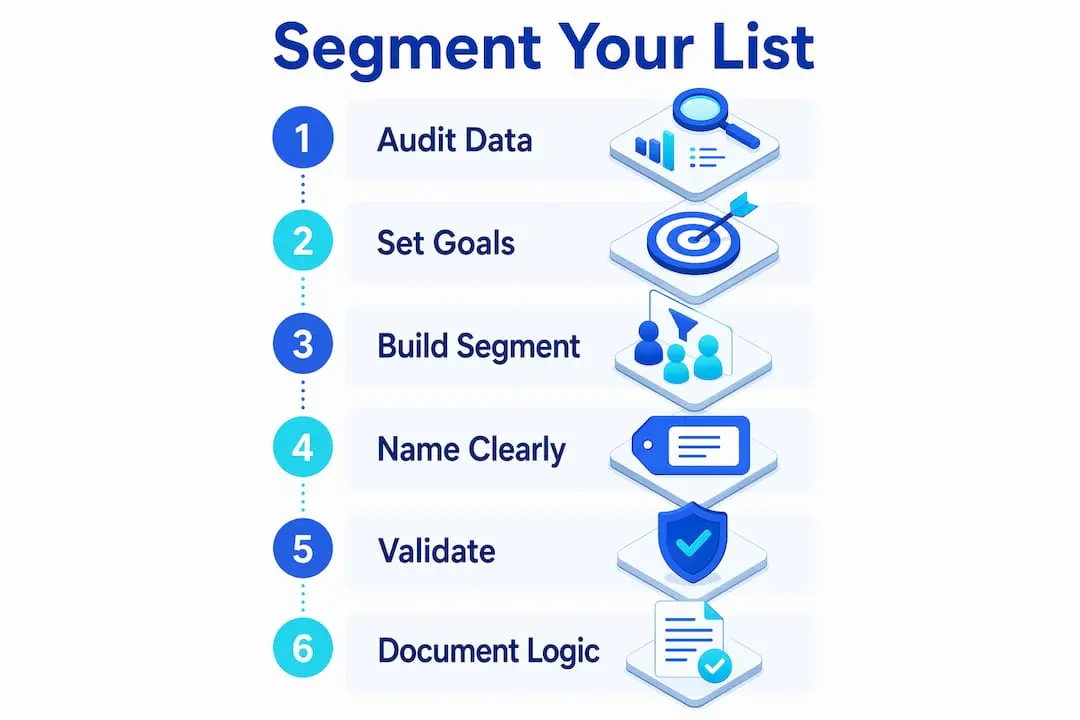
How to create your first membership list segments
Building your first segments does not require a sophisticated setup. A clear process matters far more than advanced technology.

Step 1: Audit your existing data. Pull a full export of your member records and identify which fields are consistently populated. Fields with more than 20% missing values are unreliable as segment criteria at this stage.
Step 2: Define your segment goals. Each segment should serve a specific communication purpose. Ask what message you want to send and who genuinely needs to receive it. A segment built around “members who attended an event in the last 90 days” has a clear purpose. A segment called “active members” without a measurable definition does not.
Step 3: Choose your criteria and build the segment. Use your platform’s filter or rule builder to apply the criteria. Where possible, choose dynamic rules so the segment updates automatically as member data changes.
Step 4: Name your segments clearly. Segment naming is crucial for clear list management and team collaboration. Use a consistent naming convention such as “Tier_Location_Behaviour” (for example, “Premium_London_EventAttendee_2026”). Vague names like “Group A” create confusion when multiple team members manage campaigns.
Step 5: Validate the segment before sending. Preview a sample of records in each segment and check that the members included genuinely match your intended criteria. Look for obvious outliers or missing entries.
Step 6: Document your segment logic. Write down the rules behind each segment in a shared document. This protects your work when team members change and makes future refinements far easier.
Pro Tip: Preview at least 10 member records from each new segment before you use it in a campaign. Spot-checking catches rule errors that automated validation misses.
Segmenting by behaviour data such as attendance or engagement consistently outperforms simple demographics in driving campaign relevance. Build behavioural segments early, even if they start small.
Which segmentation strategies yield the best member engagement?
The most effective membership list strategies combine multiple data types rather than relying on a single dimension. Combining demographic, behavioural, and preference data yields the best overall campaign engagement. Each dimension adds a layer of precision that a single filter cannot achieve on its own.
Behavioural segmentation
Behavioural segmentation groups members by what they actually do. Engagement segments built from email opens, clicks, and last interaction improve deliverability and campaign success. A member who has not opened an email in six months needs a re-engagement message, not your standard newsletter. A member who clicks every event announcement is a strong candidate for early-bird event promotions.
Demographic segmentation
Demographic segmentation uses membership tier, location, age, or job function to tailor content. A regional chapter update is only relevant to members in that region. A professional development offer aimed at early-career members will not resonate with senior fellows. Demographic filters are quick to apply and immediately reduce irrelevant sends.
Preference and lifecycle segmentation
Preference segmentation uses data members have given you directly, such as topic interests selected at sign-up or communication frequency preferences. Lifecycle segmentation groups members by tenure: new joiners in their first 90 days need onboarding content, while long-standing members respond better to loyalty recognition and advanced resources.
Here is a summary of the top segmentation types and their primary benefits:
- Behavioural: Targets members based on real actions, improving relevance and deliverability
- Demographic: Filters by tier, location, or role for geographically or professionally specific content
- Preference-based: Uses member-declared interests for high-relevance, low-friction targeting
- Lifecycle/tenure: Matches content to where a member is in their membership journey
- Event participation: Separates attendees from non-attendees for follow-up and re-engagement campaigns
| Segmentation type | Best use case | Key data required |
|---|---|---|
| Behavioural | Re-engagement, event follow-up | Open rates, clicks, attendance logs |
| Demographic | Regional updates, tier-specific offers | Location, membership level |
| Preference-based | Content newsletters, topic campaigns | Interest fields, survey responses |
| Lifecycle | Onboarding, renewal, loyalty programmes | Join date, renewal date |
Even small lists under 1,000 subscribers achieve higher revenue and engagement through well-targeted segmentation. The quality of your segment logic matters far more than the size of your list.
How do you maintain and improve segments over time?
Segments are not permanent. Member behaviour changes, data ages, and your organisation’s communication goals evolve. Treating segments as fixed lists is one of the most common mistakes membership managers make.
Dynamic segments solve the staleness problem automatically, but they still require human oversight. Automating member segmentation reduces manual errors, provides real-time updates, and supports predictive insights. Automation handles the mechanics; your team provides the strategic judgement about whether a segment still serves its original purpose.
Track these key performance indicators per segment to assess ongoing value:
- Open rate: A declining open rate signals that the segment criteria may no longer match member expectations
- Click-through rate: Low clicks on targeted content suggest the segment is too broad or the content is misaligned
- Unsubscribe rate: A spike in unsubscribes from a specific segment points to over-communication or poor relevance
- Conversion rate: For event registrations or renewals, conversion rate shows whether the segment is commercially productive
Three common maintenance mistakes undermine segmentation over time. Segment overlap occurs when the same member appears in multiple competing segments and receives contradictory messages. List decay happens when member data is not updated and segments include lapsed or invalid contacts. Over-segmentation creates so many narrow groups that campaign management becomes unmanageable and send frequency drops to the point of irrelevance.
Schedule a segment review every quarter. Check whether each segment still has a clear purpose, whether the underlying data is current, and whether the segment’s performance metrics justify its continued use. Retire segments that no longer serve a distinct communication need.
Pro Tip: Set a calendar reminder every quarter to review your segment list. Delete or merge any segment that has not been used in a campaign within the past six months.
For practical guidance on email list targeting in membership contexts, the principles of relevance and timing apply equally to associations, nonprofits, and professional bodies.
Key takeaways
Effective membership list segmentation requires clean data, clear criteria, and regular maintenance to deliver sustained improvements in engagement and campaign ROI.
| Point | Details |
|---|---|
| Segmentation drives ROI | Targeted campaigns generate 77% of email marketing ROI versus generic broadcasts. |
| Start with reliable data | Audit your member records before building segments to avoid criteria built on incomplete fields. |
| Prefer dynamic segments | Dynamic rules update automatically and reduce the manual effort of maintaining accurate lists. |
| Combine multiple data types | Demographic, behavioural, and preference data together produce stronger engagement than any single filter. |
| Review segments quarterly | Retire unused segments and update criteria based on open rates, clicks, and conversion data. |
Why I think most membership teams overcomplicate segmentation
The most common mistake I see is organisations waiting until they have “enough data” before they start segmenting. They want perfect demographic coverage, complete behavioural histories, and a fully mapped preference profile before they commit to a single segment. That wait is unnecessary and costly.
Starting with two or three simple, meaningful groups is genuinely enough to see a measurable improvement in engagement. A new joiner segment and a lapsed member segment, built from join date and last email open, will outperform a single broadcast list every time. The sophistication comes later, once you have real campaign data to learn from.
The other tension I see regularly is between automation and human judgement. Balancing technology automation with human strategy prevents segmentation from becoming siloed or irrelevant. Automated rules are only as good as the thinking behind them. A platform can update a segment in real time, but it cannot tell you whether that segment still aligns with your organisation’s goals for the quarter.
My honest advice: treat your first segments as experiments, not permanent structures. Run a campaign, look at the numbers, and adjust. The managers who improve fastest are the ones who iterate quickly rather than waiting for a perfect setup that never arrives. Segmentation is a practice, not a project.
— Rob
How Colossus supports smarter member segmentation
Membership managers who want to move from manual list management to automated, data-driven segmentation will find the tools they need in one place.

Colossus brings together membership management features including dynamic segmentation, CRM data integration, and email campaign automation within a single platform. You can build rule-based segments from demographic, behavioural, and preference data without switching between systems. Colossus also connects segmentation directly to event management and CRM tools, so your event attendance data and member relationship history feed directly into your targeting criteria. For organisations ready to move beyond basic list management, Colossus provides the infrastructure to make segmentation both practical and measurable.
FAQ
What is membership list segmentation?
Membership list segmentation is the process of dividing your member database into distinct groups based on shared characteristics, behaviour, or preferences. It allows you to send targeted communications that are relevant to each group rather than broadcasting one message to everyone.
How many segments should I start with?
Start with two or three segments built from data you already collect reliably. Adding complexity before you understand how members respond to basic segments creates unnecessary confusion and maintenance overhead.
Does list size affect whether segmentation is worth doing?
List size does not determine whether segmentation is worthwhile. Even lists under 1,000 members achieve higher engagement and revenue through well-targeted segmentation, because relevance matters more than reach.
What is the difference between a static and a dynamic segment?
A static segment is a fixed list you update manually. A dynamic segment updates automatically based on real-time member data and behaviour, making it far more practical for active membership organisations.
How often should I review my membership segments?
Review your segments every quarter. Check performance metrics per segment, retire groups that are no longer used, and update criteria to reflect current member data and organisational priorities.