Event RSVP management: a practical guide for planners

TL;DR:
- Event RSVP management automates invitations and tracks responses using purpose-built software, replacing manual spreadsheets. It offers real-time dashboards, customizable forms, and integrated communication and payment features to improve attendance accuracy. Using these tools allows planners to efficiently build guest lists, target messaging, and connect RSVP data with other event operations.
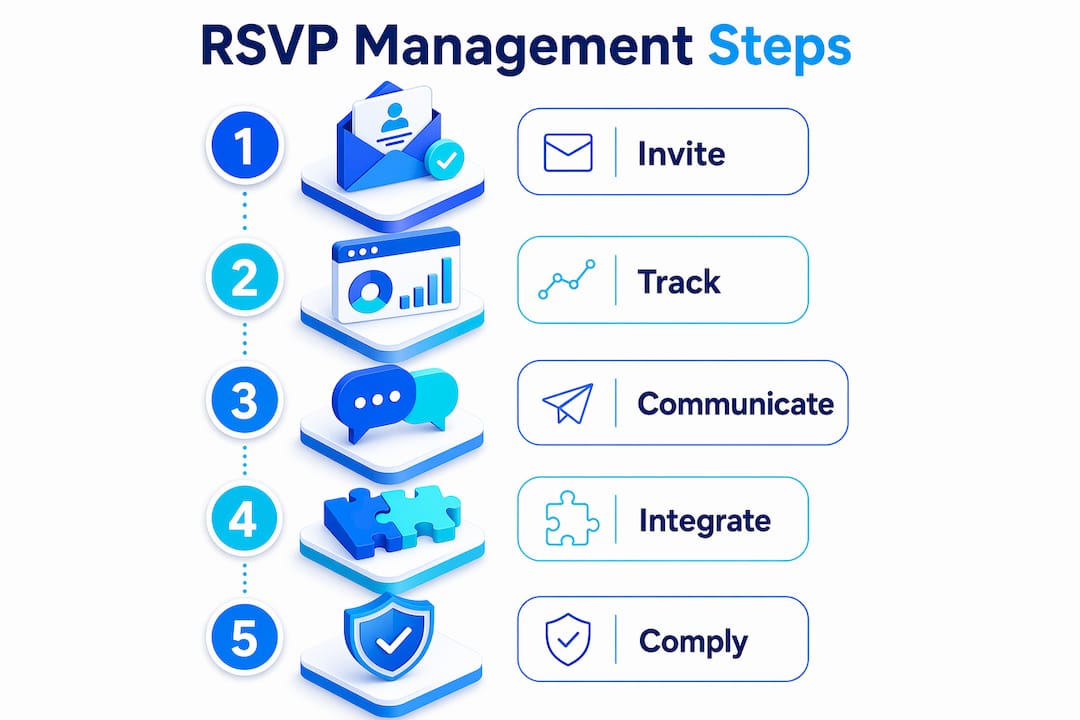
Event RSVP management is the centralised process of sending invitations, tracking guest responses, and coordinating attendance using purpose-built software. It replaces manual spreadsheets with real-time dashboards that categorise each guest as accepted, declined, or pending within minutes. Over 1,500 organisations, including Imperial College London, now rely on automated event registration platforms to handle workflows that were once entirely manual. That adoption rate signals a clear shift: professional event planners treat RSVP tracking as a core operational function, not an afterthought. Whether you manage conferences, association meetings, or social gatherings, the right system turns a chaotic inbox into a live, accurate attendee record.
What features define effective event RSVP management software?
The best RSVP tracking tools share a common set of capabilities that separate them from generic email platforms. Understanding these features helps you evaluate any system before committing.
Core dashboard and response tracking
Real-time status dashboards are the foundation of any credible RSVP system. They categorise every guest as accepted, declined, or pending without requiring manual updates. That live view lets you make catering, seating, and logistics decisions based on current data rather than yesterday’s spreadsheet.
Customisable online RSVP forms
Effective online RSVP forms collect far more than a yes or no. They capture plus-one details, dietary requirements, accessibility needs, and personal messages. Over 40% of guests leave messages containing critical event information, and a well-designed form surfaces all of it automatically. That data feeds directly into your planning without a single manual data entry step.

Automation and communication tools
Automated invitations, reminders, and follow-ups are non-negotiable for any event with more than 50 guests. The system sends reminders only to non-respondents, which keeps communication relevant and avoids irritating guests who have already replied. Manual override functions remain critical for non-digital attendees such as VIPs or older demographics, where a staff member can log a response received by phone or post.
Integration and compliance
Strong event invitation solutions connect with payment gateways, check-in scanning tools, and CRM systems. GDPR compliance is a legal requirement for any UK-based organiser collecting personal data. Selecting an RSVP system built as an event workflow tool rather than a newsletter platform avoids failures related to data capture and GDPR compliance.
| Feature category | What to look for |
|---|---|
| Response tracking | Live dashboard with accepted, declined, and pending counts |
| Form customisation | Fields for plus-ones, dietary needs, and guest messages |
| Automated communication | Targeted reminders sent only to non-respondents |
| Payment integration | Secure collection of ticket fees or donations at registration |
| Manual override | Staff ability to log offline RSVPs directly into the system |
| GDPR compliance | Consent capture, data export, and deletion tools built in |
Pro Tip: Test your RSVP form as a guest before sending any invitations. Check that every field saves correctly and that the confirmation email arrives within two minutes.
How can event planners optimise guest list management with RSVP tracking tools?
Accurate guest list management starts with a counterintuitive principle: let the list build itself. Modern RSVP systems build your guest list from responses rather than requiring you to pre-populate a spreadsheet and then reconcile it later. That single shift removes hours of administrative work per event.
Here are five practices that produce the most accurate attendee records:
-
Track declines early. Approximately 6.1% of invitees decline immediately after receiving an invitation. Removing these guests from your pending count gives you a more realistic projection of final attendance from day one.
-
Segment your pending list by deadline proximity. Guests who have not responded with five days to go need a different message than those who received their invitation yesterday. Your RSVP tracking tool should allow you to filter by response status and send targeted follow-ups to each group.
-
Use RSVP data to manage plus-ones precisely. When a guest confirms a plus-one, the system should add that person to the attendee count automatically. Manual reconciliation of plus-ones is one of the most common sources of catering and seating errors.
-
Flag special requirements as they arrive. Dietary needs and accessibility requests captured at the RSVP stage should flow directly to your catering and venue contacts. Waiting until the week of the event to collate these details creates unnecessary pressure.
-
Maintain a manual override log. Maintaining manual override capability is essential for guests who cannot or will not RSVP digitally. A dedicated field in your system for offline confirmations keeps your total count accurate without creating a parallel spreadsheet.
Pro Tip: Set your RSVP deadline three days before your final catering or venue cut-off. That buffer gives you time to chase the last few non-respondents without missing supplier deadlines.
What are the best communication practices when managing event RSVPs?
Communication is where most event planners lose attendance. The mistake is treating RSVP outreach like a broadcast newsletter rather than a targeted workflow. The two approaches produce very different results.
Effective RSVP communication follows a clear sequence:
- Send a personalised invitation with a clear call to action and a specific deadline.
- Follow up with a reminder only to guests who have not yet responded, not to the entire list.
- Send a confirmation to every accepted guest with event details, directions, and any pre-event requirements.
- Communicate any changes, such as venue updates or schedule shifts, only to confirmed attendees.
Segmented communication produces the strongest engagement. Personalised messages for VIP donors or key speakers, sent separately from the general invitation, signal that you value their attendance specifically. That distinction improves both response rates and the quality of the relationship.
Treating event RSVP management like generic email marketing leads to poor attendance. Workflow-based software ensures accurate attendance capture by sending the right message to the right guest at the right time, rather than broadcasting to everyone simultaneously.
Timing matters as much as content. For a corporate event, send the initial invitation four to six weeks in advance, with a reminder two weeks out and a final nudge three days before the deadline. For social gatherings, a two to three week window with one reminder is usually sufficient. Reviewing event venue marketing best practices can also help you align your communication timing with broader promotional activity.
Guest privacy requires the same attention as communication quality. Store only the data you need, obtain clear consent at the point of registration, and use a system with built-in GDPR tools. Data breaches at the RSVP stage damage trust far more than a late reminder ever would.
How does integrating RSVP management with broader event operations enhance success?
RSVP management does not exist in isolation. The most effective event planners connect their guest tracking directly to payments, check-in, and post-event engagement. Unified platforms that cover invitation tracking, payment collection, check-in scanning, and post-event sharing cut administrative work and keep data consistent across every stage of the event lifecycle.
The table below shows how integration affects each operational area:
| Operational area | Standalone RSVP tool | Integrated platform |
|---|---|---|
| Payment collection | Separate system, manual reconciliation | Collected at registration, auto-reconciled |
| Check-in | Printed list or separate app | QR scan against live RSVP data |
| CRM update | Manual export after event | Automatic sync to attendee records |
| Post-event sharing | Manual email with attachments | Automated delivery to confirmed guests |
| Reporting | Exported spreadsheet | Live dashboard with attendance analytics |
For conferences and large association meetings, the benefits of integration are especially clear. When a delegate registers and pays through the same system that manages their RSVP, their record is complete from the moment they confirm. Check-in on the day requires only a QR scan rather than a manual search through a printed list. After the event, their attendance data flows into your CRM, ready to inform the next invitation cycle.
Integrated event solutions also support scalability. An organisation running three events per year can manage with a lighter setup, but one running monthly member meetings, annual conferences, and regional workshops needs a platform that handles all three without requiring separate tools for each. The breadth of integrated event functions is a major competitive advantage for any platform targeting professional event planners. For nonprofits specifically, reviewing event planning approaches for nonprofits can clarify which integration features matter most for your context.
Key takeaways
Effective event RSVP management requires a purpose-built system that automates responses, tracks guest data in real time, and connects directly to payments, check-in, and CRM workflows.
| Point | Details |
|---|---|
| Use real-time dashboards | Live categorisation of accepted, declined, and pending guests removes manual update errors. |
| Let the list build itself | RSVP systems that populate guest lists from responses reduce administrative overhead significantly. |
| Target communication by status | Send reminders only to non-respondents to avoid irritating confirmed guests and improve reply rates. |
| Maintain manual override capability | Log offline RSVPs directly in the system to keep attendance counts accurate for all guest types. |
| Integrate across event operations | Connect RSVP data to payments, check-in, and CRM to eliminate duplicate data entry and improve reporting. |
Why I think most planners underestimate their RSVP system
After working across conferences, association events, and large social gatherings, the pattern I see most often is this: planners invest heavily in venue, catering, and programme, then treat RSVP management as a box-ticking exercise. They send an email, wait, and chase manually. The result is inaccurate headcounts, last-minute catering changes, and a check-in queue that nobody planned for.
The misconception is that RSVP tools are just digital versions of a reply card. They are not. A properly configured system is a live data feed that informs every other decision you make. When I see an organiser still reconciling plus-ones in a spreadsheet the day before an event, I know the RSVP workflow was not set up correctly at the start.
My honest advice: choose your RSVP system before you choose your venue. The system shapes how you collect data, how you communicate, and how you check guests in on the day. Getting that decision right early saves more time than any other single planning choice. For events with mixed audiences, including guests who will not respond digitally, the manual override function is not optional. It is the difference between an accurate headcount and an embarrassing shortfall at the door.
— Rob
How Colossus supports your event RSVP management
Colossus brings together the tools that event planners need in one place: guest tracking, automated communication, payment collection, and CRM integration. Our event management software is built for membership organisations, associations, and nonprofits that run events regularly and need accurate data at every stage.
Whether you manage a single annual conference or a rolling calendar of member meetings, Colossus gives you a live view of your attendee list, automated follow-ups, and check-in tools that connect directly to your guest records. Explore our full platform features to see how RSVP tracking fits into a complete event management workflow built for organisations that take member engagement seriously.
FAQ
What is event RSVP management?
Event RSVP management is the centralised process of sending invitations, tracking guest responses, and coordinating attendance using purpose-built software. It replaces manual spreadsheets with automated workflows and real-time dashboards.
How do I manage event RSVPs for a large conference?
Use an integrated platform that captures responses, collects payments, and syncs with your CRM automatically. Send targeted reminders only to non-respondents and maintain a manual override function for guests who confirm offline.
What should online RSVP forms include?
Effective online RSVP forms capture plus-one details, dietary requirements, accessibility needs, and personal messages. Collecting this data at registration removes the need for follow-up calls and reduces last-minute logistical issues.
How does automated RSVP tracking improve guest list management?
Automated RSVP tracking builds your guest list from responses rather than requiring manual population. Early identification of declines, approximately 6.1% of invitees, allows planners to refine attendance forecasts from the first day of outreach.
What is the difference between RSVP software and email marketing tools?
RSVP software is designed for event workflow management, including data capture, waitlisting, and GDPR compliance. Email marketing tools are built for broadcast communication and lack the response tracking, form logic, and attendance reporting that event planners require.