Online member registration guide for membership organisations

TL;DR:
- Online member registration replaces paper forms with a quick, user-friendly digital process that enhances first impressions.
- Effective systems require clear prerequisites, well-designed forms, real-time integrations, and ongoing testing to ensure accuracy and ease of use.
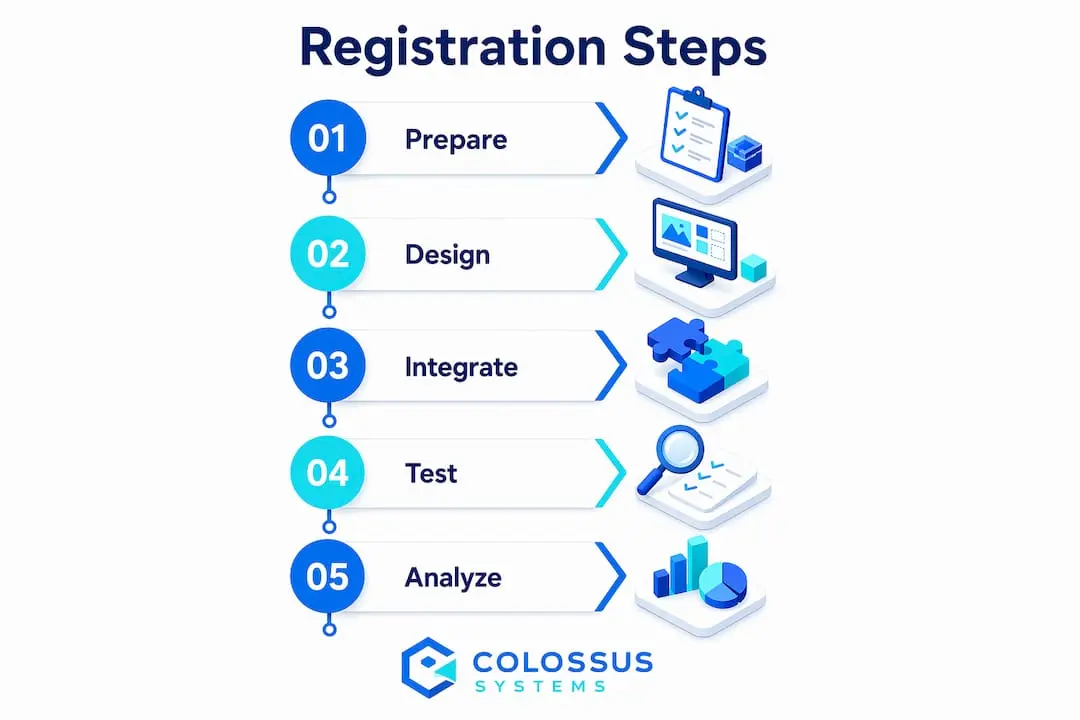
Online member registration is the process by which membership organisations collect, verify, and record applicant data through a digital portal, replacing paper forms and manual entry. A well-designed registration process can be completed in under 5 minutes when members have their digital identification ready. That speed matters because first impressions shape whether a new member feels welcomed or frustrated before they have even joined. This guide covers prerequisites, form design, system integration, testing, and continuous improvement so your organisation can build a registration process that works reliably from day one.
What do you need before building an online registration system?
The membership application process fails most often not during launch, but in the preparation phase. Administrators who skip prerequisites end up with incomplete data, failed payments, and compliance gaps that take weeks to untangle.
Documents and data to collect from members
Every registration system must define what information it needs before a single form field is created. Standard requirements include:
- Verified identification: A valid government-issued photo ID, such as a driver’s licence or passport, is the baseline for identity verification across most membership types.
- Background checks: Some professional memberships require compliance checks costing around £15–£20 per individual, plus renewal fees near £40 annually.
- Training certificates: Organisations in regulated sectors often require proof of completed training before granting full membership status.
- Contact and payment details: Email address, billing address, and payment method are non-negotiable for fee collection and ongoing communication.
Platform and integration essentials
Choosing the right platform before you build saves significant rework later. Your platform must support CRM integration, payment processing, and data export at a minimum. Government digital standards in 2026 require identity verification services for any scheme maintaining official membership integrity. That adds a layer of complexity, but it also protects your organisation from fraudulent enrolments.

| Requirement | Entry-level setup | Full membership platform |
|---|---|---|
| Identity verification | Manual document upload | Automated ID verification service |
| Payment processing | Single payment gateway | Recurring billing and tiered fees |
| CRM integration | Manual data export | Real-time sync with member database |
| Compliance support | Basic data fields | Background check and audit trail |
| Multi-tier registration | Single form | Multiple forms per membership level |
How do you design an effective online member registration form?
Registration form design is the first impression your organisation makes on a prospective member. Treat it as a gateway, not a data collection exercise.
Step-by-step form creation
- Define your fields first. List every piece of information your organisation genuinely needs. Remove anything that is not used within 90 days of collection. Unnecessary fields increase drop-off rates.
- Set up core fields. Every registration form needs a username, email address, and password as the minimum account creation fields. Add membership tier selection, billing details, and any compliance fields relevant to your sector.
- Apply field validation. Validate email format, password strength, and required fields in real time. Members should see errors as they type, not after they submit.
- Design for clarity. Group related fields under clear labels. Use single-column layouts on mobile. Avoid placing more than six fields on a single screen without a logical break or section header.
- Add conditional logic. Show additional fields only when relevant. A member selecting a professional tier should see credential upload fields. A standard member should not.
- Set up confirmation and onboarding. After submission, send an automated confirmation email with next steps. This reduces support queries and sets expectations immediately.
Multi-form setups for different membership tiers
Multiple simultaneous registration forms allow your organisation to tailor the experience for each membership level. A student member form looks very different from a corporate member form. Keeping them separate reduces confusion and improves data accuracy. Platforms that support multi-form configurations let administrators manage each form independently, including its fields, fees, and approval workflows.
Pro Tip: Enable a “save and resume” function on any form that requires external documents. Members who need to locate a certificate or ID will abandon a form that does not save their progress. Allowing them to return later significantly improves completion rates.
How do you integrate registration with membership and payment systems?
Secure integration with CRM and payment processors is the backbone of efficient membership administration. Without it, administrators manually re-enter data, fees go unrecorded, and member records fall out of sync.
Connecting form data to your CRM and member directory
When a member submits a registration form, that data should flow directly into your CRM without manual intervention. Real-time synchronisation means your member directory is always current. It also means your email marketing, event invitations, and renewal reminders reach the right people at the right time. Colossus connects registration data directly to its CRM module, so new member records appear automatically with full contact and membership details populated.
Setting up payment feeds for one-time and recurring fees
Payment integration must handle both one-time joining fees and recurring annual or monthly subscriptions. Your payment gateway must be PCI-DSS compliant to protect cardholder data. Tiered memberships add complexity because different fee levels must map to the correct membership record in your database. Test every payment scenario before going live, including failed payments and refund requests.
Common integration challenges and how to address them
- Data synchronisation delays: Set up webhooks rather than scheduled batch imports. Webhooks push data in real time, eliminating the lag that causes duplicate records.
- Field mapping mismatches: Map every form field to its corresponding CRM field before launch. Unmapped fields create blank records that require manual correction.
- Payment gateway conflicts: Use a single payment processor across your registration and renewal workflows. Multiple processors create reconciliation problems at month end.
- Compliance data gaps: Ensure background check results and training certificates are stored against the correct member record and flagged for renewal. Organisations with nonprofit compliance needs face particular scrutiny here.
- Access permission errors: New members should receive the correct portal access level automatically upon payment confirmation. Test this with mock accounts before launch.
For a detailed look at how member management software handles these integrations, the Colossus platform documentation covers each connection point in practical terms.
How do you test, troubleshoot, and improve your registration process?
Testing is the phase most administrators underestimate. A registration form that works perfectly on a desktop browser in your office may fail on a mobile device with a slow connection.
Cross-device and browser testing
Cross-device testing, particularly on mobile, reduces drop-offs caused by layout issues, missing fields, and slow load times. Test your form on at least three browsers (Chrome, Safari, and Firefox) and on both iOS and Android devices. Pay particular attention to file upload fields, which behave differently across operating systems.
Troubleshooting checklist
| Issue | Likely cause | Fix |
|---|---|---|
| Form not submitting | Validation error on hidden field | Audit all conditional fields for required status |
| Payment not processing | Gateway misconfiguration | Re-test API keys and webhook endpoints |
| Duplicate member records | Batch import overlap with webhook | Disable batch import after webhook is live |
| Members not receiving confirmation email | Spam filter or incorrect sender domain | Set up SPF and DKIM records for your sending domain |
| Mobile layout broken | Non-responsive form template | Switch to a mobile-first form template |
| Drop-off at document upload | No save-and-resume option | Enable progress saving before document fields |
Using analytics to improve completion rates
Monitoring drop-offs and usage patterns identifies exactly where members abandon your registration process. Most analytics tools show you the field or page where exits occur. If 40% of members leave at the document upload step, the fix is clear: add a save-and-resume option or move that step to a post-registration checklist.
Pro Tip: Run a mock registration yourself every quarter. Processes drift over time as fields are added and integrations are updated. A quarterly test catches problems before members do.
Key takeaways
Effective online member registration requires clear prerequisites, user-centred form design, real-time system integration, and thorough cross-device testing to achieve high completion rates and accurate member data.
| Point | Details |
|---|---|
| Prepare before you build | Define required documents, compliance checks, and platform integrations before creating a single form field. |
| Design for the member, not the database | Limit fields to what you genuinely use, apply real-time validation, and use conditional logic to keep forms relevant. |
| Integrate in real time | Use webhooks and direct CRM connections to eliminate manual data entry and keep member records accurate. |
| Test on mobile first | Most members register on mobile devices, so test every form on iOS and Android before launch. |
| Monitor and iterate | Use analytics to track drop-off points and run quarterly mock registrations to catch process drift early. |
Why the registration form deserves more attention than most organisations give it
I have worked with membership organisations of every size, from small professional associations with a few hundred members to national bodies managing tens of thousands of records. The single most consistent mistake I see is treating the registration form as an administrative afterthought.
The form is not a back-office tool. It is the first interaction a new member has with your organisation’s systems, and it sets the tone for everything that follows. A clunky, slow, or confusing form tells a prospective member that your organisation does not value their time. A clean, fast, and logical form tells them the opposite.
The testing phase is where I see the most corners cut. Administrators test once, on their own laptop, and declare the form ready. Then members arrive on mobile devices, on older browsers, or with documents they need to locate, and the process falls apart. The “save and resume” recommendation is not a nice-to-have. For any form requiring external documents, it is the difference between a completed registration and an abandoned one.
My strongest advice is this: treat member data security as a design constraint, not an afterthought. Build your security requirements into the form and integration architecture from the start. Retrofitting security onto a live system is expensive, disruptive, and often incomplete.
— Rob
How Colossus supports your membership registration workflow
Managing member registrations across multiple tiers, payment types, and compliance requirements is genuinely complex. Colossus brings registration forms, CRM, payment processing, and member portals into a single platform, so your team spends less time on manual administration and more time on member engagement.

The Colossus features page details how the platform handles multi-tier registration forms, real-time CRM synchronisation, and secure payment integration in one place. Organisations managing events alongside memberships can also explore the event management tools that connect directly to member records created at registration. If you want to see how these capabilities apply to your specific organisation, the Colossus team offers personalised demonstrations on request.
FAQ
What is online member registration?
Online member registration is the digital process through which organisations collect applicant information, verify identity, and process membership fees via a web-based form or portal. A well-configured system completes standard registrations in under 5 minutes when members have their documents ready.
What fields should a member registration form include?
Every registration form needs a username, email address, password, and payment details as a minimum. Professional or regulated memberships should also include identity verification, training certificates, and compliance declarations relevant to the membership tier.
How do I connect my registration form to a CRM?
Use webhooks to push form submission data to your CRM in real time. Map every form field to its corresponding CRM field before launch to prevent blank or duplicate records appearing in your member directory.
Why do members abandon registration forms?
The most common causes are too many fields, no save-and-resume option for document uploads, and poor mobile layouts. Analytics tools that track drop-off by field or page identify the exact point where members leave so you can address the specific problem.
How often should I update my registration process?
Review your registration forms and integrations at least twice a year. Government digital standards and payment compliance requirements change regularly, and form fields often accumulate over time without review. A quarterly mock registration test catches issues before they affect real members.